Page 54 of 522

LRS0453
.Check the booster seat in your vehicle
to be sure it is compatible with the
vehicle’s seat and seat belt system.
. Make sure the child’s head will be
properly supported by the booster seat
or vehicle seat. The seatback must be at
or above the center of the child’s ears.
For example, if a low back booster seat
*1is chosen, the vehicle seatback
must be at or above the center of the
child’s ears. If the seatback is lower
than the center of the child’s ears, a
high back booster seat
*2should be
used.
LRS0464
. If the booster seat is compatible with
your vehicle, place your child in the
booster seat and check the various
adjustments to be sure the booster
seat is compatible with your child.
Always follow all recommended proce-
dures.
All U.S. states and Canadian provinces or
territories require that infants and small
children be restrained in an approved child
restraint at all times while the vehicle is
being operated.
The instructions in this section apply to
booster seat installation in the rear seats
or the front passenger seat.
Booster seat installationGUID-40E07C14-FDFC-455A-BC3F-EBD09D23E55A
CAUTION
Do not use the lap/shoulder belt Automatic
Locking Retractor (ALR) mode when using a
booster seat with the seat belts.
Refer to all warnings and cautions in the
“Child safety” (P.1-18),“Child restraints”
(P.1-20) and “Booster seats” (P.1-34) be-
fore installing a booster seat.
Follow these steps to install a booster seat
in the rear seat or in the front passenger
seat:
Safety —Seats, seat belts and supplemental restraint system1-35
Page 76 of 522
GUID-7F14A382-7F82-4651-BDC7-0E12FD740023
JVC0209X
1. Side ventilator
2. Paddle shifter (if so equipped)
3. Meters and gauges
4. Center ventilator
5. Center multi-function control panel—Navigation system* (if so equipped)
—
Vehicle information and setting
buttons
— Around View Monitor (if so
equipped)
6. Center display 7. Clock
8. Hazard warning flasher switch
9. Front passenger supplemental air bag
10. Hood release handle
11. Fuse box cover
12. Parking brake
13. Steering wheel
—Horn
— Driver supplement air bag
14. Push-button ignition switch
15. Front passenger air bag status light
16. Rear window defroster switch
17. Power outlet
18. Automatic climate control system
19. Audio system
20. Glove box lid release handle
*: Refer to the separate Navigation System
Owner’s Manual.
Instruments and controls2-5
INSTRUMENT PANEL
Page 83 of 522

2-12Instruments and controls
GUID-3B7E2B79-E712-41D2-976D-4E1B161E68FC
All-Wheel Drive (AWD) warning light (AWD
models)*Lane departure warning light
(orange)*Front passenger air bag status light
Anti-lock Braking System (ABS) warning
lightLow tire pressure warning lightHigh beam indicator light
Master warning lightIntelligent Brake Assist (IBA) off indicator
light*
Automatic transmission check warning lightPreview Function warning light (orange)*Lane Departure Prevention (LDP) ON indica-
tor light (green)*
Brake warning lightRear Active Steer warning light*Malfunction Indicator Light (MIL)
Seat belt warning lightSecurity indicator light
Charge warning lightSupplemental air bag warning lightSPORT mode indicator light*
Distance Control Assist (DCA) system warn-
ing light (orange)*Vehicle Dynamic Control (VDC) warning lightTurn signal/hazard indicator lights
Engine oil pressure warning lightAdaptive Front lighting System (AFS) indi-
cator light*Vehicle Dynamic Control (VDC) off indicator
light
Intelligent Cruise Control (ICC) system
warning light (orange)*Automatic transmission position indicator
light*: if so equipped
Intelligent Key warning lightExterior light indicator
CHECKING BULBSGUID-FCD7FF45-DCC8-41AD-86CC-E12DA130279A
,or,,,,,,
The following lights come on briefly and then go off (if so equipped):
,or,,,,,,,,
If any light does not come on, it may
indicate a burned-out bulb or an open
circuit in the electrical system. Have the
system checked by an INFINITI retailer.
Some indicators and warnings are also
displayed on the dot matrix crystal display between the speedometer and tachometer.
(See
“Dot matrix liquid crystal display”
(P.2-21).)
WARNING/INDICATOR LIGHTS AND
AUDIBLE REMINDERS
Page 84 of 522

All-Wheel Drive (AWD) warning
light (AWD models)
GUID-34B5C08F-9F8A-41FB-8888-5ADA4E0614B0warning light comes on when the
ignition switch is pushed to ON. It turns off
soon after the engine is started.
If the AWD system malfunctions, or the
diameter of the front and the rear wheels
are different, the warning light will either
remain illuminated or blink. (See “All-
Wheel Drive (AWD)” (P.5-75).)
CAUTION
.If the warning light comes on while
driving there may be a malfunction in
the AWD system. Reduce the vehicle
speed and have your vehicle checked by
an INFINITI retailer as soon as possible.
. If the AWD warning light blinks on when
you are driving:
—blinks rapidly (about twice a sec-
ond):
Pull off the road in a safe area, and
idle the engine. The driving mode will
change to 2WD to prevent the AWD
system from malfunctioning. If the warning light turns off, you can drive
again.
—blinks slowly (about once every 2
seconds):
Pull off the road in a safe area, and
idle the engine. Check that all tire
sizes are the same, tire pressure is
correct and tires are not worn.
. If the warning light is still on after the
above operations, have your vehicle
checked by an INFINITI retailer as soon
as possible.
orAnti-lock Braking
System (ABS) warning light
GUID-68529AFA-E8CD-454B-94E5-DC063FB6B3A9
Automatic transmission check
warning light
GUID-60799B3B-6B0F-4F32-8B2E-91DFF1BDB69B
orBrake warning lightGUID-E4C4A31D-A21C-45A9-A0DE-1E09CBCD04AE
Page 92 of 522
are not operating.
AUDIBLE REMINDERSGUID-C0FA3258-142A-4A63-A081-BEA4082ED041
orposition and the ignition switch
in the ACC, OFF or LOCK position.
Turn the light switch off when you leave the
vehicle.
Parking brake reminder chimeGUID-A8E0CFE9-4B3C-4682-9102-FA10802A7450
SIC3827
The dot matrix liquid crystal display*1is
located between the tachometer and the
speedometer, and it displays the auto-
matic transmission position indicator, the
Intelligent Cruise Control (ICC) system (if so
equipped), the Distance Control Assist
(DCA) system (if so equipped) information,
the Intelligent Key operation information
and other warnings and information.
For detailed information about each sys-
tem, see the following sections:
. Automatic Transmission (AT)
— “Warning/indicator lights and audi- ble reminders” (P.2-12).
Instruments and controls2-21
DOT MATRIX LIQUID CRYSTAL DISPLAY
Page 110 of 522

SIC3269
Headlight beam selectGUID-0984DF8F-E44E-4829-A38E-A0F35820F936
position. Pull it back to select the
low beam.
*3Pulling the lever toward you will flash
the headlight high beam even when
the headlight switch is in the OFF
position.
Battery saver systemGUID-2697CA72-C2E4-4E8F-A093-1D2ACD8835B1
orposition and the ignition switch
in the ACC, OFF or LOCK position.
When the headlight switch is in the
orposition while the ignition switch is in
the ON position, the lights will automati-
cally turn off within a period of time after
the ignition switch has been pushed to the
OFF position.
When the headlight switch remains in the
orposition after the lights
automatically turn off, the lights will turn
on when the ignition switch is pushed to
the ON position.
CAUTION
. When you turn on the headlight switch
again after the lights automatically turn
off, the lights will not turn off auto-
matically. Be sure to turn the light
switch to the OFF position when you
leave the vehicle for extended periods of
time, otherwise the battery will be
discharged.
Instruments and controls2-39
Page 120 of 522
GUID-BB3EAA65-63CC-4F32-9A1D-5C8D3DCEDC45
SIC3325
If the power supply is disconnected, the
clock will not indicate the correct time.
Readjust the time.
ADJUSTING THE TIMEGUID-74DEF1C7-F832-4803-9312-6291A6683AFA
SIC3631
Front
SIC4274
Center console
SIC3835
Rear console
SIC3836
Cargo area
Instruments and controls2-49
CLOCKPOWER OUTLET
Page 123 of 522
2-52Instruments and controls
SIC3838
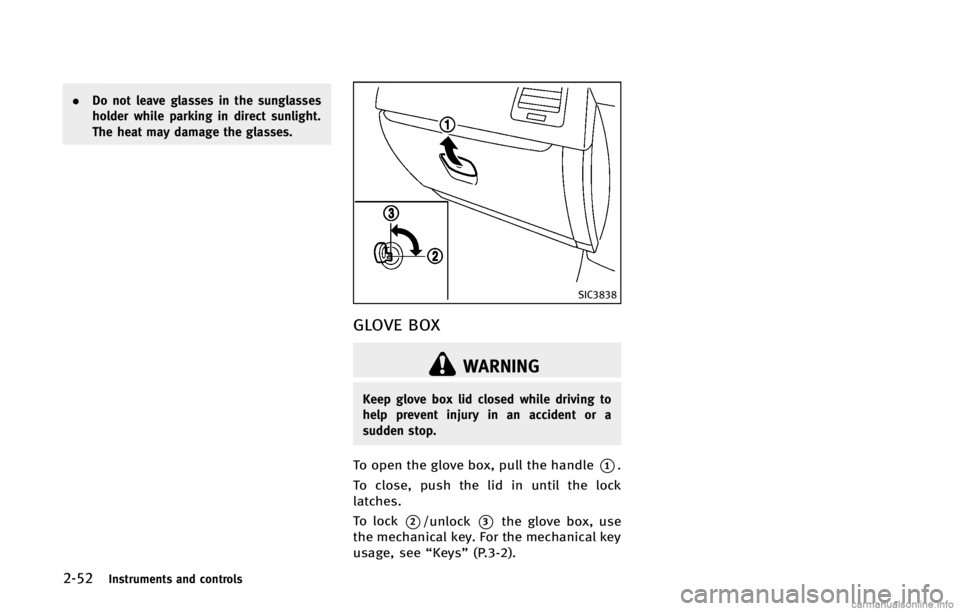
GLOVE BOXGUID-E830851B-9B72-4851-862E-E49D0F8A1F76
WARNING
Keep glove box lid closed while driving to
help prevent injury in an accident or a
sudden stop.
To open the glove box, pull the handle*1.
To close, push the lid in until the lock
latches.
To lock
*2/unlock*3the glove box, use
the mechanical key. For the mechanical key
usage, see “Keys”(P.3-2).