2013 HYUNDAI VELOSTER check engine
[x] Cancel search: check enginePage 198 of 372
517
Driving your vehicle
✽ ✽
NOTICE
• The EcoShift dual clutch transmission
gives the driving feel of a Manual
Transmission, yet provides the ease of
a fully Automatic Transmission.
Unlike a traditional Automatic
Transmission, the gear shifting can be
felt (and heard) on the EcoShift dual
clutch transmission
- Think of it as an automatically shift-
ing Manual Transmission.
- Shift into drive range and you get
great shifting feedback and sound,
but no shifting hassle.
• Dry-type clutch transfers driving
torque and also delivers direct driving
feel which feels differently than a
smooth Automatic Transmission with
slip of torque converter. This might be
easily felt especially at launch & low
vehicle speed.
• EcoShift dual clutch transmission
adopts dry-type, may be different than
a vehicle equipped with a conventional
automatic transaxle.
• When rapidly accelerating at low vehi-
cle speed, engine could rev at high rpm
depending on vehicle drive conditions.
(Continued)(Continued)
• For smooth uphill launch, press down
the accelerator pedal properly depend-
ing on the vehicle drive condition.
• If you release your foot from the accel-
erator pedal at low vehicle speed, you
may feel strong engine braking, which
is similar to manual transmission.
• If you want to slow down while driv-
ing downhill, you may use sport mode
or paddle shift to downshift, and also
use foot brake properly depending on
driving conditions to get enough
deceleration.
• When you turn the ignition on and off,
you may hear clicking sounds as the
transmission solenoids turn on and
off, cycling through a self test. This is
a normal sound for the dual clutch
transmission.
For smooth operation, depress the brake
pedal when shifting from N (Neutral) to a
forward or reverse gear.
WARNING
Always check the surrounding
areas near your vehicle for peo-
ple, especially children, before
shifting a car into D (Drive) or R
(Reverse).
Before leaving the driver’s seat,
always make sure the shift lever is
in the P (Park) position; then set
the parking brake fully and shut
the engine off. Unexpected and
sudden vehicle movement can
occur if these precautions are not
followed in the order identified.
CAUTION
To prevent clutch damage, the
clutch is released and the torque
flow is interrupted. If the clutch is
released, apply the foot brake,
shift into Park and wait several
seconds before driving again.
Ignoring the warnings can lead to
damage to the transmission.
(Continued)
Page 199 of 372
Driving your vehicle
18 5
Transaxle ranges
P (Park)
Always come to a complete stop before
shifting into P (Park). This position locks
the transaxle and prevents the front
wheels from rotating.
WARNING
Shifting into P (Park) while the
vehicle is in motion will cause the
drive wheels to lock which will
cause you to lose control of the
vehicle.
Do not use the P (Park) position
in place of the parking brake.
Always make sure the shift lever
is latched in the P (Park) position
and set the parking brake fully.
Never leave a child unattended in
a vehicle.
CAUTION
To avoid damage to your transaxle,
do not accelerate the engine in R
(Reverse) or any forward gear posi-
tion with the brakes on.
When stopped on an upgrade, do
not hold the vehicle with engine
power. Use the service brake or
the parking brake.
Do not shift from N (Neutral) or P
(Park) into D (Drive), or R
(Reverse) when the engine is
above idle speed.
(Continued)
If the LCD warning is active, the
foot brake must be applied.
If a transaxle system problem
occurs, the transaxle indicator
will blink. If this occurs, take your
vehicle to an authorized
HYUNDAI dealer and have the
system checked.
When the clutch is overheated,
the safe protection mode oper-
ates. According to the safe pro-
tection mode, the transaxle indi-
cator blinks with a buzzer sound.
The buzzer beeps 3 times. In this
time, the LCD warning about safe
protection mode also displays.
If this occurs, the transaxle may
not shift smoothly due to clutch
overheating. To prevent damage
to the transaxle clutches, shift
into Park and wait for several sec-
onds before driving again.
Do not hold the vehicle on a hill in
Drive or Reverse by applying the
accelerator pedal because the
clutch may be overheated.
Instead, use the foot brake or
parking brake.
(Continued)(Continued)
When the transaxle shifts auto-
maticaly or manually, the gear
shifts may be noticeable; howev-
er, this is characteristic of the
double-clutch transaxle and does
not indicate a transaxle concern.
If the vehicle is held by applying
accelerator pedal on a hill, the
transmission and clutch will be
damaged. To hold at the hill, use
the parking brake or foot brake.
Page 205 of 372
Driving your vehicle
24 5
Power brakes
Your vehicle has power-assisted brakes
that adjust automatically through normal
usage.
In the event that the power-assisted
brakes lose power because of a stalled
engine or some other reason, you can
still stop your vehicle by applying greater
force to the brake pedal than you nor-
mally would. The stopping distance, how-
ever, will be longer.
When the engine is not running, the
reserve brake power is partially depleted
each time the brake pedal is applied. Do
not pump the brake pedal when the
power assist has been interrupted.
Pump the brake pedal only when neces-
sary to maintain steering control on slip-
pery surfaces.
In the event of brake failure
If service brakes fail to operate while the
vehicle is in motion, you can make an
emergency stop with the parking brake.
The stopping distance, however, will be
much greater than normal.
BRAKE SYSTEM
WARNING- Brakes
Do not drive with your foot rest-
ing on the brake pedal. This will
create abnormal high brake tem-
peratures, excessive brake lining
and pad wear, and increased
stopping distances.
(Continued)
(Continued)
When descending a long or steep
hill, shift to a lower gear and avoid
continuous application of the
brakes. Continuous brake applica-
tion will cause the brakes to over-
heat and could result in a tempo-
rary loss of braking performance.
Wet brakes may impair the vehi-
cle’s ability to safely slow down;
the vehicle may also pull to one
side when the brakes are applied.
Applying the brakes lightly will
indicate whether they have been
affected in this way. Always test
your brakes in this fashion after
driving through deep water. To
dry the brakes, apply them lightly
while maintaining a safe forward
speed until brake performance
returns to normal.
Always, confirm the position of
the brake and accelerator pedal
before driving. If you don't check
the position of the accelerator
and brake pedal before driving,
you may depress the accelerator
instead of the brake pedal. It may
cause a serious accident.
WARNING- Parking brake
Applying the parking brake while
the vehicle is moving at normal
speeds can cause a sudden loss of
control of the vehicle. If you must
use the parking brake to stop the
vehicle, use great caution in apply-
ing the brake.
Page 208 of 372
527
Driving your vehicle
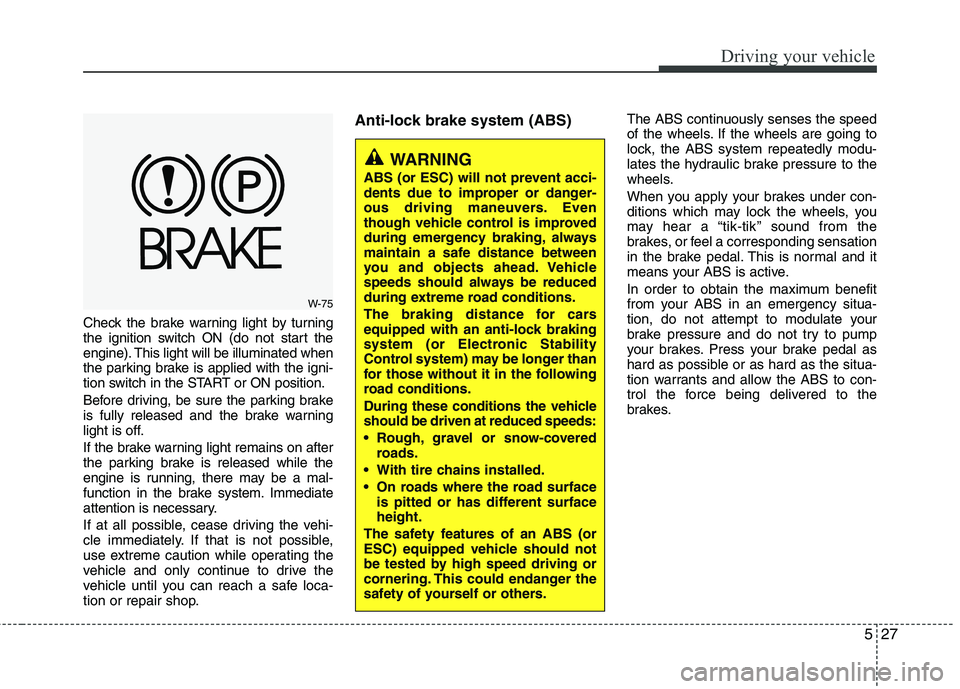
Check the brake warning light by turning
the ignition switch ON (do not start the
engine). This light will be illuminated when
the parking brake is applied with the igni-
tion switch in the START or ON position.
Before driving, be sure the parking brake
is fully released and the brake warning
light is off.
If the brake warning light remains on after
the parking brake is released while the
engine is running, there may be a mal-
function in the brake system. Immediate
attention is necessary.
If at all possible, cease driving the vehi-
cle immediately. If that is not possible,
use extreme caution while operating the
vehicle and only continue to drive the
vehicle until you can reach a safe loca-
tion or repair shop.
Anti-lock brake system (ABS)The ABS continuously senses the speed
of the wheels. If the wheels are going to
lock, the ABS system repeatedly modu-
lates the hydraulic brake pressure to the
wheels.
When you apply your brakes under con-
ditions which may lock the wheels, you
may hear a “tik-tik’’ sound from the
brakes, or feel a corresponding sensation
in the brake pedal. This is normal and it
means your ABS is active.
In order to obtain the maximum benefit
from your ABS in an emergency situa-
tion, do not attempt to modulate your
brake pressure and do not try to pump
your brakes. Press your brake pedal as
hard as possible or as hard as the situa-
tion warrants and allow the ABS to con-
trol the force being delivered to the
brakes.
WARNING
ABS (or ESC) will not prevent acci-
dents due to improper or danger-
ous driving maneuvers. Even
though vehicle control is improved
during emergency braking, always
maintain a safe distance between
you and objects ahead. Vehicle
speeds should always be reduced
during extreme road conditions.
The braking distance for cars
equipped with an anti-lock braking
system (or Electronic Stability
Control system) may be longer than
for those without it in the following
road conditions.
During these conditions the vehicle
should be driven at reduced speeds:
Rough, gravel or snow-covered
roads.
With tire chains installed.
On roads where the road surface
is pitted or has different surface
height.
The safety features of an ABS (or
ESC) equipped vehicle should not
be tested by high speed driving or
cornering. This could endanger the
safety of yourself or others.
W-75
Page 210 of 372
529
Driving your vehicle
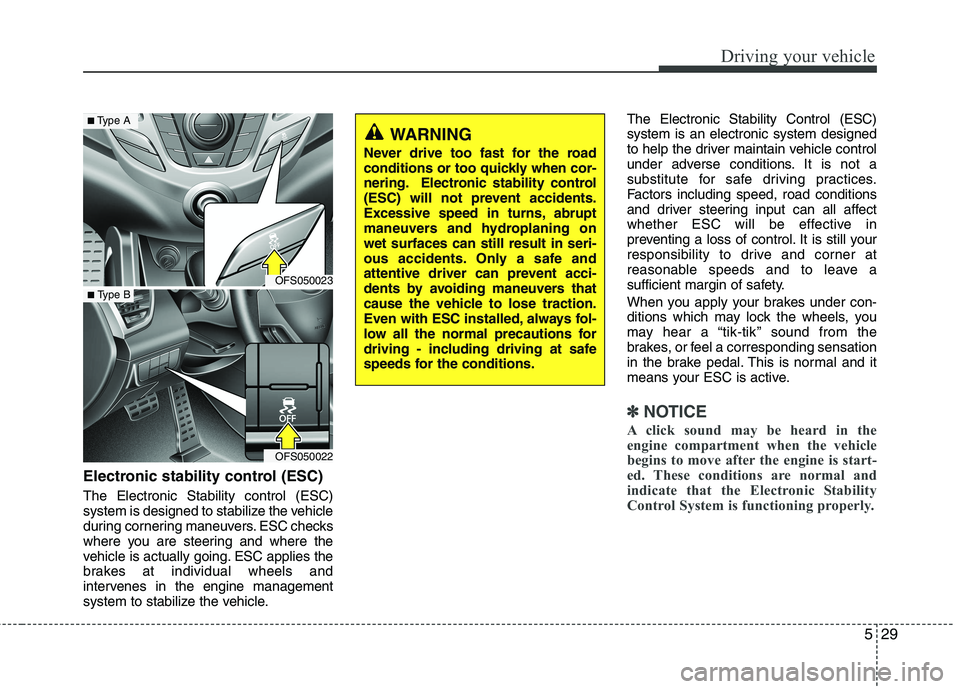
Electronic stability control (ESC)
The Electronic Stability control (ESC)
system is designed to stabilize the vehicle
during cornering maneuvers. ESC checks
where you are steering and where the
vehicle is actually going. ESC applies the
brakes at individual wheels and
intervenes in the engine management
system to stabilize the vehicle.The Electronic Stability Control (ESC)
system is an electronic system designed
to help the driver maintain vehicle control
under adverse conditions. It is not a
substitute for safe driving practices.
Factors including speed, road conditions
and driver steering input can all affect
whether ESC will be effective in
preventing a loss of control. It is still your
responsibility to drive and corner at
reasonable speeds and to leave a
sufficient margin of safety.
When you apply your brakes under con-
ditions which may lock the wheels, you
may hear a “tik-tik’’ sound from the
brakes, or feel a corresponding sensation
in the brake pedal. This is normal and it
means your ESC is active.
✽ ✽
NOTICE
A click sound may be heard in the
engine compartment when the vehicle
begins to move after the engine is start-
ed. These conditions are normal and
indicate that the Electronic Stability
Control System is functioning properly.
WARNING
Never drive too fast for the road
conditions or too quickly when cor-
nering. Electronic stability control
(ESC) will not prevent accidents.
Excessive speed in turns, abrupt
maneuvers and hydroplaning on
wet surfaces can still result in seri-
ous accidents. Only a safe and
attentive driver can prevent acci-
dents by avoiding maneuvers that
cause the vehicle to lose traction.
Even with ESC installed, always fol-
low all the normal precautions for
driving - including driving at safe
speeds for the conditions.
OFS050023
OFS050022
■Type A
■ Type B
Page 211 of 372
Driving your vehicle
30 5
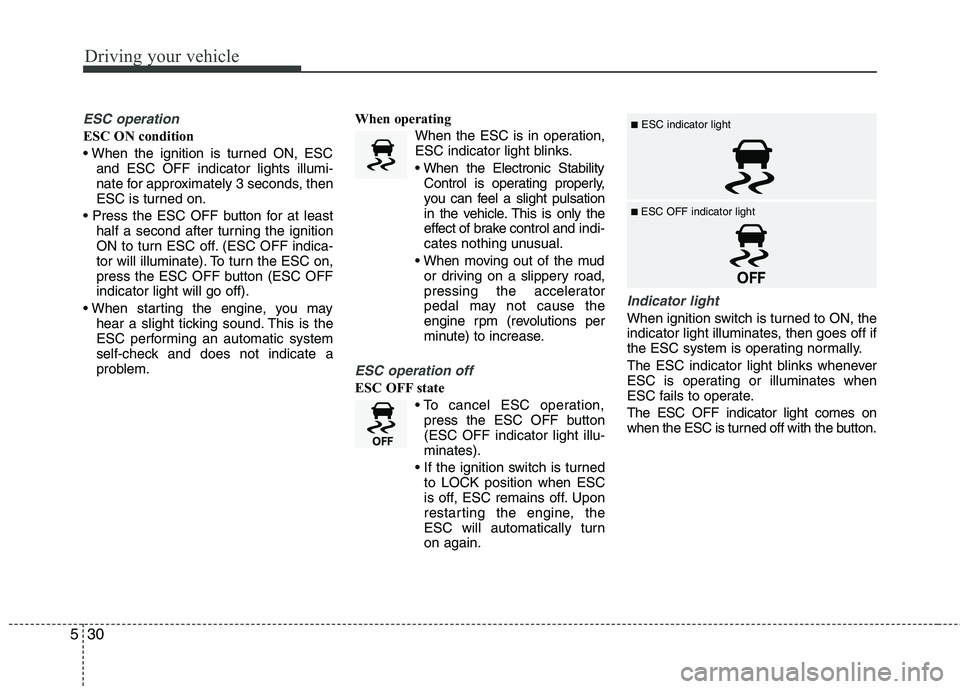
ESC operation
ESC ON condition
and ESC OFF indicator lights illumi-
nate for approximately 3 seconds, then
ESC is turned on.
half a second after turning the ignition
ON to turn ESC off. (ESC OFF indica-
tor will illuminate). To turn the ESC on,
press the ESC OFF button (ESC OFF
indicator light will go off).
hear a slight ticking sound. This is the
ESC performing an automatic system
self-check and does not indicate a
problem.When operating
When the ESC is in operation,
ESC indicator light blinks.
Control is operating properly,
you can feel a slight pulsation
in the vehicle. This is only the
effect of brake control and indi-
cates nothing unusual.
or driving on a slippery road,
pressing the accelerator
pedal may not cause the
engine rpm (revolutions per
minute) to increase.
ESC operation off
ESC OFF state
press the ESC OFF button
(ESC OFF indicator light illu-
minates).
to LOCK position when ESC
is off, ESC remains off. Upon
restarting the engine, the
ESC will automatically turn
on again.
Indicator light
When ignition switch is turned to ON, the
indicator light illuminates, then goes off if
the ESC system is operating normally.
The ESC indicator light blinks whenever
ESC is operating or illuminates when
ESC fails to operate.
The ESC OFF indicator light comes on
when the ESC is turned off with the button.
■ESC indicator light
■ ESC OFF indicator light
Page 215 of 372
Driving your vehicle
34 5
The cruise control system allows you to
program the vehicle to maintain a con-
stant speed without resting your foot on
the accelerator pedal.
This system is designed to function
above approximately 25 mph (40 km/h).
✽ ✽
NOTICE
During normal cruise control operation,
when the SET switch is activated or
reactivated after applying the brakes,
the cruise control will energize after
approximately 3 seconds. This delay is
normal.
✽ ✽
NOTICE
To activate cruise control, depress the
brake pedal at least once after turning
the ignition switch to the ON position or
starting the engine. This is to check if
the brake switch which is important
part to cancel cruise control is in normal
condition.
CRUISE CONTROL SYSTEM (IF EQUIPPED)
WARNING
If the cruise control is left on,
(CRUISE indicator light in the
instrument cluster illuminated)
the cruise control can be activat-
ed unintentionally. Keep the
cruise control system off
(CRUISE indicator light OFF)
when the cruise control is not in
use, to avoid inadvertently set-
ting a speed.
Use the cruise control system
only when traveling on open
highways in good weather.
Do not use the cruise control
when it may not be safe to keep
the car at a constant speed, for
instance, driving in heavy or
varying traffic, or on slippery
(rainy, icy or snow-covered) or
winding roads or over 6% up-hill
or down-hill roads.
Pay particular attention to the
driving conditions whenever
using the cruise control system.
Be careful when driving downhill
using the cruise control system,
which may increase the vehicle
speed.
CAUTION
During cruise-speed driving of a
manual transaxle vehicle, do not
shift into neutral without depress-
ing the clutch pedal, since the
engine will be overrevved. If this
happens, depress the clutch pedal
or release the cruise control ON-
OFF switch.
Page 220 of 372
539
Driving your vehicle
Your vehicle's fuel economy depends
mainly on your style of driving, where you
drive and when you drive.
Each of these factors affects how many
miles (kilometers) you can get from a gal-
lon (liter) of fuel. To operate your vehicle
as economically as possible, use the fol-
lowing driving suggestions to help save
money in both fuel and repairs:
Drive smoothly. Accelerate at a moder-
ate rate. Don't make "jack-rabbit" starts
or full-throttle shifts and maintain a
steady cruising speed. Don't race
between stoplights. Try to adjust your
speed to that of the other traffic so you
don't have to change speeds unneces-
sarily. Avoid heavy traffic whenever
possible. Always maintain a safe dis-
tance from other vehicles so you can
avoid unnecessary braking. This also
reduces brake wear.
Drive at a moderate speed. The faster
you drive, the more fuel your car uses.
Driving at a moderate speed, especial-
ly on the highway, is one of the most
effective ways to reduce fuel consump-
tion. Don't "ride" the brake pedal. This can
increase fuel consumption and also
increase wear on these components.
In addition, driving with your foot rest-
ing on the brake pedal may cause the
brakes to overheat, which reduces
their effectiveness and may lead to
more serious consequences.
Take care of your tires. Keep them
inflated to the recommended pressure.
Incorrect inflation, either too much or
too little, results in unnecessary tire
wear. Check the tire pressures at least
once a month.
Be sure that the wheels are aligned
correctly. Improper alignment can
result from hitting curbs or driving too
fast over irregular surfaces. Poor align-
ment causes faster tire wear and may
also result in other problems as well as
greater fuel consumption. Keep your car in good condition. For
better fuel economy and reduced
maintenance costs, maintain your car
in accordance with the maintenance
schedule in section 7. If you drive your
car in severe conditions, more frequent
maintenance is required (see section 7
for details).
Keep your car clean. For maximum serv-
ice, your vehicle should be kept clean
and free of corrosive materials. It is
especially important that mud, dirt, ice,
etc. not be allowed to accumulate on the
underside of the car. This extra weight
can result in increased fuel consumption
and also contribute to corrosion.
Travel lightly. Don't carry unnecessary
weight in your car. Weight reduces fuel
economy.
Don't let the engine idle longer than
necessary. If you are waiting (and not
in traffic), turn off your engine and
restart only when you're ready to go.
ECONOMICAL OPERATION