2013 HYUNDAI TUCSON power steering
[x] Cancel search: power steeringPage 13 of 397
17
Introduction
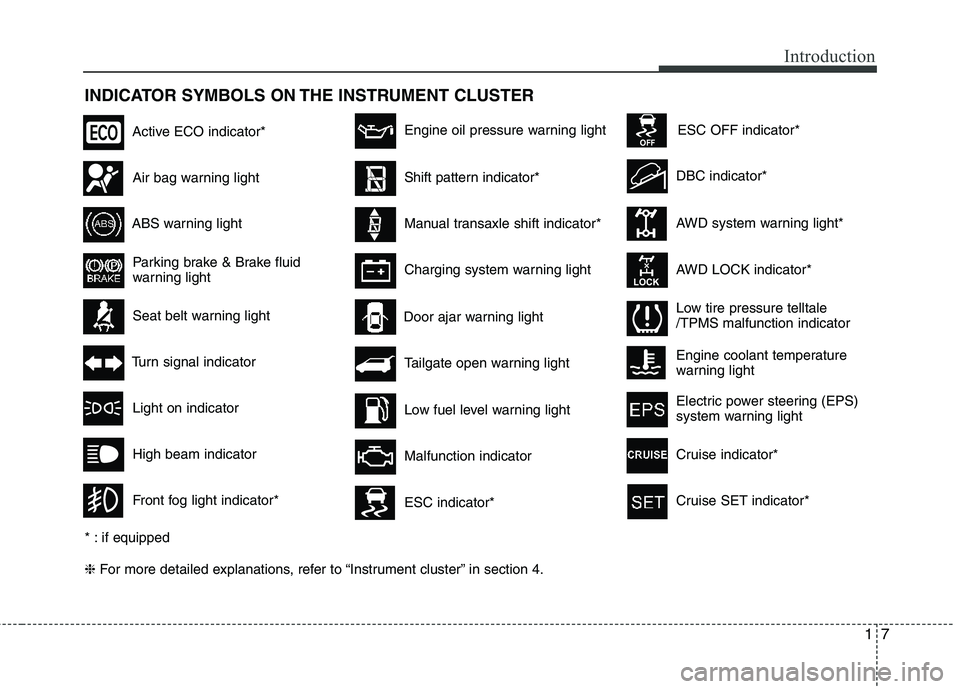
INDICATOR SYMBOLS ON THE INSTRUMENT CLUSTER ❈For more detailed explanations, refer to “Instrument cluster” in section 4.
Seat belt warning light
Tailgate open warning light
High beam indicator
Light on indicator
Turn signal indicator
Front fog light indicator*
ABS warning light
Parking brake & Brake fluid
warning light
Engine oil pressure warning light
AWD system warning light*
AWD LOCK indicator*
Malfunction indicator
Air bag warning light
Low fuel level warning light DBC indicator*
Charging system warning light
Door ajar warning light
* : if equipped
ESC indicator*
ESC OFF indicator*
Low tire pressure telltale /TPMS malfunction indicator
Active ECO indicator*
Shift pattern indicator*
Manual transaxle shift indicator*
Engine coolant temperature
warning light
Electric power steering (EPS)
system warning light
Cruise indicator*
Cruise SET indicator*
Page 15 of 397
Your vehicle at a glance
2
2
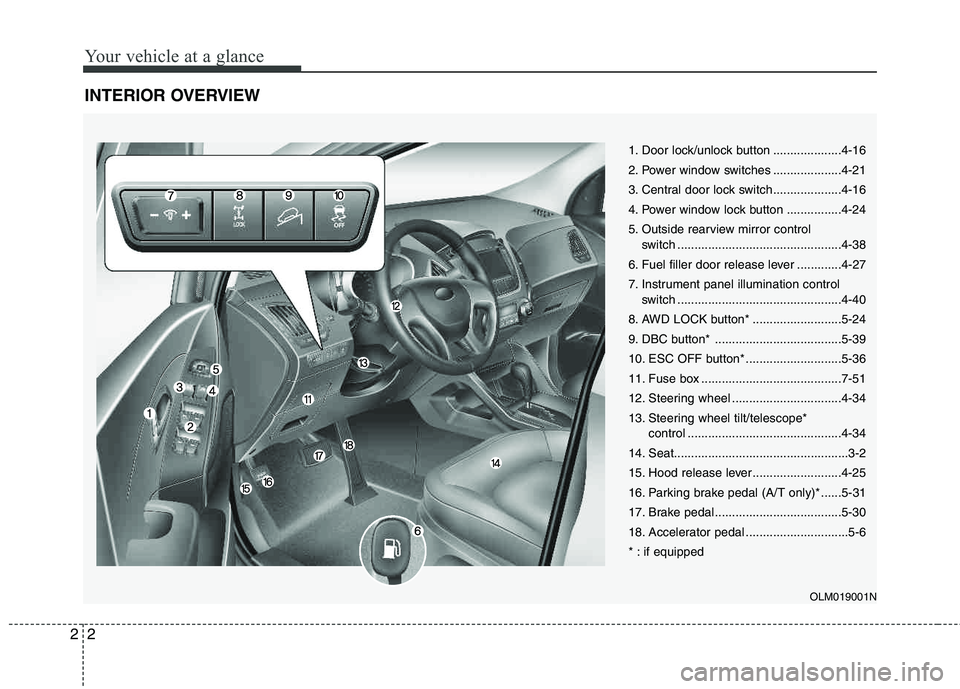
INTERIOR OVERVIEW
1. Door lock/unlock button ....................4-16
2. Power window switches ....................4-21
3. Central door lock switch....................4-16
4. Power window lock button ................4-24
5. Outside rearview mirror control
switch ................................................4-38
6. Fuel filler door release lever .............4-27
7. Instrument panel illumination control switch ................................................4-40
8. AWD LOCK button* ..........................5-24
9. DBC button* .....................................5-39
10. ESC OFF button* ............................5-36
11. Fuse box .........................................7-51
12. Steering wheel ................................4-34
13. Steering wheel tilt/telescope* control .............................................4-34
14. Seat...................................................3-2
15. Hood release lever ..........................4-25
16. Parking brake pedal (A/T only)* ......5-31
17. Brake pedal .....................................5-30
18. Accelerator pedal ..............................5-6
* : if equipped
OLM019001N
Page 16 of 397
23
Your vehicle at a glance
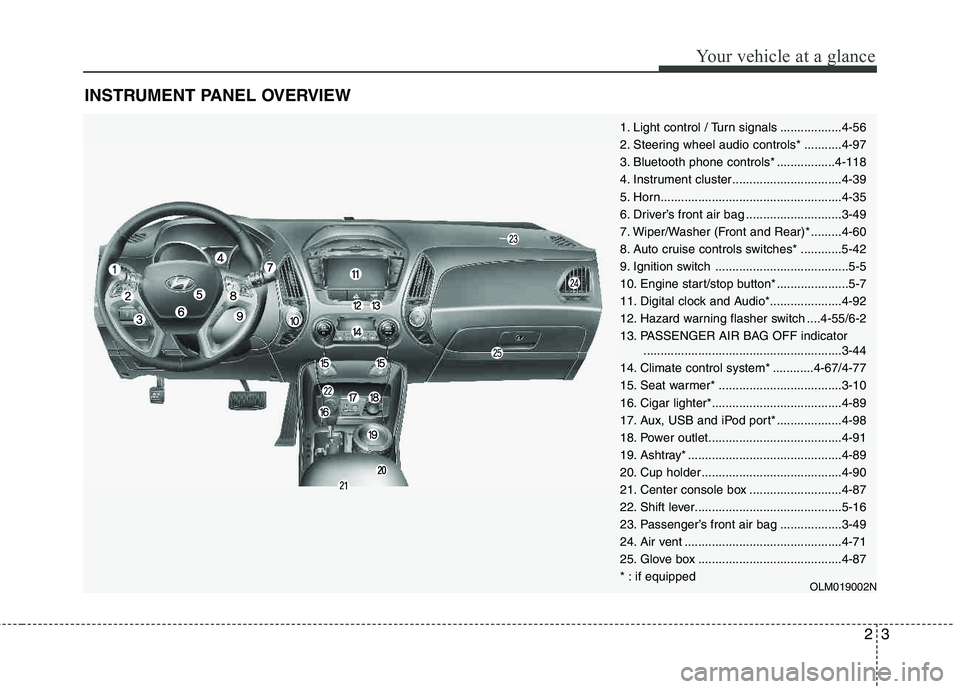
INSTRUMENT PANEL OVERVIEW
OLM019002N
1. Light control / Turn signals ..................4-56
2. Steering wheel audio controls* ...........4-97
3. Bluetooth phone controls* .................4-118
4. Instrument cluster................................4-39
5. Horn.....................................................4-35
6. Driver’s front air bag ............................3-49
7. Wiper/Washer (Front and Rear)* .........4-60
8. Auto cruise controls switches* ............5-42
9. Ignition switch .......................................5-5
10. Engine start/stop button* .....................5-7
11. Digital clock and Audio*.....................4-92
12. Hazard warning flasher switch ....4-55/6-2
13. PASSENGER AIR BAG OFF indicator..........................................................3-44
14. Climate control system* ............4-67/4-77
15. Seat warmer* ....................................3-10
16. Cigar lighter*......................................4-89
17. Aux, USB and iPod port* ...................4-98
18. Power outlet.......................................4-91
19. Ashtray* .............................................4-89
20. Cup holder .........................................4-90
21. Center console box ...........................4-87
22. Shift lever...........................................5-16
23. Passenger’s front air bag ..................3-49
24. Air vent ..............................................4-71
25. Glove box ..........................................4-87
* : if equipped
Page 23 of 397
Safety features of your vehicle
6
3
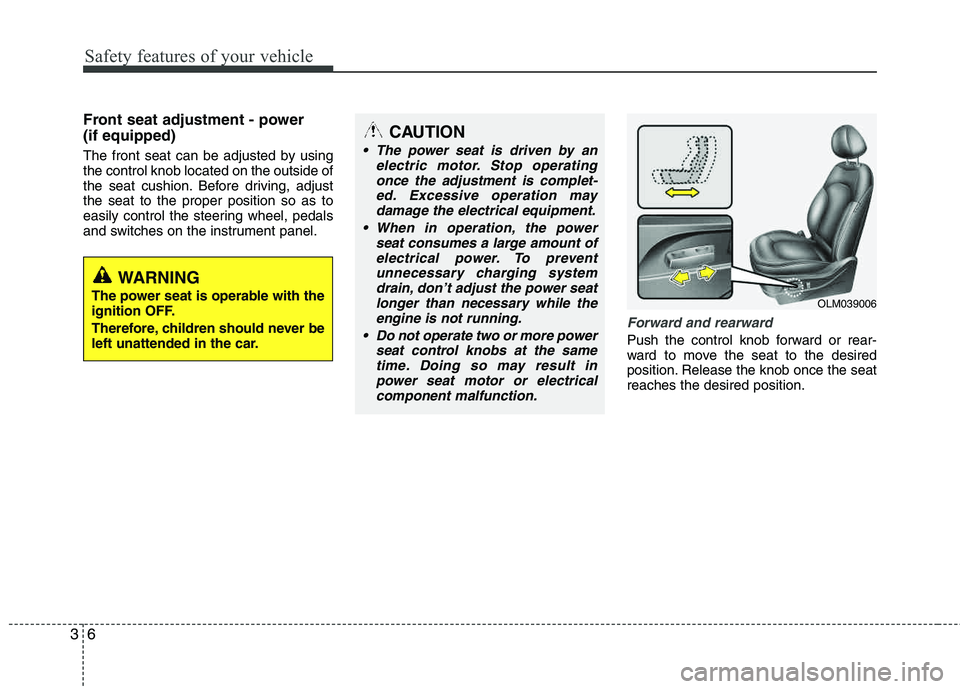
Front seat adjustment - power (if equipped)
The front seat can be adjusted by using the control knob located on the outside of
the seat cushion. Before driving, adjust the seat to the proper position so as to
easily control the steering wheel, pedals
and switches on the instrument panel.
Forward and rearward
Push the control knob forward or rear-
ward to move the seat to the desired
position. Release the knob once the seatreaches the desired position.
OLM039006
CAUTION
The power seat is driven by an
electric motor. Stop operatingonce the adjustment is complet-
ed. Excessive operation maydamage the electrical equipment.
When in operation, the power seat consumes a large amount of
electrical power. To prevent unnecessary charging systemdrain, don’t adjust the power seat
longer than necessary while theengine is not running.
Do not operate two or more power seat control knobs at the same
time. Doing so may result inpower seat motor or electrical component malfunction.
WARNING
The power seat is operable with the
ignition OFF.
Therefore, children should never be
left unattended in the car.
Page 114 of 397

Features of your vehicle
34
4
Electric power steering
The power steering uses a motor to
assist you in steering the vehicle. If the
engine is off or if the power steering sys-
tem becomes inoperative, the vehicle
may still be steered, but it will require
increased steering effort.
The motor driven power steering is con-
trolled by a power steering control unit
which senses the steering wheel torque,
steering wheel position and vehicle
speed to command the motor.
The steering wheel becomes heavier as
the vehicle’s speed increases and
becomes lighter as the vehicle’s speed
decreases for optimum steering control.
Should you notice any change in the
effort required to steer during normal
vehicle operation, have the power steer-
ing checked by an authorized HYUNDAI
dealer.
✽✽
NOTICE
The following symptoms may occur dur-
ing normal vehicle operation:
The EPS warning light does not illu- minate.
The steering wheel becomes heavier after turning the ignition switch on.
This happens as the system performs
the EPS system diagnostics. When the
diagnostics is completed, the steering
wheel will return to its normal condi-
tion.
Click noise may be heard from the EPS relay after the ignition switch is
turned to the ON or LOCK position.
Motor noise may be heard when the vehicle is at a stop or at a low driving
speed.
If the Electric Power Steering System does not operate normally, the warn-
ing light will illuminate on the instru-
ment cluster. The steering wheel may
become difficult to control or operate
abnormally. Take your vehicle to an
authorized HYUNDAI dealer and
have the vehicle checked as soon as
possible.
When you operate the steering wheel in low temperature, abnormal noise
could occur. If temperature rises, the
noise will disappear. This is a normal
condition. Tilt steering/Telescope steering (if equipped)
Tilt steering allows you to adjust the
steering wheel before you drive. You can
also raise the steering wheel to give your
legs more room when you exit and enter
the vehicle (if equipped).
The steering wheel should be positioned
so that it is comfortable for you to drive,
while permitting you to see the instru-
ment panel warning lights and gauges.
STEERING WHEEL
WARNING
Never adjust the angle and height of steering wheel while driving.
You may lose your steering con-
trol and cause severe personal
injury or accidents.
After adjusting, push the steering wheel both up and down to be
certain it is locked in position.
Page 133 of 397
453
Features of your vehicle
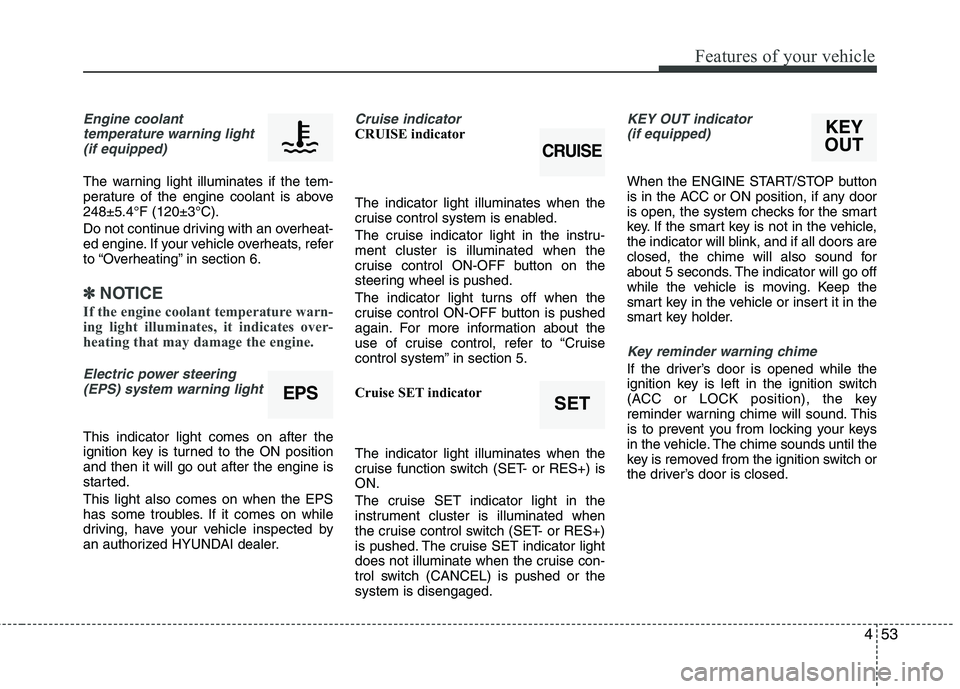
Engine coolanttemperature warning light
(if equipped)
The warning light illuminates if the tem-
perature of the engine coolant is above248±5.4°F (120±3°C).
Do not continue driving with an overheat-
ed engine. If your vehicle overheats, refer
to “Overheating” in section 6.
✽✽ NOTICE
If the engine coolant temperature warn-
ing light illuminates, it indicates over-
heating that may damage the engine.
Electric power steering (EPS) system warning light
This indicator light comes on after the
ignition key is turned to the ON position and then it will go out after the engine is
started. This light also comes on when the EPS
has some troubles. If it comes on while
driving, have your vehicle inspected by
an authorized HYUNDAI dealer.
Cruise indicator CRUISE indicator The indicator light illuminates when the
cruise control system is enabled.
The cruise indicator light in the instru- ment cluster is illuminated when the
cruise control ON-OFF button on the
steering wheel is pushed.
The indicator light turns off when the
cruise control ON-OFF button is pushed
again. For more information about the
use of cruise control, refer to “Cruise
control system” in section 5.
Cruise SET indicator The indicator light illuminates when the
cruise function switch (SET- or RES+) is ON.
The cruise SET indicator light in the
instrument cluster is illuminated when
the cruise control switch (SET- or RES+)
is pushed. The cruise SET indicator light
does not illuminate when the cruise con-
trol switch (CANCEL) is pushed or the system is disengaged.KEY OUT indicator (if equipped)
When the ENGINE START/STOP button
is in the ACC or ON position, if any door
is open, the system checks for the smart
key. If the smart key is not in the vehicle,
the indicator will blink, and if all doors are
closed, the chime will also sound for
about 5 seconds. The indicator will go off
while the vehicle is moving. Keep the
smart key in the vehicle or insert it in the
smart key holder.
Key reminder warning chime
If the driver’s door is opened while the
ignition key is left in the ignition switch
(ACC or LOCK position), the key
reminder warning chime will sound. This
is to prevent you from locking your keys
in the vehicle. The chime sounds until the
key is removed from the ignition switch or
the driver’s door is closed.
EPSSET
CRUISE
KEY
OUT
Page 200 of 397
Features of your vehicle
120
4
■ Bluetooth ®Wireless Technology
Language Setting
The system language can be changed by
the following steps:
1. Power on the audio system with the volume set to an audible level.
2. Press and hold button on the steering wheel until the audio displays
“Please Wait”.
- The
Bluetooth ®Wireless Technology
system will reply in currently selected
language that it is changing to the next
language.
- System language cycles between
English, Canadian French and USSpanish.
- Press and hold the button on the steering wheel for over 10 seconds.
3. When completed, the audio display returns to normal.
4. Repeat steps 2 and 3 for the next lan- guage selection.
NOTE:
The phone needs to be paired again
after changing system language.
- Avoid resting your thumb or fingeron the button as the language
could unintentionally change.
■ Receiving a Phone Call
When receiving a phone call, a ringtone
is audible from speakers and the audio
system changes into telephone mode.
When receiving a phone call, “Incoming
call” message and incoming phone num-
ber (if available) are displayed on the
audio.
To Answer a Call:
- Press button on the steeringwheel.
To Reject a Call:
- Press button on the steering wheel.
To Adjust Ring Volume: - Use VOLUME buttons on the steeringwheel.
To Transfer a Call to the Phone (Secret Call):
- Press and hold button on thesteering wheel until the audio system
transfers a call to the phone.
■ Talking on the Phone
When talking on the phone, “Active Call”
message and the other party’s phone
number (if available) are displayed on the
audio.
- Press button on the steering wheel.
✽✽ NOTICE
In the following situations, you or the
other party may have difficulty hearing
each other:
1. Speaking at the same time, your voice may not reach each other parties. (This
is not a malfunction.) Speak alternate-
ly with the other party on the phone.
2. Keep the Bluetooth®
Wireless
Technology volume to a low level.
High-level volume may result in dis-
tortion and echo.
3. When driving on a rough road.
4. When driving at high speeds.
5. When the window is open.
6. When the air conditioning vents are facing the microphone.
7. When the sound of the air condition-
ing fan is loud.
Page 215 of 397
57
Driving your vehicle
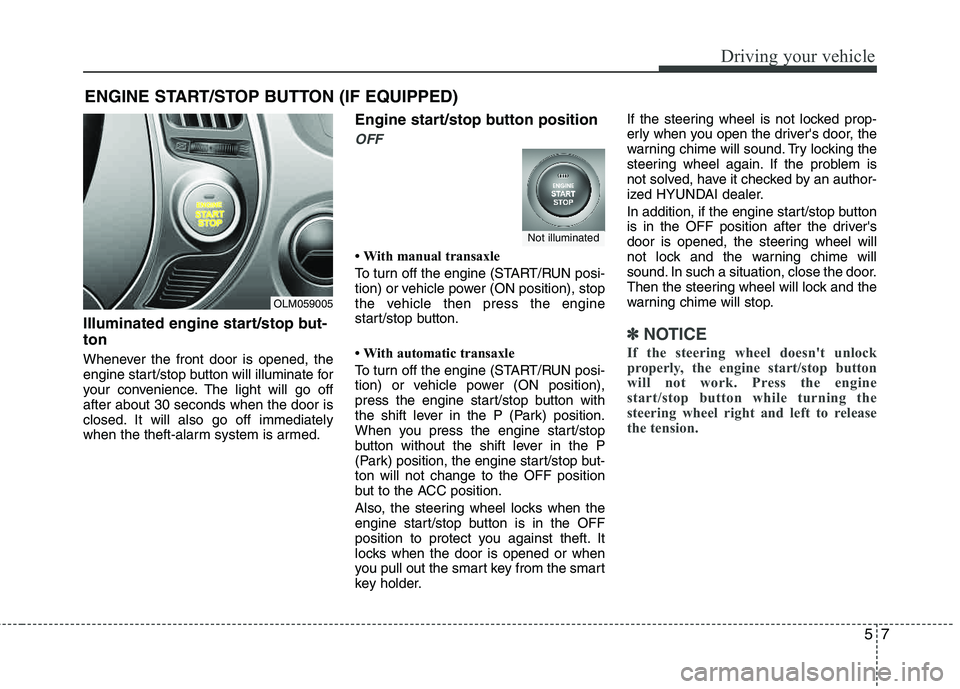
Illuminated engine start/stop but- ton
Whenever the front door is opened, the
engine start/stop button will illuminate for
your convenience. The light will go off after about 30 seconds when the door is
closed. It will also go off immediately
when the theft-alarm system is armed.
Engine start/stop button position
OFF
With manual transaxle
To turn off the engine (START/RUN posi-
tion) or vehicle power (ON position), stop
the vehicle then press the engine
start/stop button.
With automatic transaxle
To turn off the engine (START/RUN posi-
tion) or vehicle power (ON position),
press the engine start/stop button with
the shift lever in the P (Park) position.
When you press the engine start/stop
button without the shift lever in the P
(Park) position, the engine start/stop but- ton will not change to the OFF position
but to the ACC position.
Also, the steering wheel locks when the
engine start/stop button is in the OFF
position to protect you against theft. It
locks when the door is opened or when
you pull out the smart key from the smart
key holder.If the steering wheel is not locked prop-
erly when you open the driver's door, the
warning chime will sound. Try locking the
steering wheel again. If the problem is
not solved, have it checked by an author-
ized HYUNDAI dealer.
In addition, if the engine start/stop button
is in the OFF position after the driver's
door is opened, the steering wheel will
not lock and the warning chime will
sound. In such a situation, close the door.
Then the steering wheel will lock and the
warning chime will stop.
✽✽
NOTICE
If the steering wheel doesn't unlock
properly, the engine start/stop button
will not work. Press the engine
start/stop button while turning the
steering wheel right and left to release
the tension.
ENGINE START/STOP BUTTON (IF EQUIPPED)
OLM059005
Not illuminated