Page 119 of 711
Features of your vehicle
18 4
Theft-alarm stage
The alarm will be activated if any of
the following occurs while the system
is armed.
• A front or rear door is opened with-
out using transmitter or smart key.
• The tailgate/trunk is opened without
using transmitter or smart key.
• The engine hood is opened.
The siren will sound and the hazard
warning lights will blink continuously
for 27 seconds, unless the system is
disarmed. To turn off the system,
unlock the doors with the transmitter
or smart key.
Disarmed stage
The system will be disarmed when:
Transmitter
- The door unlock button is pressed.
- The engine is started.
- The ignition switch is in the “ON”
position for 30 seconds or more.
Smart key
- The door unlock button is pressed.
- The button of the front outside door
is pressed while carrying the smart
key.
- The engine is started.
- The engine start/stop button is
turned to the ON position.
After the doors are unlocked, the haz-
ard warning lights will blink twice to
indicate that the system is disarmed.
After pressing the unlock button, if
any door (or tailgate/trunk) is not
opened within 30 seconds, the sys-
tem will be rearmed.
✽NOTICE
• Without smart key system
If the system is not disarmed with
the transmitter, insert the key into
the ignition switch and start the
engine. Then the system will be
disarmed.
• With smart key system
If the system is not disarmed with
the smart key, open the door with
the mechanical key and start the
engine. Then the system will be
disarmed.
• If you lose your keys, we recom-
mend that you consult with your
authorized HYUNDAI dealer.
CAUTION
Do not change, alter or adjust
the theft-alarm system because
it could cause the theft-alarm
system to malfunction and we
recommend that the system be
serviced by an authorized
HYUNDAI dealer.
Malfunctions caused by improp-
er alterations, adjustments or
modifications to the theft-alarm
system are not covered by your
vehicle manufacturer warranty.
Page 120 of 711
419
Features of your vehicle
Operating door locks from
outside the vehicle
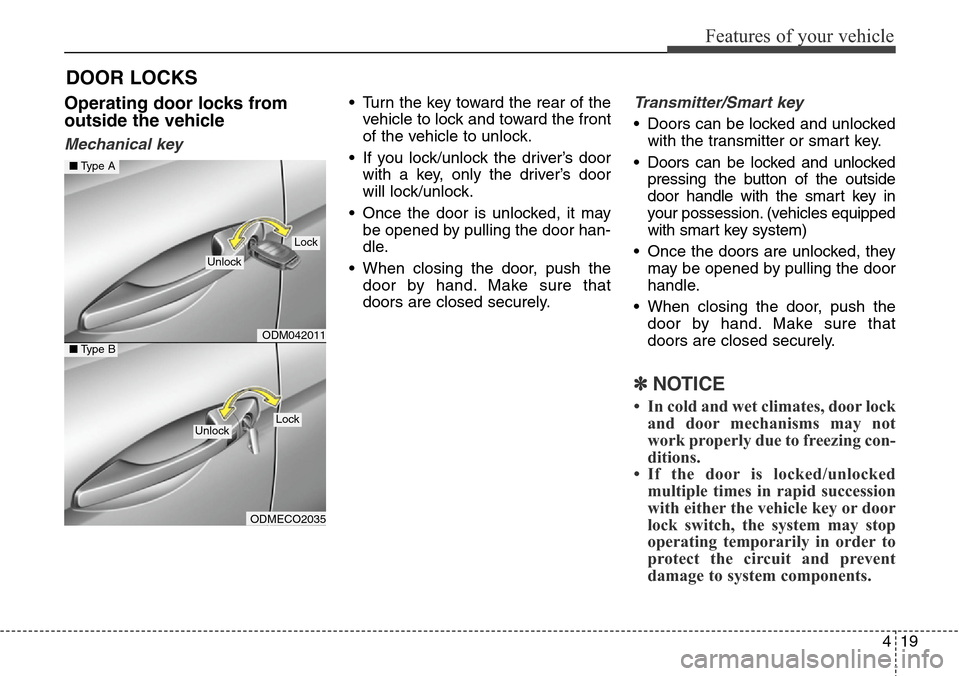
Mechanical key
• Turn the key toward the rear of the
vehicle to lock and toward the front
of the vehicle to unlock.
• If you lock/unlock the driver’s door
with a key, only the driver’s door
will lock/unlock.
• Once the door is unlocked, it may
be opened by pulling the door han-
dle.
• When closing the door, push the
door by hand. Make sure that
doors are closed securely.Transmitter/Smart key
• Doors can be locked and unlocked
with the transmitter or smart key.
• Doors can be locked and unlocked
pressing the button of the outside
door handle with the smart key in
your possession. (vehicles equipped
with smart key system)
• Once the doors are unlocked, they
may be opened by pulling the door
handle.
• When closing the door, push the
door by hand. Make sure that
doors are closed securely.
✽NOTICE
• In cold and wet climates, door lock
and door mechanisms may not
work properly due to freezing con-
ditions.
• If the door is locked/unlocked
multiple times in rapid succession
with either the vehicle key or door
lock switch, the system may stop
operating temporarily in order to
protect the circuit and prevent
damage to system components.
DOOR LOCKS
ODM042011
ODMECO2035
■Type A
■Type B
Lock
Unlock
LockUnlock
Page 121 of 711
Features of your vehicle
20 4
Operating door locks from
inside the vehicle
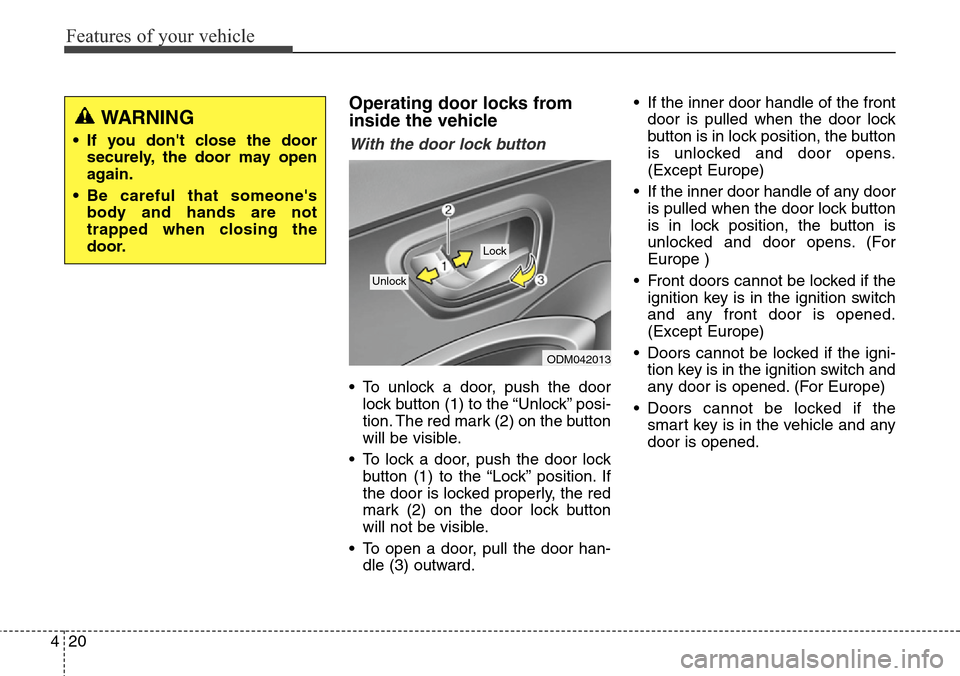
With the door lock button
• To unlock a door, push the door
lock button (1) to the “Unlock” posi-
tion. The red mark (2) on the button
will be visible.
• To lock a door, push the door lock
button (1) to the “Lock” position. If
the door is locked properly, the red
mark (2) on the door lock button
will not be visible.
• To open a door, pull the door han-
dle (3) outward.• If the inner door handle of the front
door is pulled when the door lock
button is in lock position, the button
is unlocked and door opens.
(Except Europe)
• If the inner door handle of any door
is pulled when the door lock button
is in lock position, the button is
unlocked and door opens. (For
Europe )
• Front doors cannot be locked if the
ignition key is in the ignition switch
and any front door is opened.
(Except Europe)
• Doors cannot be locked if the igni-
tion key is in the ignition switch and
any door is opened. (For Europe)
• Doors cannot be locked if the
smart key is in the vehicle and any
door is opened.
ODM042013
Lock
Unlock
WARNING
• If you don't close the door
securely, the door may open
again.
• Be careful that someone's
body and hands are not
trapped when closing the
door.
Page 122 of 711

421
Features of your vehicle
With central door lock switch
Operate by depressing the central
door lock switch.
• When pushing down on the front
portion (1) of the switch, all vehicle
doors will lock.
• When pushing down on the rear
portion (2) of the switch, all vehicle
doors will unlock.
• If the key is in the ignition switch
and any front door is open, the
doors will not lock when the front
portion (1) of central door lock
switch is pressed. (Except Europe)• If the key is in the ignition switch
and any door is open, the doors
will not lock when the front portion
(1) of the central door lock switch is
pressed. (For Europe)
• If the smart key is in the vehicle
and any door is open the doors will
not lock when the front portion (1)
of central door lock switch is
pressed.
✽NOTICE
Once the doors are locked with the
transmitter or smart key, the doors
cannot be unlocked with the central
door lock/unlock switch.
WARNING - Doors
• The doors should always be
fully closed and locked while
the vehicle is in motion to pre-
vent accidental opening of the
door. Locked doors will also
discourage potential intruders
when the vehicle stops or
slows down.
• Be careful when opening
doors and watch for vehicles,
motorcycles, bicycles or
pedestrians approaching the
vehicle in the path of the door.
Opening a door when some-
thing is approaching can
cause damage or injury.
ODM042014
Driver’s door
Page 125 of 711

Features of your vehicle
24 4
Opening the tailgate
• The tailgate is locked or unlocked
when all doors are locked or
unlocked with the key, transmitter,
smart key or central door
lock/unlock switch.
• Only the tailgate is unlocked if the
tailgate unlock button on the trans-
mitter or smart key is pressed for
approximately 1 second.
• If unlocked, the tailgate can be
opened by pressing the handle and
pulling it up.
• Once the tailgate is opened and
then closed, the tailgate locks auto-
matically. (All doors must be locked.)
✽NOTICE
In cold and wet climates, door lock
and door mechanisms may not work
properly due to freezing conditions.
Closing the tailgate
Lower and push down the tailgate
firmly. Make sure that the tailgate is
securely latched.
TAILGATE
ODM042016
WARNING
The tailgate swings upward.
Make sure no objects or people
are near the rear of the vehicle
when opening the tailgate.
CAUTION
Make certain that you close the
tailgate before driving your
vehicle. Possible damage may
occur to the tailgate lift cylin-
ders and attaching hardware if
the tailgate is not closed prior to
driving.
ODM042017
WARNING
Make sure your hands, feet and
other parts of your body are
safely out of the way before
closing the tailgate.
Page 128 of 711
427
Features of your vehicle
(1) Driver’s door power window
switch
(2) Front passenger’s door power
window switch
(3) Rear door (left) power window
switch
(4) Rear door (right) power window
switch
(5) Window opening and closing
(6) Automatic power window
up*/down*
(7) Power window lock switch
*: if equipped
✽NOTICE
In cold and wet climates, power win-
dows may not work properly due to
freezing conditions.
WINDOWS
ODM042019
Page 129 of 711

Features of your vehicle
28 4
Power windows
The ignition switch must be in the ON
position for power windows to oper-
ate. Each door has a power window
switch that controls the door’s win-
dow. The driver’s door has a master
power window switch that controls all
the windows in the vehicle. Also, the
driver has a power window lock
switch which can block the operation
of rear passenger windows.
The power windows can be operated
for approximately 30 seconds after
the ignition key is removed or turned
to the ACC or LOCK position.
However, if the front doors are
opened, the power windows cannot
be operated even within the 30 sec-
onds period.
✽NOTICE
While driving with the rear windows
down or with the sunroof (if
equipped) in an open (or partially
open position), your vehicle may
demonstrate a wind buffeting or
pulsation noise. This noise is a nor-
mal occurrence and can be reduced
or eliminated by taking the follow-
ing actions. If the noise occurs with
one or both of the rear windows
down, partially lower both front
windows approximately one inch.
If you experience the noise with the
sunroof open, slightly reduce the
size of the sunroof opening.
Window opening and closing
Ty p e A
To open or close a window, press
down or pull up the front portion of
the corresponding switch to the first
detent position (5).
ODM042020
Page 130 of 711

429
Features of your vehicle
Ty p e B
Auto down window (if equipped)
Pressing the power window switch
momentarily to the second detent
position (6) completely lowers the
window even when the switch is
released. To stop the window at the
desired position while the window is
in operation, pull up the switch
momentarily to the opposite direction
of the window movement.Type C
Auto up/down window (if equipped)
Pressing or pulling up the power win-
dow switch momentarily to the sec-
ond detent position (6) completely
lowers or lifts the window even when
the switch is released. To stop the
window at the desired position while
the window is in operation, pull up or
press down and release the switch.
✽NOTICE
If the power window does not oper-
ate normally, the automatic power
window system must be reset as fol-
lows:
1. Turn the ignition switch to the ON
position.
2. Close the driver’s window and
continue pulling up the driver’s
power window switch for at least
1 second after the window is com-
pletely closed.
ODM042021ODMECO2001
