2013 HYUNDAI I40 ignition key
[x] Cancel search: ignition keyPage 101 of 534
Downloaded from www.Manualslib.com manuals search engine Features of your vehicle
14
4
Disarmed stage
The system will be disarmed when:
Transmitter
- The door unlock button is pressed.
- The engine is started.
- The ignition switch is in the “ON” posi-
tion for 30 seconds or more.
Smart key
- The door unlock button is pressed.
- The button of the front outside door ispressed while carrying the smart key.
- The engine is started.
After the doors are unlocked, the hazard
warning lights will blink twice to indicate
that the system is disarmed.
After pressing the unlock button, if any
door (or tailgate) is not opened within 30
seconds, the system will be rearmed.
✽ ✽ NOTICE
• Without smart key systemIf the system is not disarmed with the
transmitter, insert the key into the
ignition switch and start the engine.
Then the system will be disarmed.
•With smart key system
If the system is not disarmed with the
smart key, open the door with the
mechanical key and start the engine.
Then the system will be disarmed.
• If you lose your keys, consult your authorized HYUNDAI dealer.
CAUTION
Do not change, alter or adjust the
theft-alarm system because it couldcause the theft-alarm system to malfunction and should only beserviced by an authorized HYUNDAIdealer.
Malfunctions caused by improperalterations, adjustments or modifi-cations to the theft-alarm system are not covered by your vehiclemanufacturer warranty.
Page 104 of 534
Downloaded from www.Manualslib.com manuals search engine 417
Features of your vehicle
If any door is unlocked, the indicator ofthe central door lock switch will go off.
When you press the central door unlock switch, all vehicle doors will
unlock.
✽ ✽ NOTICE
Once the doors are locked with the
transmitter or smart key, the doors can-
not be unlocked with the central door
lock/unlock switch.
WARNING - Doors
The doors should always be fully
closed and locked while the vehi-
cle is in motion to prevent acci-
dental opening of the door.
Locked doors will also discour-
age potential intruders when the
vehicle stops or slows.
Be careful when opening doors and watch for vehicles, motorcy-
cles, bicycles or pedestrians
approaching the vehicle in the
path of the door. Opening a door
when something is approaching
can cause damage or injury.
WARNING- Unlocked
vehicles
Leaving your vehicle unlocked can
invite theft or possible harm to you
or others from someone hiding in
your vehicle while you are gone.
Always remove the ignition key,
engage the parking brake, close all
windows and lock all doors when
leaving your vehicle unattended.
WARNING- Unattendedchildren
An enclosed vehicle can become
extremely hot, causing death or
severe injury to unattended chil-
dren or animals who cannot escape
the vehicle. Furthermore, children
might operate features of the vehi-
cle that could injure them, or they
could encounter other harm, possi-
bly from someone gaining entry to
the vehicle. Never leave children or
animals unattended in your vehicle.
WARNING - Door lock mal-function
If a power door lock ever fails to
function while you are in the vehi-
cle, try one or more of the follow-
ing:
Operate the other door locks and
handles.
Lower the driver’s window and use the key to unlock the door
from outside.
Move to the cargo area and open the tailgate.
Page 114 of 534
Downloaded from www.Manualslib.com manuals search engine 427
Features of your vehicle
Power windows
The ignition switch must be in the ON
position for power windows to operate.
Each door has a power window switch
that controls the door’s window. The dri-
ver’s door has a master power window
switch that controls all the windows in the
vehicle. Also, the driver has a power win-
dow lock switch which can block the
operation of rear passenger windows.
The power windows can be operated for
approximately 30 seconds after the igni-
tion key is removed or turned to the ACC
or LOCK position. However, if the front
doors are opened, the power windows
cannot be operated even within the 30
seconds period.
✽ ✽NOTICE
While driving with the rear windows
down or with the sunroof (if equipped) in
an open (or partially open position), your
vehicle may demonstrate a wind buffet-
ing or pulsation noise. This noise is a
normal occurrence and can be reduced
or eliminated by taking the following
actions. If the noise occurs with one or
both of the rear windows down, partially
lower both front windows approximate-
ly one inch. If you experience the noise
with the sunroof open, slightly reduce the
size of the sunroof opening.
Window opening and closing
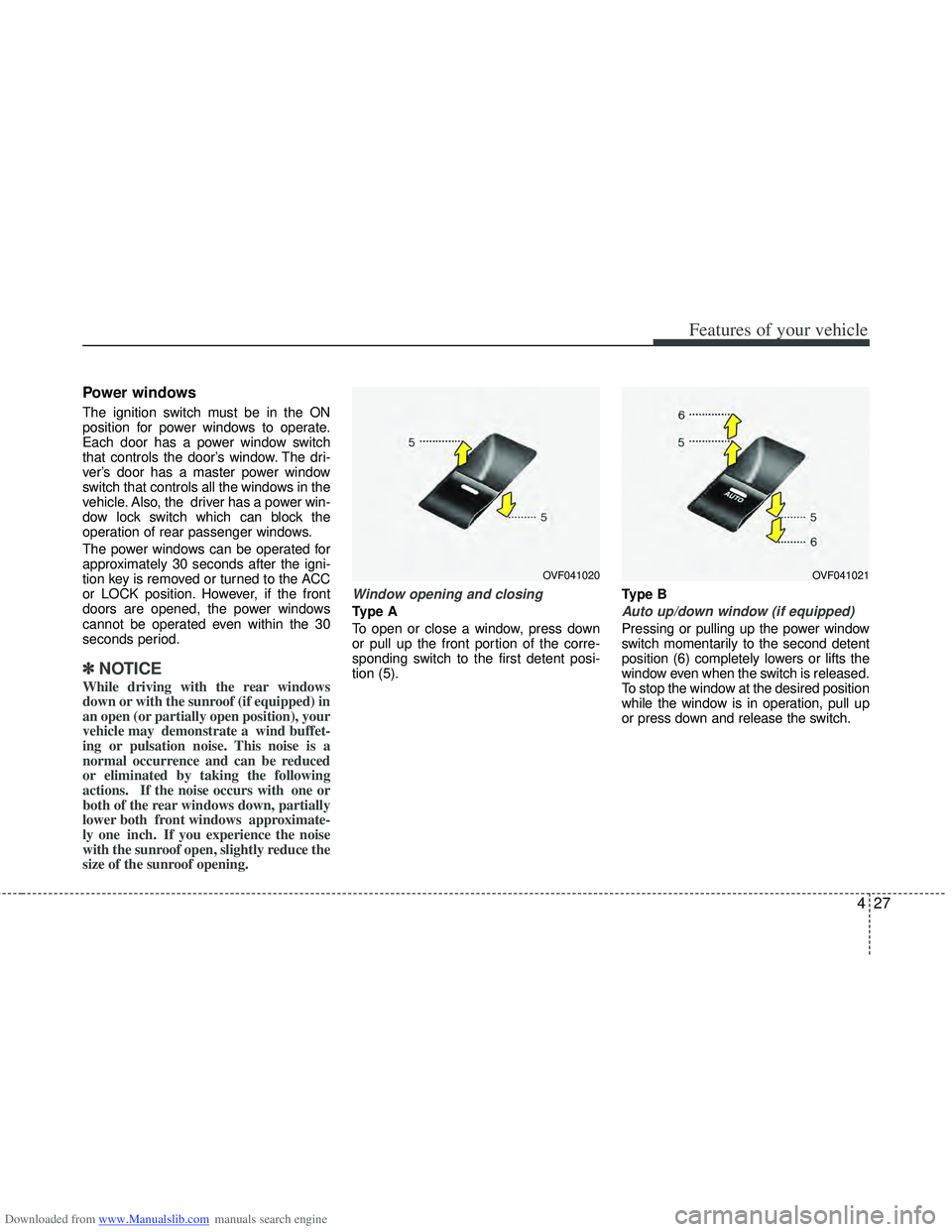
Type A
To open or close a window, press down
or pull up the front portion of the corre-
sponding switch to the first detent posi-
tion (5). Type BAuto up/down window (if equipped)
Pressing or pulling up the power window
switch momentarily to the second detent
position (6) completely lowers or lifts the
window even when the switch is released.
To stop the window at the desired position
while the window is in operation, pull up
or press down and release the switch.
OVF041020OVF041021
Page 116 of 534

Downloaded from www.Manualslib.com manuals search engine 429
Features of your vehicle
WARNING - Windows
NEVER leave the ignition key inthe vehicle.
NEVER leave any child unattend- ed in the vehicle. Even very
young children may inadvertently
cause the vehicle to move, entan-
gle themselves in the windows,
or otherwise injure themselves or
others.
Always double check to make sure all arms, hands, head and
other obstructions are safely out
of the way before closing a win-
dow.
Do not allow children to play with the power windows. Keep the dri-
ver’s door power window lock
switch in the LOCK position
(pressed). Serious injury can
result from unintentional window
operation by the child.
Do not extend face or arms out- side the window while driving.
Power window lock button
For Europe
The driver can disable the power win-dow switches on rear passenger doors
by pressing the power window lock but-
ton located on the driver’s door to the
LOCK position (pressed).
Except Europe
The driver can disable the power win- dow switches on the passenger doors
by pressing the power window lock but-
ton located on the driver’s door to the
LOCK position (pressed).
When the power window lock switch is in the LOCK position (pressed),
the driver’s master control cannot
operate the front and/or rear pas-
senger door power windows.
OVF041022
CAUTION
To prevent possible damage to the power window system, do notopen or close two windows ormore at the same time. This willalso ensure the longevity of the fuse.
Never try to operate the main switch on the driver's door andthe individual door windowswitch in opposing directions atthe same time. If this is done, thewindow will stop and cannot beopened or closed.
Page 127 of 534

Downloaded from www.Manualslib.com manuals search engine Features of your vehicle
40
4
Recalling positions from memory
1. Change the ignition switch to the ON
position.
2. To recall the position in the memory, press the desired memory button (1 or
2). The system will beep once, then the
driver’s seat will automatically adjust to
the stored position.
Adjusting the control switch for the dri-
ver’s seat while the system is recalling
the stored position will cause the move-
ment to stop and move in the direction
that the control switch is moved.
Easy access function
(if equipped)
The system will move the driver's seat
automatically as follows:
Without smart key system - It will move the driver’s seat rearwardwhen the ignition key is removed.
- It will move the driver’s seat forward when the ignition key is inserted.
With smart key system - It will move the driver’s seat rearwardwhen the engine start/stop button is
changed to the OFF position.
- It will move the driver’s seat forward when the engine start/stop button is
changed to the ACC or START posi-
tion.
You can activate or deactivate this feature.
Refer to "User setting" in this section.
WARNING
Use caution when recalling the
adjustment memory while sitting in
the vehicle. Push the seat position
control switch to the desired posi-
tion immediately if the seat moves
too far in any direction.
Page 144 of 534

Downloaded from www.Manualslib.com manuals search engine 457
Features of your vehicle
Door
Auto Door Lock
Off - The auto door lock operation will becanceled.
Speed - All doors will be automatically locked when the vehicle speed
exceeds 15km/h (9.3mph).
Shift Lever - All doors will be automati- cally locked if the shift lever
is shifted from the P(Park)
position to the R(Reverse),
N(Neutral) or D(Drive) posi-
tion. (for automatic
transaxle shift lever)
Auto Door Unlock
Off - The auto door unlock operation will
be canceled.
Key Out - All doors will be automatically unlocked when the ignition key
is removed from ignition switch
(or smart key is in the OFF
position).
Shift Lever - All doors will be automati- cally unlocked if the shift
lever is shifted to the
P(Park) position. (for auto-
matic transaxle shift lever)
Lamp
Headlamp Escort
If the Headlamp Escort is checked:
The Headlamp Escort and Headlamp
Welcome function will be activated.
For details, refer to “Lighting” in section 4.
OVF041061
■
Type A ■
Type BOVF041062
■
Type A ■
Type B
Page 154 of 534

Downloaded from www.Manualslib.com manuals search engine 467
Features of your vehicle
Air bag warning light
This warning light will illuminate for
approximately 6 seconds each time you
turn the ignition switch to the ON posi-
tion.
This light also comes on when the SRS
is not working properly. If the air bag
warning light does not come on, or con-
tinuously remains on after operating for
about 6 seconds when you turn the igni-
tion switch to the ON position or started
the engine, or if it comes on while driving,
have the SRS inspected by an author-
ized HYUNDAI dealer.
.
Immobilizer indicator
Without smart key system
This indicator illuminates when the
immobilizer key is inserted and turned to
the ON position to start the engine.
At this time, you can start the engine. The
indicator goes out after the engine is run-
ning.
If this indicator blinks when the ignition
switch is in the ON position before start-
ing the engine, have the system checked
by an authorized HYUNDAI dealer.With smart key system
If any of the following occurs in a vehicle
equipped with the smart key, the immobi-
lizer indicator illuminates, blinks or goes
off.
When the smart key is in the vehicle, if
the engine start/stop button is in the
ACC or ON position, the indicator will
illuminate for approximately 30 seconds
to indicate that you are able to start the
engine. However, when the smart key is
not in the vehicle, if the engine start/stop
button is pressed, the indicator will blink
for a few seconds to indicate that you are
not be able to start the engine.
If the indicator illuminates only for 2 sec- onds and goes out when the engine
start/stop button is turned to ON position
with the smart key in the vehicle, have
the system checked by an authorized
HYUNDAI dealer.
When the battery is weak, if the engine start/stop button is pressed, the indica-
tor will blink and you are not able to start
the engine. However, you are able to
start the engine by pressing the engine
start/stop button directly with the smart
key. Also, if the smart key system related
parts have a problem, the indicator will
blink.
Page 155 of 534

Downloaded from www.Manualslib.com manuals search engine Features of your vehicle
68
4
Door ajar warning light
This warning light illuminates when a
door is not closed securely.
Tailgate open warning light
This warning light illuminates when the
tailgate is not closed securely.
Low fuel level warning
This warning light indicates the fuel tank
is nearly empty. When it comes on, you
should add fuel as soon as possible.
Driving with the fuel level warning light on
or with the fuel level below “O/E” can
cause the engine to misfire and damage
the catalytic converter (if equipped).
EPS (Electronic Power
Steering) system warninglight
This indicator light comes on after the
ignition key is turned to the ON position
and then it will go out.
This light also comes on when the EPS
has some problems. If it comes on while
driving, have your vehicle checked by an
authorized HYUNDAI dealer.
Turn signal indicator lights
The blinking green arrows on the instru-
ment panel show the direction indicated
by the turn signals. If the arrow comes on
but does not blink, blinks more rapidly
than normal, or does not illuminate at all,
a malfunction in the turn signal system is
indicated. Your dealer should be consult-
ed for repairs.