Page 193 of 718

Features of your vehicle
96 4
Immobilizer Indicator
Light (Without Smart
Key) (if equipped)
This indicator light illuminates:
• When the vehicle detects the
immobilizer in your key properly
while the ignition switch is ON.
- At this time, you can start the
engine.
- The indicator light goes off after
starting the engine.
This indicator light blinks:
• When there is a malfunction with
the immobilizer system.
In this case, we recommend that
you have the vehicle inspected by
an authorized HYUNDAI dealer.
Immobilizer Indicator
Light (With Smart Key)
(if equipped)
This indicator light illuminates for up
to 30 seconds:
• When the vehicle detects the
smart key in the vehicle properly
while the Engine Start/Stop Button
is ACC or ON.
- At this time, you can start the
engine.
- The indicator light goes off after
starting the engine.
This indicator light blinks for a few
seconds:
• When the smart key is not in the
vehicle.
- At this time, you can not start the
engine.This indicator light illuminates for 2
seconds and goes off:
• When the vehicle can not detect
the smart key which is in the vehi-
cle while the Engine Start/Stop
Button is ON.
In this case, we recommend that
you have the vehicle inspected by
an authorized HYUNDAI dealer.
This indicator light blinks:
• When the battery of the smart key
is weak.
- At this time, you can not start the
engine. However, you can start
the engine if you press the Engine
Start/Stop Button with the smart
key. (For more details, refer to
“Starting the Engine” in section 5).
• When there is a malfunction with
the immobilizer system.
In this case, we recommend that
you have the vehicle inspected by
an authorized HYUNDAI dealer.
Page 195 of 718
![Hyundai Grand Santa Fe 2013 Owners Manual Features of your vehicle
98 4
AUTO HOLD Indicator
Light (if equipped)
This indicator light illuminates:
• [White] When you activate the auto
hold system by pressing the AUTO
HOLD button.
• [Green]](/manual-img/35/14776/w960_14776-194.png "Hyundai Grand Santa Fe 2013 Owners Manual Features of your vehicle
98 4
AUTO HOLD Indicator
Light (if equipped)
This indicator light illuminates:
• [White] When you activate the auto
hold system by pressing the AUTO
HOLD button.
• [Green]")
Features of your vehicle
98 4
AUTO HOLD Indicator
Light (if equipped)
This indicator light illuminates:
• [White] When you activate the auto
hold system by pressing the AUTO
HOLD button.
• [Green] When you stop the vehicle
completely by depressing the
brake pedal with the auto hold sys-
tem activated.
• [Yellow] When there is a malfunc-
tion with the auto hold system.
In this case, we recommend that
you have the vehicle inspected by
an authorized HYUNDAI dealer.
For more details, refer to “Auto Hold”
in chapter 5.
Glow Indicator Light
(Diesel Engine)
This indicator light illuminates:
• When the engine is being preheat-
ed with the ignition switch or
Engine Start/Stop Button in the ON
position.
- The engine can be started after
the glow indicator light goes off.
- The illumination time varies with
the engine coolant temperature,
air temperature, and battery con-
dition.
If the indicator light remains on or
blinks after the engine has warmed
up or while driving, there may a mal-
function with the engine preheating
system.
In this case, we recommend that you
have the vehicle inspected by an
authorized HYUNDAI dealer.
✽NOTICE - Engine Preheating
If the engine does not start within 10
seconds after the preheating is com-
pleted, set the ignition switch or
Engine Start/Stop Button to the
LOCK or OFF position for 10 sec-
onds and then to the ON position in
order to preheat the engine again.AUTO
HOLD
Page 196 of 718

499
Features of your vehicle
4 Wheel Drive (4WD)
LOCK Indicator Light
(if equipped)
This indicator light illuminates:
• Once you set the ignition switch or
Engine Start/Stop Button to the ON
position.
- It illuminates for approximately 3
seconds and then goes off.
• When you select 4WD Lock mode
by pressing the 4WD LOCK button.
- The 4WD LOCK mode is to
increase the drive power when
driving on wet pavement, snow
covered roads and/or off-road.
Cruise
Indicator Light
(if equipped)
This indicator light illuminates:
• When the cruise control system is
enabled.
For more details, refer to “Cruise
Control System” in section 5.
Cruise SET Indicator
Light (if equipped)
This indicator light illuminates:
• When the cruise control speed is
set.
For more details, refer to “Cruise
Control System” in section 5.
Downhill Brake Control
(DBC) Indicator Light
(if equipped)
This warning light illuminates:
• Once you set the ignition switch or
Engine Start/Stop Button to the ON
position.
- It illuminates for approximately 3
seconds and then goes off.
• When you activate the DBC sys-
tem by pressing the DBC button.
This warning light blinks:
• When the DBC is operating.
This warning light illuminates yellow:
• When there is a malfunction with
the DBC system.
In this case, we recommend that
you have the vehicle inspected by
an authorized HYUNDAI dealer.
For more details, refer to “Downhill
Brake Control (DBC) System” in
chapter 5.
CRUISE
SET
CAUTION - 4WD Lock
Mode
Do not use 4WD LOCK mode on
dry paved roads or highway, it
can cause noise, vibration or
damage of 4WD related parts.
Page 198 of 718

4101
Features of your vehicle
• This system will activate when back-
ing up with the ignition switch ON.
If the vehicle is moving at a speed
over 10 km/h (6 mph), the system
may not be activated correctly.
• The sensing distance while the rear
parking assist system is in operation
is approximately 120 cm (47 in.).
• When more than two objects are
sensed at the same time, the clos-
est one will be recognized first.Types of warning sound
• When an object is 120 cm to 61 cm
(47 in. to 24 in.) from the rear
bumper: Buzzer beeps intermittently.
• When an object is 60 cm to 31 cm
(23 in. to 12 in.) from the rear
bumper: Buzzer beeps more fre-
quently.
• When an object is within 30 cm (11
in.) of the rear bumper:
Buzzer sounds continuously.
Non-operational conditions of
rear parking assist system
The rear parking assist system
may not operate properly when:
1. Moisture is frozen to the sensor. (It
will operate normally when the
moisture has been cleared.)
2. The sensor is covered with foreign
matter, such as snow or water, or
the sensor cover is blocked. (It will
operate normally when the materi-
al is removed or the sensor is no
longer blocked.)
3. Driving on uneven road surfaces
(unpaved roads, gravel, bumps,
gradient).
4. Objects generating excessive
noise (vehicle horns, loud motor-
cycle engines, or truck air brakes)
are within range of the sensor.
5. Heavy rain or water spray exists.
6. Wireless transmitters or mobile
phones are within range of the
sensor.
7. The sensor is covered with snow.
8. Trailer towing
Page 202 of 718

4105
Features of your vehicle
Operation of the parking
assist system
Operating condition
• This system activates when the
parking assist system button is
pressed with the ignition switch ON.
• The indicator of the parking assist
system button turns on automati-
cally and activates the parking
assist system when you shift the
gear to the R (Reverse) position or
press the SPAS button. It will turn
off automatically when you drive
above 40 km/h (24.8 mph). (If
equipped with SPAS)• If the vehicle speed is above
10km/h (6.2 mph), the parking
assist system will not operate.
• The sensing distance while back-
ing up is approximately 120 cm (47
in.) when you are driving less than
10 km/h (6.2 mph).
• The side sensors are activated
when you shift the gear to the R
(Reverse) position.
• The sensing distance while moving
forward is approximately 100 cm
(39.4 in.) when you are driving less
than 10 km/h (6.2 mph).
• When more than two objects are
sensed at the same time, the clos-
est one will be recognized first.
✽NOTICE
It may not operate if it’s distance from
the object is already less than approx-
imately 25 cm when the system is ON.
ODM042236
Page 211 of 718
Features of your vehicle
114 4
• Press the Smart Parking Assist
System button again for more than
2 seconds to turn off the system.
• The Smart Parking Assist System
defaults to the OFF position when-
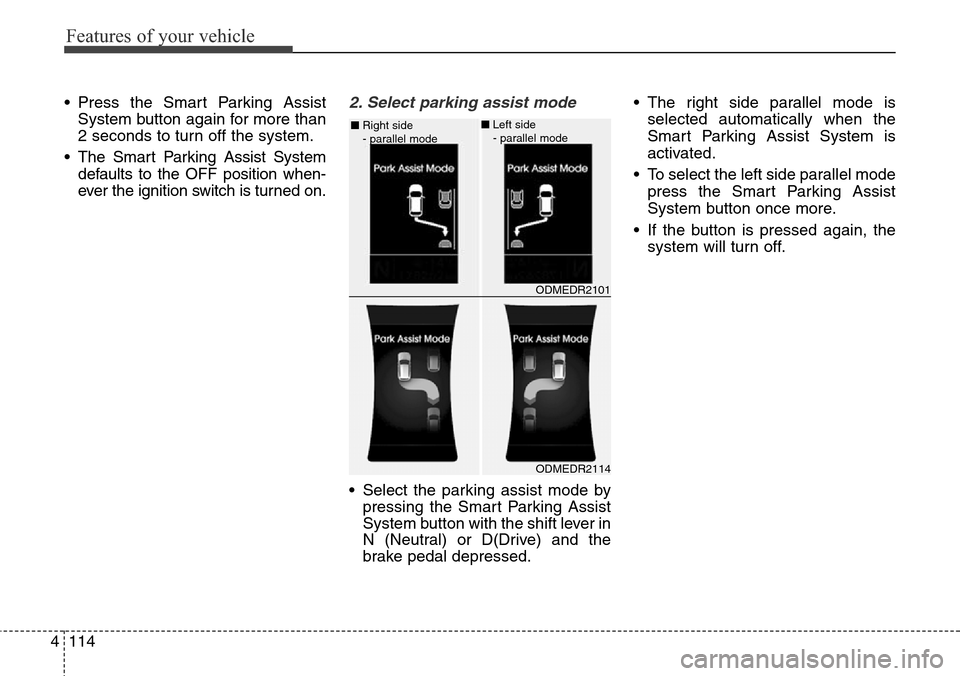
ever the ignition switch is turned on.2. Select parking assist mode
• Select the parking assist mode by
pressing the Smart Parking Assist
System button with the shift lever in
N (Neutral) or D(Drive) and the
brake pedal depressed.• The right side parallel mode is
selected automatically when the
Smart Parking Assist System is
activated.
• To select the left side parallel mode
press the Smart Parking Assist
System button once more.
• If the button is pressed again, the
system will turn off.
ODMEDR2114 ■Right side
- parallel mode
ODMEDR2101 ■Left side
- parallel mode
Page 218 of 718
4121
Features of your vehicle
The rearview camera will activate
when the back-up light is ON with the
ignition switch ON and the shift lever
in the R (Reverse) position.
✽NOTICE
The warning "Warning ! Check sur-
roundings for safety" will appear on
the rearview display when the
rearview camera is activated.
REARVIEW CAMERA (IF EQUIPPED)
WARNING
• This system is a supplemen-
tary function only. It is the
responsibility of the driver to
always check the inside/out-
side rearview mirror and the
area behind the vehicle before
and while backing up because
there is a dead zone that cannot
be seen through the camera.
• Always keep the camera lens
clean. If the lens is covered
with foreign matter, the cam-
era may not operate normally.
ODM042238
ODM042239
Page 219 of 718
Features of your vehicle
122 4
The hazard warning flasher should
be used whenever you find it neces-
sary to stop the car in a hazardous
location. When you must make such
an emergency stop, always pull off
the road as far as possible.The hazard warning lights are turned
on by pushing in the hazard switch.
This causes all turn signal lights to
blink. The hazard warning lights will
operate even though the key is not in
the ignition switch.
To turn the hazard warning lights off,
push the switch a second time.
HAZARD WARNING FLASHER
ODM042242
ODM042243
■Type A
■Type B