Page 218 of 429

4139
Features of your vehicle
(Continued) Please avoid using USB memory products which can be used askey chains or cellular phoneaccessories as they could causedamage to the USB jack. Pleasemake certain only to use plug type connector products as shownbelow.(Continued)
If the USB device is divided by logical drives, only the music fileson the highest-priority drive arerecognized by car audio.
Devices such as MP3 Player/ Cellular phone/Digital camera canbe unrecognizable by standardUSB I/F can be unrecognizable.
Charging through the USB may not be supported in some mobiledevices.
❋ A car exclusive cable (providedor sold separately) is required touse the iPod
®.
Some non-standard USB devices (METAL COVER TYPE USB) can beunrecognizable.
Some USB flash memory readers (such as CF, SD, microSD, etc.) orexternal-HDD type devices can beunrecognizable.
Music files protected by DRM (DIGITAL RIGHTS MANAGEMENT)are not recognizable.
The data in the USB memory may be lost while using this audio.Always back up important data ona personal storage device.
(Continued)
Page 232 of 429

4153
Features of your vehicle
■Phone Setup
All Bluetooth®Wireless Technology relat-
ed operations can be performed by voice
command or by manual operation.
Press button on the steeringwheel to activate voice recognition.
Push the TUNE/SETUP knob to enterSETUP mode. Select “BLUETOOTH”
item by rotating the TUNE/SETUP
knob, then push the knob.
Before using
Bluetooth®Wireless
Technology features, the phone must be
paired (registered) to the audio system.
Up to 5 phones can be paired in the sys-
tem.
✽ ✽ NOTICE
• The pairing procedure of the phone
varies according to each phone model.
Before attempting to pair phone,
please see your phone’s User’s Guide
for instructions.
• Once pairing with the phone is com- pleted, there is no need to pair with
that phone again unless the phone is
deleted manually from the audio sys-
tem (refer “Deleting Phone” section)
or the vehicle’s information is
removed from the phone.
• Need to confirm if pairing can be done by voice. Need to confirm which sys-
tem can paired by voice, CDC, CDP.1. Press button.
2. Say “Set Up”.
- The system replies with availablecommands.
- To skip the information message, press again and then a beep is
heard.
3. Say “Pair Phone”
4. Say “Yes” to proceed.
5. Say the name of your phone when prompted.
- Use any name to uniquely describe your phone.
- Use Full name to voice tag.
- Do not use a short name or similar name to voice command.
6.
Bluetooth®Wireless Technology sys-
tem will repeat the name you stated.
7. Say "Yes" to confirm.
8. The audio displays “searching ----
passkey: 0000” and asks you to initiate
pairing procedure from the phone.
9. Search the
Bluetooth®Wireless
Technology system on your phone.
Your phone should display your [vehi-
cle model name] on the
Bluetooth®
Wireless Technology device list. Then
attempt pairing on your phone.
10. After Pairing is completed, your phone will start to transfer phone/contact list
to the audio system.
Page 238 of 429
4159
Features of your vehicle
■ Key matrix
No.
Disconnected(BT Icon off)Connected (BT Icon On)
Paired H/P Empty Paired H/P
Exist
1 SHORT
LONG
STEERING
MODE KEY
SHORT
LONG
[10sec]
AUDIO
POWER KEY Normal mode
BT SETUP menuIncoming Call
Outgoing Call
Active CallTRANSFER
CALL
Not Connect---Accept Call
Connected
-
Transfer Call
(Handsfree <->Phone)
KEY
--
VR
MODE Cancel-Reject Call End Call End Call
End Call
-Active ActiveActiveActive-- -
Change
language
-
-
Change
language
-
Change
language
- -
- --
Change
language
- --Reject Call
-
End call
-
2nd call
1st Call:waiting 2nd Call:active
-
-
End call-
2
3
4
Page 240 of 429
5
Before driving / 5-3
Key / 5-5
Engine start/stop button / 5-7
Automatic transmission / 5-11
Brake system / 5-18
Cruise control system / 5-36
Smart cruise control system / 5-40
Lane departure warning system (LDWS) / 5-51
Economical operation / 5-54
Special driving conditions / 5-56
Winter driving / 5-60
Vehicle load limit / 5-64
Vehicle weight / 5-69
Trailer towing / 5-70
Driving your vehicle
Page 244 of 429
55
Driving your vehicle
E030100AEN
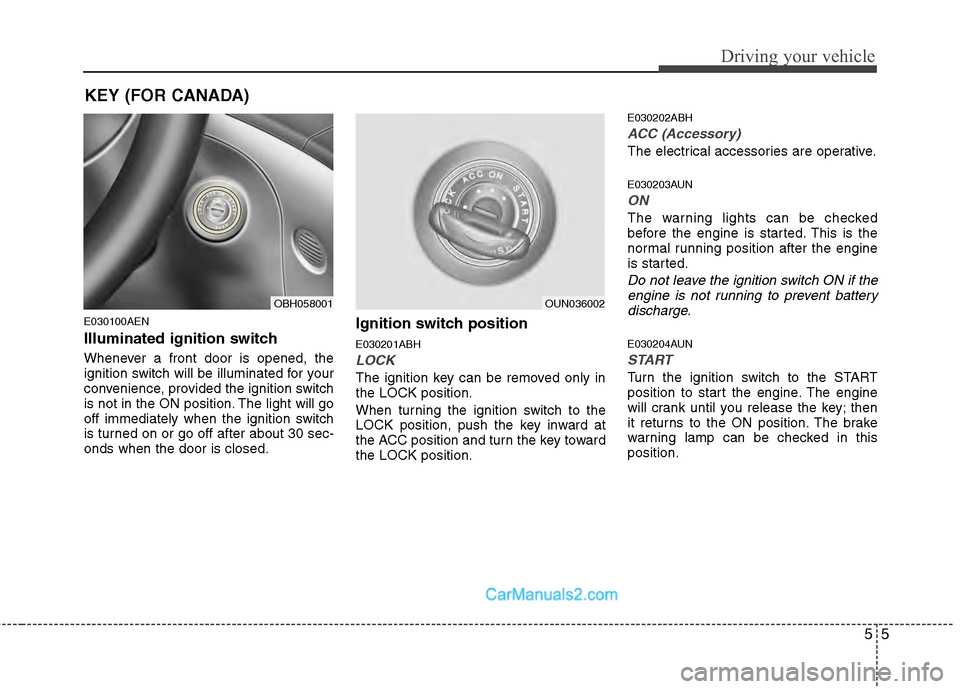
Illuminated ignition switch
Whenever a front door is opened, the
ignition switch will be illuminated for your
convenience, provided the ignition switch
is not in the ON position. The light will go
off immediately when the ignition switch
is turned on or go off after about 30 sec-
onds when the door is closed.
Ignition switch position
E030201ABH
LOCK
The ignition key can be removed only in
the LOCK position.
When turning the ignition switch to the
LOCK position, push the key inward at
the ACC position and turn the key toward
the LOCK position.
E030202ABH
ACC (Accessory)
The electrical accessories are operative.
E030203AUN
ON
The warning lights can be checked
before the engine is started. This is the
normal running position after the engine
is started.
Do not leave the ignition switch ON if theengine is not running to prevent battery discharge.
E030204AUN
START
Turn the ignition switch to the START
position to start the engine. The engine
will crank until you release the key; then
it returns to the ON position. The brake
warning lamp can be checked in this
position.
OBH058001OUN036002
KEY (FOR CANADA)
Page 245 of 429

Driving your vehicle
65
E030205ABHStarting the engine
E040000AUN-EU
E040100ABH-EU
1. Make sure the parking brake is applied.
2. Place the shift lever in P (Park).Depress the brake pedal fully.
You can also start the engine when theshift lever is in the N (Neutral) position.
3. Turn the ignition switch to START and
hold it there until the engine starts (a
maximum of 10 seconds), then
release the key.
4. In extremely cold weather (below -18°C / 0°F) or after the vehicle has
not been operated for several days, let
the engine warm up without depress-
ing the accelerator.
Whether the engine is cold or warm, itshould be started without depressingthe accelerator.
WARNING
Always wear appropriate shoes when
operating your vehicle. Unsuitable
shoes (high heels, slippers, ski
boots,etc.) may interfere with your
ability to use the brake and accelera-
tor pedal.
CAUTION
If the engine stalls while you are inmotion, do not attempt to move theshift lever to the P (Park) position. If traffic and road conditions permit,you may put the shift lever in the N(Neutral) position while the vehicle is still moving and turn the ignitionswitch to the START position in an attempt to restart the engine.
CAUTION
Do not engage the starter for morethan 10 seconds. If the engine stalls or fails to start, wait 5 to 10 secondsbefore re-engaging the starter.Improper use of the starter maydamage it.
WARNING - Ignition
switch
Never turn the ignition switch to LOCK or ACC while the vehicle is
moving. This would result in loss
of directional control and braking
function, which could cause an
accident.
Before leaving the driver’s seat, always make sure the shift lever is
engaged in P (Park), set the park-
ing brake fully, and shut the engine
off. Unexpected and sudden vehi-
cle movement may occur if these
precautions are not taken.
Never reach for the ignition switch, or any other controls through the
steering wheel while the vehicle is
in motion. The presence of your
hand or arm in this area could
cause a loss of vehicle control, an
accident and serious bodily injury
or death.
Do not place any movable objects around the driver’s seat as they
may move while driving, interfere
with the driver and lead to an acci-
dent.
Page 248 of 429

59
Driving your vehicle
Starting the engine
E040000ABH
E040100ABH
1. Carry the smart key or leave it insidethe vehicle.
2. Make sure the parking brake is firmly applied.
3. Place the shift lever in the P(Park) position.
4. Depress the brake pedal.
5. Press the engine start/stop button.
6. In extremely cold weather (below - 18°C / 0°F) or after the vehicle has not
been operated for several days, let the
engine warm up without depressing
the accelerator.
Whether the engine is cold or warm, itshould be started without depressing
the accelerator.
Even if the smart key is in the vehicle,
if it is far away from you, the engine
may not start.
When the engine start/stop button is in
the ACC or ON position, if any door is
open, the system checks for the smart
key. If the smart key is not in the vehi-
cle, the warning, "Key is not in vehicle"
will come on, and if all doors are
closed, the chime will also sound for
about 5 seconds. The indicator will turn
off while the vehicle is moving. Keep
the smart key in the vehicle when
using the ACC position or if the vehicle
engine is on.
WARNING
Always wear appropriate shoes
when operating your vehicle.
Unsuitable shoes (high heels, slip-
pers, ski boots, etc.) may interfere
with your ability to use the brake
and accelerator pedal.
WARNING
The engine will start by pressing
the engine start/stop button, only
when the smart key is in the vehi-
cle. Never allow children or any per-
son who is unfamiliar with the vehi-
cle to touch the engine start/stop
button or related parts.
CAUTION
If the engine stalls while you are in
motion, do not attempt to move theshift lever to the P (Park) position. Iftraffic and road conditions permit,you may put the shift lever in the N (Neutral) position while the vehicleis still moving and press the enginestart/stop button in an attempt torestart the engine.
Page 249 of 429

Driving your vehicle
10
5
✽
✽
NOTICE
• If the battery is weak or the smart key
does not work correctly, you can start
the engine by inserting the smart key
into the smart key holder. To eject the
smart key from the smart key holder,
press the smart key inward past the
detent and then pull the key outward.
• When the stop lamp fuse is blown, you can't start the engine normally.
Replace the fuse with a new one. If you
are not able to replace the fuse, you
can start the engine by pressing the
engine start/stop button for 10 seconds
with the engine start/stop button in
ACC. The engine can start without
depressing the brake pedal. But for
your safety always depress the brake
pedal before starting the engine.
OBH058003
CAUTION
Do not press the engine
start/stop button for more than 5seconds except when the stoplamp fuse is disconnected.
When you eject the smart key from the smart key holder, pressthe smart key inward and pull it out. If you pull out the smart keyforcibly without pushing thesmart key, the smart key holdermay be damaged and couldn’toperate normally.
![Hyundai Genesis 2013 Owners Manual 4159
Features of your vehicle
■ Key matrix
No.
Disconnected(BT Icon off)Connected (BT Icon On)
Paired H/P Empty Paired H/P
Exist
1 SHORT
LONG
STEERING
MODE KEY
SHORT
LONG
[10sec]
AUDIO
POWER KEY Nor](/manual-img/35/14675/w960_14675-237.png "Hyundai Genesis 2013 Owners Manual 4159
Features of your vehicle
■ Key matrix
No.
Disconnected(BT Icon off)Connected (BT Icon On)
Paired H/P Empty Paired H/P
Exist
1 SHORT
LONG
STEERING
MODE KEY
SHORT
LONG
[10sec]
AUDIO
POWER KEY Nor")
