Page 160 of 479

471
Features of your vehicle
ItemsExplanation
Driving Mode Theme
(if equipped)• On : The instrument cluster theme is automatically changed in accordance with the drive mode
(NORMAL, SPORT, SNOW).
• Off : The automatic change function of the instrument cluster theme will be deactivated
ECO Driving• On : The ECO driving mode will be activated.
• Off : The ECO driving mode will be deactivated.
AVG Fuel Eco Reset
• Auto Reset: The average fuel economy will reset automatically when refueling.
• Manual Reset: The average fuel economy will not reset automatically when refueling.
❈For more details, refer to “Trip Computer” in this chapter.
Language (if equipped)• Choose the language of LCD display (English, French, Spanish).
ItemsExplanation
Auto Door Lock
• Off: The auto door lock operation will be deactivated.
• Speed: All doors will be automatically locked when the vehicle speed exceeds 15km/h (9.3mph).
• Shift Lever: All doors will be automatically locked if the automatic transmission shift lever is shifted
from the P (Park) position to the R (Reverse), N (Neutral), or D (Drive) position.
Auto Door Unlock
• Off: The auto door unlock operation will be canceled.
• Power Off: All doors will be automatically unlocked when the Engine Start/Stop Button is set to
the OFF position.
• Shift Lever: All doors will be automatically unlocked if the automatic transmission shift lever is
shifted to the P (Park) position.
• Driver Door Unlock: All doors will be automatically unlocked if the driver's door is unlocked.
Door
Page 162 of 479

473
Features of your vehicle
ItemsExplanation
Seat Easy Access
• Off: The seat easy access function will be deactivated.
• Normal/Enhanced:
- When you turn off the engine, the driver’s seat will automatically move rearward by 5 cm
(Normal) or 7.5 cm (Enhanced) for you to enter or exit the vehicle more comfortably.
- If you change the Engine Start/Stop Button from OFF position to the ACC, ON, or START posi-
tion, the driver’s seat will return to the original position.
❈For more details, refer to “Driver Position Memory System” in chapter 4.
Steering Easy Access
• On: The steering wheel will automatically move forward or rearward for the driver to enter or exit
the vehicle comfortably.
• Off: The steering easy access function will be deactivated.
❈For more details, refer to “Driver Position Memory System” in chapter 4.
Driver Convenience
Haptic Steering System Switch (if equipped)
Adjust the rotating effort of the haptic switch on the steering wheel for LCD display control (Strong, Normal, Mild).
❈For the haptic switch, refer to "LCD Display Control" in this chapter.
Page 164 of 479
475
Features of your vehicle
Warning Messages
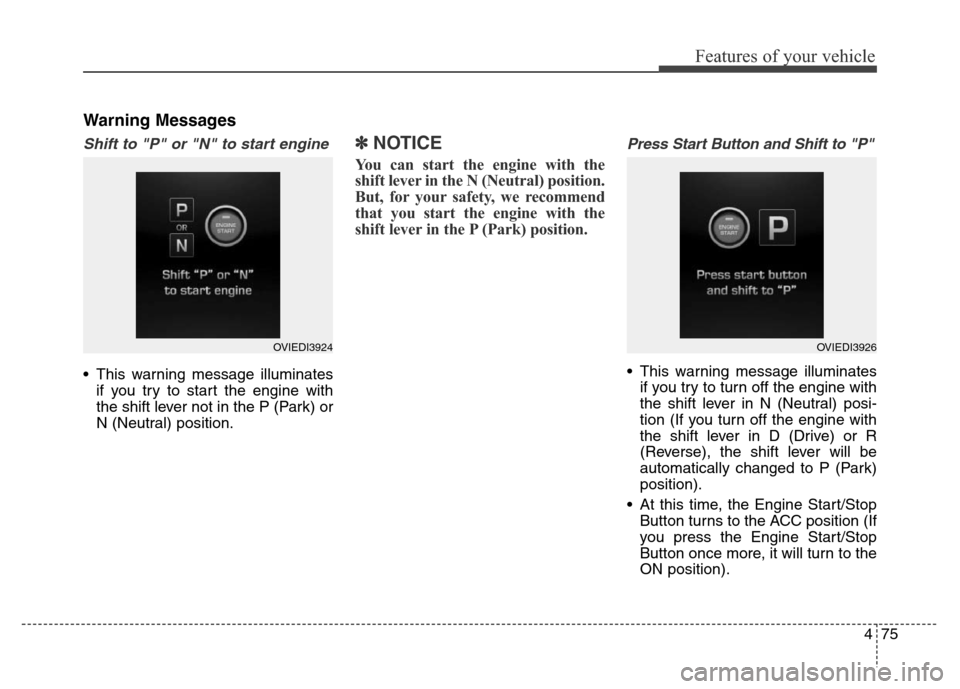
Shift to "P" or "N" to start engine
• This warning message illuminates
if you try to start the engine with
the shift lever not in the P (Park) or
N (Neutral) position.
✽NOTICE
You can start the engine with the
shift lever in the N (Neutral) position.
But, for your safety, we recommend
that you start the engine with the
shift lever in the P (Park) position.
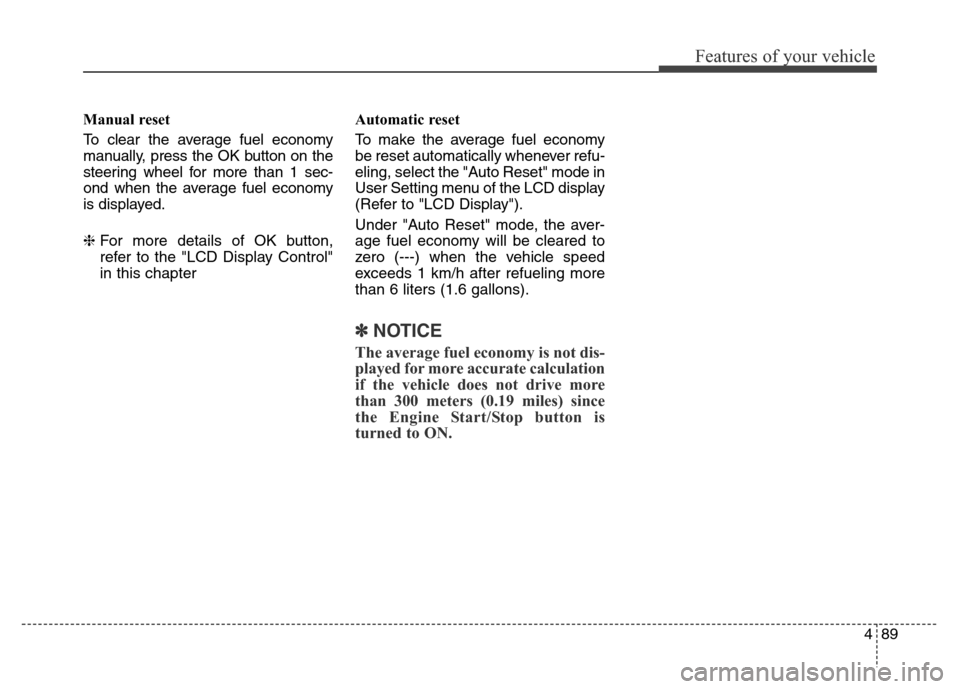
Press Start Button and Shift to "P"
• This warning message illuminates
if you try to turn off the engine with
the shift lever in N (Neutral) posi-
tion (If you turn off the engine with
the shift lever in D (Drive) or R
(Reverse), the shift lever will be
automatically changed to P (Park)
position).
• At this time, the Engine Start/Stop
Button turns to the ACC position (If
you press the Engine Start/Stop
Button once more, it will turn to the
ON position).
OVIEDI3924OVIEDI3926
Page 178 of 479
489
Features of your vehicle
Manual reset
To clear the average fuel economy
manually, press the OK button on the
steering wheel for more than 1 sec-
ond when the average fuel economy
is displayed.
❈For more details of OK button,
refer to the "LCD Display Control"
in this chapterAutomatic reset
To make the average fuel economy
be reset automatically whenever refu-
eling, select the "Auto Reset" mode in
User Setting menu of the LCD display
(Refer to "LCD Display").
Under "Auto Reset" mode, the aver-
age fuel economy will be cleared to
zero (---) when the vehicle speed
exceeds 1 km/h after refueling more
than 6 liters (1.6 gallons).
✽NOTICE
The average fuel economy is not dis-
played for more accurate calculation
if the vehicle does not drive more
than 300 meters (0.19 miles) since
the Engine Start/Stop button is
turned to ON.
Page 206 of 479

4117
Features of your vehicle
Battery saver function
• The purpose of this feature is to
prevent the battery from being dis-
charged. The system automatically
turns off the position lamps when
the driver turns off the engine and
opens the driver-side door.
• With this feature, the position
lamps will be turned off automati-
cally if the driver parks on the side
of road at night.
If necessary, to keep the lamps on
when the engine is turned off per-
form the following:
1) Open the driver-side door.
2) Turn the position lamps OFF
and ON again.
Headlamp escort function
The headlamps (and/or position lamp)
will remain on for approximately 5 min-
utes after the engine start/stop button
is turned to the ACC or OFF position.
However, if the driver’s door is opened
and closed, the headlamps are turned
off after 15 seconds.
The headlamps can be turned off by
pressing the lock button on the smart
key twice or turning off the light
switch from the headlight or Auto
light position.
❈Traffic Change (For Europe)
The low beam light distribution is
asymmetric. If you go abroad to a
country with opposite traffic direc-
tion, this asymmetric part will dazzle
oncoming car driver. To prevent daz-
zle, ECE regulation demand several
technical solutions (ex. automatic
change system, adhesive sheet,
down aiming). This headlamps are
designed not to dazzle opposite driv-
ers. So, you need not change your
headlamps in a country with oppo-
site traffic direction.
LIGHTING
CAUTION
If the driver gets out of the vehi-
cle through other doors (except
driver's door), the battery saver
function does not operate.
Therefore, it causes the battery
to be discharged. In this case,
make sure to turn off the lamp
before getting out of the vehicle.
Page 208 of 479

4119
Features of your vehicle
AFLS (Adaptive Front Lighting
System) (if equipped)
Adaptive front lighting system uses
the steering angle and vehicle speed,
to keep your field of vision wide by
swiveling and leveling the headlamp.
Change the switch to the AUTO posi-
tion when the engine is running. The
adaptive front lighting system will
operate when the headlamp is ON.
To turn off the AFLS, change the
switch to other positions. After turn-
ing the AFLS off, headlamp swiveling
no longer occurs, but leveling oper-
ates continuously.If the AFLS malfunction indicator
comes on, the AFLS is not working
properly. Drive to the nearest safe
location and restart the engine. If the
indicator continuously remains on,
we recommend that the system be
checked by an authorized HYUNDAI
dealer.
Position lamp position ( )
When the light switch is in the posi-
tion lamp position, the position,
license and instrument panel lights
will turn ON.OVI043091
OVIDDI2916/OVI043425
■Type A■Type B
ODM042245
Page 212 of 479

4123
Features of your vehicle
Daytime running light
(if equipped)
Daytime Running Lights (DRL) can
make it easier for others to see the
front of your vehicle during the day.
DRL can be helpful in many different
driving conditions, and it is especially
helpful after dawn and before sunset.
The DRL system will turn OFF when:
1. The parking light switch is ON.
2. Engine stops.
Headlamp leveling device
It is automatically adjusted the head-
lamp beam level according to the
number of the passengers and the
loading weight in the luggage area.
And it offers the proper headlamp
beam under the various conditions.
Headlamp washer
If your vehicle is equipped with the
headlamp washer it will be operating
at the same time when you operate
the windshield washer. It will operate
when the headlamp switch is in the
first or second position and the
engine start/stop button is in the ON
position.
The washer fluid will be sprayed on
to the headlamps.
✽NOTICE
• Check the headlamp washers peri-
odically to confirm that the wash-
er fluid is being sprayed properly
onto the headlamp lenses.
• The headlamp washer can be
operated 15 minutes after being
operated last time.
WARNING
If it does not work properly even
though your car is inclined
backward according to passen-
ger's posture, or the headlamp
beam is irradiated to the high or
low position, we recommend
that the system be inspected by
an authorized HYUNDAI dealer.
Do not attempt to inspect or
replace the wiring yourself.
Page 213 of 479

Features of your vehicle
124 4
Windshield wipers
Operates as follows when the engine
start/stop button is turned ON.MIST / V : For a single wiping cycle,
push the lever upward
and release it with the
lever in the OFF position.
The wipers will operate
continuously if the lever is
pushed upward and held.
OFF / O : Wiper is not in operation
AUTO : Auto control wipe
LO / 1 : Normal wiper speed
HI / 2 : Fast wiper speed
✽NOTICE
If there is heavy accumulation of
snow or ice on the windshield,
defrost the windshield for about 10
minutes, or until the snow and/or ice
is removed before using the wind-
shield wipers to ensure proper oper-
ation.
If you do not remove the snow
and/or ice before using the wiper
and washer, it may damage the
wiper and washer system.
Auto control
The rain sensor located on the upper
end of the windshield glass senses
the amount of rainfall and controls
the wiping cycle for the proper inter-
val. The more it rains, the faster the
wiper operates. When the rain stops,
the wiper stops.
To vary the speed setting, turn the
speed control knob (B).
If the wiper switch is set in AUTO
mode when the engine start/stop
button is ON, the wiper will operate
once to perform a self-check of the
system. Set the wiper to OFF (O)
position when the wiper is not in use.
WIPERS AND WASHERS
OVI043500L
OVI043502L
■Type A
■Type B