Page 93 of 488

92
uuGauges and DisplaysuMulti-Information Display*
Instrument Panel
■List of customizable options
*: Default Setting
Setup Group Customizable FeaturesDescriptionSelectable Settings
METER
SETUP
LANGUAGE SELECTIONChanges the displayed language.ENGLISH*/FRENCH/SPANISH
ADJUST OUTSIDE TEMP.
DISPLAYAdjusts the temperature reading by a few degrees.-5°F ~ ±0°F* ~ +5°F (U.S.)
-3°C ~ ±0°C* ~ +3°C (Canada)
TRIP A INFO RESET
Changes the setting of how to reset trip meter A,
average fuel economy A, average speed A, and
elapsed time A.
with REFUEL/
MANUAL ONLY*/IGN OFF
POSITION
SETUPMEMORY POSITION LINKChanges the driver's seat and the outside mirror
positions to a stored setting.ON*/OFF
LIGHTING
SETUP
INTERIOR LIGHT
DIMMING TIME
Changes the length of time the interior lights stay on
after you close the doors.60 sec/30 sec*/15 sec
HEADLIGHT AUTO OFF
TIMER
Changes the length of time the exterior lights stay
on after you close the driver's door.60 sec/30 sec/15 sec*/0 sec
AUTO LIGHT SENSITIVITYChanges the timing for the headlights to come on.MAX/HIGH/MID*/LOW/MIN
Page 98 of 488

97
Controls
This chapter explains how to operate the various controls necessary for driving.
Setting the Clock................................ 98Locking and Unlocking the DoorsKey Types and Functions .................... 99 Locking/Unlocking the Doors from the Outside .......................................... 101Locking/Unlocking the Doors from the Inside ............................................. 103Childproof Door Locks ..................... 104Auto Door Locking/Unlocking .......... 105Opening and Closing the Tailgate... 110Security System................................ 118Immobilizer System .......................... 118Security System Alarm*.................... 118Opening and Closing the Windows..... 120
Opening and Closing the Moonroof*...... 123Operating the Switches Around the Steering WheelIgnition Switch ................................. 124 Turn Signals ..................................... 125 Light Switches.................................. 125Fog Lights*...................................... 127Daytime Running Lights ................... 127Wipers and Washers ........................ 128Brightness Control ........................... 130 Rear Defogger/Heated Door Mirror* Button ........................................... 131Driving Position Memory System*.... 132Adjusting the Steering Wheel........... 134
Adjusting the Mirrors....................... 135Interior Rearview Mirror ................... 135 Power Door Mirrors ......................... 136Adjusting the Seats.......................... 137Adjusting the Seat Positions ............. 137Interior Lights/Interior Convenience Items................................................ 150Interior Lights .................................. 150Interior Convenience Items .............. 152Climate Control System................... 165Using Automatic Climate Control .... 165Automatic Climate Control Sensors ...... 170
* Not available on all models
Page 132 of 488
131
uuOperating the Switches Around the Steering WheeluRear Defogger/Heated Door Mirror* Button
Controls
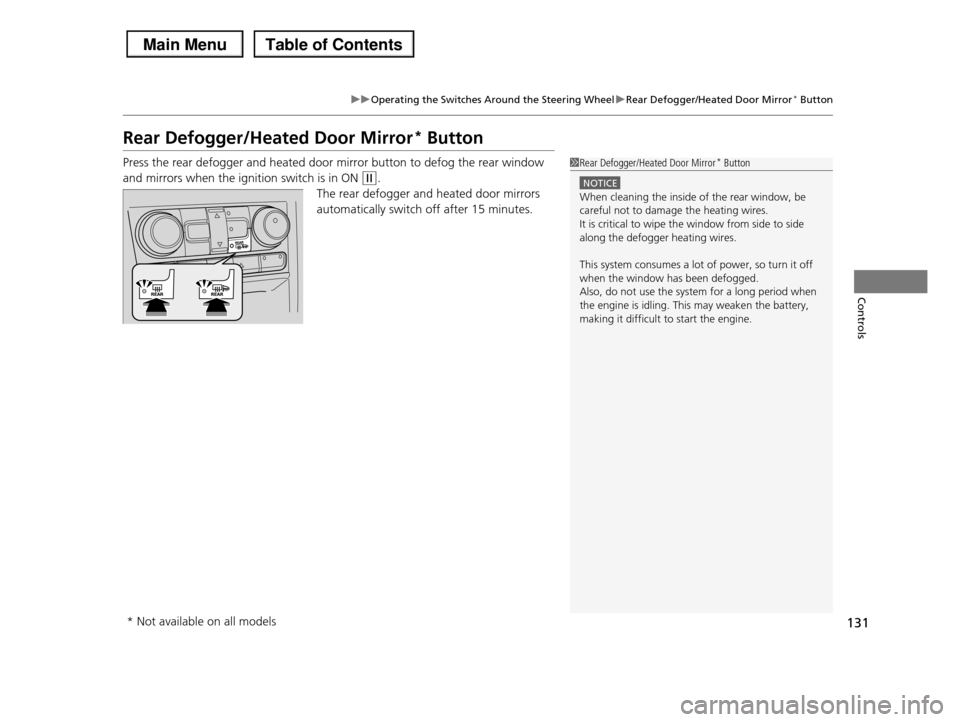
Rear Defogger/Heated Door Mirror* Button
Press the rear defogger and heated door mirror button to defog the rear window
and mirrors when the ignition switch is in ON (w.
The rear defogger and heated door mirrors
automatically switch off after 15 minutes.
1Rear Defogger/Heated Door Mirror* Button
NOTICE
When cleaning the inside of the rear window, be careful not to damage the heating wires.
It is critical to wipe the window from side to side
along the defogger heating wires.
This system consumes a lot of power, so turn it off
when the window has been defogged. Also, do not use the system for a long period when
the engine is idling. This may weaken the battery,
making it difficult to start the engine.
* Not available on all models
Page 133 of 488
132
uuOperating the Switches Around the Steering WheeluDriving Position Memory System*
Controls
Driving Position Memory System*
You can store two driver’s seat and door mirror positions with the driving position
memory system.
When you unlock and open the driver’s door with a remote transmitter, the seat and
door mirrors adjust automatically to one of the two preset positions.
The multi-information display shows you which remote transmitter you used to
unlock the vehicle when you enter.
•Driver 1 transmitter is linked to memory button 1.
•Driver 2 transmitter is linked to memory button 2.
1Driving Position Memory System*
Using the multi-information display, you can disable
the automatic seat adjustment function.
2Customized Features P. 90
The customize setting is also stored by the Driver 1
and 2 transmitters. What setting is recalled next time depends on which transmitter you use to unlock and
open the driver's door.
Driver 1Driver 2
* Not available on all models
Page 134 of 488
133
uuOperating the Switches Around the Steering WheeluDriving Position Memory System*
Controls
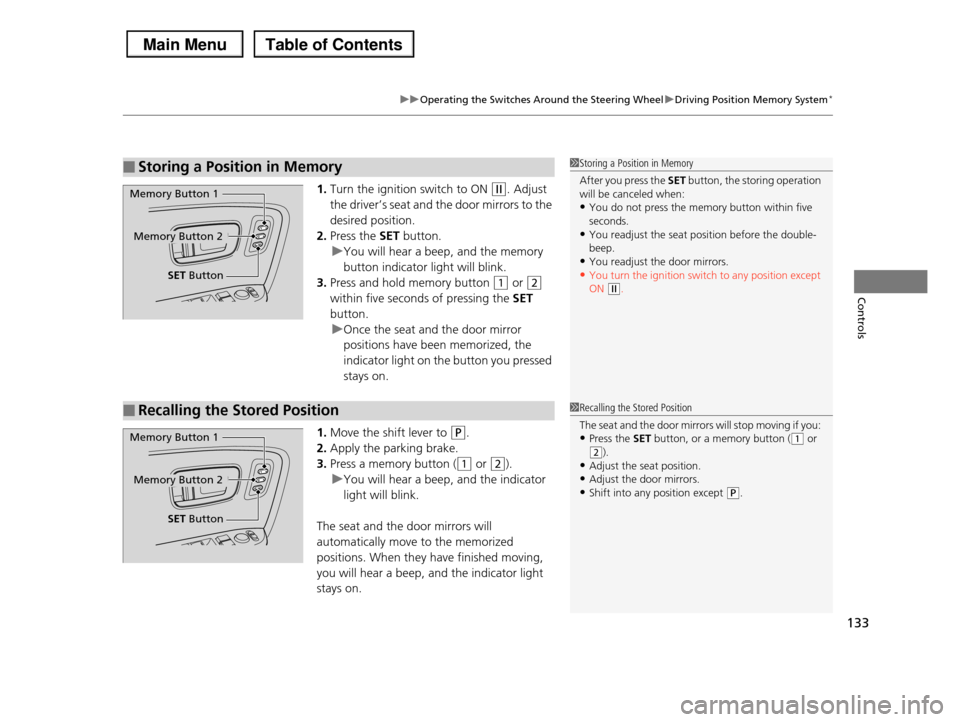
1.Turn the ignition switch to ON (w. Adjust
the driver’s seat and the door mirrors to the
desired position.
2.Press the SET button.
uYou will hear a beep, and the memory
button indicator light will blink.
3.Press and hold memory button (1 or (2
within five seconds of pressing the SET
button.
uOnce the seat and the door mirror
positions have been memorized, the
indicator light on the button you pressed
stays on.
1.Move the shift lever to (P.
2.Apply the parking brake.
3.Press a memory button ((1 or (2).
uYou will hear a beep, and the indicator
light will blink.
The seat and the door mirrors will
automatically move to the memorized
positions. When they have finished moving,
you will hear a beep, and the indicator light
stays on.
■Storing a Position in Memory1Storing a Position in Memory
After you press the SET button, the storing operation will be canceled when:
•You do not press the memory button within five
seconds.•You readjust the seat position before the double-
beep.
•You readjust the door mirrors.•You turn the ignition switch to any position except
ON (w.
Memory Button 1
Memory Button 2
SET Button
■Recalling the Stored Position1Recalling the Stored Position
The seat and the door mirrors will stop moving if you:
•Press the SET button, or a memory button ((1 or (2).
•Adjust the seat position.
•Adjust the door mirrors.•Shift into any position except (P.
Memory Button 1
Memory Button 2
SET Button
Page 136 of 488
135
Controls
Adjusting the Mirrors
Interior Rearview Mirror
Adjust the angle of the rearview mirror when you are sitting in the correct driving
position.
Flip the tab to switch the position.
The night position will help to reduce the glare
from headlights behind you when driving
after dark.
When driving after dark, the automatic
dimming rearview mirror always reduces the
glare from headlights behind you.
■Rearview Mirror with Day and Night Positions*
1Adjusting the Mirrors
Keep the inside and outside mirrors clean and
adjusted for best visibility.
Adjust the mirrors before you start driving.
2Adjusting the Seat Positions P. 137Tab
Daytime Position
Night Position
Up
Down
■Automatic Dimming Rearview Mirror*
Sensor
1Automatic Dimming Rearview Mirror*
The auto dimming function cancels when the shift position is in (R.
* Not available on all models
Page 137 of 488
136
uuAdjusting the Mirrors uPower Door Mirrors
Controls
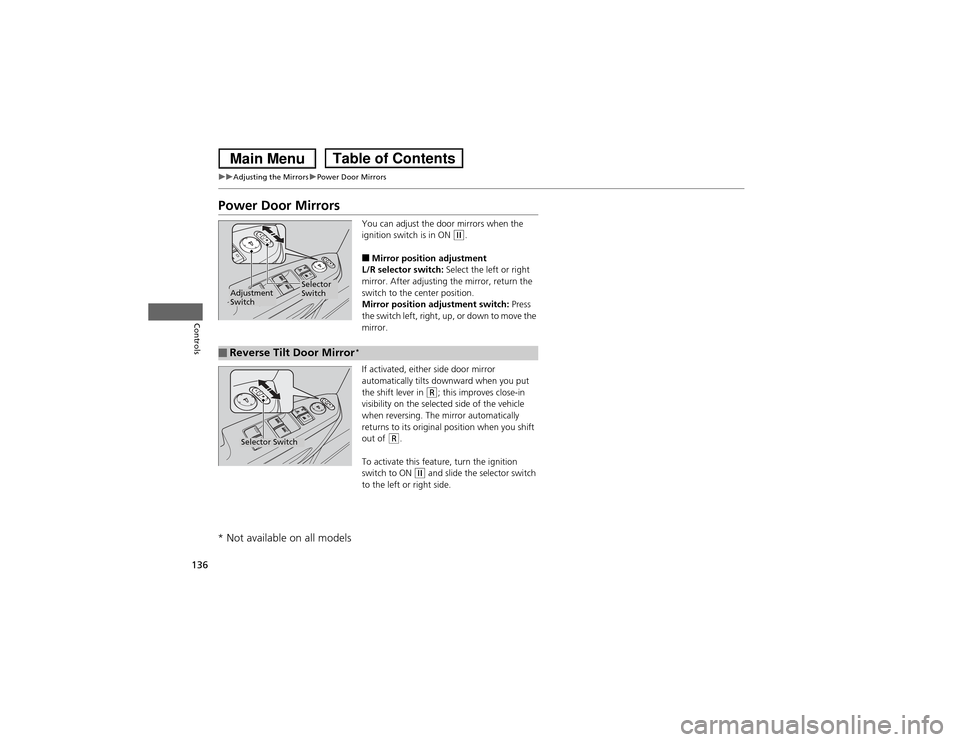
Power Door Mirrors
You can adjust the door mirrors when the
ignition switch is in ON
(w.
■Mirror position adjustment
L/R selector switch: Select the left or right
mirror. After adjusting the mirror, return the
switch to the center position.
Mirror position adjustment switch: Press
the switch left, right, up, or down to move the
mirror.
If activated, either side door mirror
automatically tilts downw ard when you put
the shift lever in
(R; this improves close-in
visibility on the selected side of the vehicle
when reversing. The mirror automatically
returns to its original position when you shift
out of
(R.
To activate this feature, turn the ignition
switch to ON
(w and slide the selector switch
to the left or right side.
Selector
Switch
Adjustment
Switch■Reverse Tilt Door MirrorSelector Switch
* Not available on all models
*
Page 162 of 488
Continued161
uuInterior Lights/Interior Convenience ItemsuInterior Convenience Items
Controls
To open the sunglasses holder, push and
release the indent. To close, push it again until
it latches.
You can store eyeglasses and other small
items in this holder.
■Conversation mirror*
The sunglasses holder comes with a mirror.
Open the sunglasses holder fully, then push it
back to the first detent.
You can use the mirror to view the rear seats.
■Sunglasses Holder1Sunglasses Holder
Keep the holder closed while driving except when accessing stored items.
Push
* Not available on all models