Page 334 of 488

Continued333
uuTowing a TraileruTowing Preparation
Driving
Your vehicle has a class 3 trailer hitch as standard equipment.
The jumper harness and trailer brake fuse are stored in the glove box.
2Trailer brakes P. 334
2Trailer light P. 335
Turn the knob one-quarter left to open the
cover.
uThe 7-Pin trailer connector and trailer
hitch are located.
■Towing Equipment and Accessories1Towing Equipment and Accessories
Make sure that all equipment is properly installed and
maintained, and that it meets federal, state, province/
territory, and local regulations.
Consult your trailer sales or rental agency if any other
items are recommended or required for your towing situation.
The lighting and wiring of trailers can vary by type and brand. If a connector is required, it should only
be installed by a qualified technician.
Trailer packages and products:
•Ball mount, hitch plug, hitch pin etc.
•Wiring harness kit•Trailer hitch kit (jumper harness included)
2Trailer brakes P. 334
•Automatic transmission cooler kit2Automatic transmission cooler P. 337
Are available at a dealer.
2WD models
Knob
7-Pin Trailer Connector
Trailer Hitch
Page 335 of 488

uuTowing a TraileruTowing Preparation
334
Driving
■Trailer brakes
Recommended for any trailer with a total weight of 1,000 lbs (450 kg) or more:
There are two common types of trailer brakes: surge and electric. Surge brakes are
common for boat trailers, since the brakes will get wet.
If you choose electric brakes, be sure they are electronically actuated. Do not
attempt to attach trailer brakes to your vehicle's hydraulic system, as it will lower
braking effectiveness and create a potential hazard.
The 4-pin gray connector installed in your vehicle has all of the circuits required to
install most electric trailer brake controllers.
Have a qualified mechanic install your trailer
brake controller following the trailer brake
controller manufacturer’s instructions. Failure
to properly install the trailer brake controller
may increase the distance it takes for you to
stop your vehicle when towing a trailer.
The trailer jumper harness is used to install the
controller for the electric trailer brakes.
Insert the trailer brake fuse into the engine
compartment sub fuse box.
2Engine Compartment Sub Fuse Box P. 455
1Trailer brakes
The 4-pin gray connector is located under the instrument panel near the top of the parking brake
pedal.
Electric Brake (Brown/White)
Ground (Black)
Brake (20A) (Purple)
Stop (Sky Blue)
Trailer brake controller connector’s terminals:
Electric Brake (Brown/White)
Ground (Black)
Brake (20A) (Blue)
Brake Lights (Sky Blue)
Touring models
Page 337 of 488
336
uuTowing a TraileruTowing Preparation
Driving
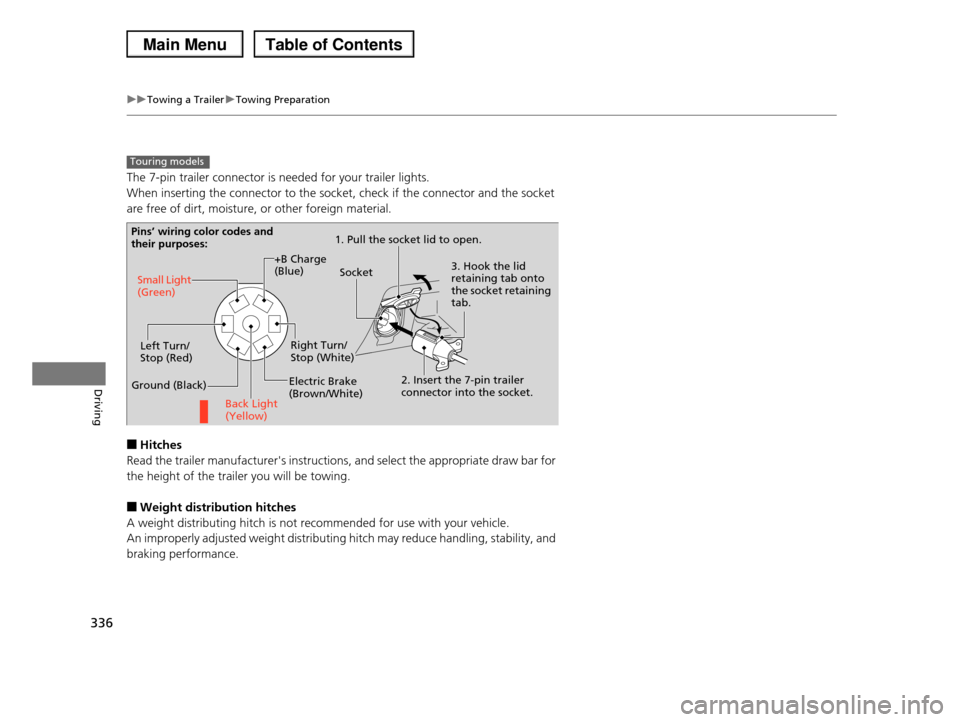
The 7-pin trailer connector is needed for your trailer lights.
When inserting the connector to the socket, check if the connector and the socket
are free of dirt, moisture, or other foreign material.
■Hitches
Read the trailer manufacturer's instructions, and select the appropriate draw bar for
the height of the trailer you will be towing.
■Weight distribution hitches
A weight distributing hitch is not recommended for use with your vehicle.
An improperly adjusted weight distributing hitch may reduce handling, stability, and
braking performance.
Touring models
Pins’ wiring color codes and their purposes:1. Pull the socket lid to open.
3. Hook the lid retaining tab onto the socket retaining tab.
2. Insert the 7-pin trailer connector into the socket.
Socket
Back Light (Yellow)
Left Turn/Stop (Red)
Electric Brake (Brown/White)
Right Turn/Stop (White)
Ground (Black)
Small Light (Green)
+B Charge (Blue)
Page 338 of 488
337
uuTowing a TraileruTowing Preparation
Driving
■Safety chains
Always use safety chains when you tow a trailer. Leave enough slack to allow the
trailer to turn corners easily, but do not allow the chains to drag on the ground.
■Sway control
Recommended to use if your trailer tends to sway. Consult the trailer maker for
what kind of sway control you need and how to install it.
■Automatic transmission cooler
Install an additional ATF (automatic transmission fluid) cooler to help prevent the
transmission from overheating, and damaging. You can get the additional ATF
cooler at a dealer.
■Trailer mirrors
Many states, provinces and territories require special exterior mirrors when towing a
trailer. Install special mirrors whenever you cannot clearly see behind you, or if the
trailer creates a blind spot.
2WD models
Page 356 of 488

355
uuWhen DrivinguTPMS (Tire Pressure Monitoring System)
Continued
Driving
TPMS (Tire Pressure Monitoring System)
Monitors the tire pressure while you are
driving. If your vehicle's tire pressure becomes
significantly low, the low tire pressure
indicator comes on.
Monitors the tire pressure while you are
driving. If your vehicle's tire pressure becomes
significantly low, the low tire pressure/TPMS
indicator comes on and a message appears on
the multi-information display.
1TPMS (Tire Pressure Monitoring System)
Conditions such as low ambient temperature and
altitude change directly affect tire pressure and can
trigger the low tire pressure indicator to come on.2If the Low Tire Pressure Indicator Comes
On P. 452
Tire pressure checked and inflated in:
•Warm weather can become under-inflated in
colder weather.•Cold weather can become over-inflated in warmer
weather.
The low tire pressure indicator will not come on as a result of over inflation.
Conditions such as low ambient temperature and
altitude change directly affect tire pressure and can
trigger the low tire pressure/TPMS indicator to come on.
2If the Low Tire Pressure/TPMS Indicator
Comes On or Blinks P. 453
Tire pressure checked and inflated in:
•Warm weather can become under-inflated in colder weather.
•Cold weather can become over-inflated in warmer
weather.
The low tire pressure/TPMS indicator will not come on as a result of over inflation.
Models with information display
Models with multi-information display
Models with information display
Models with multi-information display
Page 357 of 488

uuWhen DrivinguTPMS (Tire Pressure Monitoring System)
356
Driving
If your vehicle's tire pressure becomes significantly low, the specific tire indicator
comes on.
To select the tire pressure monitor, turn the
ignition switch to ON (w, and press the /
(information) button until you see the tire
pressure screen.
The pressure for each tire is displayed in PSI
(U.S.) or kPa (Canada).
CHECK TIRE PRESSURE is displayed when a
tire has significantly low pressure. The specific
tire is displayed on the screen.
■Tire Pressure Monitor1Tire Pressure Monitor
The pressure displayed on the multi-information
display can be slightly different from the actual
pressure as measured by a gauge. If there is a significant difference between the two values, or if
the low tire pressure/TPMS indicator and the message
on the multi-information display do not go off after you have inflated the tire to the specified pressure,
have the system checked by a dealer.
CHECK TPMS SYSTEM may appear if you drive with
the compact spare tire, or there is a problem with the
TPMS.
Models with multi-information displayModels with information display
Models with multi-information display
Page 369 of 488

uuParking Your VehicleuParking Sensor System*
368
Driving
■The parking sensor system on navigation screen
•An appropriate indicator blinks when there
are any obstacles around the parking
sensors. The color of the indicator changes
in accordance with the distance between
your vehicle and obstacles.
•An appropriate indicator stays on in red
when there is a problem with the
corresponding parking sensor.
2Multi-Information Display Warning
and Information Messages* P. 78
1.Make sure that the parking sensor system is not activated. Turn the ignition
switch to LOCK (0.
2.Press and hold the parking sensor system button, and turn the ignition switch to
ON (w.
3.Keep pressing the button for ten seconds. Release the button when the indicator
in the button flashes.
4.Press the button again. The indicator in the button goes off.
uThe beeper sounds twice. The rear sensors are now turned off.
To turn the rear sensors on again, follow the above procedure. The beeper sounds
three times when the rear sensors come back on.
■Turning off All Rear Sensors1Turning off All Rear Sensors
When you shift to (R, the indicator in the parking
sensor system button blinks as a reminder that the
rear sensors have been turned off.
* Not available on all models
Page 370 of 488

369
Driving
Rearview Camera*
About Your Rearview Camera
The audio/information screen can display your vehicle’s rear view.
The display automatically changes to a rear view when the shift lever is moved to
(R.
■Rearview Camera Display Area
1About Your Rearview Camera
The rear camera view is restricted. You cannot see
the corner ends of the bumper or what is underneath
the bumper. Its unique lens also makes objects appear closer or farther than they actually are.
Visually confirm that it is safe to drive before backing up. Certain conditions (such as weather, lighting, and
high temperatures) may also restrict the rear view. Do
not rely on the rearview display which does not give you all information about conditions at the back of
your vehicle.
To turn the guide lines on or off, press and hold the
RETURN button for about three seconds.
If you turn the guide lines off, they remain off until you turn them back on.
Rotate to adjust the brightness of the rearview camera.
If the camera lens is covered with dirt or moisture, use a soft, moist cloth to keep the lens clean and free
of debris.
Models without navigation system
Screen display
Bumper
GuidelinesApprox. 118 in (3 m)
Approx. 79 in (2 m)
Approx. 39 in (1 m)
Approx. 20 in (0.5 m)
Tailgate Open Range
Approx. 118 in (3 m)
Approx. 79 in (2 m) Approx. 39 in (1 m)
Camera
* Not available on all models