Page 138 of 411
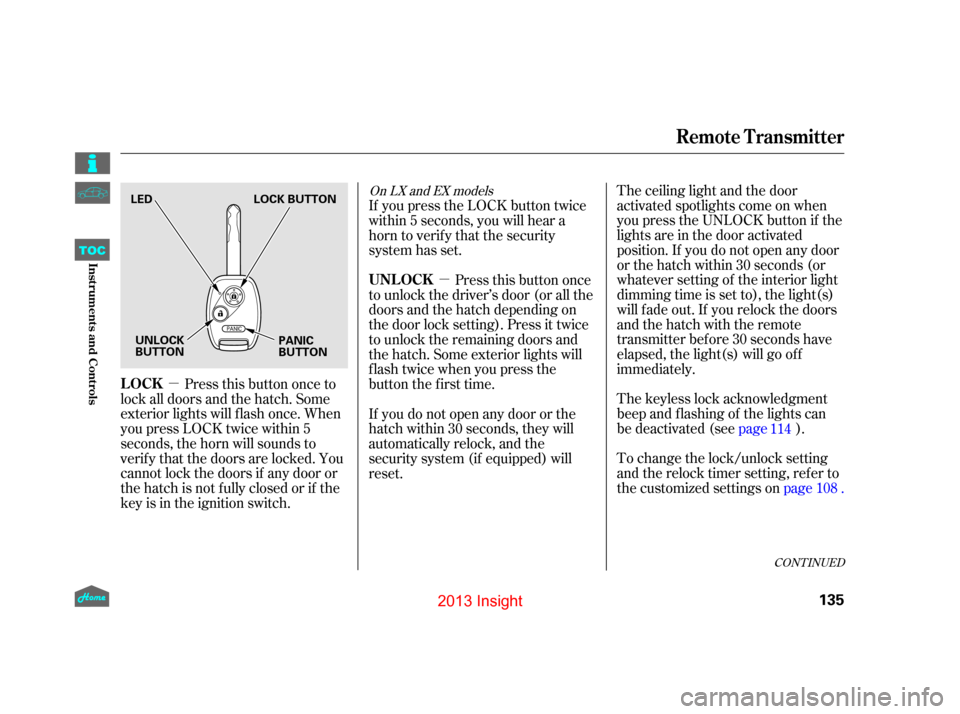
�µ�µ
The ceiling light and the door
activated spotlights come on when
you press the UNLOCK button if the
lights are in the door activated
position. If you do not open any door
or the hatch within 30 seconds (or
whatever setting of the interior light
dimming time is set to), the light(s)
will f ade out. If you relock the doors
and the hatch with the remote
transmitter before 30 seconds have
elapsed, the light(s) will go of f
immediately.
To change the lock/unlock setting
and the relock timer setting, refer to
the customized settings on
page .
The keyless lock acknowledgment
beep and f lashing of the lights can
be deactivated (see
page).
Press this button once to
lock all doors and the hatch. Some
exterior lights will f lash once. When
you press LOCK twice within 5
seconds, the horn will sounds to
verif y that the doors are locked. You
cannot lock the doors if any door or
the hatch is not f ully closed or if the
key is in the ignition switch. If you press the LOCK button twice
within 5 seconds, you will hear a
horn to verify that the security
system has set.
Press this button once
to unlock the driver’s door (or all the
doors and the hatch depending on
the door lock setting). Press it twice
to unlock the remaining doors and
the hatch. Some exterior lights will
f lash twice when you press the
button the first time.
If you do not open any door or the
hatch within 30 seconds, they will
automatically relock, and the
security system (if equipped) will
reset. 114
108
CONT INUED
On LX and EX models
LOCK UNL OCK
Remote Transmitter
135
LED
LOCK BUTTON
UNLOCK
BUTTON PANIC
BUTTON
12/07/13 16:54:07 31TM8630_140
Inst rument s and Cont rolsTOC
2013 Insight
Page 172 of 411
Playing the A M/FM Radio (Insight model)
169
AM
BUTTONFM
BUTTON
PRESET BUTTONS
POWER/
VOLUME
KNOB
SEEK/SKIP BAR TUNE KNOB
A.SEL/SCAN
BAR
12/07/13 16:58:04 31TM8630_174
FeaturesTOC
2013 Insight
Page 173 of 411

�µ�µ
�µ
You can use any of f ive methods to
f ind radio stations on the selected
band: tune, seek, scan, the preset
buttons, and auto select.
Use the TUNE knob to
tune the radio to a desired f requency.
Turn the knob to the right to tune to
a higher f requency, and turn it to the
lef t to tune to a lower f requency.
The ignition switch must be in the
ACCESSORY (I) or ON (II) position.
Turn the system on by pushing the
power/volume knob or the AM or
FM button. Adjust the volume by
turning the power/volume knob.
The scan f unction samples
all stations with strong signals on the
selected band. To activate it, press
the right side of the A. SEL/SCAN
bar, then release it. You will see
SCAN in the display. The system will
scan f or a station with a strong signal.
When it f inds one, it will stop and
play that station for about 10 seconds.
If you do nothing, the system will
then scan f or the next strong station
andplayitfor10seconds.Whenit
plays a station you want to listen to,
press the SCAN side of the bar again.
The band and f requency that the
radio was last tuned to is displayed.
To change bands, press the AM or
FM button. On the FM band, ST will
be displayed if the station is broad-
castinginstereo.Stereo
reproduction on AM is not available.
The seek f unction
searches up and down from the
current f requency to f ind a station
with a strong signal. To activate it,
press the or side of the
SEEK bar, then release it. To Select a Station
TUNE
To Play the AM/FM Radio
SCAN
SEEK /SK IP
Playing the A M/FM Radio (Insight model)
170
12/07/13 16:58:11 31TM8630_175
FeaturesTOC
2013 Insight
Page 174 of 411

�µ�µ�µ If you do not like the stations auto
select has stored, you can store
other f requencies on the preset
buttons as previously described.
For information on AM/FM radio
frequencies and reception, see
.
Each preset button can
store one f requency on AM and two
f requencies on FM.
Select the desired band, AM or
FM. You can store one f requency
on FM1, and one f requency on
FM2witheachpresetbutton.
Usethetune,seek,orscan
function to tune the radio to a
desired station. ,pressthe
A. SEL side of the bar. This restores
the presets you originally set.
Press the lef t side of the
A. SEL/SCAN bar. You will see
A. SEL f lashing in the display, and
the system goes into scan mode f or
several seconds. It stores the
f requencies of six AM, and twelve
FM stations in the preset buttons.
You will see a ‘‘0’’ displayed af ter
pressing a preset button if auto
select cannot f ind a strong station f or
every preset button. If you are
traveling and can no longer receive
your preset stations, you can use the
auto select feature to find stations in
the local area.
Pick a preset button (1 6), then
press and hold it until you hear a
beep.
Repeat steps 1 through 3 to store a
total of six stations on AM and
twelve stations on FM.
1.
2.
3.
4.
To turn of f auto select
Preset
A UT O SEL ECT
Playing the A M/FM Radio (Insight model)
171
12/07/13 16:58:20 31TM8630_176
FeaturesTOC
page 212
2013 Insight
Page 184 of 411
Playing the FM/AM Radio (LX model and EX model without navigation system)
181
SEEK BUTTONA.SEL BUTTON
SCAN BUTTON
SEEK BUTTON
PRESET BUTTONS
VOL/SELECT KNOB
FM/AM BUTTON
BUTTON
BUTTON BUTTON
12/07/13 16:59:30 31TM8630_186
FeaturesTOC
2013 Insight
Page 185 of 411

�µ�µ�µ
The ignition switch must be in the
ACCESSORY (I) or ON (II) position.
Turn the system on by pushing the
FM/AM button. Adjust the volume
by turning the VOL/SELECT knob.
The band and f requency that the
radio was last tuned to are displayed.
To change bands, press the FM/AM
button. On the FM band, ST will be
displayed if the station is
broadcasting in stereo. Stereo
reproduction in AM is not available.
You can use any of f ive methods to
find radio stations on the selected
band: tune, seek, scan, the preset
buttons, and auto select. Use the SEEK button to
tune to a desired f requency. Press
the button to tune to a higher
f requency, and the button to
tune to a lower f requency.
You can also operate the tune
f unction by using the VOL/SELECT
knob. Press the VOL/SELECT knob
and you will see ‘‘SEL’’ in the display.
Turn the knob right to tune to a
higher f requency, or lef t to tune to a
lower f requency. To turn it of f , press
the VOL/SELECT knob or button, or button.
The system will return to the normal
display about 10 seconds af ter you
stop adjusting the tune mode. The SEEK f unction
searches up and down from the
current f requency to f ind a station
with a strong signal. To activate it,
press and hold the or side
of the SEEK button until you hear a
beep, then release it.
The scan f unction samples
all stations with strong signals on the
selected band. To activate it, press
the SCAN button, then release it.
You will see SCAN in the display.
When the system finds a strong
signal, it will stop and play that
station f or about 10 seconds.
If you do nothing, the system will
then scan f or the next strong station
andplayitfor10seconds.Whenit
plays a station you want to listen to,
press the SCAN button again.
To Play the FM/AM Radio
To Select a Station
T UNE
SEEK
SCAN
Playing the FM/AM Radio (LX model and EX model without navigation system)
182
12/07/13 16:59:41 31TM8630_187
FeaturesTOC
2013 Insight
Page 186 of 411

�µ
�µ
�µ If you are
traveling and can no longer receive
your preset stations, you can use the
auto select feature to find stations in
the local area.
Press the A. SEL button. ‘‘A. SEL’’
f lashes in the display, and the system
goes into scan mode f or several
seconds. It stores the f requencies of
six AM and twelve FM stations in
the preset buttons. You will see a ‘‘0’’ displayed af ter
pressing a preset button if auto
select cannot f ind a strong station f or
that preset button.
If you do not like the stations auto
select has stored, you can store
other f requencies on the preset
buttons as previously described.
press the
A. SEL button. This restores the
presets you originally set.
Each preset button can
store one f requency on AM and two
f requencies on FM.
Select the desired band, AM
or FM.
Usethetune,seek,orscan
function to tune the radio to a
desired station.
Repeat steps 1 through 3 to store a
total of six stations on AM and
twelve stations on FM. Pick a preset button (1 6), then
press and hold it until you hear
a beep. For information on FM/AM radio
frequencies and reception, see
page.
1.
2.
3.
4.
212
To turn of f auto select,
AUTO SELECT
Preset
Playing the FM/AM Radio (LX model and EX model without navigation system)
183
12/07/13 16:59:49 31TM8630_188
FeaturesTOC
2013 Insight
Page 200 of 411
Unclip the USB connector by
pivoting it, and pull out the USB
adapter cable in the console
compartment.Connect your dock connector to
the iPod correctly and securely.
Install the dock connector to the
USB adapter cable securely.If the iPod indicator does not appear
in the audio display, check the
connections, and try to reconnect the
iPod a f ew times.
If the audio system still does not
recognize the iPod, the iPod may
need to be reset. Follow the
instructions that came with your
iPod, or you can f ind reset
instructions online at
1. 2.
3.
www.apple.com/
CONT INUED
Connect ing an iPod
Playing an iPod(U.S. L X model and EX model without navigation system)
197
DOCK CONNECTOR
USB ADAPTER
CABLE
USB CONNECTOR
USB ADAPTER CABLE
12/07/13 17:01:49 31TM8630_202
FeaturesTOC
2013 Insight


