2013 HONDA FIT tire pressure
[x] Cancel search: tire pressurePage 9 of 286
8
Quick Reference Guide
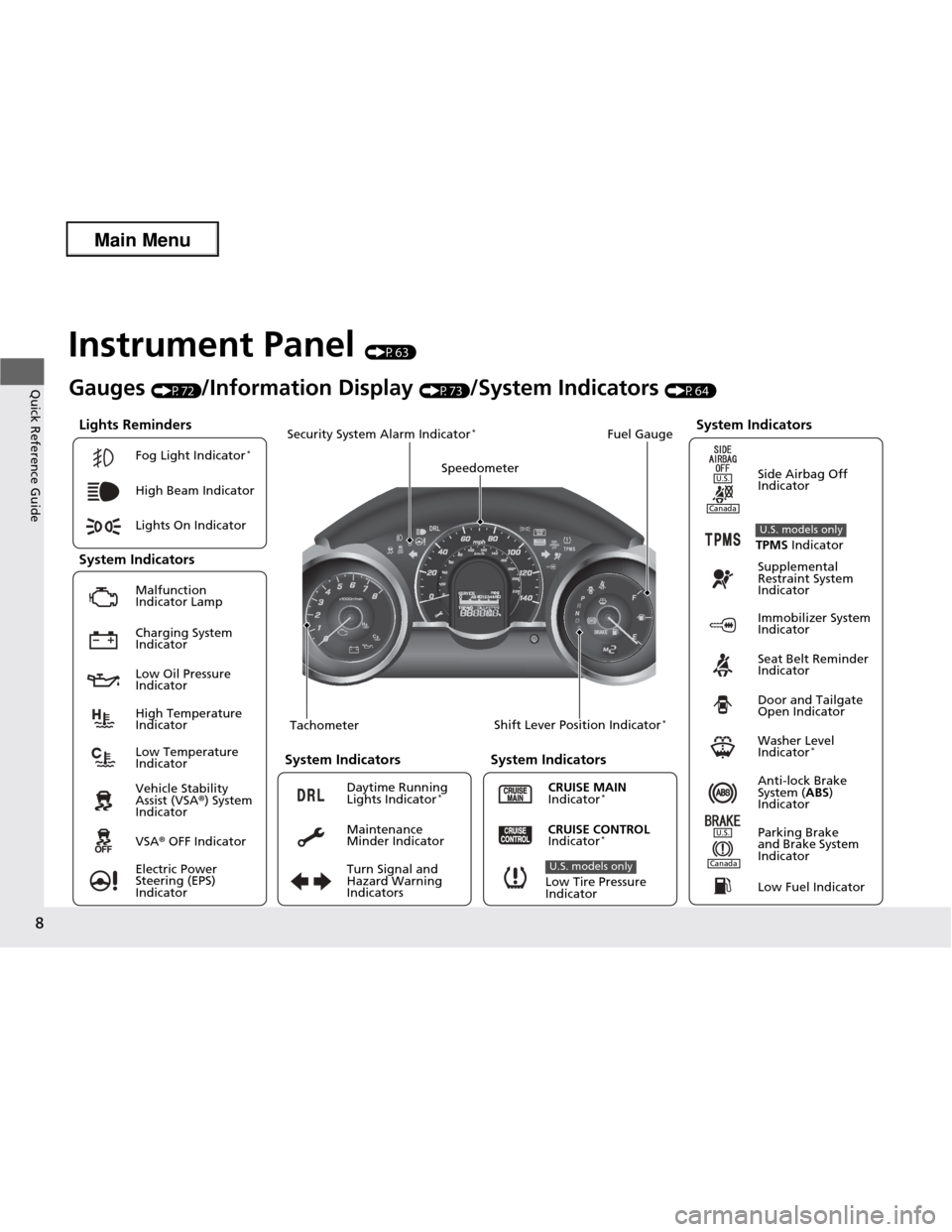
Instrument Panel (P63)
Lights Reminders
Malfunction
Indicator Lamp Low Oil Pressure Indicator Anti-lock Brake
System (ABS)
Indicator
Vehicle Stability Assist (VSA
®) System
Indicator VSA ® OFF Indicator
Electric Power Steering (EPS) Indicator
Lights On Indicator
High Beam Indicator
Immobilizer System
Indicator
Seat Belt Reminder
Indicator
System Indicators
CRUISE MAIN
Indicator * Supplemental
Restraint System
Indicator
Side Airbag Off
Indicator
Door and Tailgate
Open Indicator
Tachometer Speedometer
Fuel Gauge
Security System Alarm Indicator *
Shift Lever Position Indicator *
Low Fuel Indicator
Gauges
(P72)/Information Display (P73)/System Indicators (P64)
Turn Signal and Hazard Warning Indicators
High Temperature Indicator
Low Temperature Indicator
System Indicators System Indicators
Low Tire Pressure
Indicator
U.S. models only
Parking Brake
and Brake System
IndicatorCRUISE CONTROL
Indicator * System Indicators
Charging System Indicator
U.S.
U.S.
Canada
TPMS
Indicator
U.S. models only
Washer Level
Indicator *
Daytime Running Lights Indicator
*
Maintenance
Minder Indicator
Fog Light Indicator
*
Canada
Main Menu
Page 15 of 286

14
Quick Reference Guide
VSA® OFF Button (P177)
● The vehicle stability assist (VSA ®) system
helps stabilize the vehicle during
cornering, and helps maintain traction
while accelerating on loose or slippery road surfaces.
● VSA ® comes on automatically every time
you start the engine.
● To turn VSA ® on or off, press and hold
the button until you hear a beep.
Cruise Control *
(P173)
● Cruise control allows you to maintain a
set speed without keeping your foot on
the accelerator pedal.
● To use cruise control, press the CRUISE
button, then press DECEL/SET once you
have achieved the de sired speed (above
25 mph or 40 km/h).
Tire Pressure Monitoring System (TPMS) (P178)
● TPMS monitors tire pressure.
● TPMS is turned on automatically every time you start the engine.
U.S. models only
Refueling (P186)
Fuel recommendation: Unleaded gasoline with a pump octane number 87 or higher required
Fuel tank capacity: 10.6 US gal (40 L)
a Press on the edge of the fuel fill door to make it
pop up slightly.
b Turn the fuel fill cap
slowly to remove the cap.
c Place the cap in the holder on the fuel fill
door.
d After refueling, screw
the cap back on until it clicks at least once.
Main Menu
Page 16 of 286

15
Quick Reference Guide
Maintenance (P191)
Under the Hood (P199)
● Check engine oil, engine coolant, and windshield washer fluid. Add when necessary.
● Check brake fluid and clutch fluid.
● Check the battery condition monthly.
a Pull the hood release handle under the corner of the
dashboard.
b Locate the hood latch lever, pull the lever up, and lift up
the hood.
c When finished, close the hood and make sure it is firmly
locked in place.
Lights (P212)
● Inspect all lights regularly.
Wiper Blades
(P218)
● Replace blades if they leave streaks
across the windshield.
Tires (P222)
● Inspect tires and wheels regularly.
● Check tire pressures regularly.
● Install snow tires for winter
driving.
* Not available on all models
Main Menu
Page 24 of 286

23
uuFor Safe DrivinguImportant Safety Precautions
Safe Driving
■Pay appropriate attention to the task of driving safely
Engaging in cell phone conversation or other activities that keep you from paying
close attention to the road, other vehicles, and pedestrians could lead to a crash.
Remember, situations can change quickly, and only you can decide when it is safe to
divert some attention away from driving. ■ Control your speed
Excessive speed is a major factor in crash injuries and deaths. Generally, the higher
the speed, the greater the risk, but serious injuries can also occur at lower speeds.
Never drive faster than is safe for current conditions, regardless of the maximum speed posted. ■ Keep your vehicle in safe condition
Having a tire blowout or a mechanical failure can be extremely hazardous.
To reduce the possibility of such problems, check your tire pressures and condition
frequently, and perform all regularly scheduled maintenance.
Main MenuTable of Contents
Page 70 of 286
69
uuIndicatorsu
Continued
Instrument Panel
IndicatorNameOn/BlinkingExplanation
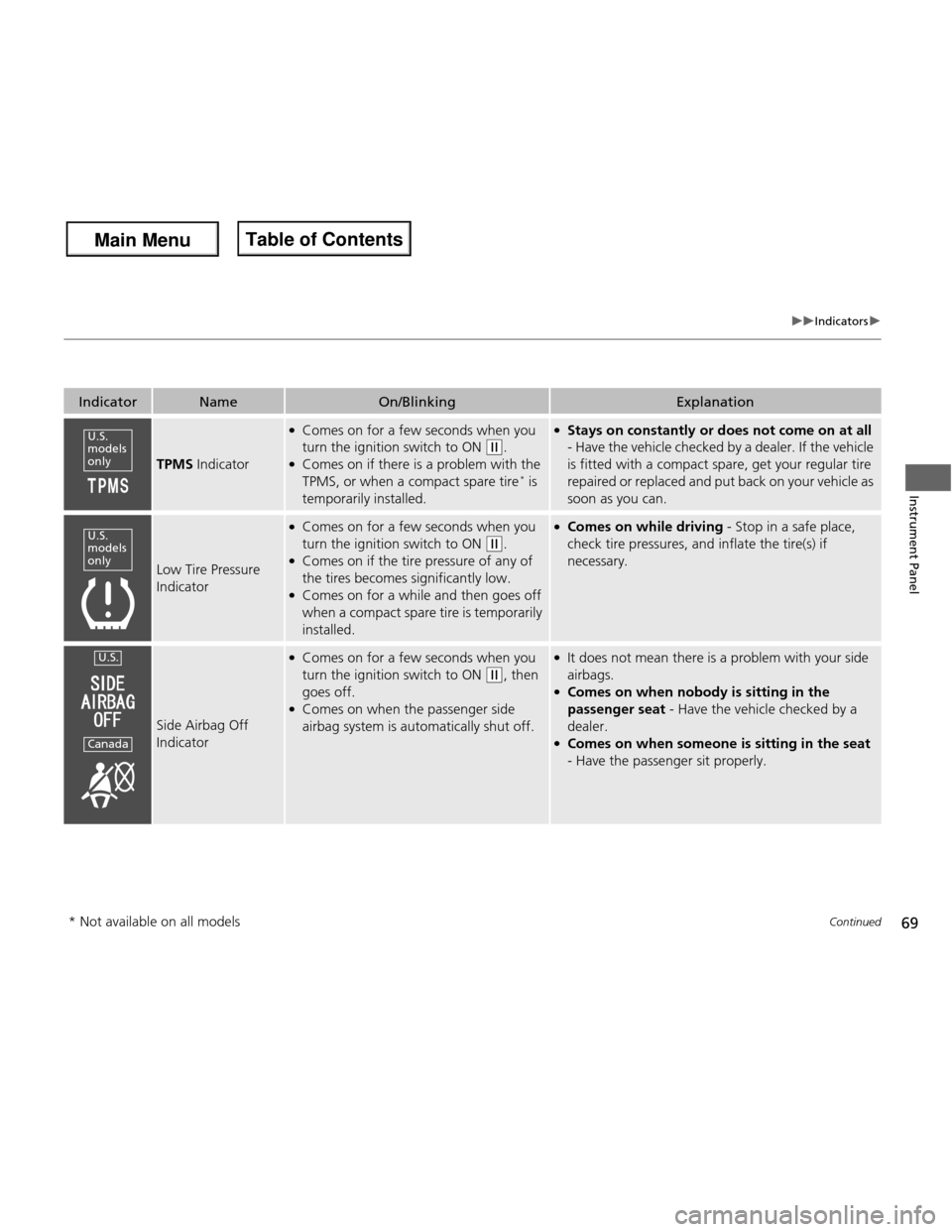
TPMS Indicator
●
Comes on for a few seconds when you
turn the ignition switch to ON
(w .
● Comes on if there is a problem with the
TPMS, or when a compact spare tire *
is
temporarily installed.
● Stays on constantly or does not come on at all
- Have the vehicle checked by a dealer. If the vehicle
is fitted with a compact spare, get your regular tire
repaired or replaced and put back on your vehicle as
soon as you can.
Low Tire Pressure
Indicator
● Comes on for a few seconds when you
turn the ignition switch to ON
(w .
● Comes on if the tire pressure of any of
the tires becomes significantly low.
● Comes on for a while and then goes off
when a compact spare tire is temporarily
installed.
● Comes on while driving - Stop in a safe place,
check tire pressures, and inflate the tire(s) if
necessary.
Side Airbag Off
Indicator
● Comes on for a few seconds when you
turn the ignition switch to ON
(w , then
goes off.
● Comes on when the passenger side
airbag system is automatically shut off.
● It does not mean there is a problem with your side airbags.
● Comes on when nobody is sitting in the
passenger seat - Have the vehicle checked by a
dealer.
● Comes on when someon e is sitting in the seat
- Have the passenger sit properly.
U.S.
models only
U.S.
models only
U.S.
Canada
* Not available on all models
Main Menu
Main MenuTable of Contents
Page 154 of 286
153
Driving
This chapter discusses driving, refueling, and information on items such as accessories.
Before Driving Driving Preparation .......................... 154
Maximum Load Limit........................ 157
Towing a Trailer Towing Your Vehicle ........................ 159
When Driving
Starting the Engine .......................... 161
Precautions While Driving................. 163
Automatic Transmission ................... 164
Shifting ............................................ 165
Shifting ............................................ 167
Models with 7 positions AT
Models with 5 positions AT
Shifting ............................................ 171
Cruise Control *
............................... 173
VSA® (Vehicle Stability Assist), aka ESC
(Electronic Stability Control), System ...... 176
TPMS (Tire Pressure Monitoring System) .. 178
Tire Pressure Monitoring System (TPMS) -
Required Federal Explanation ......... 179
Braking
Brake System ................................... 181
ABS (Anti-lock Brake System) ........... 183
Brake Assist System.......................... 184
Manual transmission modelsParking Your VehicleWhen Stopped ................................ 185
Refueling
Fuel Information .............................. 186
How to Refuel ................................. 187
Fuel Economy .................................... 189
Improving Fuel Economy .................. 189
Accessories and Modifications
Accessories ...................................... 190
Modifications................................... 190
* Not available on all models
Main Menu
Main Menu
Page 155 of 286

154
Driving
Before Driving
Driving Preparation
Check the following items before you start driving. •Make sure there are no obstructions on the windows, door mirrors, exterior
lights, or other parts of the vehicle.
uRemove any frost, snow, or ice.
uRemove any snow on the roof, as this can slip down and obstruct your field of
vision while driving. If frozen solid, remove ice once it has softened.
uWhen removing ice from around the wheels, be sure not to damage the wheel
or wheel components.
• Make sure the hood is securely closed.
uIf the hood opens while driving, your front view will be blocked.
• Make sure the tires are in good condition.
uCheck air pressure, check for damage and excessive wear.
2 Checking and Maintaining Tires P. 222
• Make sure there are no people or objects behind or around the vehicle.
uThere are blind spots from the inside.
■Exterior Checks1Exterior Checks
NOTICE
When doors are frozen shut, use warm water around
the door edges to melt any ice. Do not try to force
them open, as this can damage the rubber trim
around the doors. When done, wipe dry to avoid further freezing.
Do not pour warm water into the key cylinder.
You will be unable to insert key if the water freezes in
the hole.
Heat from the engine and exhaust can ignite
flammable materials left under the hood, causing a
fire. If you've parked your vehicle for an extended
period, inspect and remove any debris that may have
collected, such as dried grass and leaves that have
fallen or have been carried in for use as a nest by a
small animal. Also check under the hood for leftover
flammable materials after you or someone else has
performed maintenance on your vehicle.
Main Menu
Main MenuTable of Contents
Page 177 of 286
176
uuWhen DrivinguVSA® (Vehicle Stability Assist), aka ESC (Electronic Stability Control), System
Driving
VSA ® (Vehicle Stability Assist), aka ESC (Electronic
Stability Control), System VSA ® helps to stabilize the vehicle during cornering if the vehicle turns more or less
than what was intended. It also assists in maintaining traction on slippery surfaces.
It does so by regulating engine output and selectively applying the brakes.
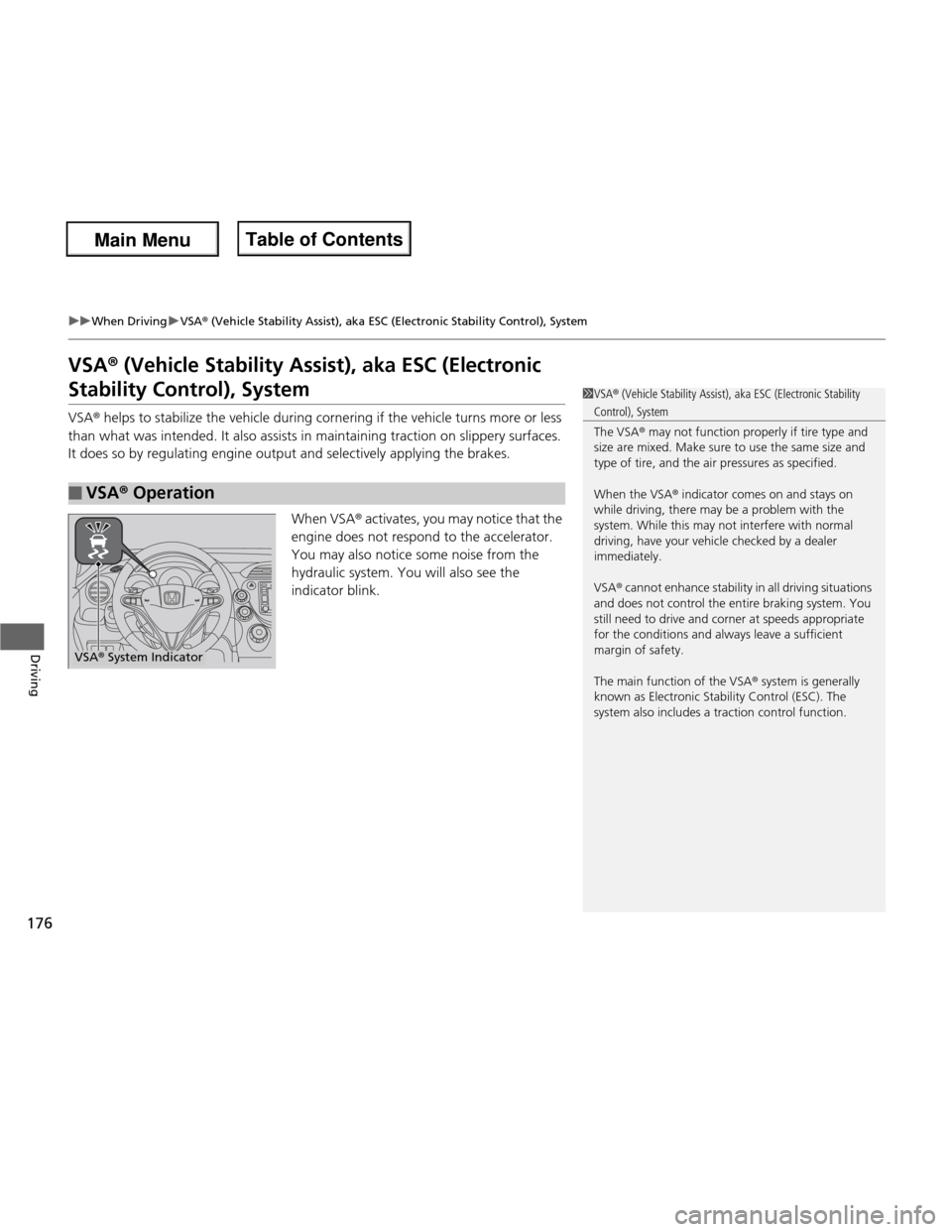
When VSA® activates, you may notice that the
engine does not respond to the accelerator.
You may also notice some noise from the
hydraulic system. You will also see the
indicator blink.
■VSA ® Operation
1VSA ® (Vehicle Stability Assist), aka ESC (Electronic Stability
Control), System
The VSA ® may not function properly if tire type and
size are mixed. Make sure to use the same size and
type of tire, and the ai r pressures as specified.
When the VSA ® indicator comes on and stays on
while driving, there may be a problem with the
system. While this may not interfere with normal
driving, have your vehicle checked by a dealer
immediately.
VSA ® cannot enhance stability in all driving situations
and does not control the entire braking system. You
still need to drive and cor ner at speeds appropriate
for the conditions and always leave a sufficient margin of safety.
The main function of the VSA ® system is generally
known as Electronic Stability Control (ESC). The
system also includes a traction control function.
VSA ® System Indicator
Main Menu
Main MenuTable of Contents