Page 200 of 286
199
Maintenance
Maintenance Under the Hood
Maintenance Items Under the Hood
Brake Fluid
(Black Cap)
Engine Coolant Reservoir Radiator Cap
Washer Fluid
(Blue Cap)
Engine Oil Dipstick
(Orange Loop)
Clutch Fluid
(Gray Cap)
Engine Oil Fill Cap
Automatic Transmission
Fluid Dipstick
(Yellow Loop)
Battery
Manual transmission
models
Automatic transmission
models
Main Menu
Main MenuTable of Contents
Page 232 of 286

231
Maintenance
Battery
Checking the BatteryCheck the battery condition monthly. Look at
the test indicator window and check the
terminals for corrosion.
If your vehicle’s battery is disconnected or goes dead:
• The audio system *
is disabled.
2 Entering the Audio Security Code P. 124
• The clock resets.
2 Setting the Clock P. 76
• The navigation system *
is disabled.
2 Refer to the navigation system manual
Charging the Battery
Disconnect both battery cables to prevent damaging your vehicle’s electrical system.
Always disconnect the negative (–) cab le first, and reconnect it last.
1Battery
WARNING: Battery post, terminals,
and related accessori es contain lead
and lead compounds. Wash your hands after handling.
The test indicator’s color information is on the
battery.
When you find corrosion, clean the battery terminals
by applying a baking powder and water solution.
Rinse the terminals with water. Cloth/towel dry the
battery. Coat the terminals with grease to help
prevent future corrosion.
3WARNING
The battery gives off explosive hydrogen
gas during normal operation.
A spark or flame can cause the battery to
explode with enough force to kill or seriously hurt you.
When conducting any battery
maintenance, wear protective clothing and
a face shield, or have a skilled technician do
it.
Test Indicator Window
* Not available on all models
Main Menu
Main MenuTable of Contents
Page 233 of 286
232
Maintenance
Remote Transmitter Care*
Replacing the Battery
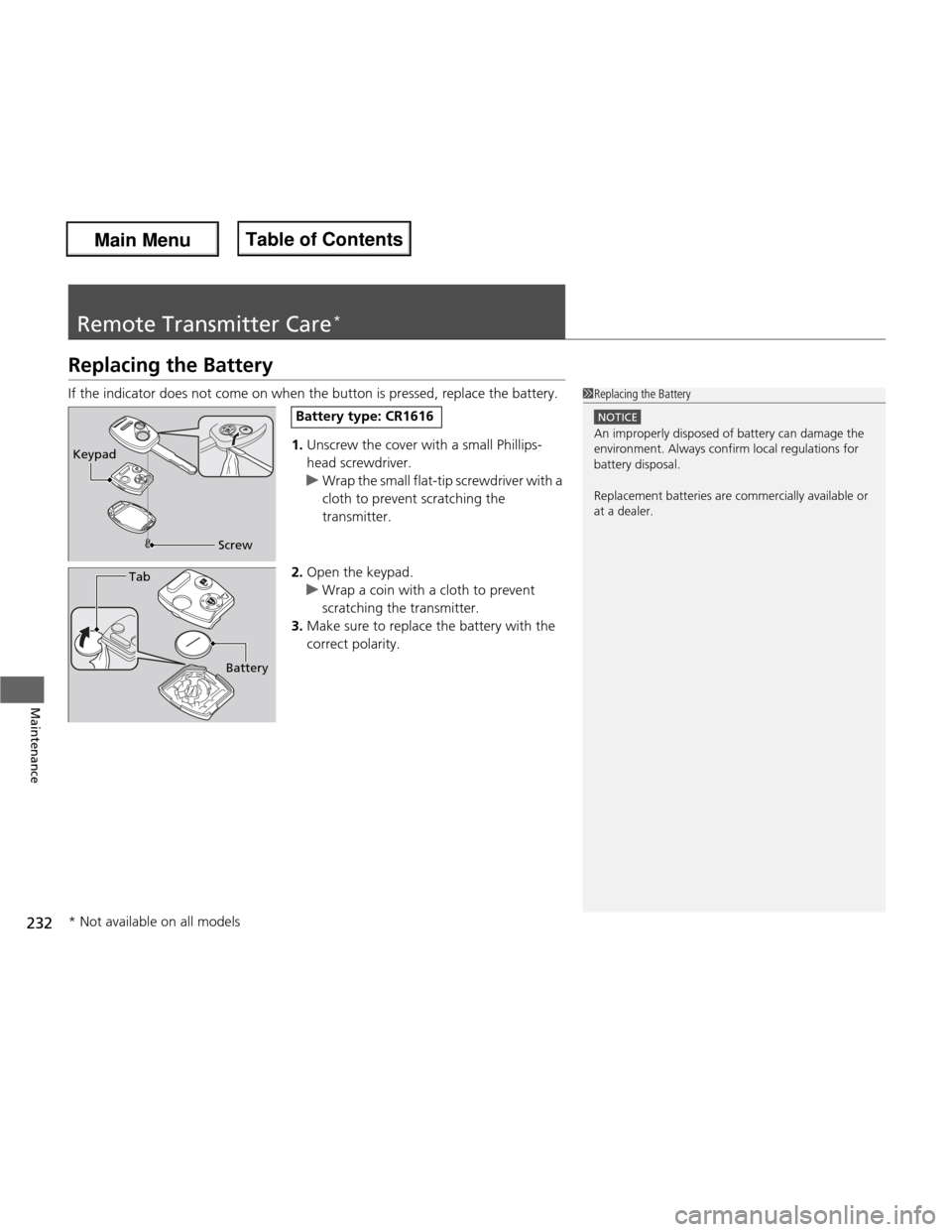
If the indicator does not come on when the button is pressed, replace the battery.
1.Unscrew the cover with a small Phillips-
head screwdriver.
uWrap the small flat-tip screwdriver with a
cloth to prevent scratching the
transmitter.
2. Open the keypad.
uWrap a coin with a cloth to prevent
scratching the transmitter.
3. Make sure to replace the battery with the
correct polarity.
1Replacing the Battery
NOTICE
An improperly disposed of battery can damage the
environment. Always confirm local regulations for
battery disposal.
Replacement batteries are commercially available or
at a dealer.
Keypad
Screw
Battery type: CR1616
Battery
Tab
* Not available on all models
Main Menu
Main MenuTable of Contents
Page 237 of 286

uuCleaninguExterior Care
236
Maintenance
A good coat of automotive body wax helps protect your vehicle’s paint from the
elements. Wax will wear off over time and expose your vehicle’s paint to the
elements, so reapply as necessary.
If you get gasoline, oil, engine coolant, or battery fluid on resin coated parts, they
may be stained or the coating may peel. Promptly wipe it away using a soft cloth and clean water.
Wipe using a glass cleaner.
Aluminum is susceptible to deterio ration caused by salt and other road
contaminants. Use a sponge and mild de tergent to wipe away promptly.
Be careful not to use harsh chemicals (including some commercial wheel cleaners) or
a stiff brush. They can damage the clear coat of the aluminum alloy wheels that
helps keep the aluminum from corroding and tarnishing.
■Applying Wax
■Maintaining the Bumpers and Other Resin Coated Parts
■Cleaning the Window
■Maintaining Aluminum Wheels *
1Applying Wax
NOTICE
Chemical solvents and strong cleaners can damage
the paint, metal, and plastic on your vehicle. Wipe up
spills immediately.
1Maintaining the Bumpers and Other Resin Coated Parts
Ask a dealer about the correct coating material when
you want to repair the painted surface of the parts made of resin.
1Cleaning the Window
Wires are mounted to the inside of the rear window.
Wipe along the same direction as the wires with a
soft cloth so as not to damage them.
* Not available on all models
Main Menu
Main MenuTable of Contents
Page 251 of 286

250
Handling the Unexpected
Engine Does Not Start
Checking the Engine
If the engine does not start, turn the ignition switch to START
(e and check the
starter.
Starter conditionChecklist
Starter doesn’t turn or turns over slowly.
The battery may be dead. Check
each of the items on the right and
respond accordingly.Check brightness of the interior light.
Turn on interior lights and check brightness. ● If the interior lights are dim or do not come on at all
2Battery P. 231
● If the interior lights come on normally 2 Inspecting and Changing Fuses P. 263
The starter turns over normally
but the engine doesn’t start.
There may be a problem with the
fuse. Check each of the items on
the right and respond accordingly.Review the engine start procedure.
Follow its instructions, and try to start the engine again. 2 Starting the Engine P. 161
Check the immobilizer system indicator.
When the immobilizer system indicator is blinking, the engine cannot be started.
2Immobilizer System P. 90
Check the fuel level. There should be enough fuel in the tank. 2 Fuel Gauge P. 72
Check the fuse.
Check all fuses, or have the vehicle checked by a dealer.
2Inspecting and Changing Fuses P. 263
If the problem continues:
2 Emergency Towing P. 264
1Checking the Engine
If you must start the vehicle immediately, use an assisting vehicle to jump start it.
2 Jump Starting P. 251
Main Menu
Main MenuTable of Contents
Page 252 of 286
251
Continued
Handling the Unexpected
Jump Starting
Turn off the power to electric devices, such as audio and lights. Turn off the engine,
then open the hood.
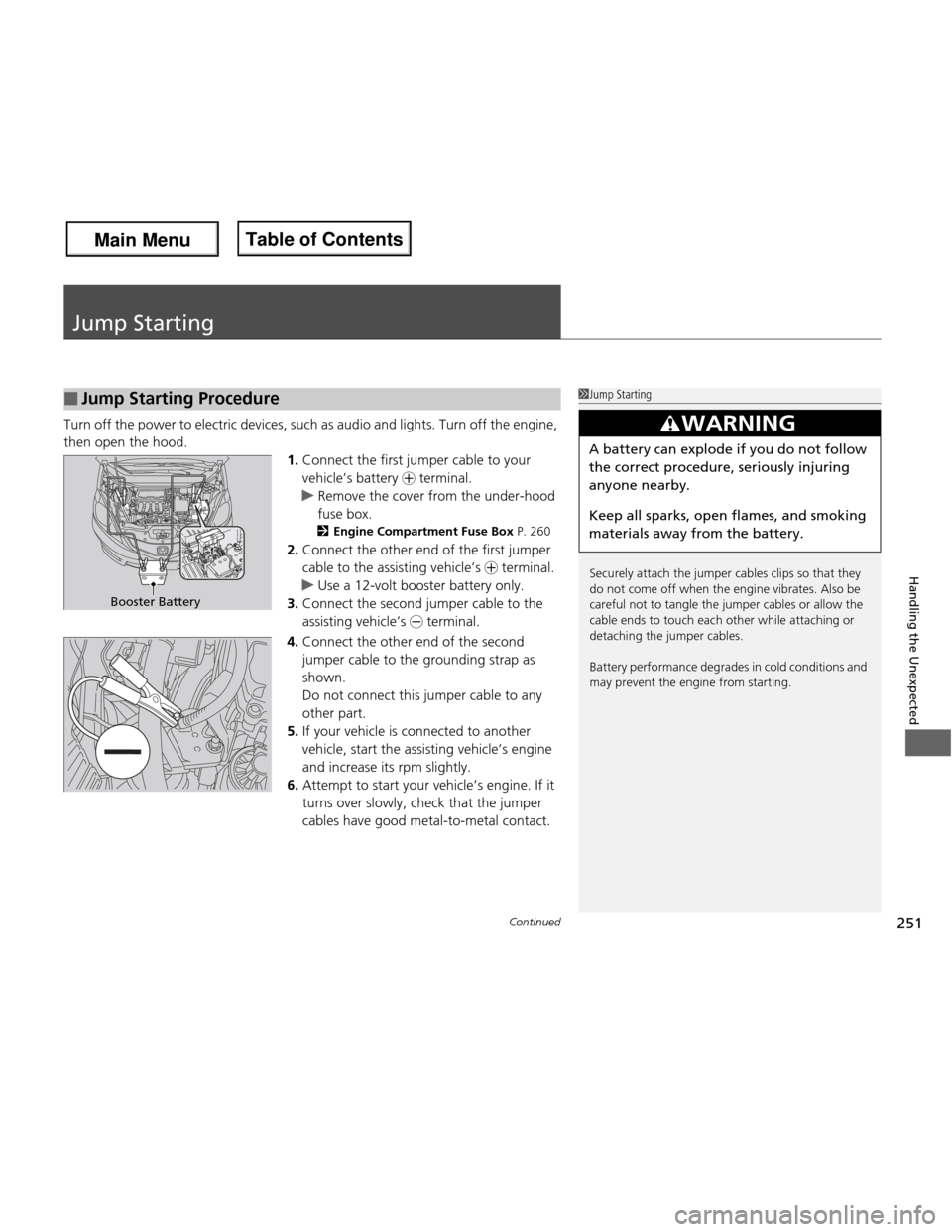
1.Connect the first jumper cable to your vehicle’s battery + terminal.
uRemove the cover from the under-hood fuse box.
2 Engine Compartment Fuse Box P. 260
2. Connect the other end of the first jumper
cable to the assisting vehicle’s + terminal.
uUse a 12-volt booster battery only.
3. Connect the second jumper cable to the
assisting vehicle’s - terminal.
4. Connect the other end of the second
jumper cable to the grounding strap as
shown.
Do not connect this jumper cable to any other part.
5. If your vehicle is co nnected to another
vehicle, start the assisting vehicle’s engine
and increase its rpm slightly.
6. Attempt to start your vehicle’s engine. If it
turns over slowly, check that the jumper cables have good metal-to-metal contact.
■Jump Starting Procedure1Jump Starting
Securely attach the jumper cables clips so that they
do not come off when the engine vibrates. Also be
careful not to tangle the jumper cables or allow the
cable ends to touch each other while attaching or
detaching the jumper cables.
Battery performance degrades in cold conditions and
may prevent the engine from starting.
3WARNING
A battery can explode if you do not follow the correct procedure, seriously injuring anyone nearby.
Keep all sparks, open flames, and smoking
materials away from the battery.
Booster Battery
Main Menu
Main MenuTable of Contents
Page 253 of 286
252
uuJump Startingu
Handling the Unexpected
Once your vehicle’s engine has started, remove the jumper cables in the following order. 1.Disconnect the jumper cable from your vehicle’s ground.
2. Disconnect the other end of the jumper cable from the assisting vehicle’s battery
- terminal.
3. Disconnect the jumper cable from your vehicle’s battery + terminal.
4. Disconnect the other end of the jumper cable from the assisting vehicle’s battery
+ terminal.
Have your vehicle inspected by a nearby service station or a dealer.
■What to Do After the Engine Starts
Main Menu
Main MenuTable of Contents
Page 257 of 286
256
Handling the Unexpected
Indicator, Coming On/Blinking
If the Low Oil Pressure Indicator Comes On■Reasons for the indicator to come on
Comes on when the engine oil pressure is low. ■ What to do as soon as the indicator comes on
1. Immediately park the vehicle in a safe place.
2. If necessary, turn the hazard warning lights on.
■ What to do after parking the vehicle
1. Stop the engine and let it sit for about one minute.
2. Open the hood and check the oil level.
uAdd oil as necessary.
3. Start the engine and check the low oil pressure indicator.
uThe light goes out: Start driving again.
uThe light does not go out within 10 seconds: Stop the engine and
contact a dealer for repairs immediately.
If the Charging System Indicator Comes On
■Reasons for the indicator to come on
Comes on when the battery is not being charged. ■ What to do when the indicator comes on
Turn off the heating and cooling *
system, rear defogger, and other
electrical systems, and immediately contact a dealer for repairs.
1If the Low Oil Pressure Indicator Comes On
NOTICE
Running the engine with low oil pressure can cause
serious mechanical damage almost immediately.
1If the Charging System Indicator Comes On If you need to stop temporarily, do not turn off the
engine. Restarting the engine may rapidly discharge
the battery.
* Not available on all models
Main Menu
Main MenuTable of Contents