2013 HONDA CROSSTOUR power steering
[x] Cancel search: power steeringPage 9 of 573
8
Quick Reference Guide
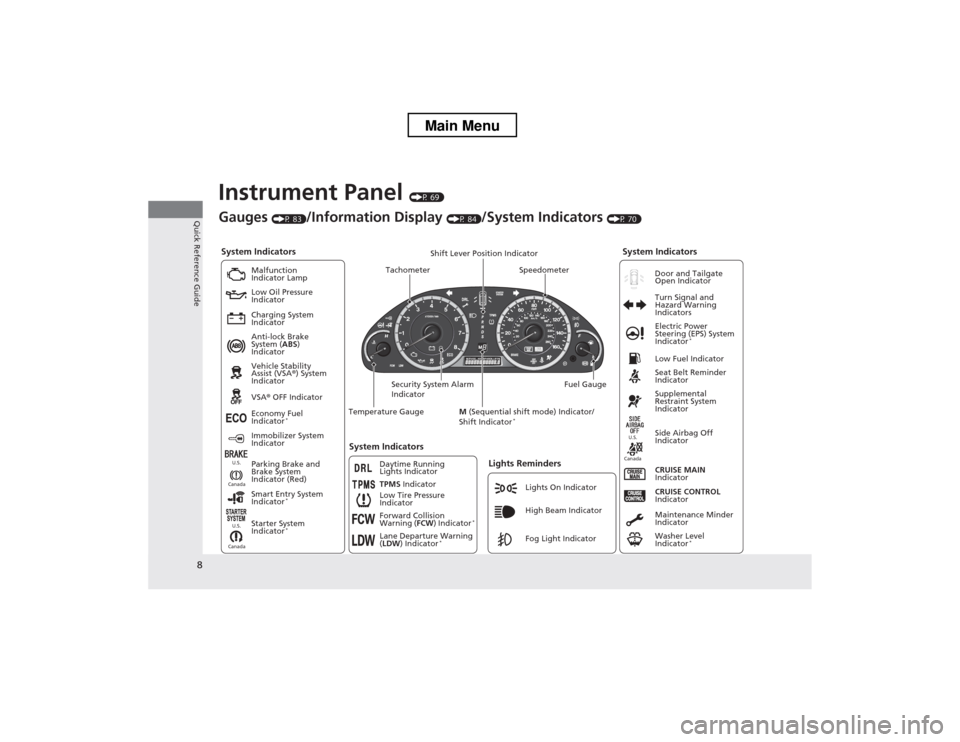
Instrument Panel (P 69)
System Indicators
Malfunction
Indicator Lamp
Low Oil Pressure
Indicator
Charging System
Indicator Anti-lock Brake
System ( ABS)
Indicator Vehicle Stability
Assist (VSA ®) System
Indicator VSA ® OFF Indicator
Low Tire Pressure
IndicatorLights Reminders
Lights On Indicator
High Beam Indicator
Fog Light Indicator
Immobilizer System
Indicator
Seat Belt Reminder
Indicator
System Indicators
CRUISE CONTROL
Indicator
Parking Brake and
Brake System
Indicator (Red) Supplemental
Restraint System
Indicator
Side Airbag Off
Indicator
CRUISE MAIN
Indicator
Tachometer Speedometer
Fuel Gauge
Security System Alarm
Indicator Shift Lever Position Indicator
Low Fuel Indicator
Gauges
(P 83)/Information Display (P 84)/System Indicators (P 70)
Economy Fuel
Indicator *
TPMS Indicator
Maintenance Minder
Indicator
Washer Level
Indicator*
Temperature Gauge
Electric Power
Steering (EPS) System
Indicator
*
Turn Signal and
Hazard Warning
Indicators
System Indicators
Canada U.S.Canada
U.S.
Starter System
Indicator
* Door and Tailgate Open Indicator
Smart Entry System
Indicator *
Canada U.S.Forward Collision
Warning (
FCW) Indicator *
Lane Departure Warning ( LDW ) Indicator *
M
(Sequential shift mode) Indicator/
Shift Indicator *
Daytime Running
Lights Indicator
Main Menu
Page 12 of 573
11
Quick Reference Guide
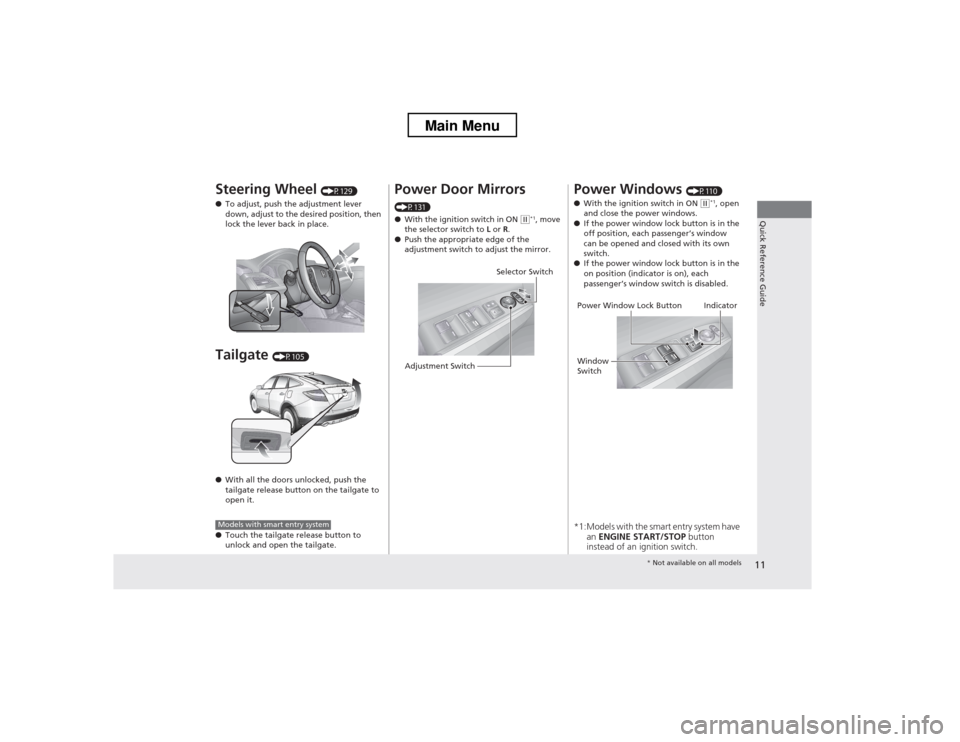
Steering Wheel (P129)
● To adjust, push the adjustment lever
down, adjust to the desired position, then
lock the lever back in place.
Tailgate (P105)
● With all the doors unlocked, push the
tailgate release button on the tailgate to
open it.
● Touch the tailgate release button to
unlock and open the tailgate.
Models with smart entry system
Power Door Mirrors
(P131) ● With the ignition switch in ON
(w*1
, move
the selector switch to L or R.
● Push the appropriate edge of the
adjustment switch to adjust the mirror.
Selector Switch
Adjustment Switch
Power Windows (P110)
● With the ignition switch in ON (w*1
, open
and close the power windows.
● If the power window lock button is in the
off position, each passenger
Page 75 of 573
74
uuIndicatorsu
Instrument Panel
*1:Models with the smart entry system have an ENGINE START/STOP button instead of an ignition switch.
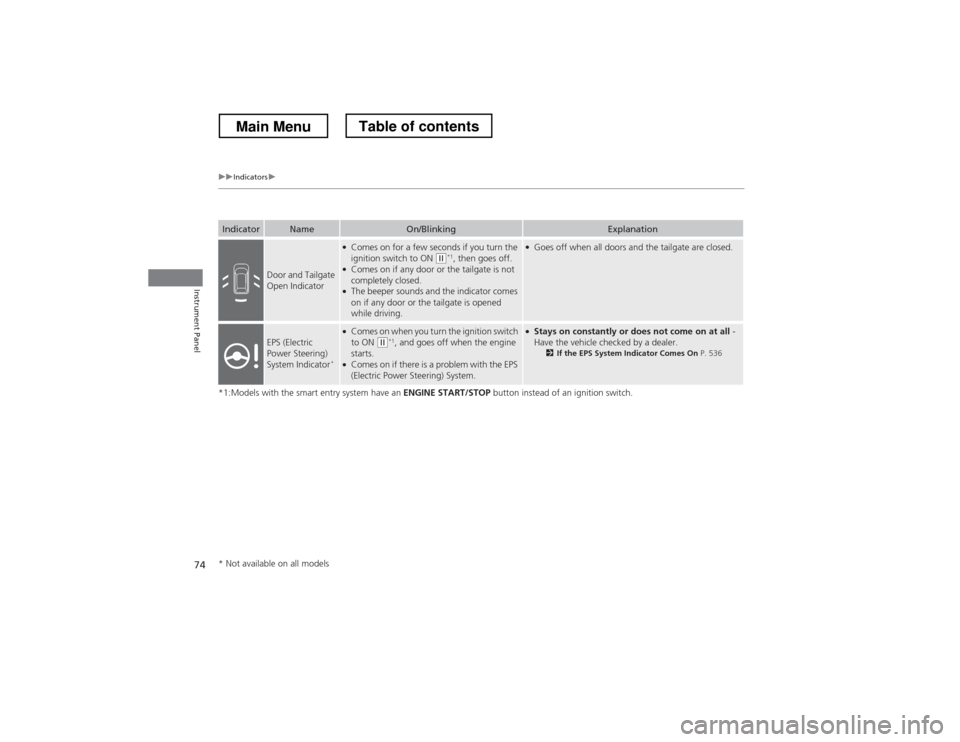
IndicatorNameOn/BlinkingExplanation
Door and Tailgate
Open Indicator
●
Comes on for a few seconds if you turn the
ignition switch to ON
(w *1
, then goes off.
● Comes on if any door or the tailgate is not completely closed.
● The beeper sounds and the indicator comes
on if any door or the tailgate is opened
while driving.
●
Goes off when all doors and the tailgate are closed.
EPS (Electric
Power Steering)
System Indicator *
●
Comes on when you turn the ignition switch to ON
(w *1
, and goes off when the engine
starts.
● Comes on if there is a problem with the EPS
(Electric Power Steering) System.
●
Stays on constantly or does not come on at all -
Have the vehicle checked by a dealer. 2If the EPS System Indicator Comes On P. 536
* Not available on all models
Main MenuTable of contents
Page 83 of 573
82
uuIndicatorsuInformation Display Warning and Information Messages
Instrument Panel
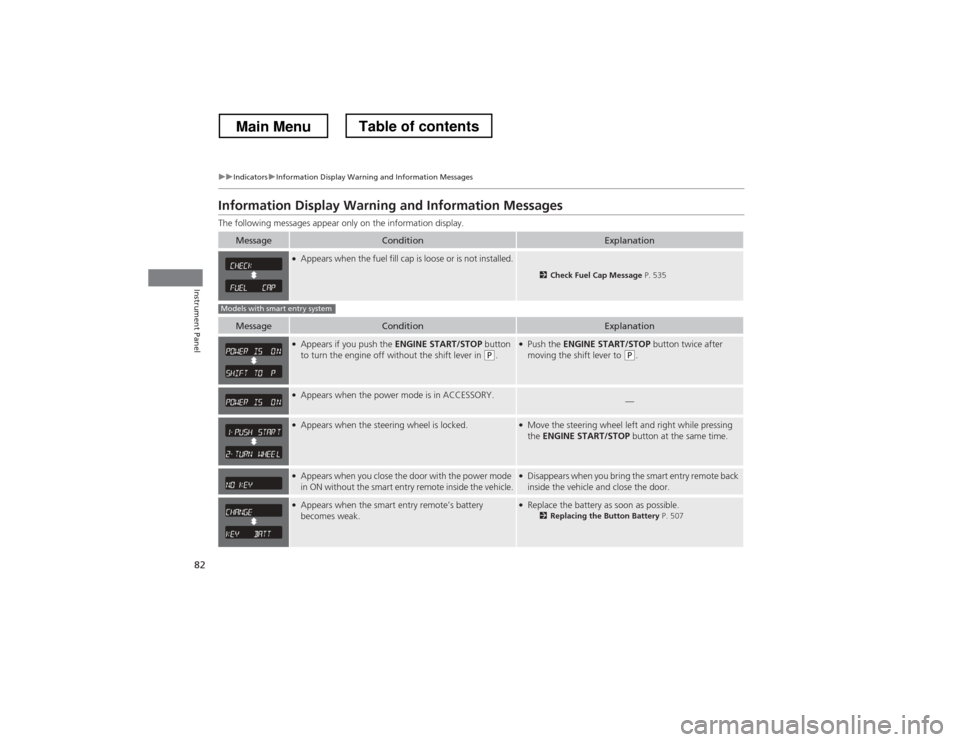
Information Display Warning and Information Messages
The following messages appear only on the information display.
MessageConditionExplanation
●Appears when the fuel fill cap is loose or is not installed.
2 Check Fuel Cap Message P. 535
MessageConditionExplanation
●
Appears if you push the ENGINE START/STOP button
to turn the engine off without the shift lever in
(P .
●
Push the ENGINE START/STOP button twice after
moving the shift lever to
(P .
●
Appears when the power mode is in ACCESSORY.—
●Appears when the steering wheel is locked.●Move the steering wheel left and right while pressing the ENGINE START/STOP button at the same time.
●
Appears when you close the door with the power mode
in ON without the smart entry remote inside the vehicle.●Disappears when you bring the smart entry remote back
inside the vehicle and close the door.
●Appears when the smart entry remote’s battery becomes weak.●Replace the battery as soon as possible.
2Replacing the Button Battery P. 507
Models with smart entry system
Main MenuTable of contents
Page 88 of 573
87
Controls
This chapter explains how to operate the various controls necessary for driving.
Setting the Clock ................................ 88
Locking and Unlocking the Doors Key Types and Functions ... ................. 91
Low Smart Entry Remote Signal Strength*.. 93Locking/Unlocking the Doors from the
Outside ............................................ 94
Locking/Unlocking the Doors from the
Inside ............................................... 99
Childproof Door Locks ..................... 100
Auto Door Locking/Unlocking .......... 101
Opening and Closing the Tailgate ... 105
Security System ................................ 107
Immobilizer System .......................... 107
Security System Alarm ...................... 107
Opening and Closing the Windows ..... 110
Opening and Closing the Moonroof.. 113Operating the Switches Around the
Steering Wheel
Ignition Switch *
............................... 114
ENGINE START/STOP Button *
........... 115
Ignition Switch and Power Mode Comparison ................................... 118
Turn Signals ..................................... 119
Light Switches.................................. 119
Fog Lights ........................................ 122
Daytime Running Lights ................... 122
Wipers and Washers ........................ 123
Brightness Control ........................... 125
Rear Defogger/Heated Door Mirror Button.. 126Driving Position Memory System *
.... 127 Adjusting the Steering Wheel .......... 129
Adjusting the Mirrors ....................... 130
Interior Rearview Mirror ................... 130
Power Door Mirrors ......................... 131
Adjusting the Seats .......................... 133
Adjusting the Seat Positions ............. 133
Interior Lights/Interior Convenience Items ................................................ 142
Interior Lights .................................. 142
Interior Convenience Items .............. 144
Heating and Cooling System *
......... 154
Using Vents, Heating and A/C.......... 154
Climate Control System *
.................. 157
Using Automatic Climate Control .... 157
Automatic Climate Control Sensors ... 162
* Not available on all models
Main Menu
Page 116 of 573
115
uuOperating the Switches Around the Steering WheeluENGINE START/STOP Button*
Continued
Controls
ENGINE START/STOP Button *
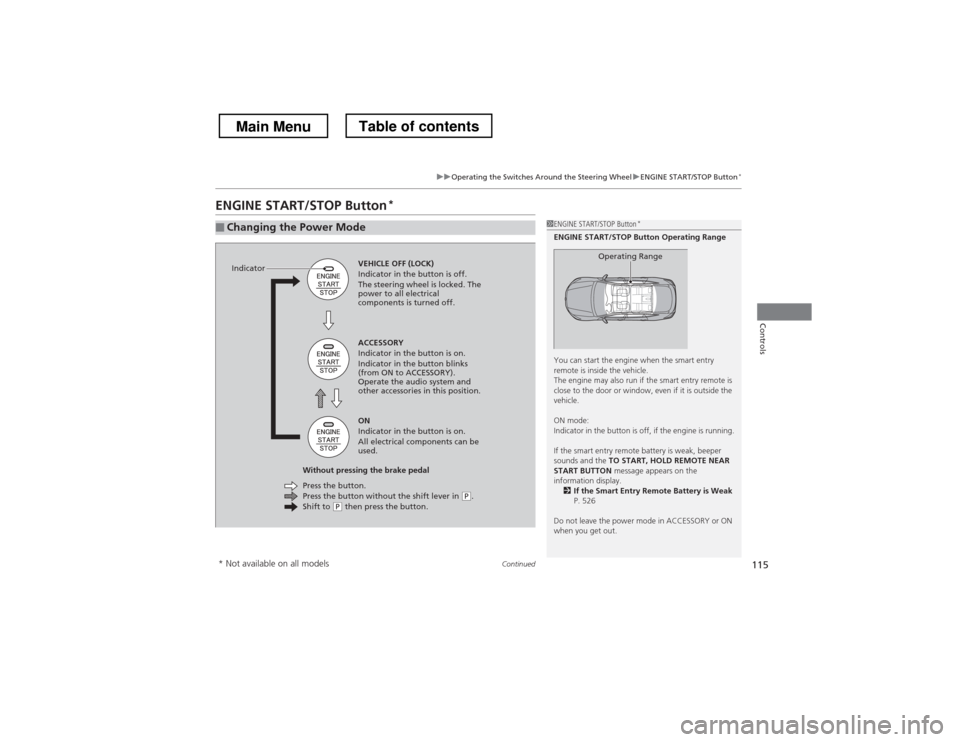
■Changing the Power Mode1ENGINE START/STOP Button
*
ENGINE START/STOP Button Operating Range
You can start the engine when the smart entry
remote is inside the vehicle.
The engine may also run if the smart entry remote is
close to the door or window, even if it is outside the
vehicle.
ON mode:
Indicator in the button is off, if the engine is running.
If the smart entry remote battery is weak, beeper
sounds and the TO START, HOLD REMOTE NEAR
START BUTTON message appears on the
information display. 2 If the Smart Entry Remote Battery is Weak
P. 526
Do not leave the power mode in ACCESSORY or ON
when you get out.
Operating RangeVEHICLE OFF (LOCK)
Indicator in the button is off.
The steering wheel is locked. The
power to all electrical
components is turned off.
Press the button without the shift lever in
(P .
Shift to (P then press the button.
Press the button.
Without pressing the brake pedal ACCESSORY
Indicator in the button is on.
Indicator in the button blinks
(from ON to ACCESSORY).
Operate the audio system and
other accessories in this position. ON
Indicator in the button is on.
All electrical components can be
used.
Indicator
* Not available on all models
Main MenuTable of contents
Page 117 of 573
uuOperating the Switches Around the Steering WheeluENGINE START/STOP Button*
116
Controls
If you leave the vehicle for 30 to 60 minutes with the shift lever in (P and the power
mode in ACCESSORY, the vehicle automatically goes into the mode similar to
VEHICLE OFF (LOCK) to avoid the battery drain.
When in this mode:
The steering wheel does not lock.
You cannot lock or unlock doors with the remote transmitter or the smart entry system. Press the ENGINE START/STOP button to switch the mode to VEHICLE OFF (LOCK).
■Automatic Power Off1ENGINE START/STOP Button*
If the power mode does not change from VEHICLE
OFF to ACCESSORY, press the ENGINE START/STOP
button while moving the steering wheel left and
right. The steering wheel will unlock, allowing the
mode to change.
* Not available on all models
Main MenuTable of contents
Page 118 of 573
117
uuOperating the Switches Around the Steering WheeluENGINE START/STOP Button*
Controls
If you open the driver’s door when the power mode is set to ACCESSORY, a warning
beep sounds.
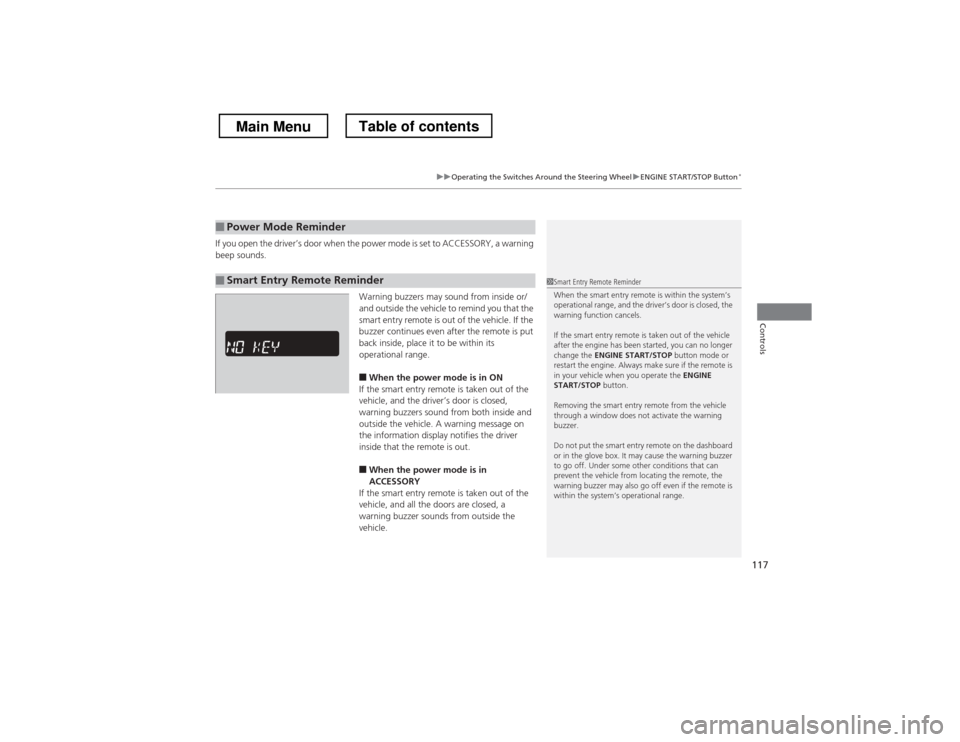
Warning buzzers may sound from inside or/
and outside the vehicle to remind you that the
smart entry remote is out of the vehicle. If the
buzzer continues even after the remote is put
back inside, place it to be within its
operational range.■ When the power mode is in ON
If the smart entry remote is taken out of the
vehicle, and the driver’s door is closed,
warning buzzers sound from both inside and
outside the vehicle. A warning message on
the information display notifies the driver
inside that the remote is out.
■ When the power mode is in
ACCESSORY
If the smart entry remote is taken out of the
vehicle, and all the doors are closed, a
warning buzzer sounds from outside the vehicle.
■Power Mode Reminder
■Smart Entry Remote Reminder1Smart Entry Remote Reminder
When the smart entry remote is within the system’s
operational range, and the driver’s door is closed, the
warning function cancels.
If the smart entry remote is taken out of the vehicle
after the engine has been started, you can no longer
change the ENGINE START/STOP button mode or
restart the engine. Always make sure if the remote is
in your vehicle when you operate the ENGINE
START/STOP button.
Removing the smart entry remote from the vehicle
through a window does not activate the warning buzzer.
Do not put the smart entry remote on the dashboard
or in the glove box. It may cause the warning buzzer
to go off. Under some other conditions that can
prevent the vehicle from locating the remote, the
warning buzzer may also go off even if the remote is
within the system’s operational range.
Main MenuTable of contents