2013 HONDA CROSSTOUR clock
[x] Cancel search: clockPage 306 of 573
305
uuCustomized Features*u
Continued
Features
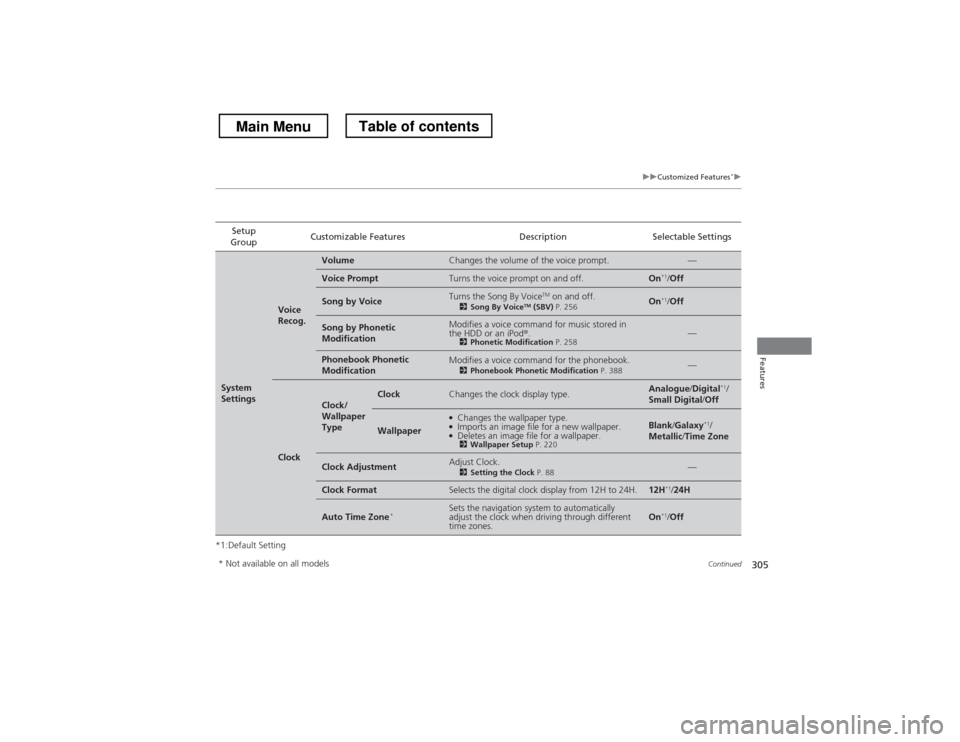
*1:Default SettingSetup
Group Customizable Features Description Selectable Settings
System
Settings
Voice
Recog.
VolumeChanges the volume of the voice prompt.—
Voice PromptTurns the voice prompt on and off.On
*1
/Off
Song by VoiceTurns the Song By Voice TM
on and off.
2 Song By Voice TM
(SBV) P. 256On*1
/Off
Song by Phonetic
ModificationModifies a voice command for music stored in
the HDD or an iPod ®.
2 Phonetic Modification P. 258—
Phonebook Phonetic
ModificationModifies a voice command for the phonebook.
2Phonebook Phonetic Modification P. 388—
Clock
Clock/
Wallpaper
TypeClockChanges the clock display type.Analogue/Digital *1
/
Small Digital /Off
Wallpaper
●
Changes the wallpaper type.
● Imports an image file for a new wallpaper.
● Deletes an image file for a wallpaper.
2 Wallpaper Setup P. 220Blank/Galaxy *1
/
Metallic /Time Zone
Clock AdjustmentAdjust Clock.
2Setting the Clock P. 88—
Clock FormatSelects the digital clock display from 12H to 24H.12H*1
/24H
Auto Time Zone *Sets the navigation system to automatically
adjust the clock when driving through different time zones.On*1
/Off
* Not available on all models
Main MenuTable of contents
Page 307 of 573
306
uuCustomized Features*u
Features
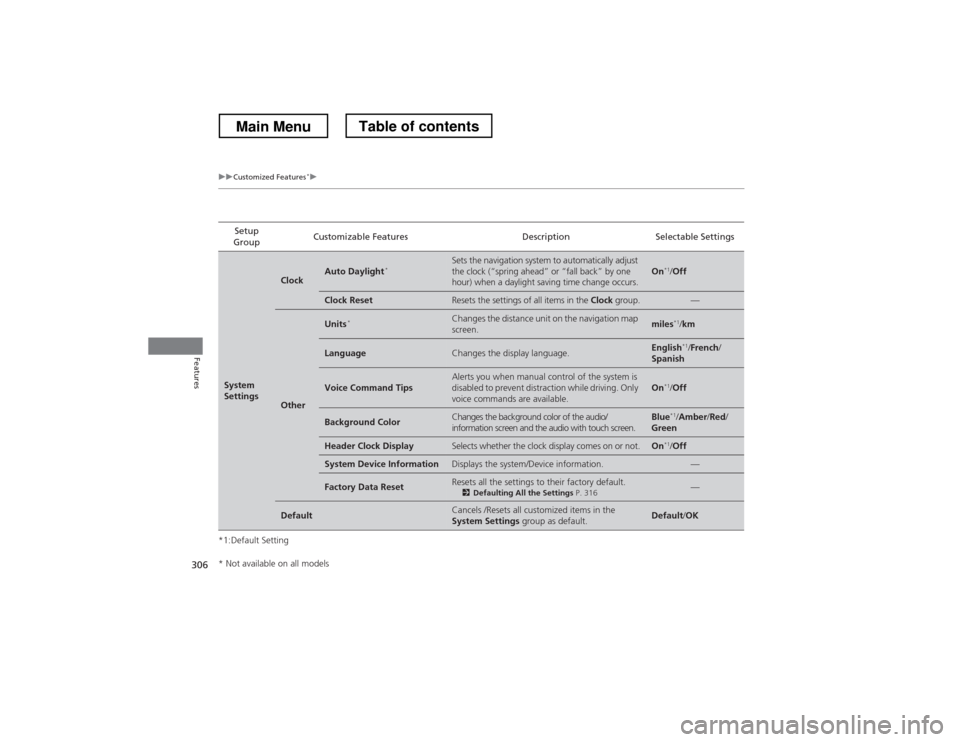
*1:Default SettingSetup
Group Customizable Features Description Selectable Settings
System
Settings
ClockAuto Daylight
*Sets the navigation system to automatically adjust
the clock (“spring ahead” or “fall back” by one
hour) when a daylight saving time change occurs.On*1
/Off
Clock ResetResets the settings of all items in the Clock group.—
Other
Units *Changes the distance unit on the navigation map screen.miles*1
/km
LanguageChanges the display language.English *1
/French /
Spanish
Voice Command TipsAlerts you when manual control of the system is
disabled to prevent distraction while driving. Only
voice commands are available.On *1
/Off
Background ColorChanges the background color of the audio/
information screen and the audio with touch screen.Blue *1
/Amber /Red /
Green
Header Clock DisplaySelects whether the clock display comes on or not.On *1
/Off
System Device InformationDisplays the system/Device information.—
Factory Data ResetResets all the settings to their factory default.
2Defaulting All the Settings P. 316—
DefaultCancels /Resets all customized items in the
System Settings group as default.Default/OK
* Not available on all models
Main MenuTable of contents
Page 315 of 573
314
uuCustomized Features*u
Features
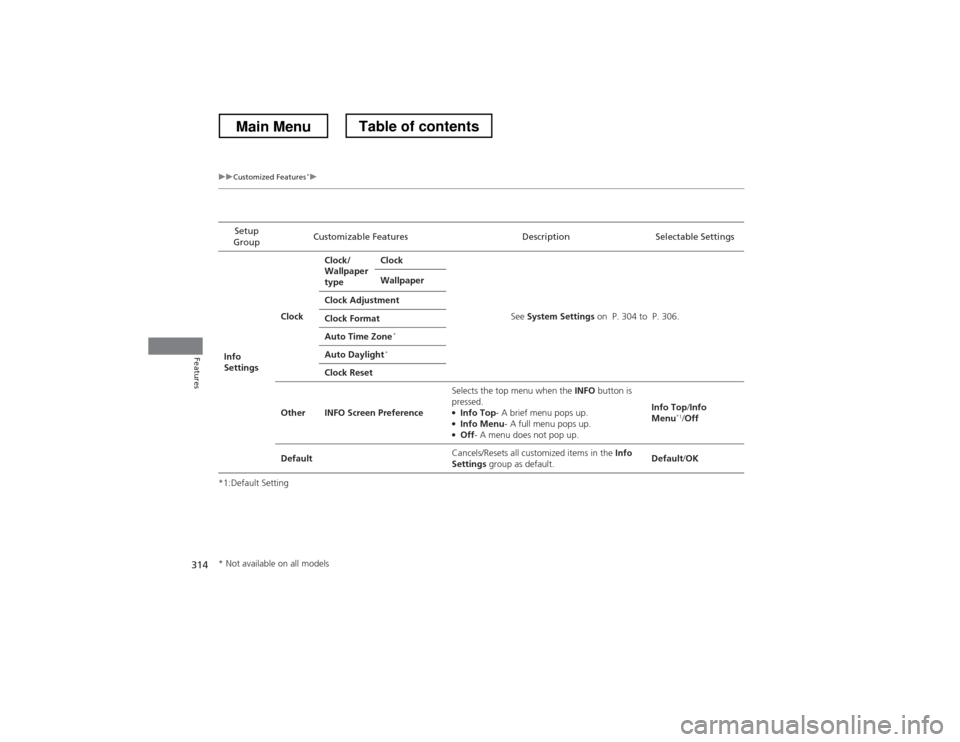
*1:Default SettingSetup
Group Customizable Features Description Selectable Settings
Info
Settings ClockClock/
Wallpaper
type
Clock
See System Settings on P. 304 to P. 306.
Wallpaper
Clock Adjustment
Clock Format
Auto Time Zone *
Auto Daylight *
Clock Reset
Other INFO Screen Preference Selects the top menu when the
INFO button is
pressed.
● Info Top - A brief menu pops up.
● Info Menu - A full menu pops up.
● Off - A menu does not pop up. Info Top
/Info
Menu *1
/Off
Default Cancels/Resets all customized items in the
Info
Settings group as default. Default
/OK
* Not available on all models
Main MenuTable of contents
Page 480 of 573
479
uuMaintenance Under the HooduEngine Coolant
Maintenance
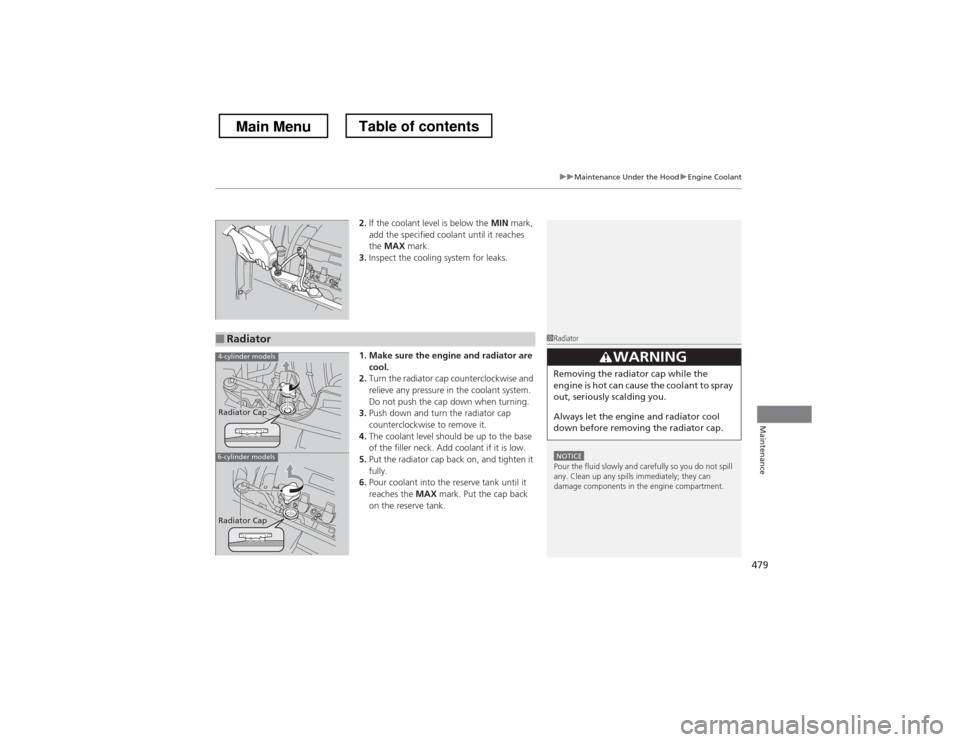
2.If the coolant level is below the MIN mark,
add the specified coolant until it reaches the MAX mark.
3. Inspect the cooling system for leaks.
1. Make sure the engine and radiator are cool.
2. Turn the radiator cap counterclockwise and
relieve any pressure in the coolant system.
Do not push the cap down when turning.
3. Push down and turn the radiator cap
counterclockwise to remove it.
4. The coolant level should be up to the base
of the filler neck. Add coolant if it is low.
5. Put the radiator cap back on, and tighten it fully.
6. Pour coolant into the reserve tank until it reaches the MAX mark. Put the cap back
on the reserve tank.
■Radiator1Radiator
NOTICEPour the fluid slowly and carefully so you do not spill
any. Clean up any spills immediately; they can
damage components in the engine compartment.
33WARNING
Removing the radiator cap while the
engine is hot can cause the coolant to spray
out, seriously scalding you.
Always let the engine and radiator cool
down before removing the radiator cap.
4-cylinder models
6-cylinder models
Radiator Cap
Radiator Cap
Main MenuTable of contents
Page 507 of 573
506
Maintenance
Battery
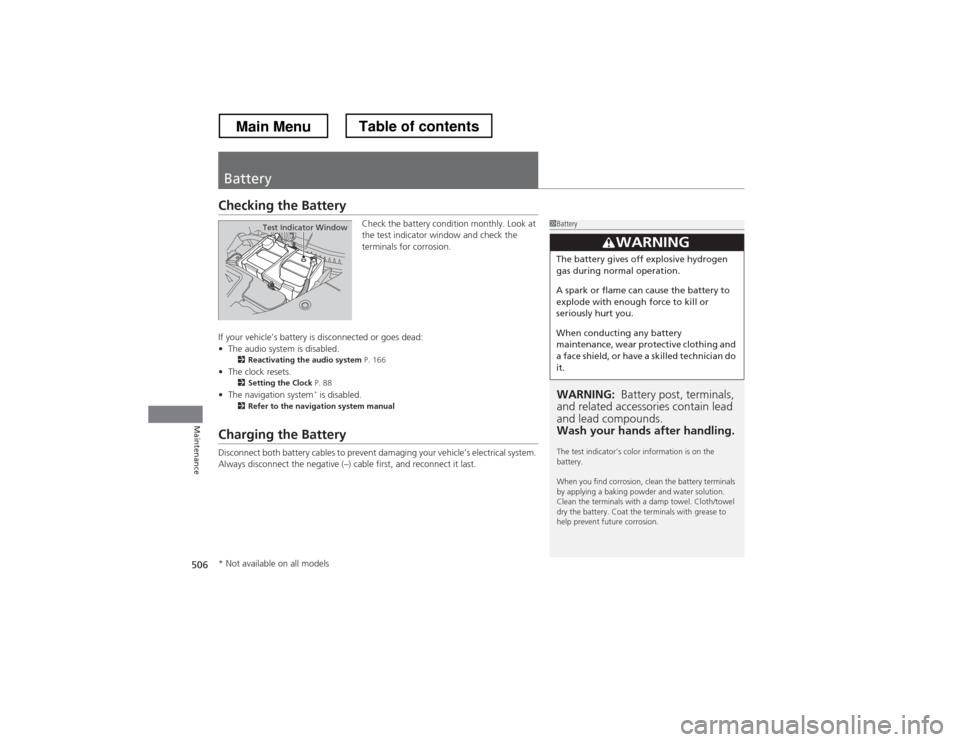
Checking the BatteryCheck the battery condition monthly. Look at
the test indicator window and check the
terminals for corrosion.
If your vehicle’s battery is disconnected or goes dead: • The audio system is disabled.
2 Reactivating the audio system P. 166
• The clock resets.
2 Setting the Clock P. 88
• The navigation system *
is disabled.
2 Refer to the navigation system manual
Charging the Battery
Disconnect both battery cables to prevent damaging your vehicle’s electrical system.
Always disconnect the negative (–) cab le first, and reconnect it last.
1Battery
WARNING: Battery post, terminals,
and related accessories contain lead and lead compounds.
Wash your hands after handling.
The test indicator’s color information is on the battery.
When you find corrosion, clean the battery terminals
by applying a baking powder and water solution.
Clean the terminals with a damp towel. Cloth/towel
dry the battery. Coat the terminals with grease to
help prevent future corrosion.
3WARNING
The battery gives off explosive hydrogen
gas during normal operation.
A spark or flame can cause the battery to
explode with enough force to kill or
seriously hurt you.
When conducting any battery
maintenance, wear protective clothing and
a face shield, or have a skilled technician do it.
Test Indicator Window
* Not available on all models
Main MenuTable of contents
Page 522 of 573

Continued521
uuIf a Tire Goes FlatuChanging a Flat Tire
Handling the Unexpected
1.Place the jack under the jacking point
closest to the tire to be changed.
2. Turn the end bracket (as shown in the
image) clockwise until the top of the jack
contacts the jacking point.
uMake sure that the jacking point tab is
resting in the jack notch.
3. Raise the vehicle, using the jack handle bar
and the jack handle, until the tire is off the
ground.
■How to Set Up the Jack1How to Set Up the Jack
Do not use the jack with people or luggage in the
vehicle.
Use the jack provided in your vehicle.
Other jacks may not support the weight (“load”) or
their shape may not match.
The following instructions must be followed to use
the jack safely.
• Do not use while the engine is running.
• Use only where the ground is firm and level.
• Use only at the jacking points.
• Do not get in the vehicle while using the jack.
• Do not put anything on top of or underneath the jack.
3WARNING
The vehicle can easily roll off the jack,
seriously injuring anyone underneath.
Follow the directions for changing a tire
exactly, and never get under the vehicle
when it is supported only by the jack.
Jack
Handle
Bar Wheel Nut
Wrench as Jack Handle
Main MenuTable of contents
Page 564 of 573

563
Index
Bluetooth® Audio ............................. 213, 266
Bluetooth ® HandsFreeLink ®.... 320, 332, 367
Booster Seats (For Children) ...................... 65
Brake System ............................................ 449
Anti-lock Brake System (ABS) .................. 451
Brake Assist System................................. 452
Fluid ....................................................... 481
Foot Brake .............................................. 450
Indicator ........................................... 70, 536
Parking Brake.......................................... 449
Brightness Control (Instrument Panel) ... 125
Bulb Replacement .................................... 484
Brake Light, Taillight, Back-Up Light,
Rear Turn Signal Light and Lower Rear
Side Marker Light ................................ 490
Fog Lights ............................................... 486
Front Turn Signal/Parking Light ............... 489
Headlights .............................................. 484
High-Mount Brake Light........ .................. 492
Rear License Plate Light ........................... 492
Side Marker Lights .................................. 488
Bulb Specifications ........................... 546, 548
C
Carbon Monoxide Gas ............................... 66
Cargo Hook .............................................. 149
Carrying Cargo ................................. 411, 413
CD Player .................................. 173, 200, 239
Center Pocket ........................................... 152
Certification Label ................................... 550 Changing Bulbs
......................................... 484
Charging System Indicator ................. 71, 534
Child Safety ................................................. 54
Childproof Door Locks ............................. 100
Child Seat .................................................... 54
Booster Seats............................................. 65
Child Seat for Infants ................................. 56
Child Seat for Small Children ..................... 57
Installing a Child Seat with a Lap/ Shoulder Seat Belt ................................... 61
Larger Children.......................................... 64
Rear-facing Child Seat ............................... 56
Selecting a Child Seat ................................ 58
Childproof Door Locks ............................. 100
Cleaning the Exterior ............................... 512
Cleaning the Interior ................................ 510
Climate Control System ............................ 157
Changing the Mode ................................ 157
Defrosting the Windshield and
Windows ............................................... 159
Dust and Pollen Filter ............................... 509
Recirculation and Fresh Air Mode ............ 158
Recirculation/Fresh Air Mode ................... 157
Sensors.................................................... 162
Synchronized Mode ................................. 161
Using Automatic Climate Control ............ 157
Clock ............................................................ 88
Coat Hook ................................................. 148
Compact Spare Tire .................. 517, 547, 549
Compass ............................................ 405, 407
Console Compartment ............................. 145 Controls
....................................................... 87
Coolant (Engine) ...................................... 478
Adding to the Radiator ............................ 479
Adding to the Reserve Tank..................... 478
Overheating ............................................ 532
Creeping (Automatic Transmission) ........ 425
Cruise Control ........................................... 432
Indicator.................................................... 81
Cup Holders .............................................. 146
Customer Service Information ................. 558
Customized Features ................................ 281
D
Daytime Running Lights .......................... 122
Dead Battery ............................................. 528
Defrosting the Windshield and Windows ......................................... 156, 159
Devices that Emit Radio Waves ............... 551
Dimming
Headlights ............................................... 119
Rearview Mirror....................................... 130
Dipstick (Engine Oil) ................................. 473
Directional Signals (Turn Signal) ............. 119
Display Button .................................. 186, 218
Door Mirrors ............................................. 131
Doors ........................................................... 91
Auto Door Locking .................................. 101
Auto Door Unlocking .............................. 101
Door and Trunk Open Indicator ................. 74
Door Open Indicator.................................. 31
Main Menu
Page 569 of 573
568
Index
Security System......................................... 107
Immobilizer System Indicator ..................... 80
Security System Alarm Indicator ................. 80
Select Lever ................................. 18, 426, 428
Operation .................................. 18, 427, 429
Releasing ................................................. 531
Won’t Move ............................................ 531
Select/Reset Knob ....................................... 84
Selecting a Child Seat ................................. 58
Selector Knob (Audio) ...................... 169, 182
Sequential Shift Mode .............................. 430
Setting the Clock ........................................ 88
Shift Lever ................................... 18, 426, 428
Shift Lever Position Indicator ........... 427, 429
Shifting (Transmission) ..................... 426, 428
Shoulder Anchor ......................................... 36
Side Airbags ................................................ 46
Cutoff System............................................ 48
Off Indicator .............................................. 48
Side Curtain Airbags ................................... 49
Smart Entry with Push Button Start System ........................................................ 96
Snow Tires ................................................. 505
Spare Tire .................................. 517, 547, 549
Spark Plugs ........................................ 546, 548
Specifications ............................................ 546
Specified Fuel ............................ 456, 546, 548
Speedometer ............................................... 83
SRS Airbags (Airbags) ................................. 42
Starting the Engine .......................... 420, 422
Does Not Start ......................................... 525 Engine Switch Buzzer .............................. 114
Jump Starting .......................................... 528
Steering Wheel ......................................... 129
Adjusting ................................................ 129
Stopping ................................................... 453
Summer Tires ............................................ 505
Sunglasses Holder ..................................... 152
Supplemental Restraint System (SRS) ........ 42
Switches (Around the Steering
Wheel) ............................................. 2, 3, 114
Synchronized Mode ................................. 161
T
Tachometer ................................................. 83
Tailgate ..................................................... 105
Unable to Open....................................... 544
Temperature Gauge ................................... 83
Temperature Sensor ................................. 162
Time (Setting) ............................................. 88
Tire Pressure Monitoring System
(TPMS) ..................................................... 446
Indicator............................................ 75, 537
Tires ........................................................... 497
Air Pressure ............................. 498, 547, 549
Checking and Maintaining ...................... 497
Inspection ............................................... 497
Labeling .................................................. 498
Puncture (Flat Tire) .................................. 517
Regulations ............................................. 500
Rotation .................................................. 504 Spare Tire ............................... 517, 547, 549
Summer .................................................. 505
Tire Chains.............................................. 505
Wear Indicators....................................... 502
Winter .................................................... 505
Tools ......................................................... 516
Towing a Trailer ....................................... 415
Equipment and Accessories ..................... 416
Load Limits ............................................. 415
Towing Your Vehicle ............................... 419
Emergency .............................................. 542
TPMS (Tire Pressure Monitoring System) .................................................... 446
Indicator ........................................... 75, 537
Transmission ..................................... 426, 428
Automatic....................................... 426, 428
Fluid ....................................................... 480
Number .................................................. 550
Shift Lever Position Indicator ........... 427, 429
Trip Meter .................................................. 85
Troubleshooting ...................................... 515
Blown Fuse ..................................... 538, 539
Brake Pedal Vibrates ................................. 22
Buzzer Sounds When Opening Door ......... 23
Emergency Towing ................................. 542
Engine Won’t Start ................................. 525
Noise When Braking ................................. 23
Overheating ............................................ 532
Puncture/Flat Tire .................................... 517
Rear Door Won’t Open ..................... 22, 100
Select Lever Won’t Move ........................ 531
Main Menu