2013 HONDA CROSSTOUR service
[x] Cancel search: servicePage 262 of 573
Continued261
uuAudio System Basic OperationuPlaying Internet Radio
Features
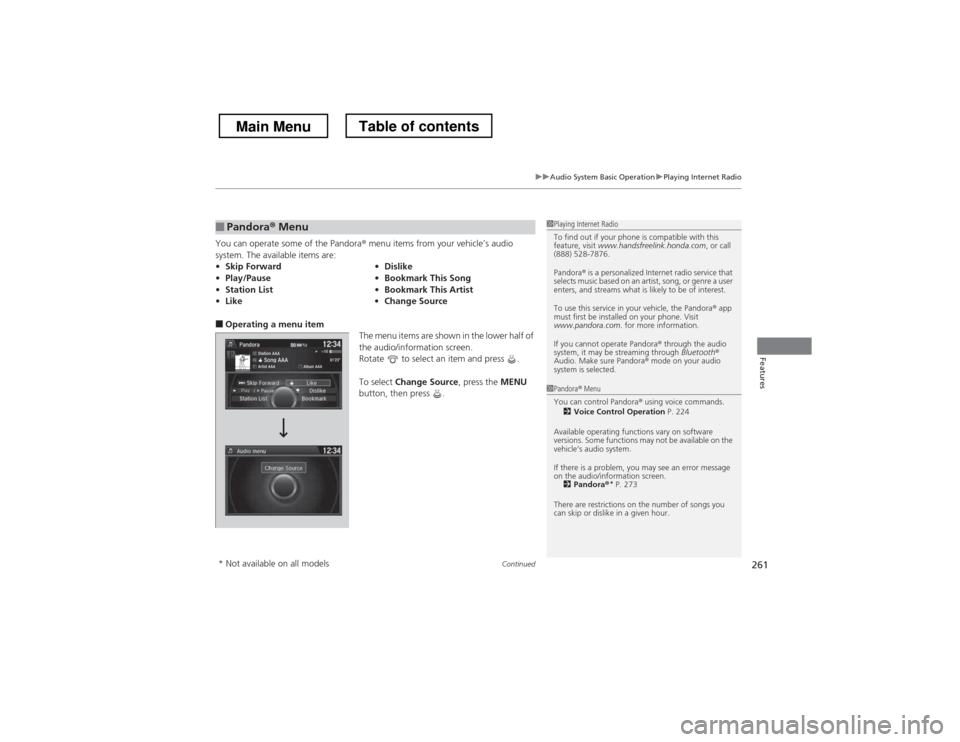
You can operate some of the Pandora® menu items from your vehicle’s audio
system. The available items are:
■ Operating a menu item
The menu items are shown in the lower half of
the audio/information screen.
Rotate to select an item and press .
To select Change Source , press the MENU
button, then press .
■Pandora ® Menu
• Skip Forward •Dislike
• Play/Pause •Bookmark This Song
• Station List •Bookmark This Artist
• Like •Change Source1Playing Internet Radio
To find out if your phone is compatible with this
feature, visit www.handsfreelink.honda.com , or call
(888) 528-7876.
Pandora ® is a personalized Internet radio service that
selects music based on an artist, song, or genre a user
enters, and streams what is likely to be of interest.
To use this service in your vehicle, the Pandora ® app
must first be installed on your phone. Visit
www.pandora.com . for more information.
If you cannot operate Pandora ® through the audio
system, it may be streaming through Bluetooth®
Audio. Make sure Pandora ® mode on your audio
system is selected.
1Pandora ® Menu
You can control Pandora ® using voice commands.
2 Voice Control Operation P. 224
Available operating functions vary on software
versions. Some functions may not be available on the
vehicle’s audio system.
If there is a problem, you may see an error message
on the audio/information screen. 2 Pandora ®*
P. 273
There are restrictions on the number of songs you
can skip or dislike in a given hour.
* Not available on all models
Main MenuTable of contents
Page 263 of 573
uuAudio System Basic OperationuPlaying Internet Radio
262
Features
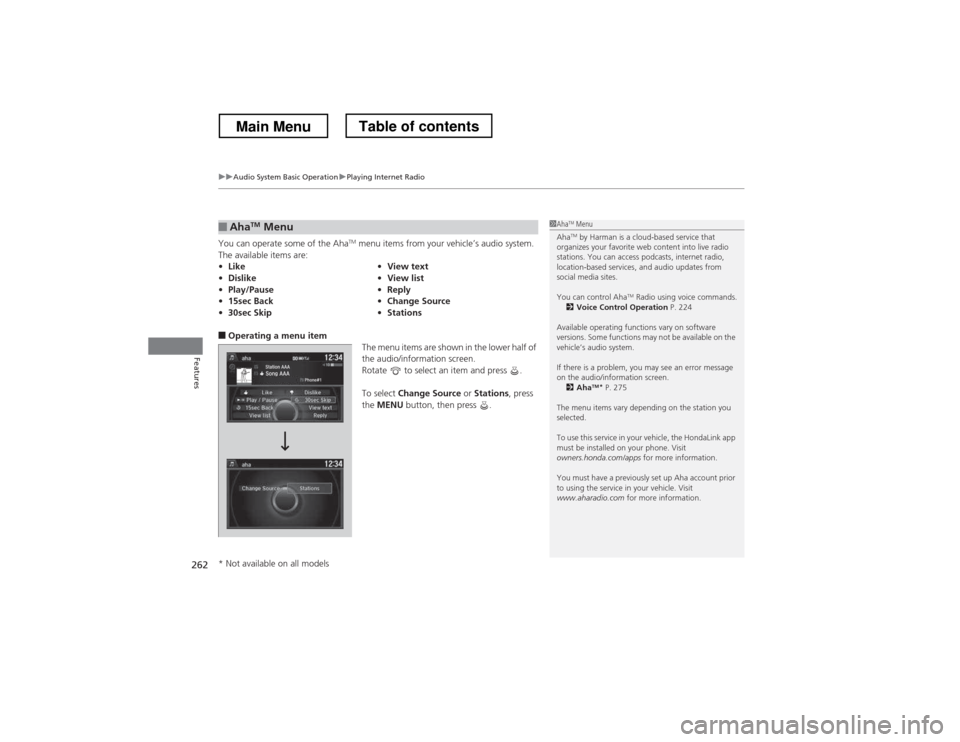
You can operate some of the Aha TM
menu items from your vehicle’s audio system.
The available items are:
■ Operating a menu item
The menu items are shown in the lower half of
the audio/information screen.
Rotate to select an item and press . To select Change Source or Stations , press
the MENU button, then press .
■AhaTM
Menu
• Like •View text
• Dislike •View list
• Play/Pause •Reply
• 15sec Back •Change Source
• 30sec Skip •Stations1Aha TM
Menu
Aha TM
by Harman is a cloud-based service that
organizes your favorite web content into live radio
stations. You can access podcasts, internet radio,
location-based services, and audio updates from
social media sites.
You can control Aha TM
Radio using voice commands.
2 Voice Control Operation P. 224
Available operating functions vary on software
versions. Some functions may not be available on the
vehicle’s audio system.
If there is a problem, you may see an error message
on the audio/information screen. 2 Aha TM
*
P. 275
The menu items vary depending on the station you
selected.
To use this service in your vehicle, the HondaLink app
must be installed on your phone. Visit
owners.honda.com/apps for more information.
You must have a previously set up Aha account prior
to using the service in your vehicle. Visit
www.aharadio.com for more information.
* Not available on all models
Main MenuTable of contents
Page 277 of 573
276
Features
General Information on the Audio System
XM® Radio Service *
1. You need your radio ID ready before registering for subscription. To see the ID in the display: Turn the MENU/SEL (Selector) knob or the interface dial until 0
appears.
2. Have your radio ID and credit card number ready, and either call or visit the XM ®
website to subscribe.
Switch to the XM ® mode by pressing the SOURCE button repeatedly or operating
the audio with touch screen, and stay in this mode for about 30 minutes until the
service is activated. Make sure your vehicle is in an open area with good reception. Loading: XM ® is loading the audio or program information.
Ch off air:
The channel is not currently broadcasting.
Ch unauthorized: XM ® radio is receiving information update from the network.
No signal:
The signal is too weak in the current location.
Ch unavailable:
No such channel exists, the channel is not part of your subscription, or the artist or
title information is unavailable.
Check antenna:
There is a problem with the XM ® antenna. Contact a dealer.
■Subscribing to XM ® Radio
■Receiving XM ® Radio
■XM ® Radio Display Messages
1Subscribing to XM ® Radio
Contact Information for XM ® Radio:
US: XM ® Radio at www.siriusxm.com or (800) 852-
9696
Canada: XM ® Canada at www.xmradio.ca , or (877)
209-0079
1Receiving XM ® Radio
The XM ® satellites are in orbit over the equator;
therefore, objects south of the vehicle may cause
satellite reception interruptions. Satellite signals are
more likely to be blocked by tall buildings and
mountains the farther north you travel from the
equator.
You may experience reception problems under the
following circumstances:
• In a location with an obstruction to the south of
your vehicle.
• In tunnels
• On the lower level of a multi-tiered road
• Large items carried on the roof rack
* Not available on all models
Main MenuTable of contents
Page 299 of 573
298
uuCustomized Features*u
Features
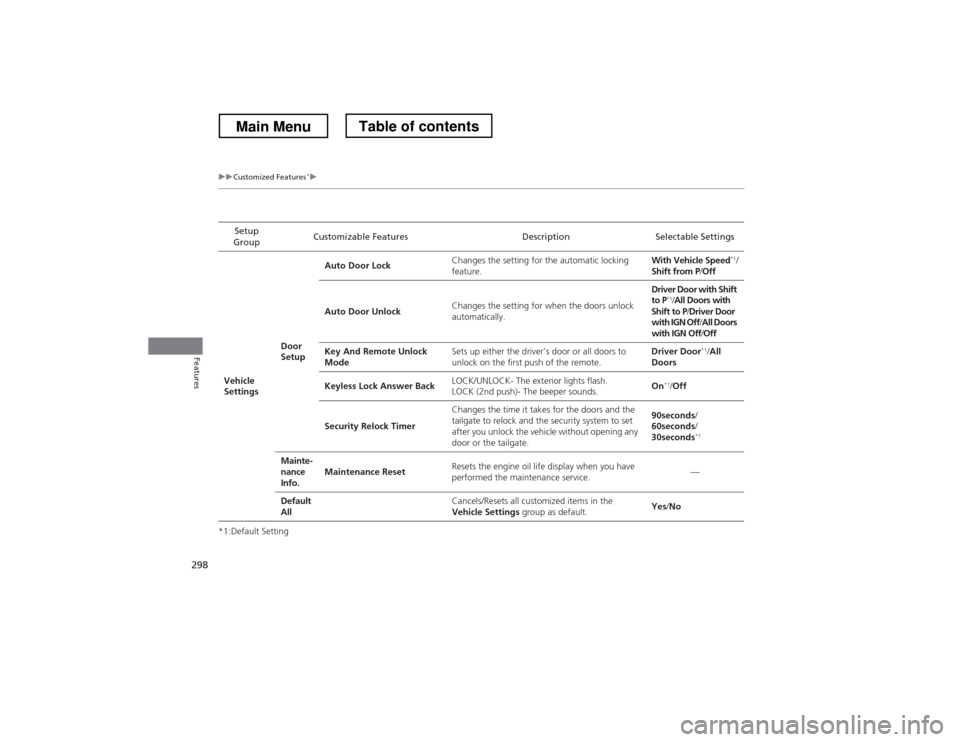
*1:Default SettingSetup
Group Customizable Features Description Selectable Settings
Vehicle
Settings Door
SetupAuto Door Lock
Changes the setting for the automatic locking feature. With Vehicle Speed
*1
/
Shift from P /Off
Auto Door Unlock Changes the setting for when the doors unlock
automatically. Driver Door with Shift
to P
*1
/All Doors with
Shift to P /Driver Door
with IGN Off /All Doors
with IGN Off /Off
Key And Remote Unlock
Mode Sets up either the driver’s door or all doors to
unlock on the first push of the remote. Driver Door
*1
/All
Doors
Keyless Lock Answer Back LOCK/UNLOCK- The exterior lights flash.
LOCK (2nd push)- The beeper sounds. On
*1
/Off
Security Relock Timer Changes the time it takes for the doors and the
tailgate to relock and the security system to set
after you unlock the vehicle without opening any
door or the tailgate. 90seconds
/
60seconds /
30seconds *1
Mainte-
nance
Info. Maintenance Reset
Resets the engine oil life display when you have
performed the maintenance service. —
Default All
Cancels/Resets all customized items in the
Vehicle Settings group as default. Yes
/No
Main MenuTable of contents
Page 310 of 573
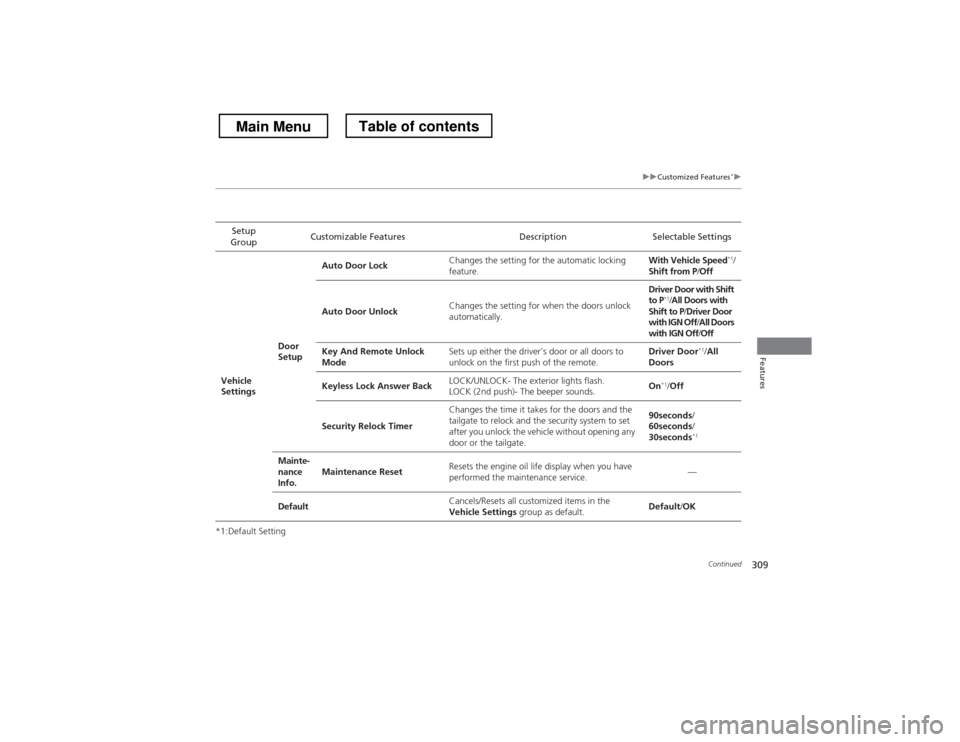
309
uuCustomized Features*u
Continued
Features
*1:Default SettingSetup
Group Customizable Features Description Selectable Settings
Vehicle
Settings Door
SetupAuto Door Lock
Changes the setting for the automatic locking
feature. With Vehicle Speed
*1
/
Shift from P /Off
Auto Door Unlock Changes the setting for when the doors unlock
automatically. Driver Door with Shift to P
*1
/All Doors with
Shift to P /Driver Door
with IGN Off /All Doors
with IGN Off /Off
Key And Remote Unlock
Mode Sets up either the driver’s door or all doors to
unlock on the first push of the remote. Driver Door
*1
/All
Doors
Keyless Lock Answer Back LOCK/UNLOCK- The exterior lights flash.
LOCK (2nd push)- The beeper sounds. On
*1
/Off
Security Relock Timer Changes the time it takes for the doors and the
tailgate to relock and the security system to set
after you unlock the vehicle without opening any
door or the tailgate. 90seconds
/
60seconds /
30seconds *1
Mainte-
nance
Info. Maintenance Reset
Resets the engine oil life display when you have
performed the maintenance service. —
Default Cancels/Resets all customized items in the
Vehicle Settings
group as default. Default
/OK
Main MenuTable of contents
Page 419 of 573
418
uuTowing a TraileruDriving Safely with a Trailer
Driving
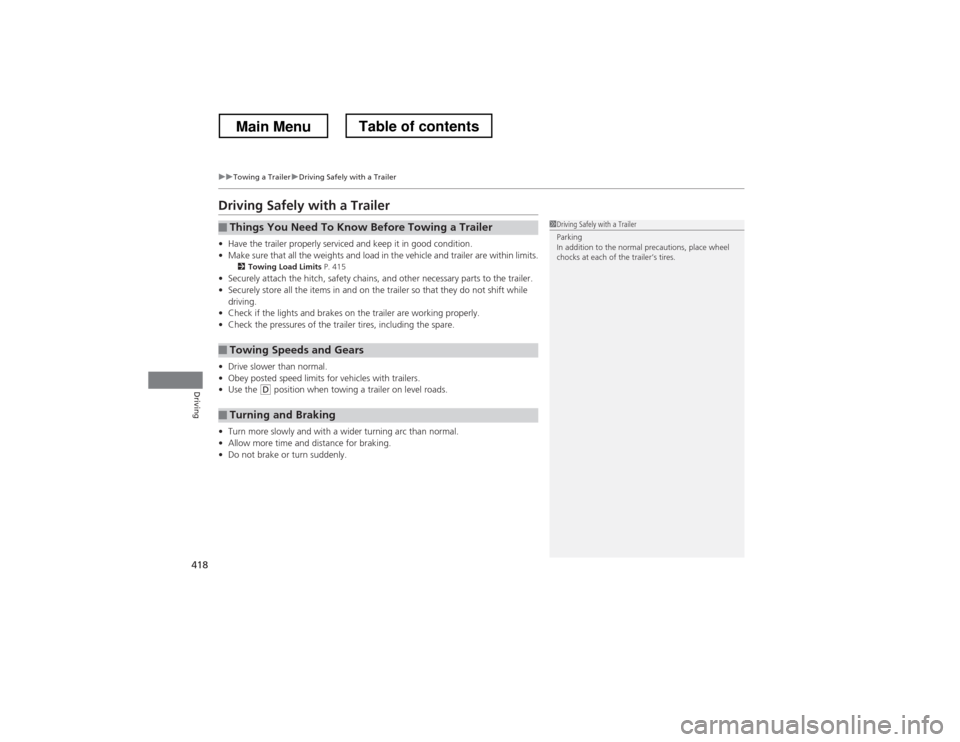
Driving Safely with a Trailer •Have the trailer properly serviced and keep it in good condition.
• Make sure that all the weights and load in the vehicle and trailer are within limits.
2 Towing Load Limits P. 415
• Securely attach the hitch, safety chains, and other necessary parts to the trailer.
• Securely store all the items in and on the trailer so that they do not shift while
driving.
• Check if the lights and brakes on the trailer are working properly.
• Check the pressures of the trailer tires, including the spare.
• Drive slower than normal.
• Obey posted speed limits for vehicles with trailers.
• Use the
(D position when towing a trailer on level roads.
• Turn more slowly and with a wider turning arc than normal.
• Allow more time and distance for braking.
• Do not brake or turn suddenly.
■Things You Need To Know Before Towing a Trailer
■Towing Speeds and Gears
■Turning and Braking
1Driving Safely with a Trailer
Parking
In addition to the normal precautions, place wheel
chocks at each of the trailer’s tires.
Main MenuTable of contents
Page 457 of 573
456
Driving
Refueling
Fuel Information ■Fuel recommendation
Use of lower octane gasoline can cause a persistent, heavy metallic knocking noise
that can lead to engine damage.
■ Top tier detergent gasoline
Because the level of detergency and additives in gasoline vary in the market, Honda
endorses the use of “TOP TIER Detergent Gasoline” where available to help
maintain the performance and reliability of your vehicle. TOP TIER Detergent
Gasoline meets a new gasoline standard jointly established by leading automotive
manufacturers to meet the needs of today’s advanced engines.
Qualifying gasoline retailers will, in most cases, identify their gasoline as having met
“TOP TIER Detergent Gasoline” standards at the retail location. This fuel is
guaranteed to contain the proper level of detergent additives and be free of metallic
additives. The proper level of detergent additives, and absence of harmful metallic
additives in gasoline, help avoid build-up of deposits in your engine and emission control system.
For further important fuel-related information for your vehicle, or on information on
gasoline that does not contain MMT, visit www.hondacars.com. In Canada, visit
www.honda.ca for additional information on gasoline. For more information on top
tier gasoline, visit www.toptiergas.com .
■ Fuel tank capacity: 18.5 US gal (70 liters)
Unleaded gasoline, pump octane number 87 or higher
1Fuel Information
NOTICEWe recommend quality gasoline containing
detergent additives that help prevent fuel system and
engine deposits. In addition, in order to maintain
good performance, fuel economy, and emissions
control, we strongly recommend the use of gasoline
that does NOT contain harmful manganese-based
fuel additives such as MMT, if such gasoline is available.
Use of gasoline with these additives may adversely
affect performance, and cause the malfunction
indicator lamp on your instrument panel to come on.
If this happens, contact a dealer for service.
Some gasoline today is blended with oxygenates such
as ethanol. Your vehicle is designed to operate on
oxygenated gasoline containing up to 10% ethanol
by volume. Do not use gasoline containing methanol.
If you notice any undesirable operating symptoms, try
another service station or switch to another brand of
gasoline.
Main MenuTable of contents
Page 458 of 573
457
uuRefuelinguHow to Refuel
Continued
Driving
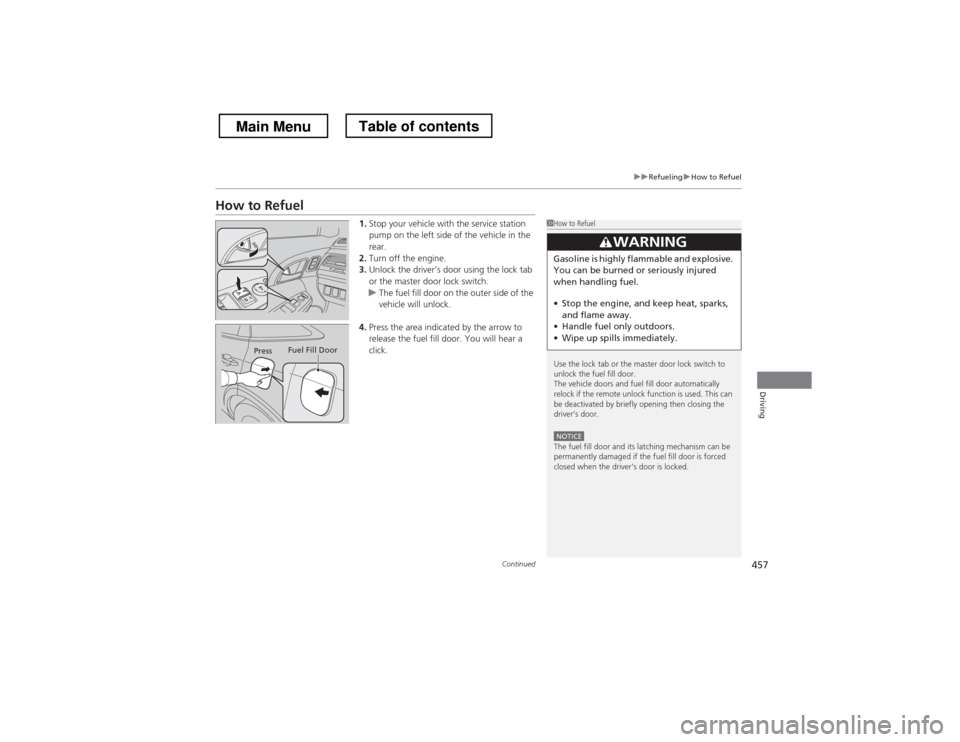
How to Refuel1.Stop your vehicle with the service station
pump on the left side of the vehicle in the rear.
2. Turn off the engine.
3. Unlock the driver’s door using the lock tab
or the master door lock switch.
uThe fuel fill door on the outer side of the
vehicle will unlock.
4. Press the area indicated by the arrow to
release the fuel fill door. You will hear a
click.
1How to Refuel
Use the lock tab or the master door lock switch to
unlock the fuel fill door.
The vehicle doors and fuel fill door automatically
relock if the remote unlock function is used. This can
be deactivated by briefly opening then closing the driver’s door.
NOTICEThe fuel fill door and its latching mechanism can be
permanently damaged if the fuel fill door is forced
closed when the driver’s door is locked.
3WARNING
Gasoline is highly flammable and explosive.
You can be burned or seriously injured
when handling fuel. • Stop the engine, and keep heat, sparks,
and flame away.
• Handle fuel only outdoors.
• Wipe up spills immediately.
Press Fuel Fill Door
Main MenuTable of contents