Page 304 of 573
303
uuCustomized Features*u
Continued
Features
*1:Default SettingSetup
Group Customizable Features Description Selectable Settings
Camera
Settings Lane-WatchShow with Turn Signal
Select whether the LaneWatch display comes on
when you move the turn signal lever to the
passenger side.
On
*1
/Off
Reference Lines Selects whether the reference lines come on the
LaneWatch monitor. On
*1
/Off
Display Brightness
Adjusts the LaneWatch display settings. —
Contrast
Black Level
Color
Tint
Default
Cancels/Resets all customized items in the LaneWatch
group as default. Yes
/No
Default Cancels/Resets all customized items in the LaneWatch
group as default. Yes
/No
Rear
Camera Fixed Guideline
Selects whether the fixed guidelines come on or
not on the rear camera monitor. On
*1
/Off
Dynamic Guideline Selects whether the dynamic guidelines come on
or not on the rear camera monitor. On
*1
/Off
Default Cancels/Resets all customized items in the
Rear
Camera group as default. Yes
/No
Main MenuTable of contents
Page 311 of 573
310
uuCustomized Features*u
Features
*1:Default SettingSetup
Group Customizable Features Description Selectable Settings
Camera
Settings
Lane-
Watch
Show with Turn SignalSelects whether the LaneWatch display comes on
when you move the turn signal lever to the
passenger side.On
*1
/Off
Reference LinesSelects whether the reference lines come on the
LaneWatch monitor.On *1
/Off
Next Maneuver Pop upSelects whether a turn direction screen of the
navigation system interrupts on the LaneWatch
display.On *1
/Off
Display
Brightness
Adjusts the LaneWatch display settings.—
Contrast
Black Level
Color
Tint
DefaultCancels/Resets all customized items in the LaneWatch group as default.Default/OK
Rear
Camera
Fixed GuidelineSelects whether the fixed guidelines come on or
not on the rear camera monitor.On *1
/Off
Dynamic GuidelineSelects whether the dynamic guidelines come on
or not on the rear camera monitor.On *1
/Off
DefaultCancels/Resets all customized items in the Rear
Camera group as default.Default/OK
Main MenuTable of contents
Page 410 of 573
409
Driving
This chapter discusses driving, refueling, and information on items such as accessories.
Before Driving Driving Preparation .......................... 410
Maximum Load Limit........................ 413
Towing a Trailer
Towing Preparation .......................... 415
Driving Safely with a Trailer .............. 418
Towing Your Vehicle ........................ 419
When Driving Starting the Engine .......................... 420
Precautions While Driving................. 424
Automatic Transmission ................... 425
Shifting ............................................ 426 Cruise Control ................................. 432
Forward Collision Warning (FCW)
*
.. 435
Lane Departure Warning (LDW) *
..... 439
VSA ® (Vehicle Stability Assist), aka ESC
(Electronic Stability Control), System .. 442
LaneWatch TM
*
.................................. 444
TPMS (Tire Pressure Monitoring System) .. 446Tire Pressure Monitoring System (TPMS) -
Required Federal Explanation ......... 447
Braking
Brake System ................................... 449
ABS (Anti-lock Brake System) ........... 451 Brake Assist System ......................... 452
Parking Your Vehicle
When Stopped ................................ 453
Rearview Camera ............................. 454
Multi-View Rear Camera .................. 455
Refueling Fuel Information .............................. 456
How to Refuel ................................. 457
Fuel Economy .................................... 459
Improving Fuel Economy .................. 459
Accessories and Modifications ........ 460
* Not available on all models
Main Menu
Page 436 of 573
435
uuWhen DrivinguForward Collision Warning (FCW)*
Continued
Driving
Forward Collision Warning (FCW) *
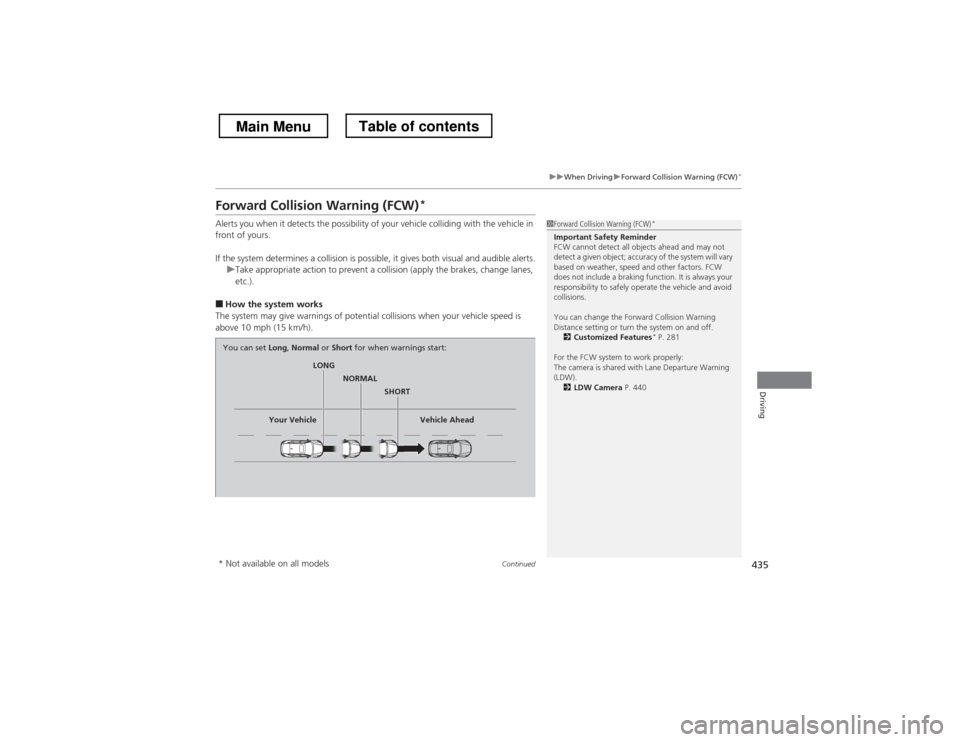
Alerts you when it detects the possibility of your vehicle colliding with the vehicle in
front of yours.
If the system determines a collision is possible, it gives both visual and audible alerts.
uTake appropriate action to prevent a collision (apply the brakes, change lanes, etc.).
■ How the system works
The system may give warnings of potential collisions when your vehicle speed is
above 10 mph (15 km/h).
1Forward Collision Warning (FCW) *
Important Safety Reminder
FCW cannot detect all objects ahead and may not
detect a given object; accuracy of the system will vary
based on weather, speed and other factors. FCW
does not include a braking function. It is always your
responsibility to safely operate the vehicle and avoid collisions.
You can change the Forward Collision Warning
Distance setting or turn the system on and off. 2 Customized Features *
P. 281
For the FCW system to work properly:
The camera is shared with Lane Departure Warning
(LDW). 2 LDW Camera P. 440
LONG
NORMAL
SHORT
Your Vehicle Vehicle Ahead
You can set
Long, Normal or Short for when warnings start:
* Not available on all models
Main MenuTable of contents
Page 437 of 573
uuWhen DrivinguForward Collision Warning (FCW)*
436
Driving
1Forward Collision Warning (FCW) *
Never apply a film or attach any objects to the
windshield that could obstruct the FCW camera’s
field of vision.
Scratches, nicks, and other damage to the windshield
within the FCW camera’s field of vision can cause the
system to operate abnormally. If this occurs, we
recommend that you replace the windshield with a
genuine Honda replacement windshield. Making
even minor repairs within the camera’s field of vision
or installing an aftermarket replacement windshield
may also cause the system to operate abnormally.
After replacing the windshield, have a dealer
recalibrate the camera. Proper calibration of the FCW
camera is necessary for the system to operate properly.
Beep
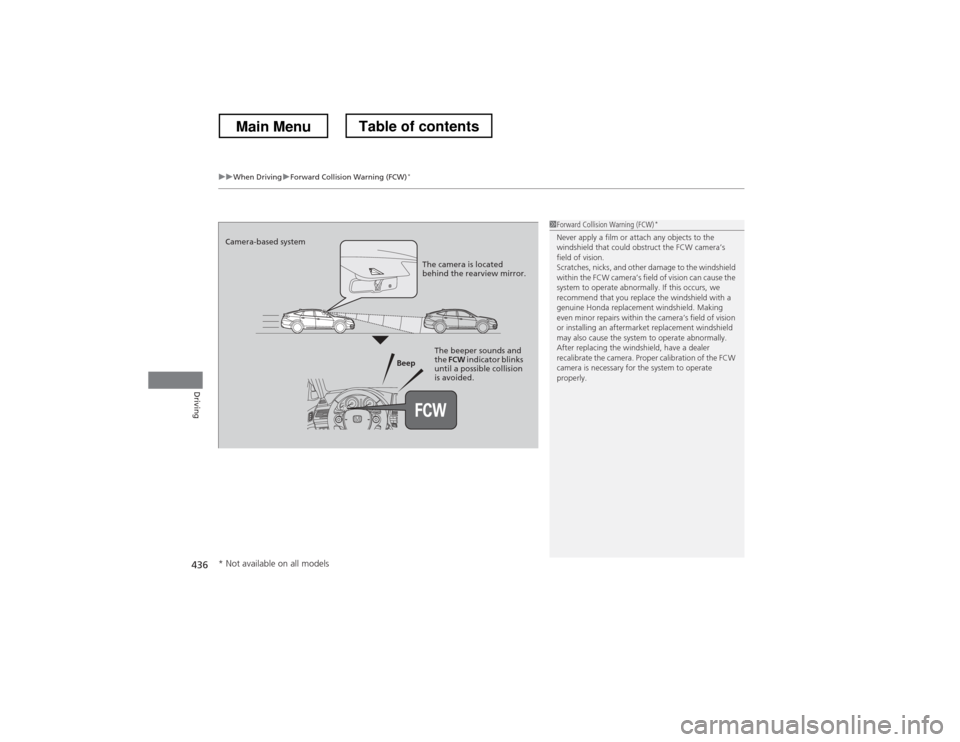
Camera-based system
The camera is located
behind the rearview mirror.
The beeper sounds and
the FCW indicator blinks
until a possible collision
is avoided.
* Not available on all models
Main MenuTable of contents
Page 438 of 573
Continued437
uuWhen DrivinguForward Collision Warning (FCW)*
Driving
■
Automatic shutoff
FCW may automatically shut itself off and the FCW indicator comes and stays on
when: • The temperature inside the system is high.
• The windshield is blocked by di rt, mud, leaves, wet snow, etc.
Once the conditions that caused FCW to shut off improve or are addressed (e.g.,
cleaning), the system comes back on.1Automatic shutoff
To help reduce the likelihood that high interior
temperatures will cause the camera system to shut
off, when parking, find a shady area or face the front
of the vehicle away from the sun. Also, do not use a
reflective sunshade that can concentrate heat on the camera.
If the CAMERA HOT message appears:
• Use the climate control system to cool down the
interior and, if necessary, the defroster mode when
windows are fogged.
• Start driving the vehicle to lower the windshield
temperature, which cools down the area around
the FCW system.
Main MenuTable of contents
Page 439 of 573
438
uuWhen DrivinguForward Collision Warning (FCW)*
Driving
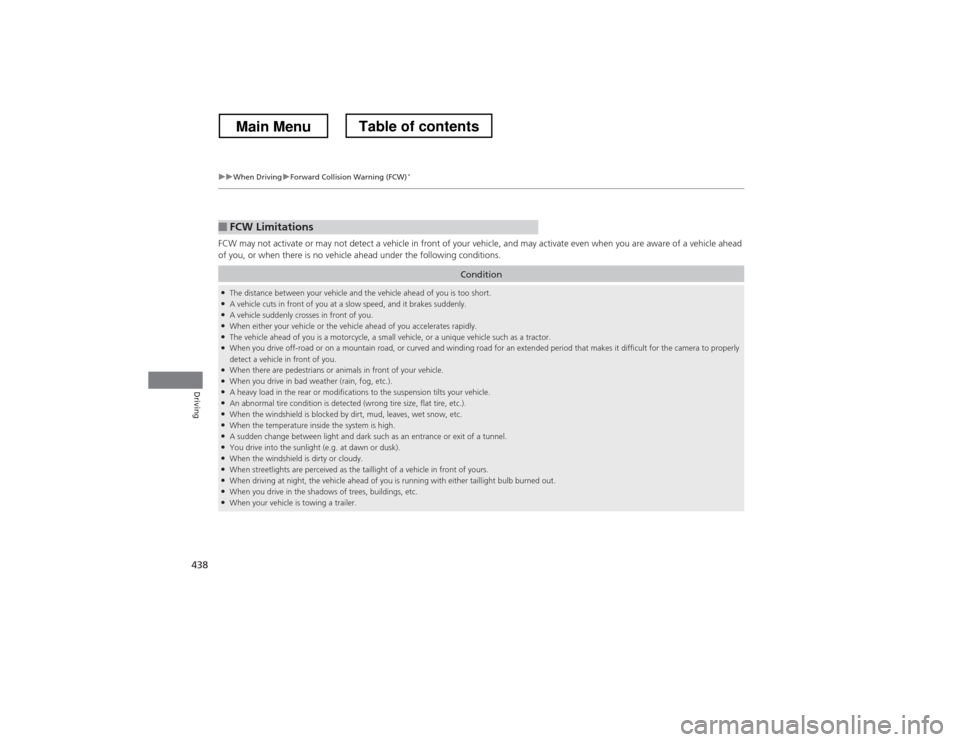
FCW may not activate or may not detect a vehicle in front of your vehicle, and may activate even when you are aware of a vehicl
e ahead
of you, or when there is no vehicle ahead under the following conditions.
■FCW Limitations
Condition
● The distance between your vehicle and the vehicle ahead of you is too short.
● A vehicle cuts in front of you at a slow speed, and it brakes suddenly.
● A vehicle suddenly crosses in front of you.
● When either your vehicle or the vehicle ahead of you accelerates rapidly.
● The vehicle ahead of you is a motorcycle, a small vehicle, or a unique vehicle such as a tractor.
● When you drive off-road or on a mountain road, or curved and winding road for an extended period that makes it difficult for th e camera to properly
detect a vehicle in front of you.
● When there are pedestrians or animals in front of your vehicle.
● When you drive in bad weather (rain, fog, etc.).
● A heavy load in the rear or modifications to the suspension tilts your vehicle.
● An abnormal tire condition is detected (wrong tire size, flat tire, etc.).
● When the windshield is blocked by dirt, mud, leaves, wet snow, etc.
● When the temperature inside the system is high.
● A sudden change between light and dark such as an entrance or exit of a tunnel.
● You drive into the sunlight (e.g. at dawn or dusk).
● When the windshield is dirty or cloudy.
● When streetlights are perceived as the taillight of a vehicle in front of yours.
● When driving at night, the vehicle ahead of you is running with either taillight bulb burned out.
● When you drive in the shadows of trees, buildings, etc.
● When your vehicle is towing a trailer.
Main MenuTable of contents
Page 441 of 573
uuWhen DrivinguLane Departure Warning (LDW)*
440
Driving
The system begins to search for lane markings when all the following conditions are met: • The vehicle is traveling between at 40-90 mph (64-145 km/h).
• The vehicle is on a straight or slightly curved road.
• The turn signals are off.
• The brake pedal is not pressed.
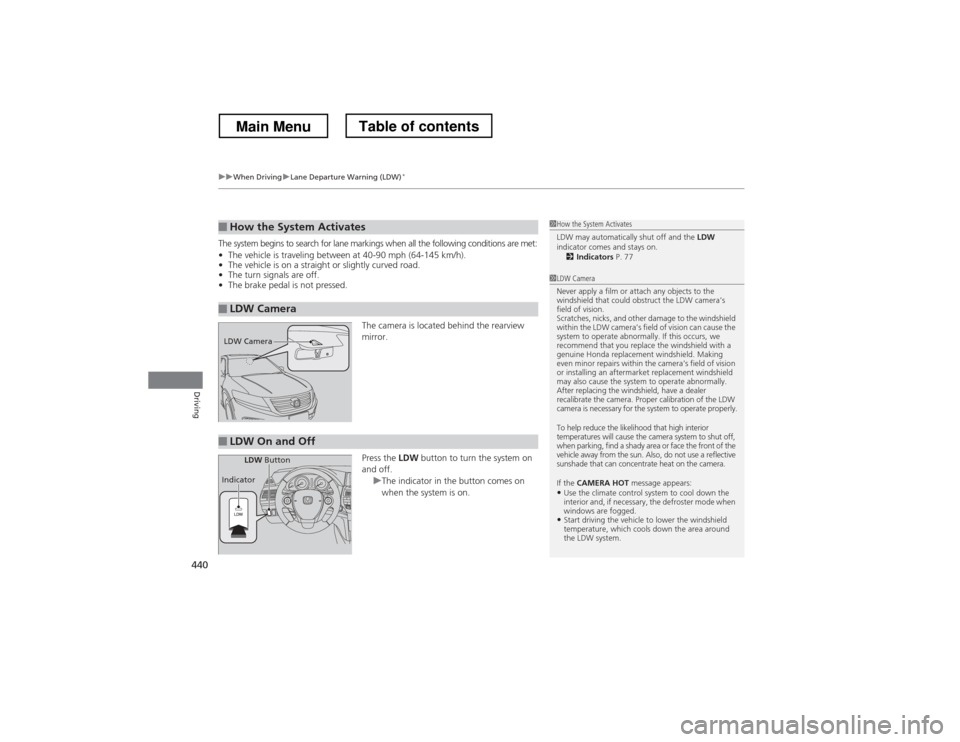
The camera is located behind the rearview mirror. Press the LDW button to turn the system on
and off.
uThe indicator in the button comes on
when the system is on.
■How the System Activates
■LDW Camera
1How the System Activates
LDW may automatically shut off and the LDW
indicator comes and stays on.
2 Indicators P. 77
1LDW Camera
Never apply a film or attach any objects to the
windshield that could obstruct the LDW camera’s
field of vision.
Scratches, nicks, and other damage to the windshield
within the LDW camera’s field of vision can cause the
system to operate abnormally. If this occurs, we
recommend that you replace the windshield with a
genuine Honda replacement windshield. Making
even minor repairs within the camera’s field of vision
or installing an aftermarket replacement windshield
may also cause the system to operate abnormally.
After replacing the windshield, have a dealer
recalibrate the camera. Proper calibration of the LDW
camera is necessary for the system to operate properly.
To help reduce the likelihood that high interior
temperatures will cause the camera system to shut off,
when parking, find a shady area or face the front of the
vehicle away from the sun. Also, do not use a reflective
sunshade that can concentrate heat on the camera.
If the CAMERA HOT message appears:
• Use the climate control system to cool down the
interior and, if necessary, the defroster mode when
windows are fogged.
• Start driving the vehicle to lower the windshield
temperature, which cools down the area around
the LDW system.
LDW Camera
■LDW On and Off
LDW Button
Indicator
Main MenuTable of contents