Page 472 of 573
471
uuMaintenance Under the HooduOpening the Hood
Maintenance
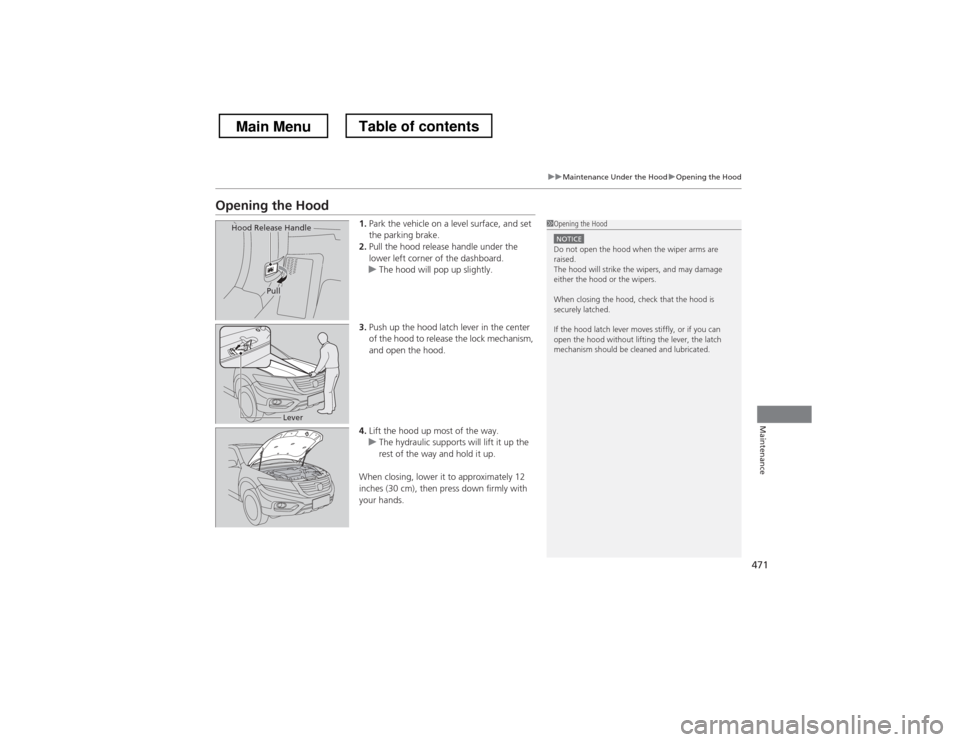
Opening the Hood1.Park the vehicle on a level surface, and set
the parking brake.
2. Pull the hood release handle under the
lower left corner of the dashboard.
uThe hood will pop up slightly.
3. Push up the hood latch lever in the center
of the hood to release the lock mechanism,
and open the hood.
4. Lift the hood up most of the way.
uThe hydraulic supports will lift it up the
rest of the way and hold it up.
When closing, lower it to approximately 12
inches (30 cm), then press down firmly with
your hands.
1Opening the Hood
NOTICEDo not open the hood when the wiper arms are raised.
The hood will strike the wipers, and may damage
either the hood or the wipers.
When closing the hood, check that the hood is
securely latched.
If the hood latch lever moves stiffly, or if you can
open the hood without lifting the lever, the latch
mechanism should be cleaned and lubricated.
Hood Release Handle
Pull
Lever
Main MenuTable of contents
Page 478 of 573

477
uuMaintenance Under the HooduChanging the Engine Oil and Oil Filter
Maintenance
4.Remove the oil filter and dispose of the
remaining oil.
5. Check that the filter gasket is not stuck to
the engine contact surface.
uIf it is stuck, you must detach it.
6. Wipe away dirt and dust adhering to the
contact surface of the engine block, and
install a new oil filter.
uApply a light coat of new engine oil to
the oil gasket.
7. Put a new washer on the drain bolt, then
reinstall the drain bolt.
uTightening torque:
29 lbf�ft (39 N�m, 4.0 kgf�m)
8. Pour the recommended engine oil into the
engine.
uEngine oil change capacity (including
filter):
4.2 US qt (4.0 L)
4.5 US qt (4.3 L)
9. Reinstall the engine oil fill cap securely and
start the engine.
10. Run the engine for a few minutes, and
then check that there is no leak from the
drain bolt or oil filter.
11. Stop the engine, wait for three minutes,
and then check the oil level on the
dipstick.
uIf necessary, add more engine oil.
1Changing the Engine Oil and Oil Filter
You will need a special wrench to replace the oil
filter. You can buy this wrench from a dealer.
When installing the new oil filter, follow the
instructions supplied with the oil filter.
Reinstall the engine oil fill cap. Start the engine. The
low oil pressure indicator should go off within five
seconds. If it does not, turn off the engine, and check your work.4-cylinder models
6-cylinder models
Oil Filter
Oil Filter4-cylinder models
6-cylinder models
Main MenuTable of contents
Page 485 of 573
484
Maintenance
Replacing Light Bulbs
Headlight Bulbs
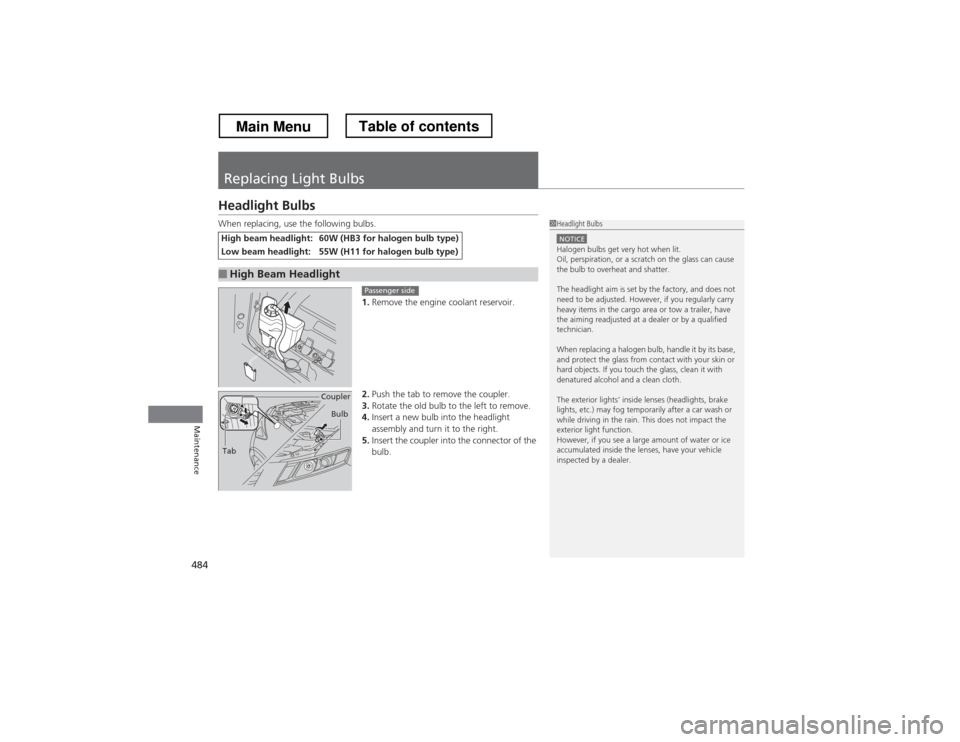
When replacing, use the following bulbs.1.Remove the engine coolant reservoir.
2. Push the tab to remove the coupler.
3. Rotate the old bulb to the left to remove.
4. Insert a new bulb into the headlight
assembly and turn it to the right.
5. Insert the coupler into the connector of the
bulb.
High beam headlight:60W (HB3 for halogen bulb type)
Low beam headlight:55W (H11 for halogen bulb type)
■High Beam Headlight
1Headlight Bulbs
NOTICEHalogen bulbs get very hot when lit.
Oil, perspiration, or a scratch on the glass can cause
the bulb to overheat and shatter.
The headlight aim is set by the factory, and does not
need to be adjusted. However, if you regularly carry
heavy items in the cargo area or tow a trailer, have
the aiming readjusted at a dealer or by a qualified
technician.
When replacing a halogen bulb, handle it by its base,
and protect the glass from contact with your skin or
hard objects. If you touch the glass, clean it with
denatured alcohol and a clean cloth.
The exterior lights’ inside lenses (headlights, brake
lights, etc.) may fog temporarily after a car wash or
while driving in the rain. This does not impact the
exterior light function.
However, if you see a large amount of water or ice
accumulated inside the lenses, have your vehicle
inspected by a dealer.
Passenger side
Tab Coupler
Bulb
Main MenuTable of contents
Page 486 of 573
485
uuReplacing Light BulbsuHeadlight Bulbs
Maintenance
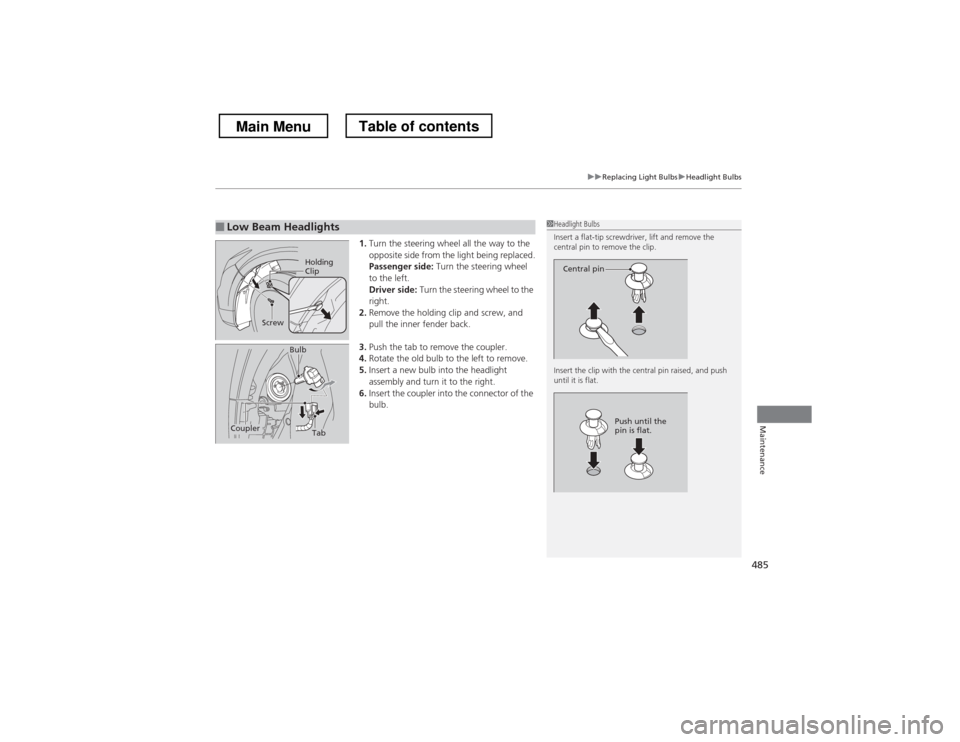
1.Turn the steering wheel all the way to the
opposite side from the light being replaced.
Passenger side: Turn the steering wheel
to the left.
Driver side: Turn the steering wheel to the
right.
2. Remove the holding clip and screw, and
pull the inner fender back.
3. Push the tab to remove the coupler.
4. Rotate the old bulb to the left to remove.
5. Insert a new bulb into the headlight
assembly and turn it to the right.
6. Insert the coupler into the connector of the
bulb.
■Low Beam Headlights1Headlight Bulbs
Insert a flat-tip screwdriver, lift and remove the
central pin to remove the clip.
Insert the clip with the central pin raised, and push until it is flat.
Central pin
Push until the
pin is flat.
Holding
Clip
Screw
TabCoupler
Bulb
Main MenuTable of contents
Page 487 of 573
486
uuReplacing Light BulbsuFog Light Bulbs
Maintenance
Fog Light Bulbs
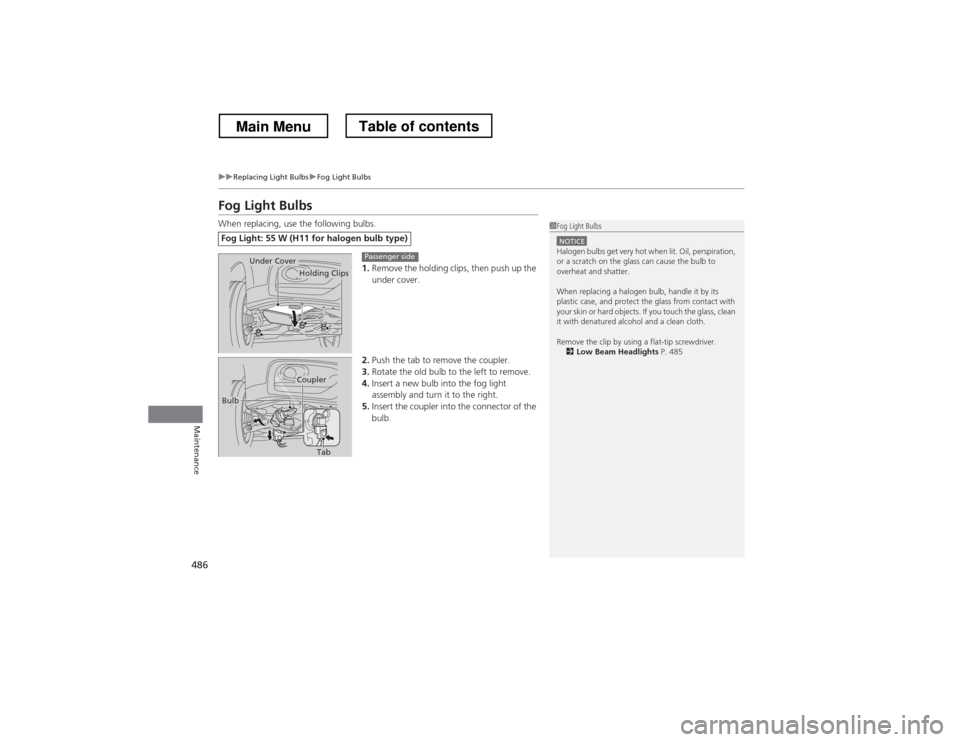
When replacing, use the following bulbs.1.Remove the holding clips, then push up the
under cover.
2. Push the tab to remove the coupler.
3. Rotate the old bulb to the left to remove.
4. Insert a new bulb into the fog light
assembly and turn it to the right.
5. Insert the coupler into the connector of the
bulb.
Fog Light: 55 W (H11 fo r halogen bulb type)
1Fog Light Bulbs
NOTICEHalogen bulbs get very hot when lit. Oil, perspiration,
or a scratch on the glass can cause the bulb to
overheat and shatter.
When replacing a halogen bulb, handle it by its
plastic case, and protect the glass from contact with
your skin or hard objects. If you touch the glass, clean
it with denatured alcohol and a clean cloth.
Remove the clip by using a flat-tip screwdriver.
2 Low Beam Headlights P. 485
Holding ClipsUnder CoverPassenger side
Tab
Coupler
Bulb
Main MenuTable of contents
Page 488 of 573
487
uuReplacing Light BulbsuFog Light Bulbs
Maintenance
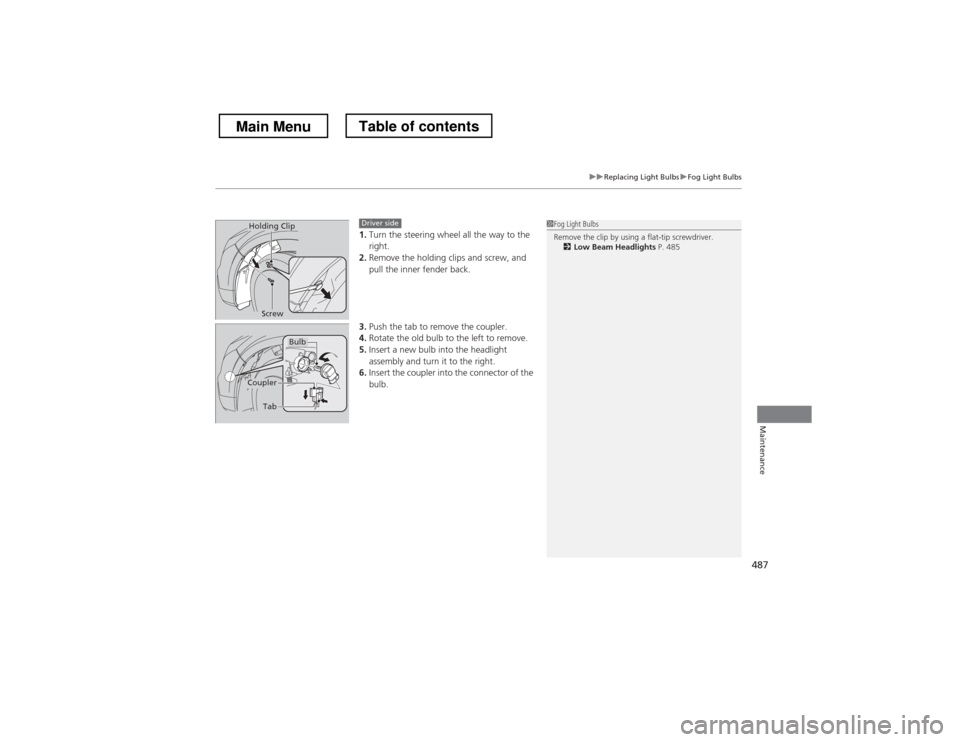
1.Turn the steering wheel all the way to the right.
2. Remove the holding clips and screw, and
pull the inner fender back.
3. Push the tab to remove the coupler.
4. Rotate the old bulb to the left to remove.
5. Insert a new bulb into the headlight
assembly and turn it to the right.
6. Insert the coupler into the connector of the
bulb.1Fog Light Bulbs
Remove the clip by using a flat-tip screwdriver.
2 Low Beam Headlights P. 485Holding Clip
ScrewDriver side
Bulb
Coupler
Tab
Main MenuTable of contents
Page 489 of 573
488
uuReplacing Light BulbsuFront Side Marker Light Bulb
Maintenance
Front Side Marker Light Bulb
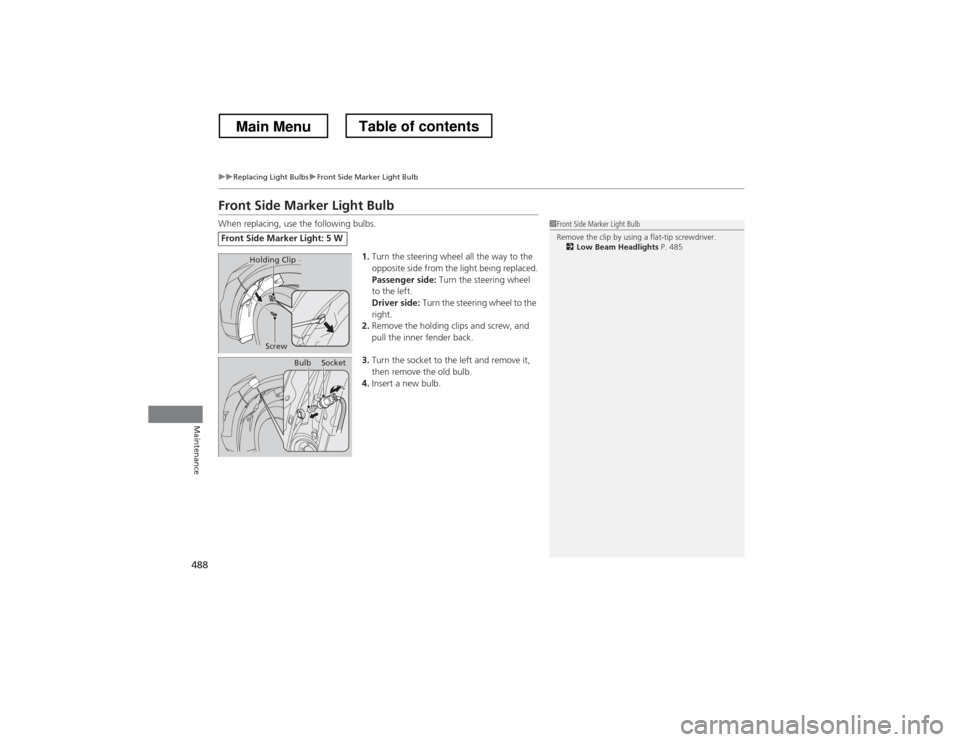
When replacing, use the following bulbs.1.Turn the steering wheel all the way to the
opposite side from the light being replaced.
Passenger side: Turn the steering wheel
to the left.
Driver side: Turn the steering wheel to the
right.
2. Remove the holding clips and screw, and
pull the inner fender back.
3. Turn the socket to the left and remove it,
then remove the old bulb.
4. Insert a new bulb.
Front Side Marker Light: 5 W
1Front Side Marker Light Bulb
Remove the clip by using a flat-tip screwdriver.
2 Low Beam Headlights P. 485
Holding Clip
Screw
BulbSocket
Main MenuTable of contents
Page 490 of 573
489
uuReplacing Light BulbsuFront Turn Signal/Parking Light Bulbs
Continued
Maintenance
Front Turn Signal/Parking Light Bulbs
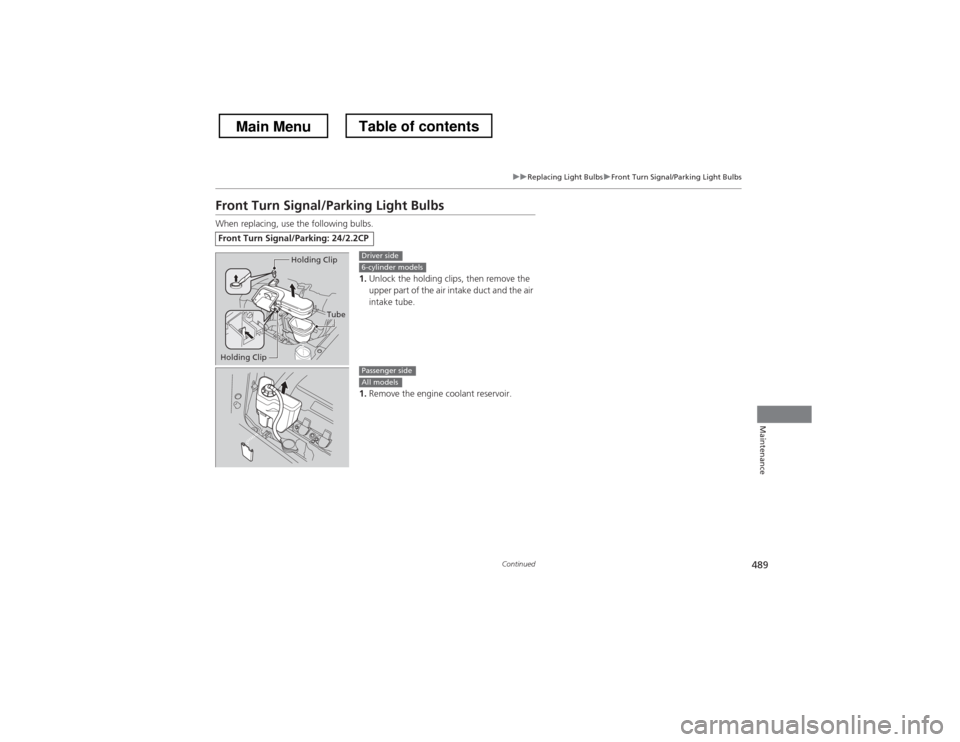
When replacing, use the following bulbs.1.Unlock the holding clips, then remove the
upper part of the air intake duct and the air intake tube.
1. Remove the engine coolant reservoir.
Front Turn Signal/Parking: 24/2.2CP
Tube
Holding Clip
Holding Clip
Driver side6-cylinder models
Passenger sideAll models
Main MenuTable of contents