Continued
87
uuGauges and intelligent Multi-Information Display (i-MID)uintelligent Multi-Information Display (i-MID)
Instrument Panel
Shows the average speed in mph or km/h since the last time Trip A or Trip B was
reset.
Shows the remaining oil life and Maintenance Minder
TM.
2Maintenance Minder
TM P. 255
Shows the outside temperature in Fahrenheit (U.S.) or Celsius (Canada).■Adjusting the outside temperature display
Adjust the temperature reading up to ±5°F or ±3°C if the temperature reading
seems incorrect.
Shows the instant fuel economy as a bar graph in mpg or l/100 km.
Shows you turn-by-turn driving directions to your destination linked with the
navigation system.2Refer to the navigation system manual■Average Speed■Engine Oil Life■Outside Temperature■Instant Fuel Economy■Turn-by-Turn Direction
*
1Outside Temperature
The temperature sensor is in the front bumper.
Road heat and exhaust from another vehicle can
affect the temperature reading when your vehicle
speed is less than 19 mph (30 km/h).
It may take several minutes for the display to be
updated after the temperature reading has stabilized.
Use the i-MID’s customized features to correct the
temperature.
2Customized Features P. 911Turn-by-Turn Direction
*
You can select whether the turn-by-turn display
comes on or not during the route guidance.
2Customized Features P. 91
* Not available on all models
104Controls
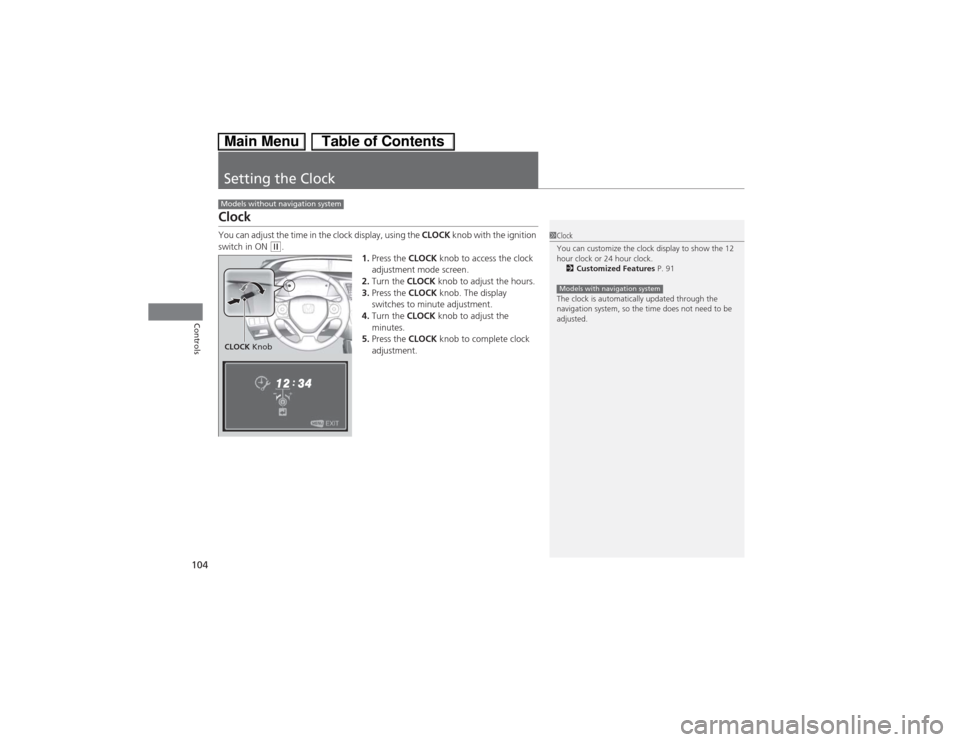
Setting the ClockClockYou can adjust the time in the clock display, using the CLOCK knob with the ignition
switch in ON
(w.
1.Press the CLOCK knob to access the clock
adjustment mode screen.
2.Turn the CLOCK knob to adjust the hours.
3.Press the CLOCK knob. The display
switches to minute adjustment.
4.Turn the CLOCK knob to adjust the
minutes.
5.Press the CLOCK knob to complete clock
adjustment.
Models without navigation system
1Clock
You can customize the clock display to show the 12
hour clock or 24 hour clock.
2Customized Features P. 91
The clock is automatically updated through the
navigation system, so the time does not need to be
adjusted.Models with navigation system
CLOCK Knob