Page 180 of 346
179
uuBluetooth® HandsFreeLink®uHFL Menus
Continued
Features
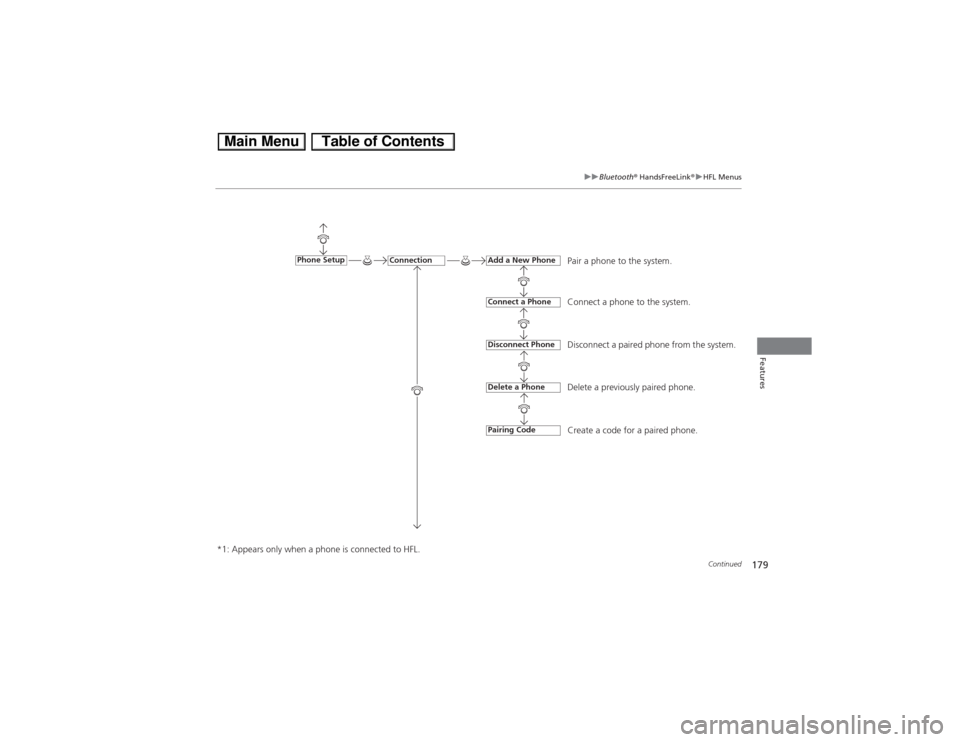
Pair a phone to the system.
Connect a phone to the system.
Disconnect a paired phone from the system.
Delete a previously paired phone.
Create a code for a paired phone.
Connection
Phone Setup
Add a New PhoneConnect a PhoneDisconnect PhoneDelete a PhonePairing Code
*1: Appears only when a phone is connected to HFL.
Page 181 of 346
180
uuBluetooth® HandsFreeLink®uHFL Menus
Features
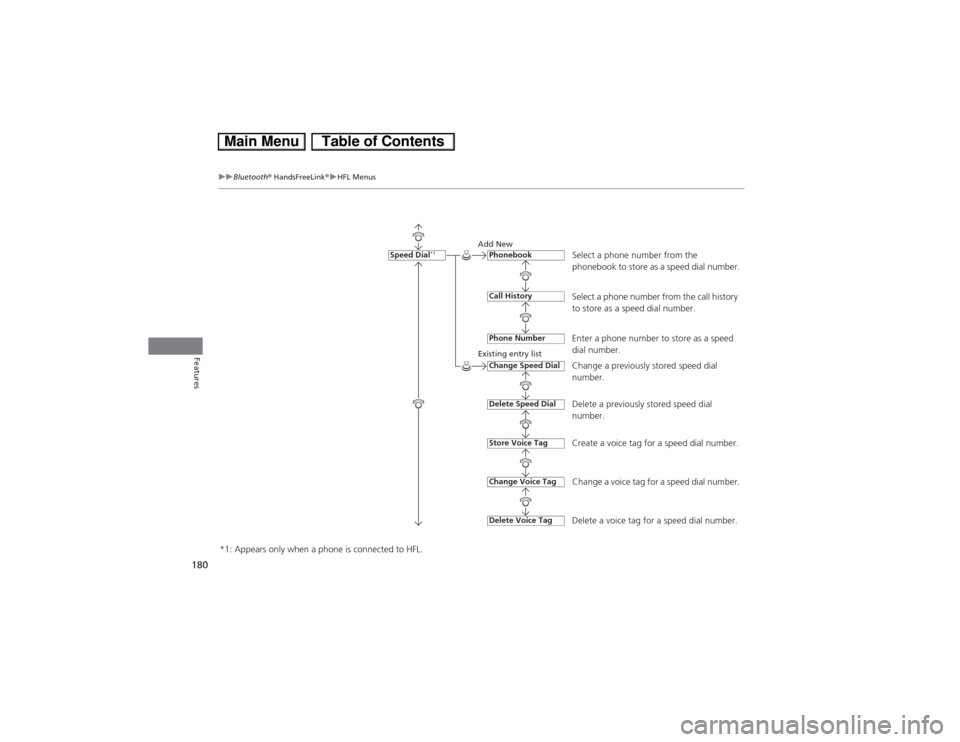
Select a phone number from the
phonebook to store as a speed dial number.
Add New
Existing entry list
Select a phone number from the call history
to store as a speed dial number.
Enter a phone number to store as a speed
dial number.
Change a previously stored speed dial
number.
Delete a previously stored speed dial
number.
Create a voice tag for a speed dial number.
Change a voice tag for a speed dial number.
Delete a voice tag for a speed dial number.
Speed Dial
*1
PhonebookCall HistoryPhone NumberChange Speed DialDelete Speed DialStore Voice TagDelete Voice TagChange Voice Tag
*1: Appears only when a phone is connected to HFL.
Page 182 of 346
181
uuBluetooth® HandsFreeLink®uHFL Menus
Continued
Features
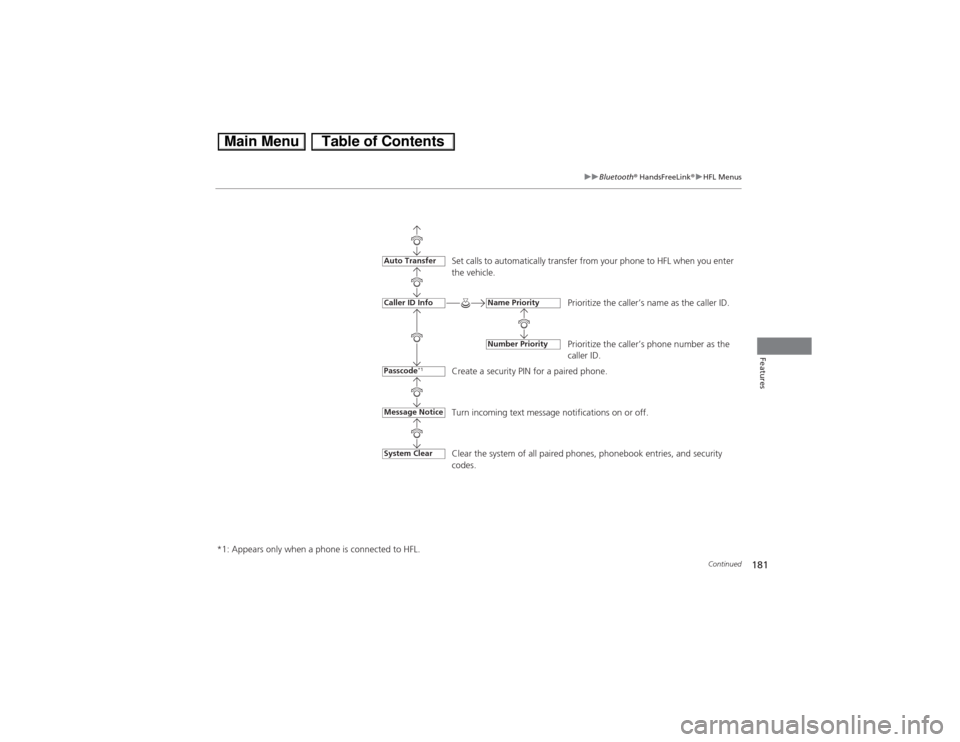
Set calls to automatically transfer from your phone to HFL when you enter
the vehicle.
Prioritize the caller’s name as the caller ID.
Prioritize the caller’s phone number as the
caller ID.
Create a security PIN for a paired phone.
Turn incoming text message notifications on or off.
Message NoticeAuto TransferCaller ID InfoPasscode
*1
Name PriorityNumber Priority
*1: Appears only when a phone is connected to HFL.Clear the system of all paired phones, phonebook entries, and security
codes.
System Clear
Page 183 of 346
uuBluetooth® HandsFreeLink®uHFL Menus
182Features
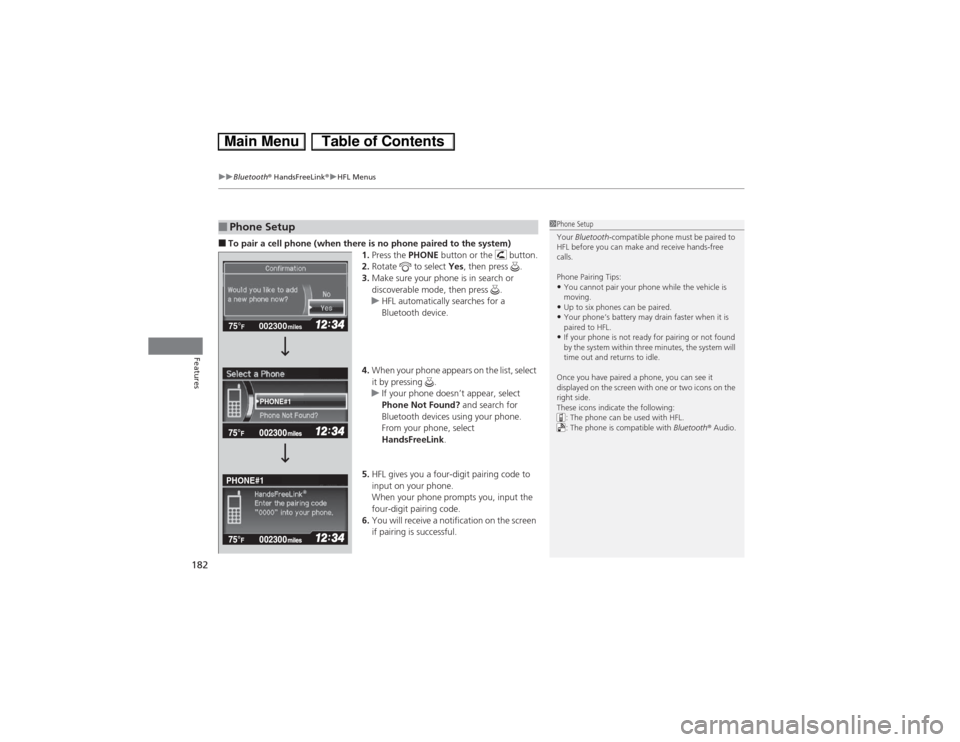
■To pair a cell phone (when there is no phone paired to the system)
1.Press the PHONE button or the button.
2.Rotate to select Yes, then press .
3.Make sure your phone is in search or
discoverable mode, then press .
uHFL automatically searches for a
Bluetooth device.
4.When your phone appears on the list, select
it by pressing .
uIf your phone doesn’t appear, select
Phone Not Found? and search for
Bluetooth devices using your phone.
From your phone, select
HandsFreeLink.
5.HFL gives you a four-digit pairing code to
input on your phone.
When your phone prompts you, input the
four-digit pairing code.
6.You will receive a notification on the screen
if pairing is successful.■Phone Setup
1Phone Setup
Your Bluetooth-compatible phone must be paired to
HFL before you can make and receive hands-free
calls.
Phone Pairing Tips:•You cannot pair your phone while the vehicle is
moving.•Up to six phones can be paired.•Your phone’s battery may drain faster when it is
paired to HFL.•If your phone is not ready for pairing or not found
by the system within three minutes, the system will
time out and returns to idle.
Once you have paired a phone, you can see it
displayed on the screen with one or two icons on the
right side.
These icons indicate the following:
: The phone can be used with HFL.
: The phone is compatible with Bluetooth® Audio.
002300 75°
F miles
PHONE#1
PHONE#1
Page 184 of 346
183
uuBluetooth® HandsFreeLink®uHFL Menus
Continued
Features
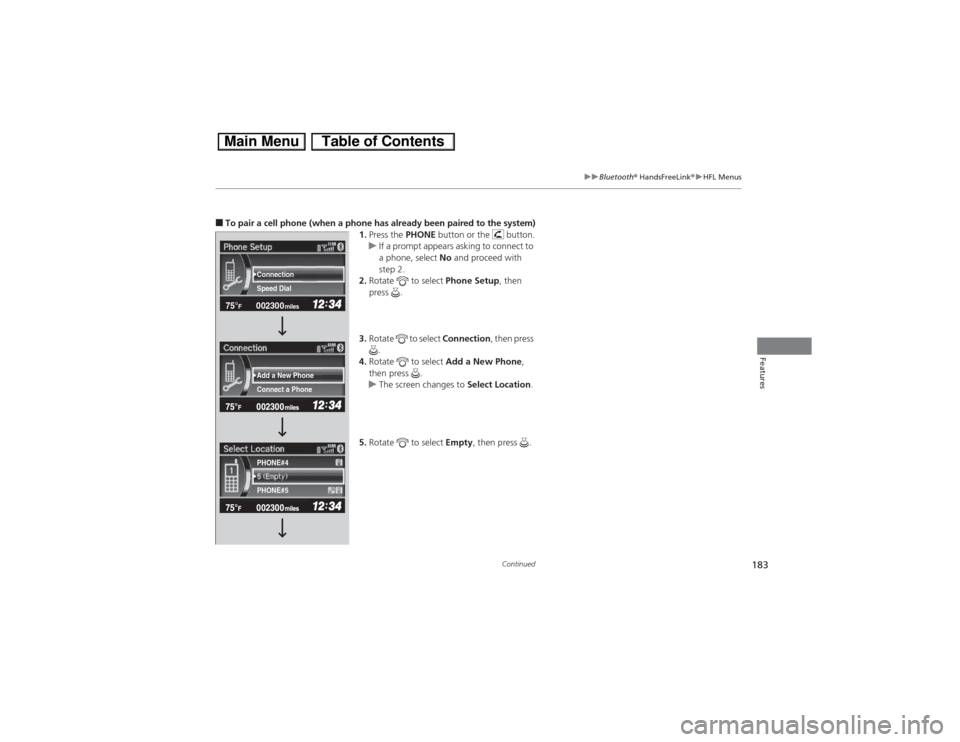
■To pair a cell phone (when a phone has already been paired to the system)
1.Press the PHONE button or the button.
uIf a prompt appears asking to connect to
a phone, select No and proceed with
step 2.
2.Rotate to select Phone Setup, then
press .
3.Rotate to select Connection, then press
.
4.Rotate to select Add a New Phone,
then press .
uThe screen changes to Select Location.
5.Rotate to select Empty, then press .
002300 75°
F miles
Connect a Phone Add a New Phone Speed Dial Connection
PHONE#4
PHONE#5
Page 185 of 346
184
uuBluetooth® HandsFreeLink®uHFL Menus
Features
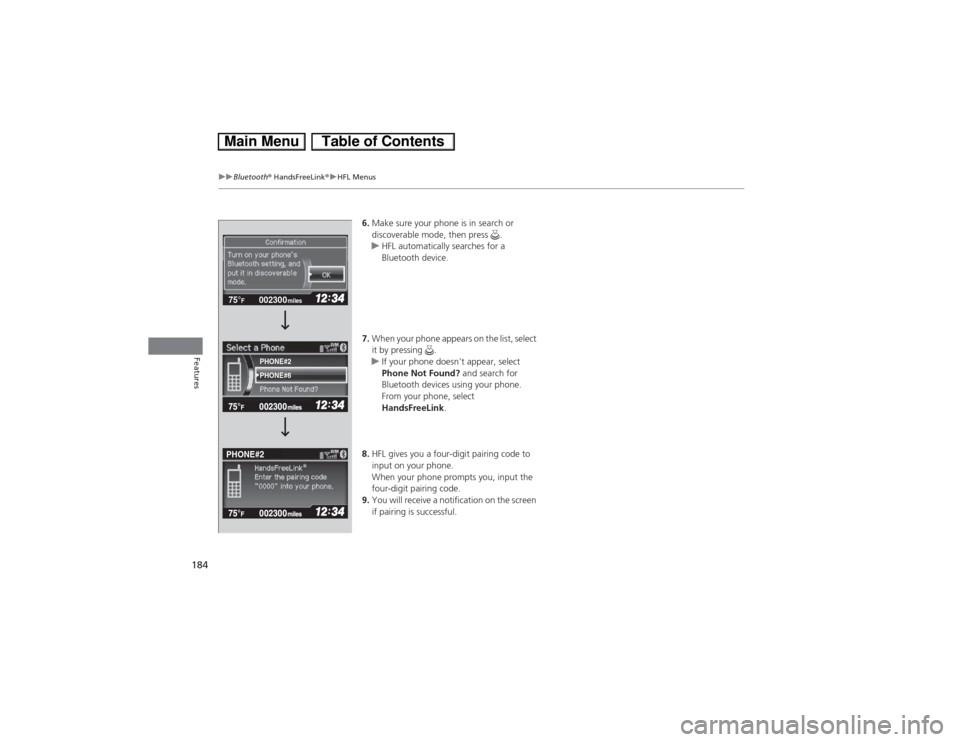
6.Make sure your phone is in search or
discoverable mode, then press .
uHFL automatically searches for a
Bluetooth device.
7.When your phone appears on the list, select
it by pressing .
uIf your phone doesn’t appear, select
Phone Not Found? and search for
Bluetooth devices using your phone.
From your phone, select
HandsFreeLink.
8.HFL gives you a four-digit pairing code to
input on your phone.
When your phone prompts you, input the
four-digit pairing code.
9.You will receive a notification on the screen
if pairing is successful.
002300 75°
F miles
PHONE#6
PHONE#2
PHONE#2
Page 186 of 346
Continued
185
uuBluetooth® HandsFreeLink®uHFL Menus
Features
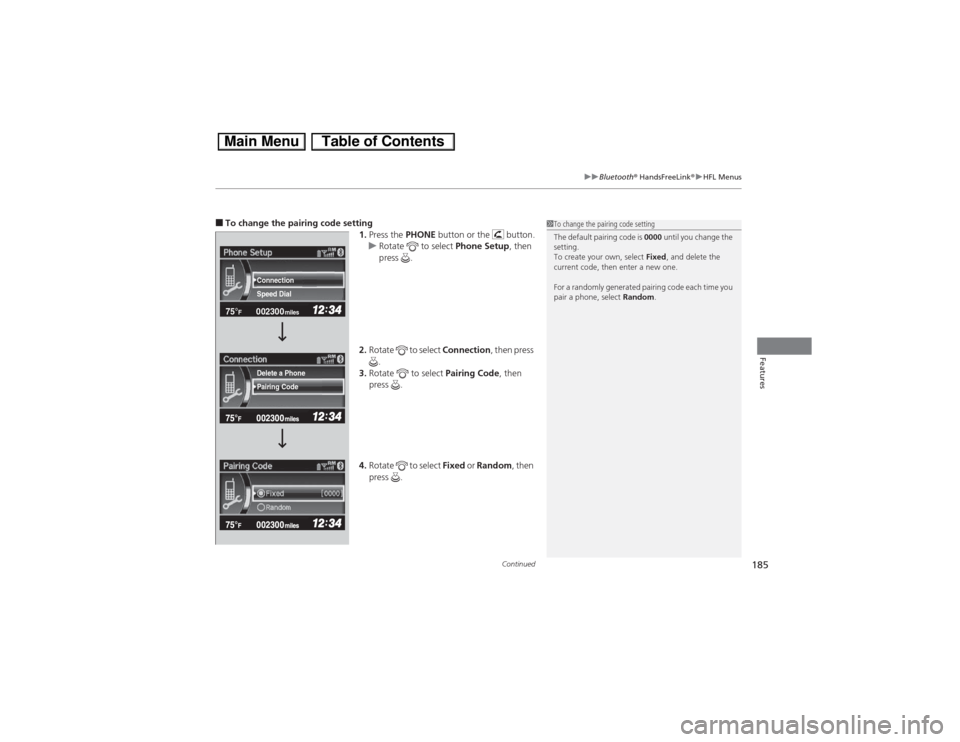
■To change the pairing code setting
1.Press the PHONE button or the button.
uRotate to select Phone Setup, then
press .
2.Rotate to select Connection, then press
.
3.Rotate to select Pairing Code, then
press .
4.Rotate to select Fixed or Random, then
press .
1To change the pairing code setting
The default pairing code is 0000 until you change the
setting.
To create your own, select Fixed, and delete the
current code, then enter a new one.
For a randomly generated pairing code each time you
pair a phone, select Random.
002300 75°
F miles
Speed Dial Connection
Pairing Code Delete a Phone
Page 187 of 346
186
uuBluetooth® HandsFreeLink®uHFL Menus
Features
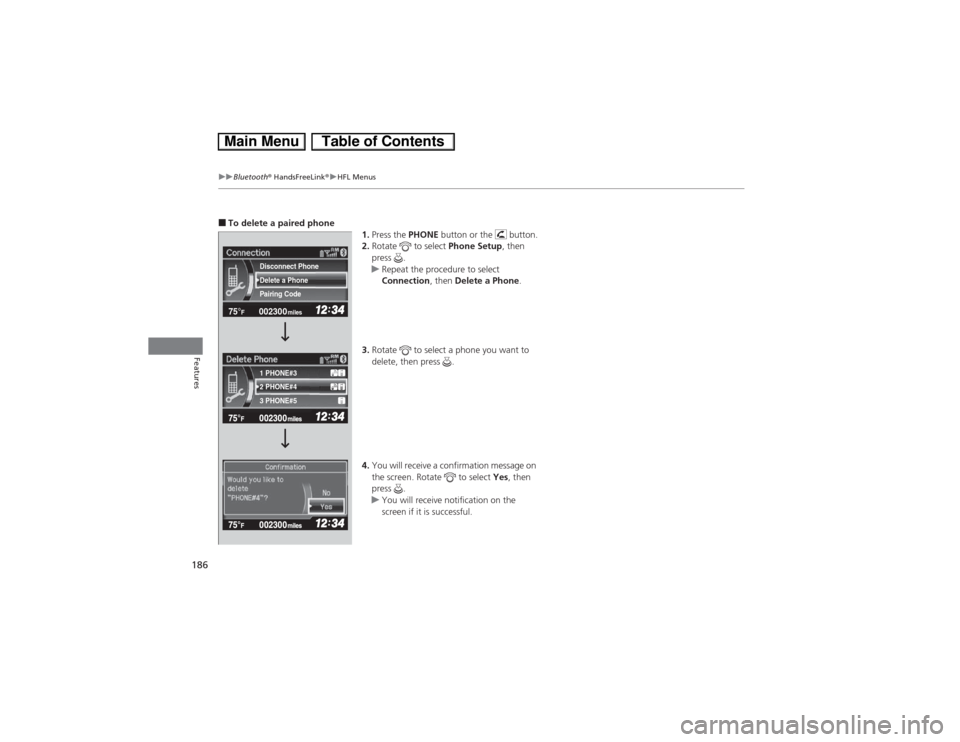
■To delete a paired phone
1.Press the PHONE button or the button.
2.Rotate to select Phone Setup, then
press .
uRepeat the procedure to select
Connection, then Delete a Phone.
3.Rotate to select a phone you want to
delete, then press .
4.You will receive a confirmation message on
the screen. Rotate to select Yes, then
press .
uYou will receive notification on the
screen if it is successful.
002300 75°
F miles
2 PHONE#4 1 PHONE#3
3 PHONE#5 Pairing Code Delete a Phone
Disconnect Phone