2013 HONDA ACCORD air control
[x] Cancel search: air controlPage 171 of 595

uuClimate Control System
*uUsing Automatic Climate Control
170Controls
Pressing the button turns the air
conditioning system on and automatically
switches the system to fresh air mode.
Press the button again to turn off, the
system returns to the previous settings.
■To rapidly defrost the windows
1.Press the button.
2. Press the button.■Defrosting the Windshield and Windows
1Defrosting the Windshield and Windows
For your safety, make sure you have a clear view
through all the windows before driving.
Do not set the temperature near the upper or lower
limit.
When cold air hits the windshield, the outside of the
windshield may fog up.
If the side windows fog up, adjust the vents so that
the air hits the side windows.1To rapidly defrost the windows
After defrosting the windows, switch over to fresh air
mode. If you keep the system in recirculation mode,
the windows may fog up from humidity. This
impedes visibility.
Page 246 of 595
245
uuAudio System Basic Operation uVoice Control Operation
Continued
Features
Voice Control OperationYour vehicle has a voice control system that allows hands-free operation of most of
the navigation system functions.
The voice control system uses the (Talk) and (hang-up/back) buttons on the
steering wheel and a microphone near the map lights on the ceiling.
To achieve optimum voice recognition when using the navigation voice control
system:
• Make sure the correct screen is displayed for the voice command that you are
using.
• Close the windows and moonroof.
• Adjust the dashboard and side vents so air does not blow onto the microphone
on the ceiling.
• Speak clearly in a clear, natural speaking voice without pausing between words.
• Reduce any background noise if possible. The system may misinterpret your
command if more than one person is speaking at the same time.
• Refer to the Voice Help feature.
2 Refer to the navigation System Manual
■Voice Recognition
1Voice Control Operation
When you press the button, a helpful prompt asks
what you would like to do. Press and release the
button again to bypass this prompt and give a
command.1Voice Recognition
The voice control system can only be used from the
driver’s seat because the microphone unit removes
noises from the front passenger’s side.
Page 248 of 595
247
uuAudio System Basic Operation uVoice Control Operation
Continued
Features
The system accepts these commands on
most screens.
• Climate control automatic
*1
•Climate control off
*1
•Air conditioner on
*1
•Air conditioner off
*1
•Climate control defrost on
*1
•Climate control defrost off
*1
•Rear defrost on
*1
•Rear defrost off
*1
•Climate control fresh air
• Climate control recirculate
• Climate control vent
• Climate control bi-level
• Climate control floor
• Climate control floor and defrost
• Fan speed up
• Fan speed down
• Fan speed # (#: 1 to 7)
• Temperature # degrees (#: 57 to 87°F)
• Driver temperature # degrees (#: 57 to
87°F)
• Passenger temperature # degrees (#: 57
to 87°F)
• Temperature up
• Temperature down
• Driver temperature up■Climate Control Commands
• Driver temperature down
• Passenger temperature up
• Passenger temperature down
• Temperature max heat
• Temperature max cool
• Driver temperature max heat
• Driver temperature max cool
• Passenger temperature max heat
• Passenger temperature max cool
• Climate control sync on
*1
•Climate control sync off
*1
*1: These commands toggle the function
on and off, so the command may not match
your intended action.
The system accepts these commands on
most screens.■Using Song By Voice
TM
Song By Voice
TM is a feature that allows you
to select music from your Hard Disc Drive or
iPod ® device using your voice.
To activate this mode, you must press the (Talk) button on the Voice Portal screen
and say: “Music search.”
■
Audio Commands
■Song By Voice
TM commands
• Music search
• List album (specify album)
• List artist (specify artist)
• List composer (specify composer)
• List genre (specify genre)
• List playlist (specify playlist)
• Play album (specify album)
• Play artist (specify artist)
• Play composer (specify composer)
• Play genre (specify genre)
• Play playlist (specify playlist)
• Play song (specify song)
• What am I listening to?
• Who am I listening to?
• Who is this?
• What’s playing?
• Who’s playing?
• What album is this?
Page 288 of 595

287
uuAudio System Basic Operation uPlaying Bluetooth ® Audio
Continued
Features
Playing Bluetooth® AudioYour audio system allows you to listen to music from your Bluetooth®-compatible
phone.
This function is available when the phone is paired and connected to the vehicle's
Bluetooth ® HandsFreeLink ® (HFL) system.2 Phone Setup P. 382
1Playing Bluetooth ® Audio
Not all Bluetooth -enabled phones with streaming
audio capabilities are compatible with the system.
For a list of compatible phones:•U.S.: Visit www.handsfreelink.honda.com , or call
1-888-528-7876.•Canada: Visit www.handsfreelink.ca , or call 1-888-
528-7876.
In some states, it may be illegal to perform some data
device functions while driving.
If more than one phone is paired to the HFL system,
there will be a delay before the system begins to play.
You can control Bluetooth® Audio using voice
commands.
2 Voice Control Operation P. 245
Bluetooth Indicator
Appears when your
phone is connected
to HFL.
Audio/
Information
Screen
Audio with Touch
Screen
Play Icon
Pause Icon
More
Select to display
the menu items.Source
Select to change
an audio source. (Power) Button
Press to turn the
audio system on and
off.VOL (Volume)
Knob
Turn to adjust the
volume.
Interface Dial/
ENTER Button
Press and turn to
select an item,
then press to set
your selection.
Move up, down,
right and left to
select secondary
menu.
Skip/Seek Icons
Select or
to change files.MENU Button
Press to display
the menu items.Folder Up/Down
Icons
Select or to
change folders.
Page 340 of 595

339
Continued
Features
Bluetooth® HandsFreeLink®Bluetooth® HandsFreeLink ® (HFL) allows you to place and receive phone calls using
your vehicle’s audio system, w ithout handling your cell phone.Using HFL
(Pick-up) button: Press to answer an incoming call.
(Hang-up/back) button: Press to end a call or to cancel a command.
(Talk) button: Press to call a number with a stored voice tag, a phonebook
name, or a number.
PHONE button: Press to go directly to the Phone screen.
Selector knob: Rotate to select an item on the screen, then press .
■HFL Buttons
1Bluetooth ® HandsFreeLink ®
To use HFL, you need a Bluetooth-compatible cell
phone. For a list of compatible phones, pairing
procedures, and special feature capabilities:•U.S.: Visit www.handsfreelink.honda.com , or call
(888) 528-7876.•Canada: Visit www.handsfreelink.ca , or call (888)
528 -7876.
To use HFL, the Bluetooth On/Off setting must be
On .
2 Customized Features P. 299
Voice control tips•Aim the vents away from the ceiling and close the
windows, as noise coming from them may interfere
with the microphone.•Press and release the button when you want to
call a number using a stored voice tag, a
phonebook name, or a number. Speak clearly and
naturally after a beep.•If the microphone picks up voices other than yours,
the command may be misinterpreted.•To change the volume level, use the audio system's
volume knob or the remote audio controls on the
steering wheel.
State or local laws may prohibit the operation of
handheld electronic devices while operating a
vehicle.
Models without navigation systemModels with one display
Talk Button
Volume up
MicrophoneHang-up/Back Button
Pick-up
Button
Volume down
Selector
KnobPHONE
Button
Page 377 of 595
376Features
Bluetooth® HandsFreeLink ®Bluetooth® HandsFreeLink ® (HFL) allows you to place and receive phone calls using
your vehicle’s navigation system, without handling your cell phone.Using HFL
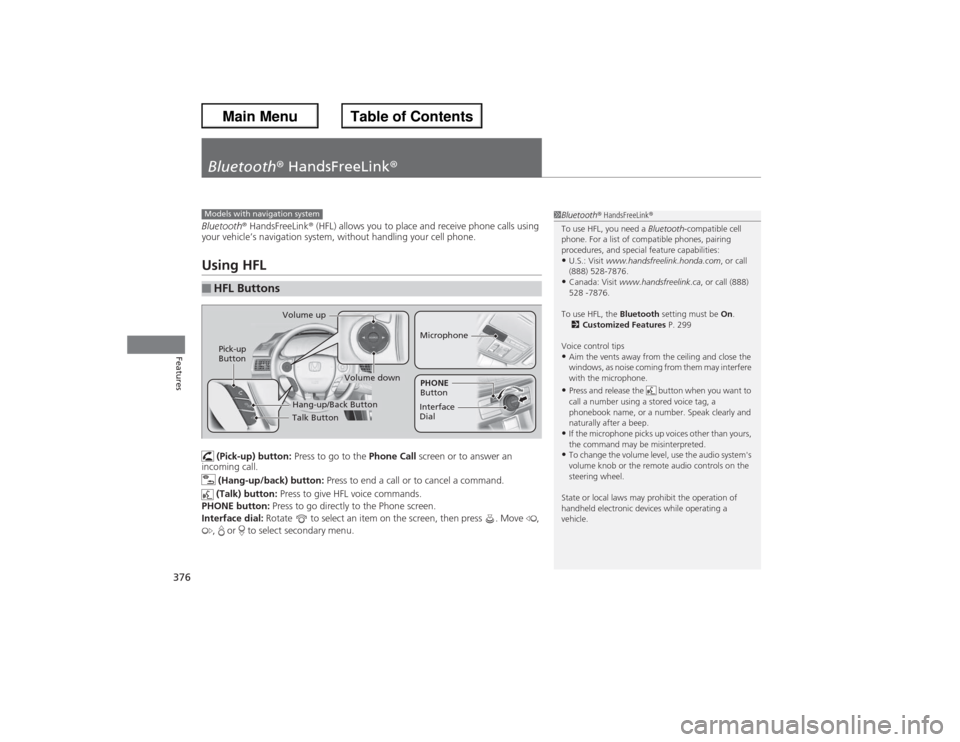
(Pick-up) button: Press to go to the Phone Call screen or to answer an
incoming call.
(Hang-up/back) button: Press to end a call or to cancel a command.
(Talk) button: Press to give HFL voice commands.
PHONE button: Press to go directly to the Phone screen.
Interface dial: Rotate to select an item on the screen, then press . Move ,
, or to select secondary menu.
■HFL Buttons
1 Bluetooth ® HandsFreeLink ®
To use HFL, you need a Bluetooth-compatible cell
phone. For a list of compatible phones, pairing
procedures, and special feature capabilities:•U.S.: Visit www.handsfreelink.honda.com , or call
(888) 528-7876.•Canada: Visit www.handsfreelink.ca , or call (888)
528 -7876.
To use HFL, the Bluetooth setting must be On.
2 Customized Features P. 299
Voice control tips•Aim the vents away from the ceiling and close the
windows, as noise coming from them may interfere
with the microphone.•Press and release the button when you want to
call a number using a stored voice tag, a
phonebook name, or a number. Speak clearly and
naturally after a beep.•If the microphone picks up voices other than yours,
the command may be misinterpreted.•To change the volume level, use the audio system's
volume knob or the remote audio controls on the
steering wheel.
State or local laws may prohibit the operation of
handheld electronic devices while operating a
vehicle.
Models with navigation system
Talk Button
Volume up
MicrophoneHang-up/Back Button
Pick-up
Button
Volume down
Interface
DialPHONE
Button
Page 428 of 595

427
Continued
Driving
When DrivingStarting the Engine
1.Make sure the parking brake is applied.
2. Check that the shift lever is in
(P, then
depress the brake pedal.
u Although it is possible to start the vehicle
in
(N, it is safer to start it in
(P.
2. Check that the shift lever is in
(N. Then
depress the brake pedal with your right
foot, and the clutch pedal with your left
foot.
u The clutch pedal must be fully depressed
to start the engine.
Models without smart entry system
1Starting the Engine
Keep your foot firmly on the brake pedal when
starting the engine.
The engine is harder to start in cold weather and in
thinner air found at altitudes above 8,000 feet (2,400
meters).
When starting the engine in cold weather, turn off all
electrical accessories such as the lights, heating and
cooling system
*/climate control system
*, and rear
defogger in order to reduce battery drain.
If you live in a region where winter is extremely cold,
an engine block heater will improve starting and
warming of the engine. If temperatures consistently
below -22
°F (-30
°C) are expected, the coolant
mixture should be charged to a higher concentration
to prevent freezing. Consult a dealer for details.
If the exhaust system sounds abnormal or you can
smell exhaust gas inside the vehicle, have your vehicle
checked by a dealer. There may be a problem with
the engine or exhaust system.
Brake Pedal
Automatic transmission (CVT) models
Brake Pedal
Clutch Pedal
Manual transmission models
* Not available on all models
Page 430 of 595

429
uuWhen Driving uStarting the Engine
Continued
Driving
Starting the Engine
1. Make sure the parking brake is applied.
2. Check that the shift lever is in
(P, then
depress the brake pedal.
u Although it is possible to start the vehicle
in
(N, it is safer to start it in
(P.
2. Check that the shift lever is in
(N. Then
depress the brake pedal with your right
foot, and the clutch pedal with your left
foot.
u The clutch pedal must be fully depressed
to start the engine.
Models with smart entry system
1Starting the Engine
Keep your foot firmly on the brake pedal when
starting the engine.
The engine is harder to start in cold weather and in
thinner air found at altitudes above 8,000 feet (2,400
meters).
When starting the engine in cold weather, turn off all
electrical accessories such as the lights, climate
control system, and rear defogger in order to reduce
battery drain.
If you live in a region where winter is extremely cold,
an engine block heater will improve starting and
warming of the engine. If temperatures consistently
below -22°F (-30°C) are expected, the coolant
mixture should be changed to a higher concentration
to prevent freezing. Consult a dealer for details.
If the exhaust system sounds abnormal or you can
smell exhaust gas inside the vehicle, have your vehicle
checked by a dealer. There may be a problem with
the engine or exhaust system.
The immobilizer system protects your vehicle from
theft.
If an improperly coded device is used, the engine’s
fuel system is disabled.
2 Immobilizer System P. 124
Brake Pedal
Automatic transmission/CVT models
Brake Pedal
Clutch Pedal
Manual transmission models