2013 GMC SIERRA 1500 locks
[x] Cancel search: locksPage 1 of 534

Black plate (1,1)GMC Sierra Owner Manual - 2013 - crc - 8/14/12
2013 GMC Sierra Owner ManualM
In Brief. . . . . . . . . . . . . . . . . . . . . . . . 1-1
Instrument Panel . . . . . . . . . . . . . . 1-2
Initial Drive Information . . . . . . . . 1-7
Vehicle Features . . . . . . . . . . . . . 1-24
Performance and Maintenance . . . . . . . . . . . . . . . . 1-31
Keys, Doors, and Windows . . . . . . . . . . . . . . . . . . . . 2-1
Keys and Locks . . . . . . . . . . . . . . . 2-1
Doors . . . . . . . . . . . . . . . . . . . . . . . . . . 2-8
Vehicle Security . . . . . . . . . . . . . . 2-10
Exterior Mirrors . . . . . . . . . . . . . . . 2-13
Interior Mirrors . . . . . . . . . . . . . . . . 2-16
Windows . . . . . . . . . . . . . . . . . . . . . 2-17
Roof . . . . . . . . . . . . . . . . . . . . . . . . . . 2-20
Seats and Restraints . . . . . . . . . 3-1
Head Restraints . . . . . . . . . . . . . . . 3-2
Front Seats . . . . . . . . . . . . . . . . . . . . 3-3
Rear Seats . . . . . . . . . . . . . . . . . . . . 3-9
Safety Belts . . . . . . . . . . . . . . . . . . 3-11
Airbag System . . . . . . . . . . . . . . . . 3-20
Child Restraints . . . . . . . . . . . . . . 3-38 Storage
. . . . . . . . . . . . . . . . . . . . . . . 4-1
Storage Compartments . . . . . . . . 4-1
Instruments and Controls . . . . 5-1
Controls . . . . . . . . . . . . . . . . . . . . . . . 5-2
Warning Lights, Gauges, and Indicators . . . . . . . . . . . . . . . . . . . 5-10
Information Displays . . . . . . . . . . 5-28
Vehicle Messages . . . . . . . . . . . . 5-37
Vehicle Personalization . . . . . . . 5-46
Universal Remote System . . . . 5-54
Lighting . . . . . . . . . . . . . . . . . . . . . . . 6-1
Exterior Lighting . . . . . . . . . . . . . . . 6-1
Interior Lighting . . . . . . . . . . . . . . . . 6-7
Lighting Features . . . . . . . . . . . . . . 6-8
Infotainment System . . . . . . . . . 7-1
Introduction . . . . . . . . . . . . . . . . . . . . 7-1
Radio . . . . . . . . . . . . . . . . . . . . . . . . . 7-10
Audio Players . . . . . . . . . . . . . . . . 7-17
Rear Seat Infotainment . . . . . . . 7-38
Phone . . . . . . . . . . . . . . . . . . . . . . . . 7-49
Trademarks and License
Agreements . . . . . . . . . . . . . . . . . 7-56 Climate Controls
. . . . . . . . . . . . . 8-1
Climate Control Systems . . . . . . 8-1
Air Vents . . . . . . . . . . . . . . . . . . . . . 8-10
Driving and Operating . . . . . . . . 9-1
Driving Information . . . . . . . . . . . . . 9-2
Starting and Operating . . . . . . . 9-23
Engine Exhaust . . . . . . . . . . . . . . 9-31
Automatic Transmission . . . . . . 9-32
Drive Systems . . . . . . . . . . . . . . . . 9-38
Brakes . . . . . . . . . . . . . . . . . . . . . . . 9-50
Ride Control Systems . . . . . . . . 9-53
Cruise Control . . . . . . . . . . . . . . . . 9-56
Object Detection Systems . . . . 9-59
Fuel . . . . . . . . . . . . . . . . . . . . . . . . . . 9-65
Towing . . . . . . . . . . . . . . . . . . . . . . . 9-71
Conversions and
Add-Ons . . . . . . . . . . . . . . . . . . . 9-101
Vehicle Care . . . . . . . . . . . . . . . . . 10-1
General Information . . . . . . . . . . 10-2
Vehicle Checks . . . . . . . . . . . . . . . 10-3
Headlamp Aiming . . . . . . . . . . . 10-34
Bulb Replacement . . . . . . . . . . 10-34
Electrical System . . . . . . . . . . . . 10-38
Wheels and Tires . . . . . . . . . . . 10-46
Page 7 of 534

Black plate (1,1)GMC Sierra Owner Manual - 2013 - crc - 8/14/12
In Brief 1-1
In Brief
Instrument Panel
Instrument Panel (Base/UplevelVersion) . . . . . . . . . . . . . . . . . . . . . 1-2
Instrument Panel (Premium Version) . . . . . . . . . . . . . . . . . . . . . 1-5
Initial Drive Information
Initial Drive Information . . . . . . . . 1-7
Remote Keyless Entry (RKE)System . . . . . . . . . . . . . . . . . . . . . . 1-7
Remote Vehicle Start . . . . . . . . . 1-8
Door Locks . . . . . . . . . . . . . . . . . . . 1-8
Windows . . . . . . . . . . . . . . . . . . . . . . 1-9
Seat Adjustment . . . . . . . . . . . . . 1-10
Memory Features . . . . . . . . . . . . 1-12
Heated and Ventilated Seats . . . . . . . . . . . . . . . . . . . . . . . 1-13
Head Restraint Adjustment . . . . . . . . . . . . . . . . . 1-13 Safety Belts . . . . . . . . . . . . . . . . . . 1-13
Passenger Sensing
System . . . . . . . . . . . . . . . . . . . . . 1-14
Mirror Adjustment . . . . . . . . . . . . 1-14
Steering Wheel Adjustment . . . . . . . . . . . . . . . . . 1-16
Throttle and Brake Pedal Adjustment . . . . . . . . . . . . . . . . . 1-17
Interior Lighting . . . . . . . . . . . . . . 1-17
Exterior Lighting . . . . . . . . . . . . . 1-18
Windshield Wiper/Washer . . . . 1-18
Climate Controls . . . . . . . . . . . . . 1-19
Transmission . . . . . . . . . . . . . . . . 1-21
Four-Wheel Drive . . . . . . . . . . . . 1-22
Vehicle Features
Radio(s) . . . . . . . . . . . . . . . . . . . . . 1-24
Satellite Radio . . . . . . . . . . . . . . . 1-25
Portable Audio Devices . . . . . . 1-25
Bluetooth
®. . . . . . . . . . . . . . . . . . . 1-26
Steering Wheel Controls . . . . . 1-26
Cruise Control . . . . . . . . . . . . . . . 1-27 Navigation System . . . . . . . . . . . 1-27
Driver Information
Center (DIC) . . . . . . . . . . . . . . . 1-27
Rear Vision Camera (RVC) . . . . . . . . . . . . . 1-28
Ultrasonic Parking Assist . . . . 1-28
Power Outlets . . . . . . . . . . . . . . . 1-29
Universal Remote System . . . 1-29
Sunroof . . . . . . . . . . . . . . . . . . . . . . 1-29
Performance and Maintenance
StabiliTrak®System . . . . . . . . . 1-31
Tire Pressure Monitor . . . . . . . . 1-31
Engine Oil Life System . . . . . . 1-32
Fuel E85 (85% Ethanol) . . . . . 1-32
Driving for Better Fuel Economy . . . . . . . . . . . . . . . . . . . 1-33
Roadside Assistance Program . . . . . . . . . . . . . . . . . . . . 1-33
OnStar
®. . . . . . . . . . . . . . . . . . . . . 1-33
Page 14 of 534

Black plate (8,1)GMC Sierra Owner Manual - 2013 - crc - 8/14/12
1-8 In Brief
L:Press and release to locate
the vehicle. Press
Land hold for
more than two seconds to sound the
panic alarm. Press
Lagain to
cancel the panic alarm.
See Keys on page 2‑1 andRemote
Keyless Entry (RKE) System
Operation on page 2‑2.
Remote Vehicle Start
With this feature the engine can be
started from outside of the vehicle.
Starting the Vehicle
1. Aim the RKE transmitter at the vehicle.
2. Press and release
Q.
3. Immediately after completing Step 2, press and hold
/for at
least two seconds or until the
turn signal lamps flash. When the vehicle starts, the parking
lamps will turn on and remain on as
long as the engine is running. The
doors will be locked and the climate
control system may come on.
The engine will continue to run for
10 minutes. Repeat the steps for a
10-minute time extension. Remote
start can be extended only once.
Canceling a Remote Start
To cancel a remote start, do one of
the following:
.Aim the RKE transmitter at the
vehicle and press and hold
/
until the parking lamps turn off.
.Turn on the hazard warning
flashers.
.Turn the vehicle on and then
back off.
See Remote Vehicle Start on
page 2‑4.
Door Locks
There are several ways to lock and
unlock the vehicle.
From outside, use the Remote
Keyless Entry (RKE) transmitter or
the key in the driver door.
From inside, use the power door
locks or the manual door locks. To
lock or unlock the door with the
manual locks, push down or pull up
on the manual lock knob.
Page 15 of 534
Black plate (9,1)GMC Sierra Owner Manual - 2013 - crc - 8/14/12
In Brief 1-9
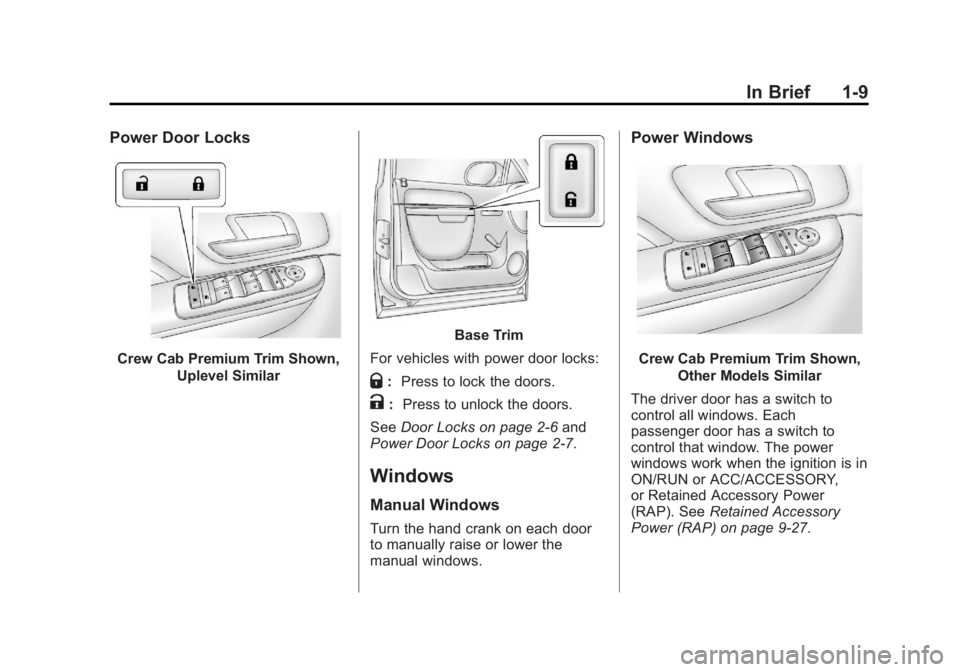
Power Door Locks
Crew Cab Premium Trim Shown,Uplevel Similar
Base Trim
For vehicles with power door locks:
Q: Press to lock the doors.
K: Press to unlock the doors.
See Door Locks on page 2‑6 and
Power Door Locks on page 2‑7.
Windows
Manual Windows
Turn the hand crank on each door
to manually raise or lower the
manual windows.
Power Windows
Crew Cab Premium Trim Shown,
Other Models Similar
The driver door has a switch to
control all windows. Each
passenger door has a switch to
control that window. The power
windows work when the ignition is in
ON/RUN or ACC/ACCESSORY,
or Retained Accessory Power
(RAP). See Retained Accessory
Power (RAP) on page 9‑27.
Page 41 of 534

Black plate (1,1)GMC Sierra Owner Manual - 2013 - crc - 8/14/12
Keys, Doors, and Windows 2-1
Keys, Doors, and
Windows
Keys and Locks
Keys . . . . . . . . . . . . . . . . . . . . . . . . . . 2-1
Remote Keyless Entry (RKE)System . . . . . . . . . . . . . . . . . . . . . . 2-2
Remote Keyless Entry (RKE) System Operation . . . . . . . . . . . 2-2
Remote Vehicle Start . . . . . . . . . 2-4
Door Locks . . . . . . . . . . . . . . . . . . . 2-6
Power Door Locks . . . . . . . . . . . . 2-7
Delayed Locking . . . . . . . . . . . . . . 2-7
Automatic Door Locks . . . . . . . . . 2-7
Lockout Protection . . . . . . . . . . . . 2-8
Safety Locks . . . . . . . . . . . . . . . . . . 2-8
Doors
Rear Doors (Extended Cab) . . . . . . . . . . . . . . 2-8
Tailgate . . . . . . . . . . . . . . . . . . . . . . . 2-9
Vehicle Security
Vehicle Security . . . . . . . . . . . . . . 2-10
Vehicle Alarm System . . . . . . . 2-10
Immobilizer . . . . . . . . . . . . . . . . . . 2-11
Immobilizer Operation . . . . . . . . 2-11
Exterior Mirrors
Convex Mirrors . . . . . . . . . . . . . . 2-13
Manual Mirrors . . . . . . . . . . . . . . . 2-13
Trailer-Tow Mirrors . . . . . . . . . . . 2-13
Power Mirrors . . . . . . . . . . . . . . . . 2-14
Folding Mirrors . . . . . . . . . . . . . . . 2-15
Heated Mirrors . . . . . . . . . . . . . . . 2-16
Park Tilt Mirrors . . . . . . . . . . . . . . 2-16
Interior Mirrors
Manual Rearview Mirror . . . . . . 2-16
Automatic Dimming Rearview Mirror . . . . . . . . . . . . . . . . . . . . . . . 2-17
Windows
Windows . . . . . . . . . . . . . . . . . . . . . 2-17
Manual Windows . . . . . . . . . . . . 2-18
Power Windows . . . . . . . . . . . . . 2-18
Rear Windows . . . . . . . . . . . . . . . 2-19
Sun Visors . . . . . . . . . . . . . . . . . . . 2-19
Roof
Sunroof (Extended Cab) . . . . . 2-20
Sunroof (Crew Cab) . . . . . . . . . 2-21
Keys and Locks
Keys
{WARNING
Leaving children in a vehicle with
the ignition key is dangerous and
children or others could be
seriously injured or killed. They
could operate the power windows
or other controls or make the
vehicle move. The windows will
function with the keys in the
ignition, and children or others
could be caught in the path of a
closing window. Do not leave
children in a vehicle with the
ignition key.
Page 42 of 534

Black plate (2,1)GMC Sierra Owner Manual - 2013 - crc - 8/14/12
2-2 Keys, Doors, and Windows
The key is used for the ignition and
all door locks.
The key has a bar-coded key tag
that the dealer or qualified locksmith
can use to make new keys. Store
this information in a safe place, not
in the vehicle.
See your dealer if a replacement
key or additional key is needed.If the vehicle has an ignition and it
becomes difficult to turn the key,
inspect the key blade for debris.
Periodically clean with a brush
or pick.
With an active OnStar subscription,
an OnStar Advisor may remotely
unlock the vehicle. See
OnStar
Overview on page 14‑1.
Remote Keyless Entry
(RKE) System
See Radio Frequency Statement on
page 13‑20 for information
regarding Part 15 of the Federal
Communications Commission (FCC)
rules and Industry Canada
Standards RSS-GEN/210/220/310.
If there is a decrease in the RKE
operating range:
.Check the distance. The
transmitter may be too far from
the vehicle.
.Check the location. Other
vehicles or objects may be
blocking the signal.
.Check the transmitter's battery.
See “Battery Replacement” later
in this section.
.If the transmitter is still not
working correctly, see your
dealer or a qualified technician
for service.
Remote Keyless Entry
(RKE) System Operation
The Remote Keyless Entry (RKE)
transmitter functions work up to
60 m (195 ft) away from the vehicle.
There are other conditions which
can affect the performance of the
transmitter. See Remote Keyless
Entry (RKE) System on page 2‑2.
Page 46 of 534

Black plate (6,1)GMC Sierra Owner Manual - 2013 - crc - 8/14/12
2-6 Keys, Doors, and Windows
For example, ifQand then/are
pressed again after the vehicle has
been running for five minutes,
10 minutes are added, allowing the
engine to run for 15 minutes.
The additional 10 minutes are
considered a second remote vehicle
start.
Once two remote starts, or a single
remote start with one time extension
has been done, the vehicle must be
started with the key. After the key is
removed from the ignition, the
vehicle can be remote started again.
The vehicle cannot be remote
started if the key is in the ignition,
the hood is not closed, or if there is
an emission control system
malfunction and the check engine
light is on.
Also, the engine will turn off during a
remote vehicle start if the coolant
temperature gets too high or if the
oil pressure gets low.Remote Start Ready
If the vehicle does not have the
remote vehicle start feature, it may
have the remote start ready feature.
This feature allows your dealer to
add the manufacturer's remote
vehicle start feature.
See your dealer to add the
manufacturer's remote vehicle start
feature to the vehicle.
Door Locks
{WARNING
Unlocked doors can be
dangerous.
.Passengers, especially
children, can easily open the
doors and fall out of a moving
vehicle. When a door is
locked, the handle will not
open it. The chance of being
thrown out of the vehicle in a
crash is increased if the
(Continued)
WARNING (Continued)
doors are not locked. So, all
passengers should wear
safety belts properly and the
doors should be locked
whenever the vehicle is
driven.
.Young children who get into
unlocked vehicles may be
unable to get out. A child can
be overcome by extreme heat
and can suffer permanent
injuries or even death from
heat stroke. Always lock the
vehicle whenever leaving it.
.Outsiders can easily enter
through an unlocked door
when you slow down or stop
the vehicle. Locking the doors
can help prevent this from
happening.
There are several ways to lock and
unlock the vehicle.
Page 47 of 534

Black plate (7,1)GMC Sierra Owner Manual - 2013 - crc - 8/14/12
Keys, Doors, and Windows 2-7
From outside, use the Remote
Keyless Entry (RKE) transmitter or
the key in the driver door.
From inside, use the power door
locks or manual door locks. To lock
or unlock the door with the manual
locks, push down or pull up on the
manual lock knob.
Power Door Locks
Crew Cab Premium Trim Shown,Up-Level Similar
Base Trim
For vehicles with power door locks:
Q: Press to lock the doors.
K: Press to unlock the doors.
Delayed Locking
The vehicle may have the delayed
locking feature. When locking the
doors with the power lock switch
and a door is open, the doors will
lock five seconds after the last door
is closed. You will hear three chimes
to signal that the delayed locking
feature is in use. Pressing the power lock switch
twice will override the delayed
locking feature and immediately lock
all the doors.
This feature will not operate if the
key is in the ignition.
This feature can be programmed
using the Driver Information
Center (DIC). See
“Delay Door
Lock” under Vehicle Personalization
(With DIC Buttons) on page 5‑46.
Automatic Door Locks
The vehicle may have an automatic
lock/unlock feature. This feature can
be programmed using the Driver
Information Center (DIC). See
Vehicle Personalization (With DIC
Buttons) on page 5‑46.