2013 FORD SUPER DUTY engine
[x] Cancel search: enginePage 65 of 563

•you have already attempted two remote vehicle starts within the last
hour
•your vehicle is not inP
•your vehicle battery voltage is too low
•the service engine soon light is on.
Remote Starting the Vehicle
Note:You must press each button within three seconds of each other.
Your vehicle will not remote start and the horn will not chirp if you do
not follow this sequence.
The label on your transmitter
details the starting procedure. To
remote start your vehicle:
1. Press the lock button to lock all the doors.
2. Press the remote start button twice. The exterior lamps will flash
twice.
The horn will chirp if the system fails to start.
Note:If you remote start your vehicle with an integrated keyhead
transmitter, you must switch the ignition on before driving your vehicle.
If you remote start your vehicle with an intelligent access transmitter,
you must have a programmed intelligent access key inside your vehicle
and press theSTART/STOPbutton on the instrument panel once while
applying the brake pedal before driving your vehicle.
The power windows will be inhibited during the remote start and the
radio will not turn on automatically.
The parking lamps will remain on and your vehicle will run for 5, 10, or
15 minutes, depending on the setting. See theInformation Displays
chapter to select the duration of the remote start system.
64Keys and Remote Control
2013 F-250/350/450/550(f23)
Owners Guide gf, 1st Printing
USA(fus)
Page 67 of 563
PRINCIPLES OF OPERATION
MyKey® allows you to program keys with restricted driving modes to
promote good driving habits. All but one of the keys programmed to the
vehicle can be activated with these restricted modes. Any keys that have
not been programmed are referred to as an administrator key or admin
key which can be used to:
•create a restricted key
•program optional MyKey settings
•clear all MyKey features altogether.
Once a key has been programmed, you can access the following
information using the information display control:
•How many admin keys and MyKeys are programmed to the vehicle.
•The total distance the vehicle has been driven with a MyKey.
For vehicles equipped with intelligent access (push button start), when
both a MyKey and an admin intelligent access key (fob) are present, the
admin fob will be recognized by the vehicle to start the engine.
Standard Settings
These settings cannot be changed.
•
Belt-Minder. This cannot be disabled and the five–minute timer does not
expire. The audio system is muted when MyKey Belt-Minder is activated.
(Not available in vehicles equipped with AM/FM only audio systems.)
•Early low fuel. Warnings are displayed in the information display control
followed by an audible tone when the fuel tank is at 1/8 tank or less.
•Driver assist features, if equipped on your vehicle, are forced on:
Parking aid, blind spot information system (BLIS) with cross traffic
alert and the collision warning system.
Optional Settings
These settings can be configured right after a MyKey is first created or
changed afterword with an Admin key.
•Vehicle speed limit of 80 mph (130 km/h). Visual warnings are
displayed followed by an audible tone when vehicle speed has reached
80 mph (130 km/h).
•Vehicle speed warning of 45, 55 or 65 mph (75, 90, or 105 km/h).
Visual warnings are displayed followed by an audible tone when the
preselected vehicle speed is exceeded.
66MyKey
2013 F-250/350/450/550(f23)
Owners Guide gf, 1st Printing
USA(fus)
Page 68 of 563

•Audio system maximum volume of 45%. A message in the audio
system is displayed when attempting to exceed the limited volume.
(Not available in vehicles equipped with AM/FM only audio systems.)
•AdvanceTrac. The system cannot be turned off when Always-on has
been set.
CREATING A MYKEY
Use the information display controls to create a MyKey.
For Type 1 information display controls:
1. Insert the key you want to program into the ignition or, if the vehicle
is equipped with push button start, put the Intelligent Access key in
the backup slot; see theStarting and Stopping the Enginechapter
for the backup slot location.
2. Turn the ignition on.
3. Press SETUP using the information display buttons until PRESS
RESET TO CREATE MYKEY is displayed.
4. Press and release the RESET button. HOLD RESET TO CONFIRM
MYKEY will be displayed.
5. Press and hold the RESET button for two seconds until MARK THIS
AS RESTRICTED is displayed Wait until KEY RESTRICTED AT
NEXT START is displayed.
The key is successfully programmed. Make sure you label it so you can
distinguish it from the admin keys.
For Type 2 information display controls:
1. Insert the key you want to program into the ignition or, if the vehicle
is equipped with push button start, put the Intelligent Access key in
the backup slot; see theStarting and Stopping the Enginechapter
for the backup slot location.
2. Turn the ignition on.
3. At the main menu screen select SETTING then MYKEY by pressing
OK or the right arrow key.
4. Press OK to select CREATE MYKEY.
5.
Hold OK as prompted until you see MARK THIS KEY AS RESTRICTED.
The key is successfully programmed. Make sure you label it so you can
distinguish it from the admin keys.
To program optional settings for the key(s), see the
Programming/Changing Optional Settingschapter.
MyKey67
2013 F-250/350/450/550(f23)
Owners Guide gf, 1st Printing
USA(fus)
Page 70 of 563
USING MYKEY WITH REMOTE START SYSTEMS
MyKey is NOT compatible with non-Ford-approved aftermarket remote
start systems. If you choose to install a remote start system please see
your Ford authorized dealer for a Ford-approved remote start system.
MYKEY TROUBLESHOOTING
Condition Potential Causes
I cannot program a
key.•The key in the ignition does not have admin
privileges.
•The key in the ignition is the only admin key
(there always has to be at least one admin
key).
•The intelligent access key is not in the
backup slot (vehicles with push button start).
•SecuriLock passive anti-theft system is
disabled or in unlimited mode.
I cannot program the
optional settings.•The key in the ignition does not have admin
privileges.
•No keys are programmed to the vehicle.
Refer toCreating a MyKey.
I cannot clear the
MyKey programmed
keys.•Key in the ignition does not have admin
privileges.
•No restricted keys are programmed to the
vehicle. Refer toCreating a MyKey.
I lost the only admin
key.•Purchase a new key from your authorized
dealer.
I lost a key.•Program spare keys as outlined under
SecuriLock®in theSecuritychapter.
No restricted key
functions with
intelligent access key
(push button start).•An admin fob is present at engine start-up.
•No MyKey programmed keys are
programmed to the vehicle. Refer toCreating
a MyKey
MyKey miles do not
accumulate.•The MyKey programmed key is not being
used by the intended user.
•The key system has been reset.
MyKey69
2013 F-250/350/450/550(f23)
Owners Guide gf, 1st Printing
USA(fus)
Page 76 of 563
SECURILOCK® PASSIVE ANTI-THEFT SYSTEM (IF EQUIPPED)
Note:The system is not compatible with non-Ford aftermarket remote
start systems. Use of these systems may result in vehicle starting
problems and a loss of security protection.
Note:Metallic objects, electronic devices or a second coded key on the
same key chain may cause vehicle starting issues if they are too close to
the key when starting the engine. Prevent these objects from touching
the coded key while starting the engine. Switch the ignition off, move all
objects on the key chain away from the coded key and restart the engine
if a problem occurs.
Note:Do not leave a duplicate coded key in the vehicle. Always take
your keys and lock all doors when leaving the vehicle.
The system is an engine immobilization system. It is designed to help
prevent the engine from being started unless a coded key programmed
to your vehicle is used. Using the wrong key may prevent the engine
from starting. A message may appear in the information display.
If you are unable to start the engine with a correctly coded key, a
malfunction has happened and a message may appear in the information
display.
Automatic Arming
The vehicle is armed immediately after switching the ignition off.
Automatic Disarming
Switching the ignition on with a coded key disarms the vehicle.
Replacement Keys
Note:Your vehicle may come equipped with two integrated keyhead
transmitters.
The integrated keyhead transmitter functions as a programmed ignition
key that operates all the locks and starts the vehicle, as well as a remote
control.
If your programmed transmitters or standard SecuriLock coded keys are
lost or stolen and you don’t have an extra coded key, you will need to
have your vehicle towed to an authorized dealer. The key codes need to
be erased from your vehicle and new coded keys will need to be
programmed.
Store an extra programmed key away from the vehicle in a safe place to
help prevent any inconveniences. See your authorized dealer to purchase
additional spare or replacement keys.
Security75
2013 F-250/350/450/550(f23)
Owners Guide gf, 1st Printing
USA(fus)
Page 77 of 563
Programming a Spare Key
Note:A maximum of eight coded keys can be programmed to your
vehicle. Only four of these eight can be integrated keyhead transmitters.
You can program your own integrated keyhead transmitters or standard
SecuriLock coded keys to your vehicle. This procedure will program both
the engine immobilizer key code and the remote entry portion of the
remote control to your vehicle.
Only use integrated keyhead transmitters or standard SecuriLock keys.
You must have two previously programmed coded keys and the new
unprogrammed key readily accessible. See your authorized dealer to have
the spare key programmed if two previously programmed coded keys are
not available
Read and understand the entire procedure before you begin.
1. Insert the first previously programmed coded key into the ignition.
2. Turn the ignition from off to on. Keep the ignition on for at least three
seconds, but no more than 10 seconds.
3. Turn the ignition off and remove the first coded key from the ignition.
4. After three seconds but within 10 seconds of removing the first coded
key, insert the second previously coded key into the ignition.
5. Turn the ignition from off to on. Keep the ignition on for at least one
second, but no more than 10 seconds.
6. Turn the ignition off and remove the second previously programmed
coded key from the ignition.
7. After three seconds but within 10 seconds of turning the ignition off
and removing the previously programmed coded key, insert the new
unprogrammed key into the ignition.
8. Turn the ignition from off to on. Keep the ignition on for at least one
second, but no more than 10 seconds.
9. Remove the newly programmed coded key from the ignition.
The key will start the vehicle’s engine and will operate the remote entry
system (if the new key is an integrated keyhead transmitter) if it has
been successfully programmed.
If the key was not successfully programmed, wait 20 seconds and repeat
Steps 1 through 8. Take your vehicle to your authorized dealer to have
the new key programmed if you are still unsuccessful.
Wait 20 seconds and then repeat this procedure from Step 1 to program
an additional key.
76Security
2013 F-250/350/450/550(f23)
Owners Guide gf, 1st Printing
USA(fus)
Page 96 of 563
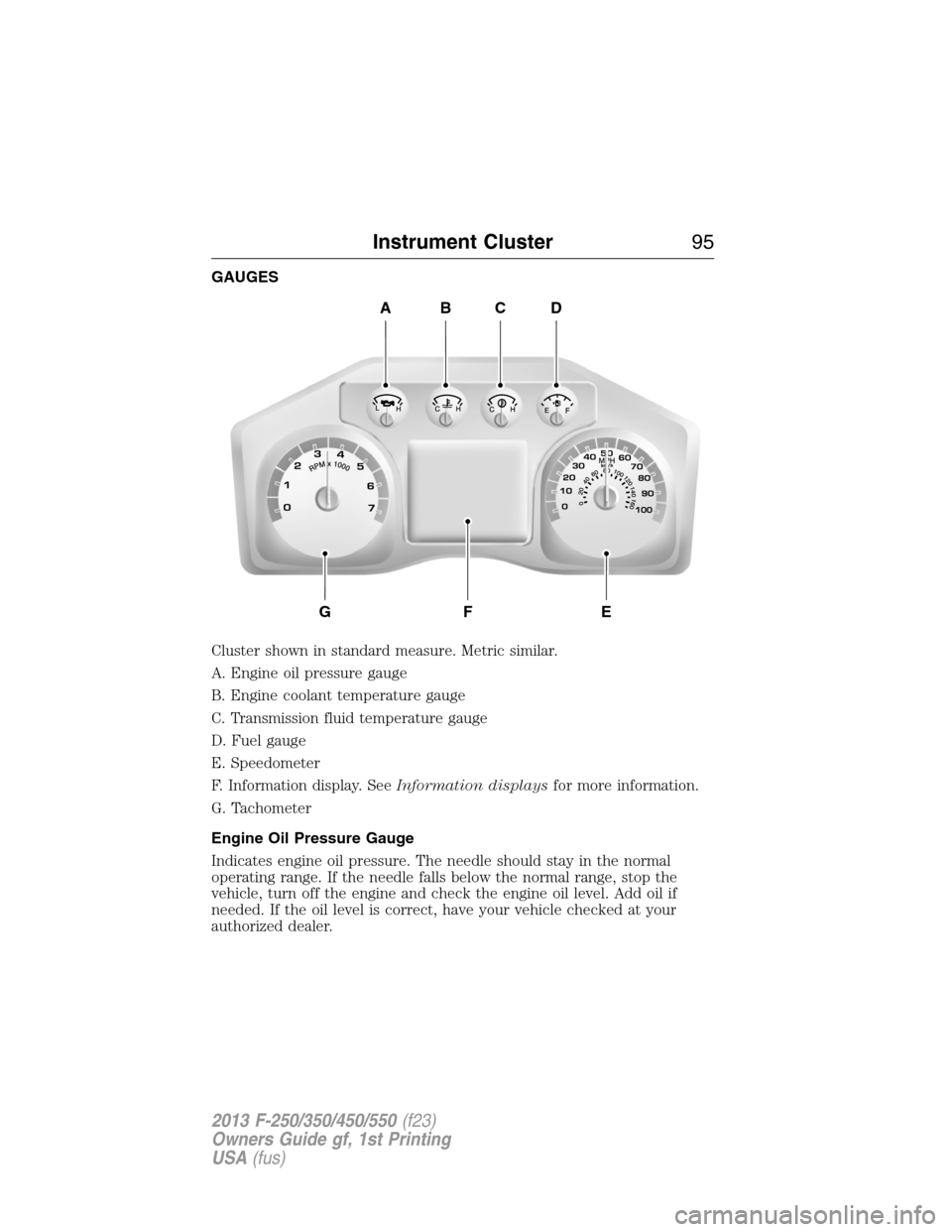
GAUGES
Cluster shown in standard measure. Metric similar.
A. Engine oil pressure gauge
B. Engine coolant temperature gauge
C. Transmission fluid temperature gauge
D. Fuel gauge
E. Speedometer
F. Information display. SeeInformation displaysfor more information.
G. Tachometer
Engine Oil Pressure Gauge
Indicates engine oil pressure. The needle should stay in the normal
operating range. If the needle falls below the normal range, stop the
vehicle, turn off the engine and check the engine oil level. Add oil if
needed. If the oil level is correct, have your vehicle checked at your
authorized dealer.
ABCD
GFE
Instrument Cluster95
2013 F-250/350/450/550(f23)
Owners Guide gf, 1st Printing
USA(fus)
Page 97 of 563

Engine Coolant Temperature Gauge
Indicates engine coolant temperature. At normal operating temperature,
the level indicator will be in the normal range. If the engine coolant
temperature exceeds the normal range, stop the vehicle as soon as safely
possible, switch off the engine and let the engine cool.
WARNING:Never remove the coolant reservoir cap while the
engine is running or hot.
Transmission Fluid Temperature Gauge
Indicates transmission fluid temperature. At normal operating
temperature, the level indicator will be in the normal range. If the
transmission fluid temperature exceeds the normal range, stop the
vehicle as soon as safely possible and verify the airflow is not restricted
such as snow or debris blocking airflow through the grill. Also, higher
than normal operating temperature can be caused by special operation
conditions (i.e. snowplowing, towing or off-road use). Refer toSpecial
operating conditions in the scheduled maintenance informationfor
instructions. Operating the transmission for extended periods of time
with the gauge in the higher than normal area may cause internal
transmission damage. Altering the severity of the driving conditions is
recommended to lower the transmission temperature into the normal
range. If the gauge continues to show high temperatures, see your
authorized dealer.
Fuel Gauge
Indicates approximately how much fuel is left in the fuel tank (when the
ignition is on). The fuel gauge may vary slightly when the vehicle is in
motion or on a grade. The fuel icon and arrow indicates which side of
the vehicle the fuel filler door is located.
Information Display
Odometer
Located in the bottom of the information display Registers the
accumulated distance your vehicle has travelled.
Trip Computer
SeeTrip A/BinInformation Displays.
Vehicle Settings and Personalization
SeeInformation Displays.
96Instrument Cluster
2013 F-250/350/450/550(f23)
Owners Guide gf, 1st Printing
USA(fus)