2013 FORD SUPER DUTY engine
[x] Cancel search: enginePage 408 of 563

Extensive Idling or Low-speed Driving for Long Distances as in
Heavy Commercial Use (i.e., Delivery, Taxi, Patrol Car or Livery)
Every 5000 miles
(8000 km) or six
monthsChange engine oil and filter.
Inspect and lubricate U-joints.
Every 30000 miles
(48000 km)Replace front wheel bearing grease and grease
seals if non-sealed bearings are used.
Every 60000 miles
(96000 km)Change transfer case fluid (4WD vehicles).
Replace spark plugs.
*Vehicles equipped with dual rear wheels should rotate the front wheels
when specified; rear wheels only if unusual wear is noted.
Operating in Dusty or Sandy Conditions Such as Unpaved or
Dusty Roads
Inspect frequently,
service as requiredReplace engine air filter.
Every 5000 miles
(8000 km)Inspect the wheels and related components for
abnormal noise, wear, looseness or drag.
Rotate tires
*, inspect tires for wear and measure
tread depth.
Every 5000 miles
(8000 km) or six
monthsChange engine oil and filter.
Inspect and lubricate U-joints.
Every 30000 miles
(48000 km)Replace front wheel bearing grease and grease
seals if non-sealed bearings are used.
Every 50000 miles
(80000 km)Change rear axle fluid (F-450/550 only).
Every 60000 miles
(96000 km)Change transfer case fluid (4WD vehicles).
*Vehicles equipped with dual rear wheels should rotate the front wheels
when specified; rear wheels only if unusual wear is noted.
Scheduled Maintenance407
2013 F-250/350/450/550(f23)
Owners Guide gf, 1st Printing
USA(fus)
Page 409 of 563
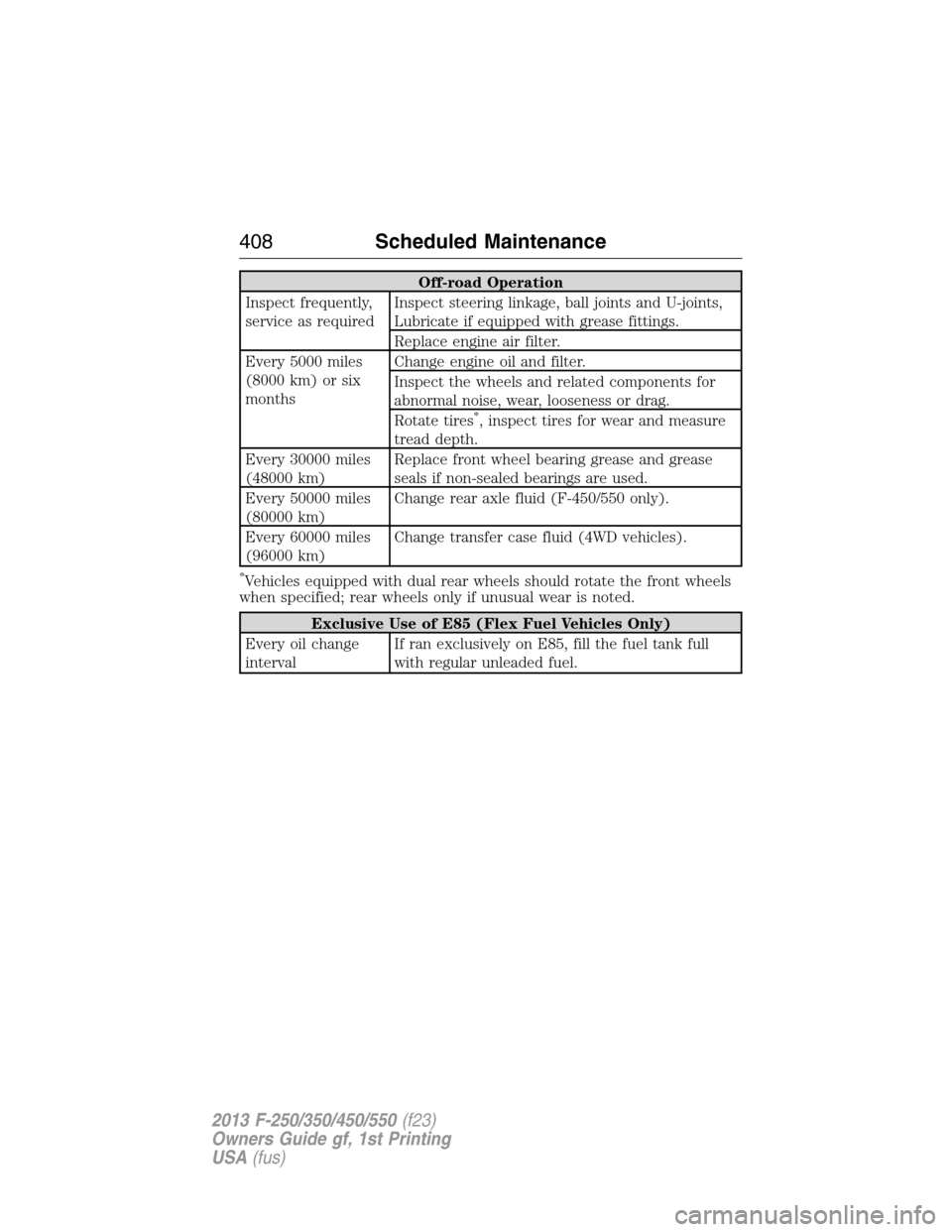
Off-road Operation
Inspect frequently,
service as requiredInspect steering linkage, ball joints and U-joints,
Lubricate if equipped with grease fittings.
Replace engine air filter.
Every 5000 miles
(8000 km) or six
monthsChange engine oil and filter.
Inspect the wheels and related components for
abnormal noise, wear, looseness or drag.
Rotate tires
*, inspect tires for wear and measure
tread depth.
Every 30000 miles
(48000 km)Replace front wheel bearing grease and grease
seals if non-sealed bearings are used.
Every 50000 miles
(80000 km)Change rear axle fluid (F-450/550 only).
Every 60000 miles
(96000 km)Change transfer case fluid (4WD vehicles).
*Vehicles equipped with dual rear wheels should rotate the front wheels
when specified; rear wheels only if unusual wear is noted.
Exclusive Use of E85 (Flex Fuel Vehicles Only)
Every oil change
intervalIf ran exclusively on E85, fill the fuel tank full
with regular unleaded fuel.
408Scheduled Maintenance
2013 F-250/350/450/550(f23)
Owners Guide gf, 1st Printing
USA(fus)
Page 412 of 563
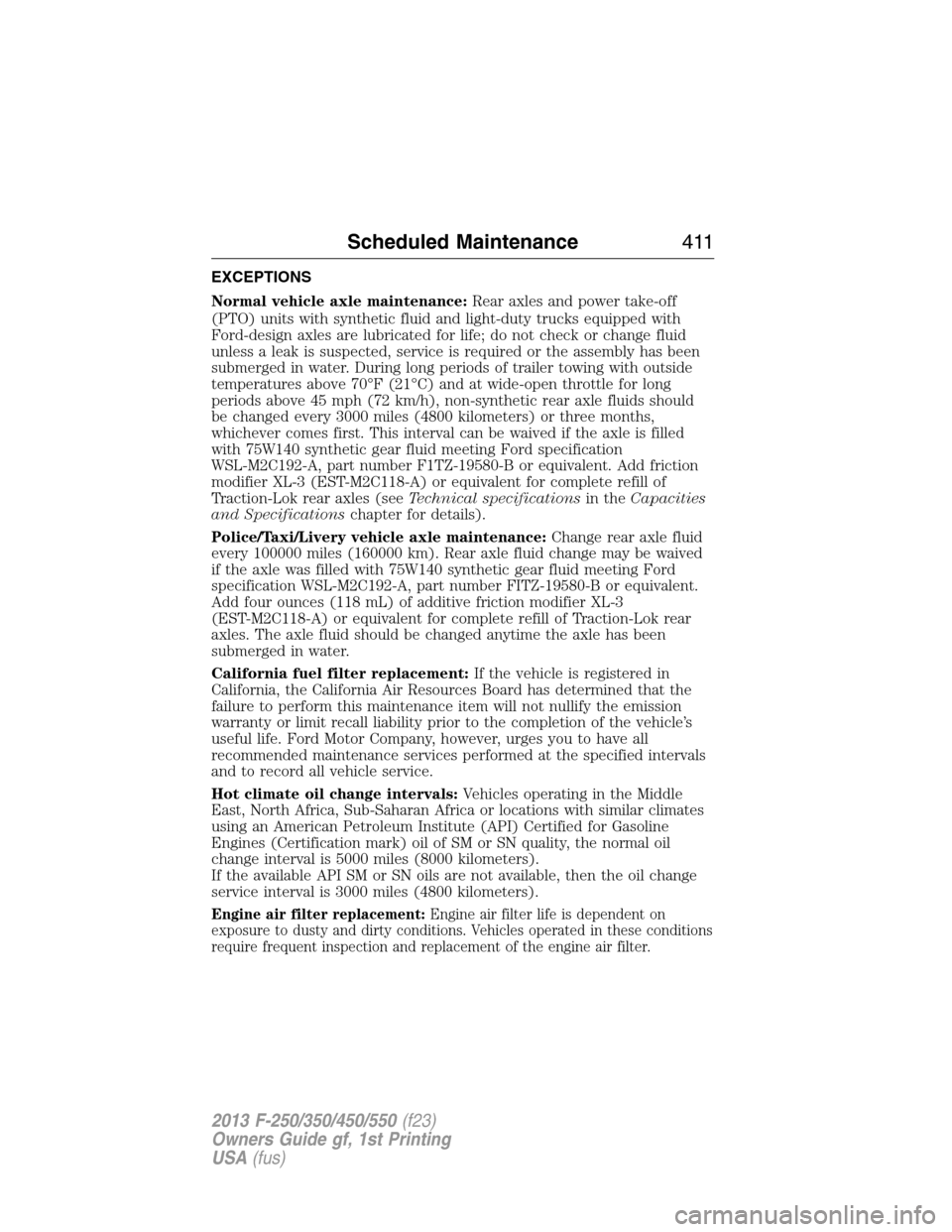
EXCEPTIONS
Normal vehicle axle maintenance:Rear axles and power take-off
(PTO) units with synthetic fluid and light-duty trucks equipped with
Ford-design axles are lubricated for life; do not check or change fluid
unless a leak is suspected, service is required or the assembly has been
submerged in water. During long periods of trailer towing with outside
temperatures above 70°F (21°C) and at wide-open throttle for long
periods above 45 mph (72 km/h), non-synthetic rear axle fluids should
be changed every 3000 miles (4800 kilometers) or three months,
whichever comes first. This interval can be waived if the axle is filled
with 75W140 synthetic gear fluid meeting Ford specification
WSL-M2C192-A, part number F1TZ-19580-B or equivalent. Add friction
modifier XL-3 (EST-M2C118-A) or equivalent for complete refill of
Traction-Lok rear axles (seeTechnical specificationsin theCapacities
and Specificationschapter for details).
Police/Taxi/Livery vehicle axle maintenance:Change rear axle fluid
every 100000 miles (160000 km). Rear axle fluid change may be waived
if the axle was filled with 75W140 synthetic gear fluid meeting Ford
specification WSL-M2C192-A, part number FITZ-19580-B or equivalent.
Add four ounces (118 mL) of additive friction modifier XL-3
(EST-M2C118-A) or equivalent for complete refill of Traction-Lok rear
axles. The axle fluid should be changed anytime the axle has been
submerged in water.
California fuel filter replacement:If the vehicle is registered in
California, the California Air Resources Board has determined that the
failure to perform this maintenance item will not nullify the emission
warranty or limit recall liability prior to the completion of the vehicle’s
useful life. Ford Motor Company, however, urges you to have all
recommended maintenance services performed at the specified intervals
and to record all vehicle service.
Hot climate oil change intervals:Vehicles operating in the Middle
East, North Africa, Sub-Saharan Africa or locations with similar climates
using an American Petroleum Institute (API) Certified for Gasoline
Engines (Certification mark) oil of SM or SN quality, the normal oil
change interval is 5000 miles (8000 kilometers).
If the available API SM or SN oils are not available, then the oil change
service interval is 3000 miles (4800 kilometers).
Engine air filter replacement:Engine air filter life is dependent on
exposure to dusty and dirty conditions. Vehicles operated in these conditions
require frequent inspection and replacement of the engine air filter.
Scheduled Maintenance411
2013 F-250/350/450/550(f23)
Owners Guide gf, 1st Printing
USA(fus)
Page 413 of 563
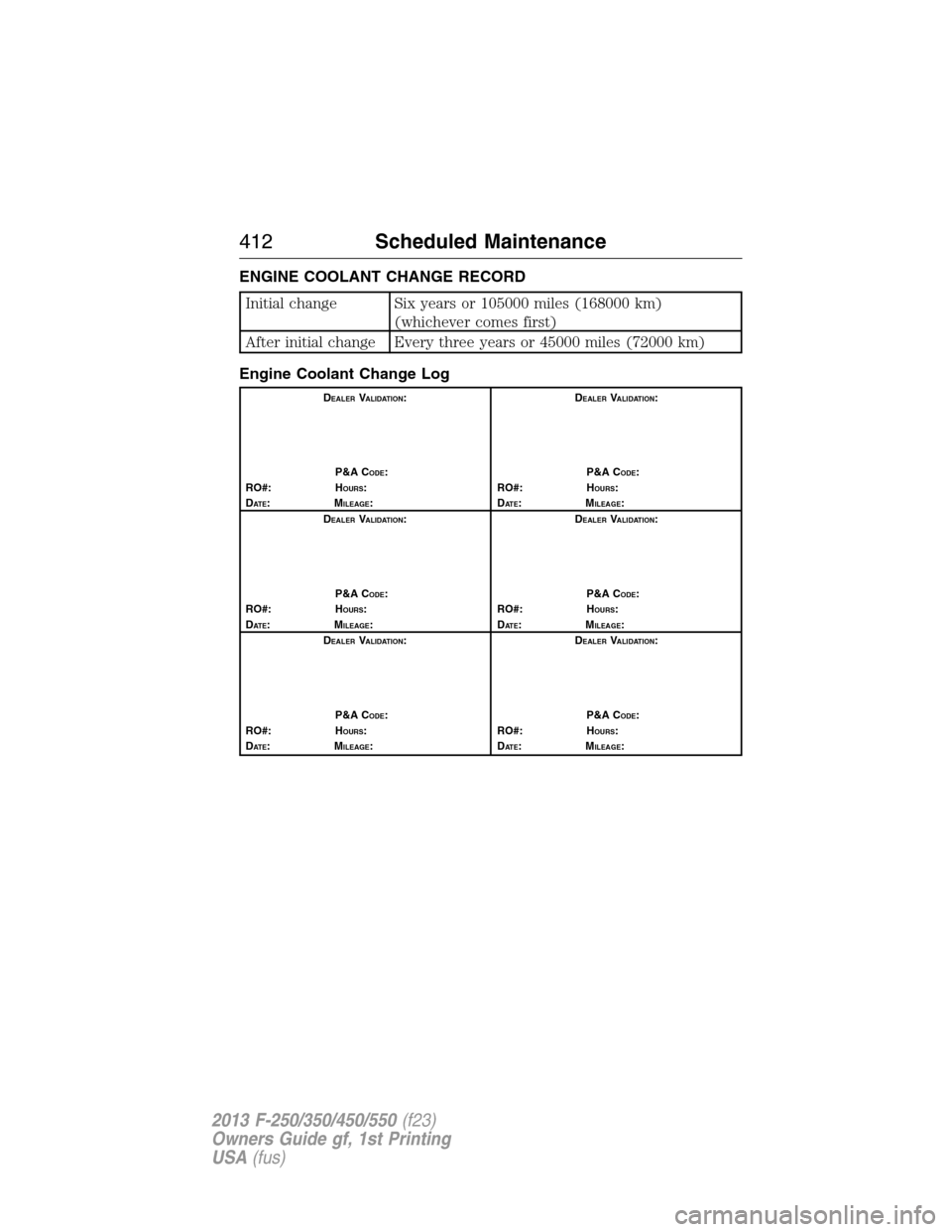
ENGINE COOLANT CHANGE RECORD
Initial change Six years or 105000 miles (168000 km)
(whichever comes first)
After initial change Every three years or 45000 miles (72000 km)
Engine Coolant Change Log
DEALERVALIDATION:
P&A C
ODE:
RO#: HOURS:
DAT E:MILEAGE:D
EALERVALIDATION:
P&A C
ODE:
RO#: HOURS:
DAT E:MILEAGE:
D
EALERVALIDATION:
P&A C
ODE:
RO#: HOURS:
DAT E:MILEAGE:D
EALERVALIDATION:
P&A C
ODE:
RO#: HOURS:
DAT E:MILEAGE:
D
EALERVALIDATION:
P&A C
ODE:
RO#: HOURS:
DAT E:MILEAGE:D
EALERVALIDATION:
P&A C
ODE:
RO#: HOURS:
DAT E:MILEAGE:
412Scheduled Maintenance
2013 F-250/350/450/550(f23)
Owners Guide gf, 1st Printing
USA(fus)
Page 490 of 563
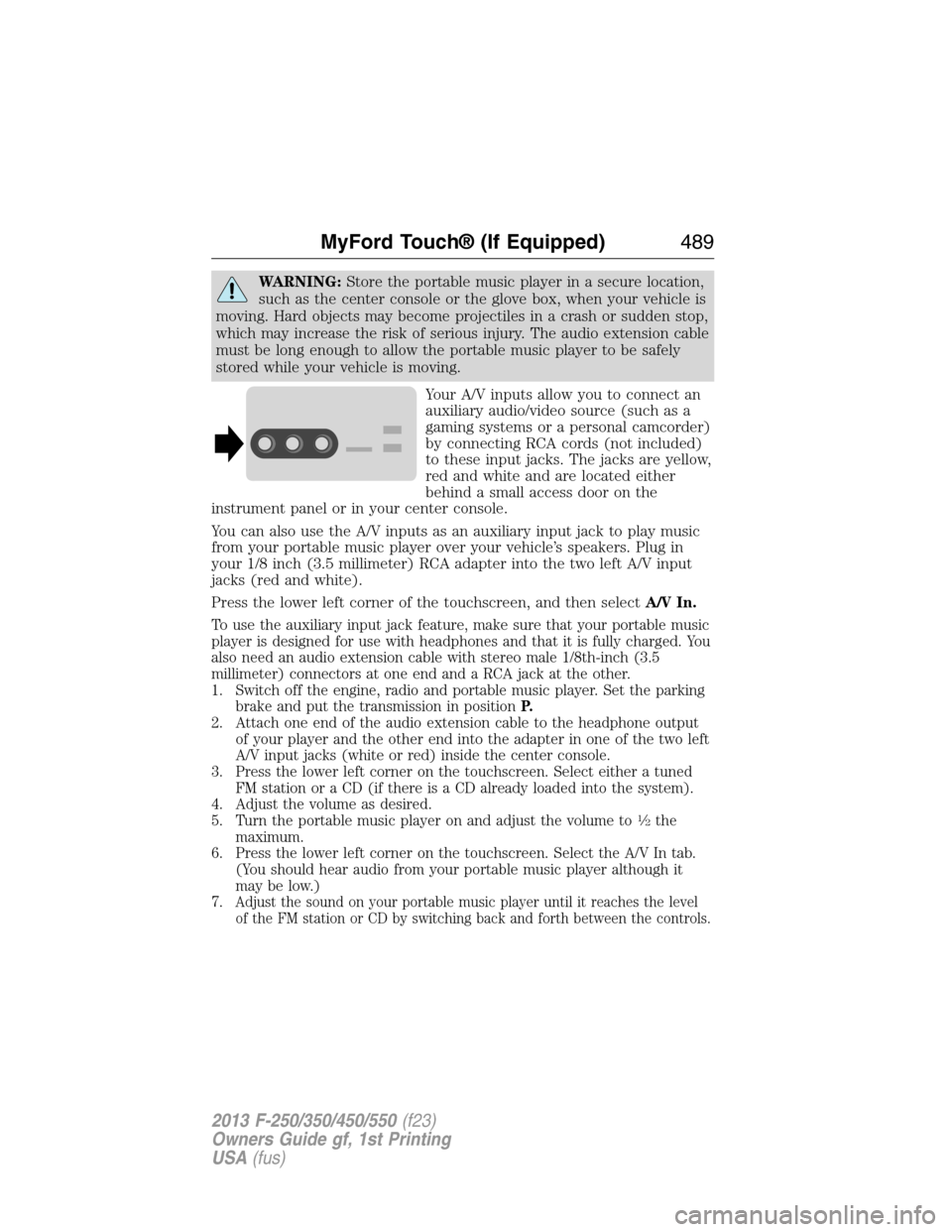
WARNING:Store the portable music player in a secure location,
such as the center console or the glove box, when your vehicle is
moving. Hard objects may become projectiles in a crash or sudden stop,
which may increase the risk of serious injury. The audio extension cable
must be long enough to allow the portable music player to be safely
stored while your vehicle is moving.
Your A/V inputs allow you to connect an
auxiliary audio/video source (such as a
gaming systems or a personal camcorder)
by connecting RCA cords (not included)
to these input jacks. The jacks are yellow,
red and white and are located either
behind a small access door on the
instrument panel or in your center console.
You can also use the A/V inputs as an auxiliary input jack to play music
from your portable music player over your vehicle’s speakers. Plug in
your 1/8 inch (3.5 millimeter) RCA adapter into the two left A/V input
jacks (red and white).
Press the lower left corner of the touchscreen, and then selectA/V In.
To use the auxiliary input jack feature, make sure that your portable music
player is designed for use with headphones and that it is fully charged. You
also need an audio extension cable with stereo male 1/8th-inch (3.5
millimeter) connectors at one end and a RCA jack at the other.
1. Switch off the engine, radio and portable music player. Set the parking
brake and put the transmission in positionP.
2. Attach one end of the audio extension cable to the headphone output
of your player and the other end into the adapter in one of the two left
A/V input jacks (white or red) inside the center console.
3. Press the lower left corner on the touchscreen. Select either a tuned
FM station or a CD (if there is a CD already loaded into the system).
4. Adjust the volume as desired.
5. Turn the portable music player on and adjust the volume to
12the
maximum.
6. Press the lower left corner on the touchscreen. Select the A/V In tab.
(You should hear audio from your portable music player although it
may be low.)
7.
Adjust the sound on your portable music player until it reaches the level
of the FM station or CD by switching back and forth between the controls.
MyFord Touch® (If Equipped)489
2013 F-250/350/450/550(f23)
Owners Guide gf, 1st Printing
USA(fus)
Page 539 of 563
DESCRIPTION OF OTHER RIGHTS AND LIMITATIONS:
•Speech Recognition:If the SOFTWARE includes speech recognition
component(s), you should understand that speech recognition is an
inherently statistical process and that recognition errors are inherent
in the process. Neither FORD MOTOR COMPANY nor its suppliers
shall be liable for any damages arising out of errors in the speech
recognition process.
•Limitations on Reverse Engineering, Decompilation and
Disassembly:You may not reverse engineer, decompile, or
disassemble nor permit others to reverse engineer, decompile or
disassemble the SOFTWARE, except and only to the extent that such
activity is expressly permitted by applicable law notwithstanding this
limitation.
•Limitations on Distributing, Copying, Modifying and Creating
Derivative Works:You may not distribute, copy, make modifications
to or create derivative works based on the SOFTWARE, except and
only to the extent that such activity is expressly permitted by
applicable law notwithstanding this limitation.
•Single EULA:The end user documentation for the DEVICE and
related systems and services may contain multiple EULAs, such as
multiple translations and/or multiple media versions (e.g., in the user
documentation and in the software). Even if you receive multiple
EULAs, you are licensed to use only one (1) copy of the SOFTWARE.
•SOFTWARE Transfer:You may permanently transfer your rights
under this EULA only as part of a sale or transfer of the DEVICE,
provided you retain no copies, you transfer all of the SOFTWARE
(including all component parts, the media and printed materials, any
upgrades, and, if applicable, the Certificate(s) of Authenticity), and
the recipient agrees to the terms of this EULA. If the SOFTWARE is
an upgrade, any transfer must include all prior versions of the
SOFTWARE.
•Termination:Without prejudice to any other rights, FORD MOTOR
COMPANY or MS may terminate this EULA if you fail to comply with
the terms and conditions of this EULA.
•Security Updates/Digital Rights Management:Content owners use
the WMDRM technology included in your DEVICE to protect their
intellectual property, included copyrighted content. Portions of the
SOFTWARE on your DEVICE use WMDRM software to access
WMDRM-protected content. If the WMDRM software fails to protect
the content, content owners may ask Microsoft to revoke the
538Appendices
2013 F-250/350/450/550(f23)
Owners Guide gf, 1st Printing
USA(fus)
Page 543 of 563
End user notice
Microsoft® Windows® Mobile for Automotive Important Safety
Information
This system Ford SYNC™ contains software that is licensed to
Manufacturer FORD MOTOR COMPANY by an affiliate of Microsoft
Corporation pursuant to a license agreement. Any removal, reproduction,
reverse engineering or other unauthorized use of the software from this
system in violation of the license agreement is strictly prohibited and
may subject you to legal action.
Read and follow instructions
Before using your Windows Automotive-based system, read and follow all
instructions and safety information provided in this end user manual
(“User’s Guide”). Not following precautions found in this User’s Guide
can lead to an accident or other serious consequences.
Keep User’s Guide in Vehicle
When kept in the vehicle, the User’s Guide will be a ready reference for
you and other users unfamiliar with the Windows Automotive-based
system. Please make certain that before using the system for the first
time, all persons have access to the User’s Guide and read its
instructions and safety information carefully.
WARNING:Operating certain parts of this system while driving
can distract your attention away from the road, and possibly
cause an accident or other serious consequences. Do not change
system settings or enter data non-verbally (using your hands) while
driving. Stop the vehicle in a safe and legal manner before attempting
these operations. This is important since while setting up or changing
some functions you might be required to distract your attention away
from the road and remove your hands from the wheel.
General operation
Voice Command Control
Functions within the Windows Automotive-based system may be
accomplished using only voice commands. Using voice commands while
driving allows you to operate the system without removing your hands
from the wheel.
Prolonged Views of Screen
Do not access any function requiring a prolonged view of the screen
while you are driving. Pull over in a safe and legal manner before
542Appendices
2013 F-250/350/450/550(f23)
Owners Guide gf, 1st Printing
USA(fus)
Page 546 of 563
You agree to indemnify and hold TeleNav harmless against all claims
resulting from any dangerous or otherwise inappropriate use of the
TeleNav Software in any moving vehicle, including as a result of your
failure to comply with the directions above.
2.Account Information
You agree: (a) when registering the TeleNav Software, to provide
TeleNav with true, accurate, current, and complete information about
yourself, and (b) to inform TeleNav promptly of any changes to such
information, and to keep it true, accurate, current and complete.
3.Software License
Subject to your compliance with the terms of this Agreement, TeleNav
hereby grants to you a personal, non-exclusive, non-transferable license
(except as expressly permitted below in connection with your permanent
transfer of the TeleNav Software license), without the right to sublicense,
to use the TeleNav Software (in object code form only) in order to
access and use the TeleNav Software. This license shall terminate upon
any termination or expiration of this Agreement. You agree that you will
use the TeleNav Software only for your personal business or leisure
purposes, and not to provide commercial navigation services to other
parties.
3.1 License limitations
You agree not to do any of the following: (a) reverse engineer,
decompile, disassemble, translate, modify, alter or otherwise change the
TeleNav Software or any part thereof; (b) attempt to derive the source
code, audio library or structure of the TeleNav Software without the
prior express written consent of TeleNav; (c) remove from the TeleNav
Software, or alter, any of TeleNav’s or its suppliers’ trademarks, trade
names, logos, patent or copyright notices, or other notices or markings;
(d) distribute, sublicense or otherwise transfer the TeleNav Software to
others, except as part of your permanent transfer of the TeleNav
Software; or (e) use the TeleNav Software in any manner that (i)
infringes the intellectual property or proprietary rights, rights of publicity
or privacy or other rights of any party, (ii) violates any law, statute,
ordinance or regulation, including but not limited to laws and regulations
related to spamming, privacy, consumer and child protection, obscenity
or defamation, or (iii) is harmful, threatening, abusive, harassing,
tortuous, defamatory, vulgar, obscene, libelous, or otherwise
objectionable; and (f) lease, rent out, or otherwise permit unauthorized
access by third parties to the TeleNav Software without advanced written
permission of TeleNav.
Appendices545
2013 F-250/350/450/550(f23)
Owners Guide gf, 1st Printing
USA(fus)