Page 57 of 437

PRINCIPLES OF OPERATION
MyKey�allows you to program keys with restricted driving modes to
promote good driving habits. All but one of the keys programmed to the
vehicle can be activated with these restricted modes. Any keys that have
not been programmed are referred to as an “administrator key” or
“admin key” which can be used to:
•create a restricted key
•program optional key settings
•clear the key feature altogether.
Once a key has been programmed you can access the following
information using the information display control:
•How many admin keys and MyKeys are programmed to the vehicle.
•The total distance the vehicle has been driven with a MyKey.
When both a MyKey and an Admin Intelligent Access keys (fob) are
present, the admin fob will be recognized by the vehicle to start the engine.
Standard Settings
These settings cannot be changed.
•
Belt-Minder. This cannot be disabled and the five–minute timer does not
expire. The audio system is muted when MyKey Belt-Minder is activated.
•Early low fuel. Warnings are displayed in the information display control
followed by an audible tone when the fuel tank is at 1/8 tank or less.
•Driver assist features, if equipped on your vehicle, are forced on:
Parking aid, blind spot information system (BLIS) with cross traffic
alert and the collision warning system.
Optional Settings
These settings can be configured right after a MyKey is first created or
changed afterword with an Admin key.
•Vehicle speed limit of 80 mph (130 km/h). Visual warnings are
displayed followed by an audible tone when vehicle speed has reached
80 mph (130 km/h).
•Vehicle speed warning of 45, 55 or 65 mph (75, 90, or 105 km/h).
Visual warnings are displayed followed by an audible tone when the
preselected vehicle speed is exceeded.
•Audio system maximum volume of 45%. A message in the audio
system is displayed when attempting to exceed the limited volume.
•AdvanceTrac. The system cannot be turned off when Always-on has
been set.
MyKey57
2013 05+ Mustang(197)
Owners Guide gf, 1st Printing
USA(fus)
Page 67 of 437

INTERIOR LUGGAGE COMPARTMENT RELEASE
WARNING:Keep vehicle doors and luggage compartment locked
and keep keys and remote transmitters out of a child’s reach.
Unsupervised children could lock themselves in the trunk and risk
injury. Children should be taught not to play in vehicles.
WARNING:Do not leave children, unreliable adults, or animals
unattended in the vehicle. On hot days, the temperature in the
trunk or vehicle interior can rise very quickly. Exposure of people or
animals to these high temperatures for even a short time can cause
death or serious heat-related injuries, including brain damage. Small
children are particularly at risk.
Your vehicle is equipped with a release handle that provides a means of
escape for children and adults if they become locked inside the luggage
compartment.
Adults should familiarize themselves with the operation and location of
the release handle.
The handle is located inside the
luggage compartment either on the
luggage compartment door (lid) or
near the tail lamps. It is composed
of a material that will glow for hours
in darkness following brief exposure
to ambient light.
Pull the handle and push up on the
luggage compartment door (lid) to
open from within the luggage
compartment.
Locks67
2013 05+ Mustang(197)
Owners Guide gf, 1st Printing
USA(fus)
Page 73 of 437
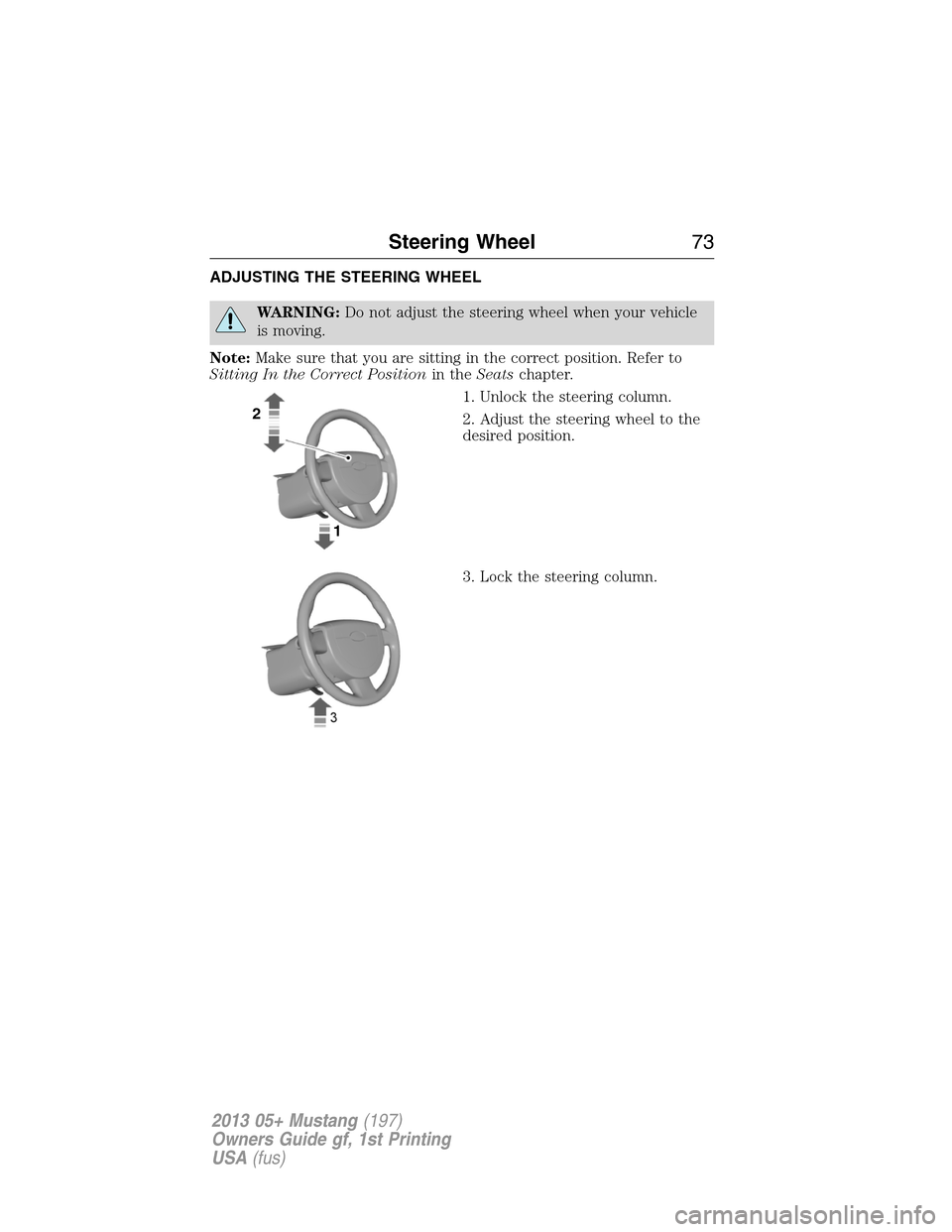
ADJUSTING THE STEERING WHEEL
WARNING:Do not adjust the steering wheel when your vehicle
is moving.
Note:Make sure that you are sitting in the correct position. Refer to
Sitting In the Correct Positionin theSeatschapter.
1. Unlock the steering column.
2. Adjust the steering wheel to the
desired position.
3. Lock the steering column.
2
1
Steering Wheel73
2013 05+ Mustang(197)
Owners Guide gf, 1st Printing
USA(fus)
Page 78 of 437

AUTOLAMPS (If equipped)
WARNING:In severe weather conditions, it may be necessary to
switch your headlamps on manually.
Note:If the vehicle is equipped with autolamps, it will have the
windshield wiper rainlamp feature.When the windshield wipers are
turned to low- or high-speed wiping during daylight, and the headlamp
control is in the autolamp position, the exterior lamps will turn on after a
brief delay and will remain on until the wipers are turned off.
The autolamp system provides light
sensitive automatic on-off control of
the exterior lights normally
controlled by the headlamp control.
The headlamps will remain on for a
period of time after you switch the
ignition off. You can adjust the time
delay using the display controls in
the instrument cluster. See the
Information Displayschapter.
INSTRUMENT LIGHTING DIMMER
•Move the control up or down to
adjust the intensity of the panel
lighting.
•Move the control to the full
upright position, past detent, to
turn on the interior lamps.
•Move the control down, past
detent, to turn off the interior
lights.
Note:The panel dimmer control works only in nighttime illumination
mode. It has no effect in daytime illumination mode. Also, selectable
features such as gauge color and halo color will not be available in
daytime illumination mode.
Note:
If the battery is disconnected, discharged, or a new battery is
installed, the dimmer switch requires re-calibration. Rotate the dimmer
switch from the full dim position to the full dome/on position to reset. This
will ensure that your displays are visible under all lighting conditions.
A
78Lighting
2013 05+ Mustang(197)
Owners Guide gf, 1st Printing
USA(fus)
Page 80 of 437

DAYTIME RUNNING LAMPS (IF EQUIPPED)
WARNING:Always remember to turn on your headlamps at dusk
or during inclement weather. The Daytime Running Lamp (DRL)
system does not activate the tail lamps and generally may not provide
adequate lighting during these conditions. Failure to activate your
headlamps under these conditions may result in a collision.
The system switches the headlamps on with a reduced output (vehicles
equipped with halogen headlamps) or turns the front fog lamps on
(vehicles equipped with HID headlamps) in low light situations.
To switch the system on:
1. Switch the ignition on.
2. Switch the lighting control to the off, autolamp or parking lamp
position.
3. Make sure the transmission selector lever is not in position P.
4. Make sure the parking brake is disengaged.
FRONT FOG LAMPS
The fog lamps can be turned on
when the lighting control is pulled
toward you and in the headlamps,
parking lamps or autolamps
positions.
The fog lamps will not operate when
the high beams are active.
A
80Lighting
2013 05+ Mustang(197)
Owners Guide gf, 1st Printing
USA(fus)
Page 82 of 437

POWER WINDOWS
WARNING:Do not leave children unattended in the vehicle and
do not let children play with the power windows. They may
seriously injure themselves.
WARNING:When closing the power windows, you should verify
they are free of obstructions and make sure that children and
pets are not in the proximity of the window openings.
Press or lift the switches to operate
the windows.
•Press the switch to the first
detent and hold to open the
window.
•Lift the switch to the first detent
and hold to close the window.
One-Touch Up or Down (Front Windows)
This feature automatically opens or closes the window.
Press or lift the switch completely and release. The window will fully
open or close. Press or lift it again to stop the window.
Restoring the One-Touch Up Functionality
Note:Perform one-touch up re-calibration with the door closed.
Calibrating with the door open will cause the window to continuously
bounce back.
Functionality may be lost under low battery power conditions.
To reset this function after restoring full battery power:
1. Pull the switch to the one-touch up position.
2. Hold the switch until the glass reaches the stall position and continue
to hold for two seconds.
3. Press the switch down and operate the window to the full down
position. One-touch up will now be functional.
Bounce-Back
The window will stop automatically while closing and reverse some
distance if there is an obstacle in the way.
AUTOAUTO
82Windows and Mirrors
2013 05+ Mustang(197)
Owners Guide gf, 1st Printing
USA(fus)
Page 84 of 437

3. Turn the ignition off, then turn back on.
4. Pull and hold the rear window switch up and hold for three seconds.
The rear windows will begin to start moving up.
Accessory Delay
You can use the window switches for several minutes after you turn the
ignition off, or until either front door is opened.
EXTERIOR MIRRORS
Power Exterior Mirrors
WARNING:Do not adjust the mirror while the vehicle is in
motion.
A. Left-hand mirror
B. Off
C. Right-hand mirror
To adjust your mirrors:
1. Select the mirror you want to adjust.
2. Move the control in the direction you want to tilt the mirror.
3. Return the control to the center position to lock mirrors in place.
Heated Exterior Mirror (If Equipped)
Note:Do not remove ice from the mirrors with a scraper or attempt to
readjust the mirror glass if it is frozen in place. These actions could
cause damage to the glass and mirrors.
Note:Do not clean the housing or glass of any mirror with harsh
abrasives, fuel or other petroleum-based cleaning products.
Both mirrors are heated to remove ice, mist and fog when the rear
window defroster is activated.
Pony Projections Lights (If Equipped)
Note:Moisture, frost and ice build-up (or other types of contamination)
on the surface of the light lens can cause some non-permanent distortion
or reduced brightness of the image. Do not use abrasive materials to
clean the lens.
B
AC
84Windows and Mirrors
2013 05+ Mustang(197)
Owners Guide gf, 1st Printing
USA(fus)
Page 85 of 437

The lights are located on the bottom of the mirror housings.
This feature will project an image onto the ground a short distance from
the vehicle whenever illuminated entry and exit is activated.
Integrated Blind Spot Mirrors (If Equipped)
WARNING:Objects in the blind spot mirror are closer than they
appear.
Blind spot mirrors have an integrated convex mirror built into the upper
outboard corner of the exterior mirrors. They are designed to assist you
by increasing visibility along the side of your vehicle.
Check the main mirror first before a lane change, then check the blind
spot mirror. If no vehicles are present in the blind spot mirror and the
traffic in the adjacent lane is at a safe distance, signal that you are going
to change lanes. Glance over your shoulder to verify traffic is clear, and
carefully change lanes.
The approaching vehicle’s image is
small and near the inboard edge of
the main mirror when it is at a
distance. The image becomes larger
and begins to move outboard across
the main mirror as the vehicle
approaches (A). Its image will
transition from the main mirror and
begin to appear in the blind spot
mirror as the vehicle approaches (B).
The vehicle will transition to your
peripheral field of view as it leaves
the blind spot mirror (C).
A
B
C
Windows and Mirrors85
2013 05+ Mustang(197)
Owners Guide gf, 1st Printing
USA(fus)