2013 FORD FOCUS transmission
[x] Cancel search: transmissionPage 201 of 475
Note:If the image comes on while the transmission is not in R
(Reverse), have the system inspected by your authorized dealer.
Note:When towing, the camera only sees what is being towed behind
the vehicle. This might not provide adequate coverage as it usually
provides in normal operation and some objects might not be seen. In
some vehicles, the guidelines may disappear once the trailer tow
connector is engaged.
Note:The camera may not operate correctly under the following
conditions:
•Nighttime or dark areas if one or both reverse lamps are not
operating. Do not use the rear view camera display when lighting is
low until both reverse lamps are functional.
•The camera’s view is obstructed by mud, water or debris. Clean the
lens with a soft, lint-free cloth and non-abrasive cleaner.
•The rear of the vehicle is hit or damaged, causing the camera to
become misaligned. Check with your authorized dealer to have the
rear view camera system checked for proper coverage and operation.
Adjusting the Rear View Camera Settings (If Equipped)
To access any of the rear view camera system settings, make the
following selections in the touch screen when the transmission is not in
R (Reverse):
1. Menu
2. Vehicle
3. Rear View Camera
After changing a system setting, the touch screen shows a preview of the
feature(s) selected.
Parking Aids201
2013 Focus(foc)
Owners Guide gf, 1st Printing
USA(fus)
Page 202 of 475
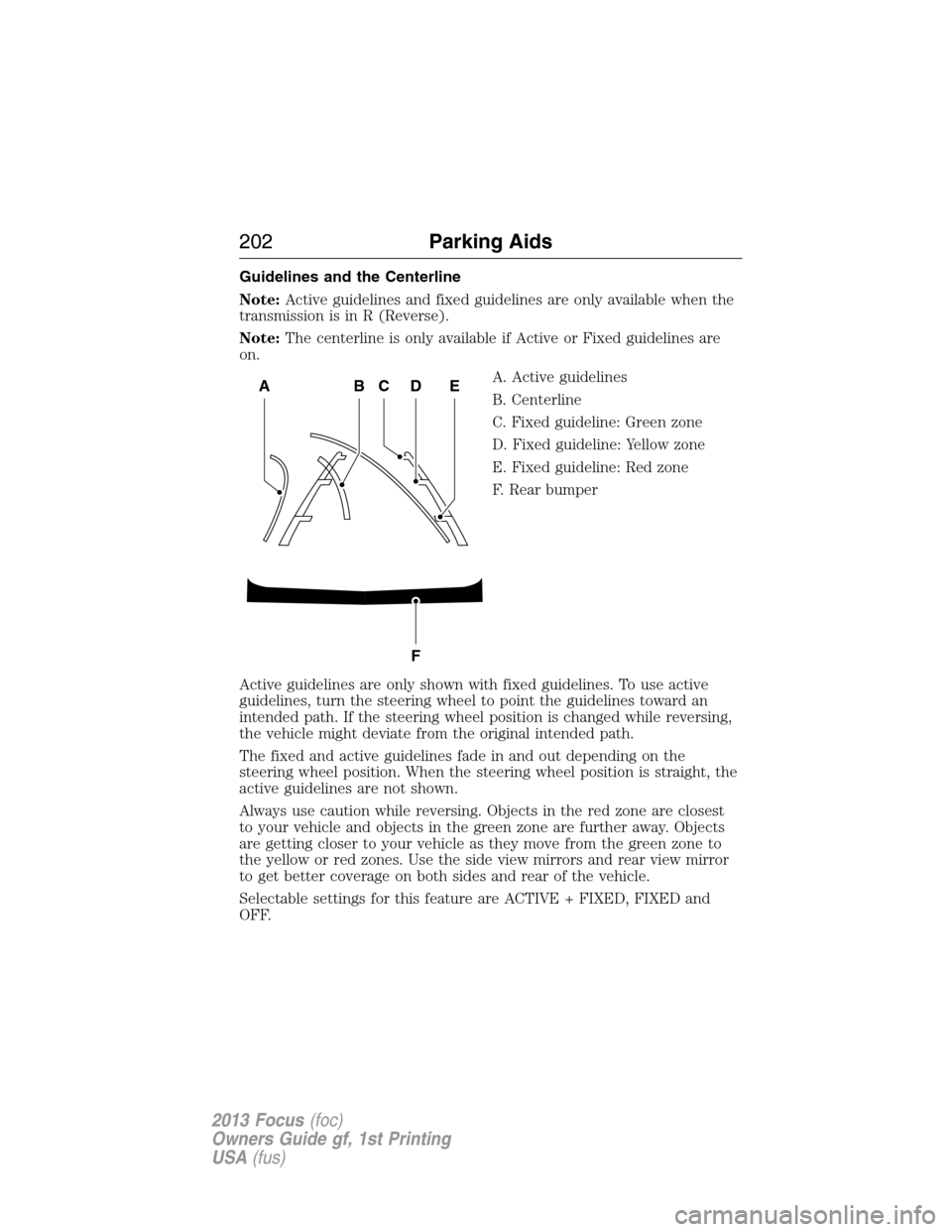
Guidelines and the Centerline
Note:Active guidelines and fixed guidelines are only available when the
transmission is in R (Reverse).
Note:The centerline is only available if Active or Fixed guidelines are
on.
A. Active guidelines
B. Centerline
C. Fixed guideline: Green zone
D. Fixed guideline: Yellow zone
E. Fixed guideline: Red zone
F. Rear bumper
Active guidelines are only shown with fixed guidelines. To use active
guidelines, turn the steering wheel to point the guidelines toward an
intended path. If the steering wheel position is changed while reversing,
the vehicle might deviate from the original intended path.
The fixed and active guidelines fade in and out depending on the
steering wheel position. When the steering wheel position is straight, the
active guidelines are not shown.
Always use caution while reversing. Objects in the red zone are closest
to your vehicle and objects in the green zone are further away. Objects
are getting closer to your vehicle as they move from the green zone to
the yellow or red zones. Use the side view mirrors and rear view mirror
to get better coverage on both sides and rear of the vehicle.
Selectable settings for this feature are ACTIVE + FIXED, FIXED and
OFF.
ABCD
F
E
202Parking Aids
2013 Focus(foc)
Owners Guide gf, 1st Printing
USA(fus)
Page 203 of 475
Visual Park Aid Alert
Note:Visual park alert is only available when the transmission is in R
(Reverse).
Note:The reverse sensing system is not effective at speeds above 3 mph
(5 km/h) and may not detect certain angular or moving objects.
The visual park aid alert allows the driver to view the area that is being
detected by the reverse sensing system. The system uses red, yellow and
green highlights which appear on top of the video image when an object
is detected by the reverse sensing system. The alert highlights the
closest object detected. The reverse sensing alert can be disabled and if
visual park aid alert is enabled, highlighted areas are still displayed.
Refer toAdjusting the Rear View Camera Settingsabove on how to
enable or disable the visual park alert feature.
Manual Zoom
WARNING:When manual zoom is on, the full area behind the
vehicle is not shown. Be aware of your surroundings when using
the manual zoom feature.
Note:Manual zoom is only available when the transmission is in R (Reverse).
Note:When manual zoom is enabled, only the centerline is shown.
Allows the driver to get a closer view of an object behind the vehicle.
The zoomed image keeps the bumper in the image to provide a
reference. The zoom is only active while the transmission is in R
(Reverse), When the transmission is shifted out of R (Reverse), the
feature automatically turns off and must be reset when it is used again.
Selectable settings for this feature are OFF, Level 1, Level 2 or Level 3.
Press the up and down arrows to change the view. The selection level
appears between the buttons (i.e. Level 1). The default setting for the
manual zoom is OFF.
Rear Camera Delay
When shifting the transmission out of R (Reverse) and into any gear
other than P (Park), the camera image remains in the display until the
vehicle speed reaches 6 mph (10 km/h). This occurs when the rear
camera delay feature is on, or until a radio button is selected.
Selectable settings for this feature are ON and OFF. The default setting
for the rear camera delay is OFF.
Parking Aids203
2013 Focus(foc)
Owners Guide gf, 1st Printing
USA(fus)
Page 212 of 475
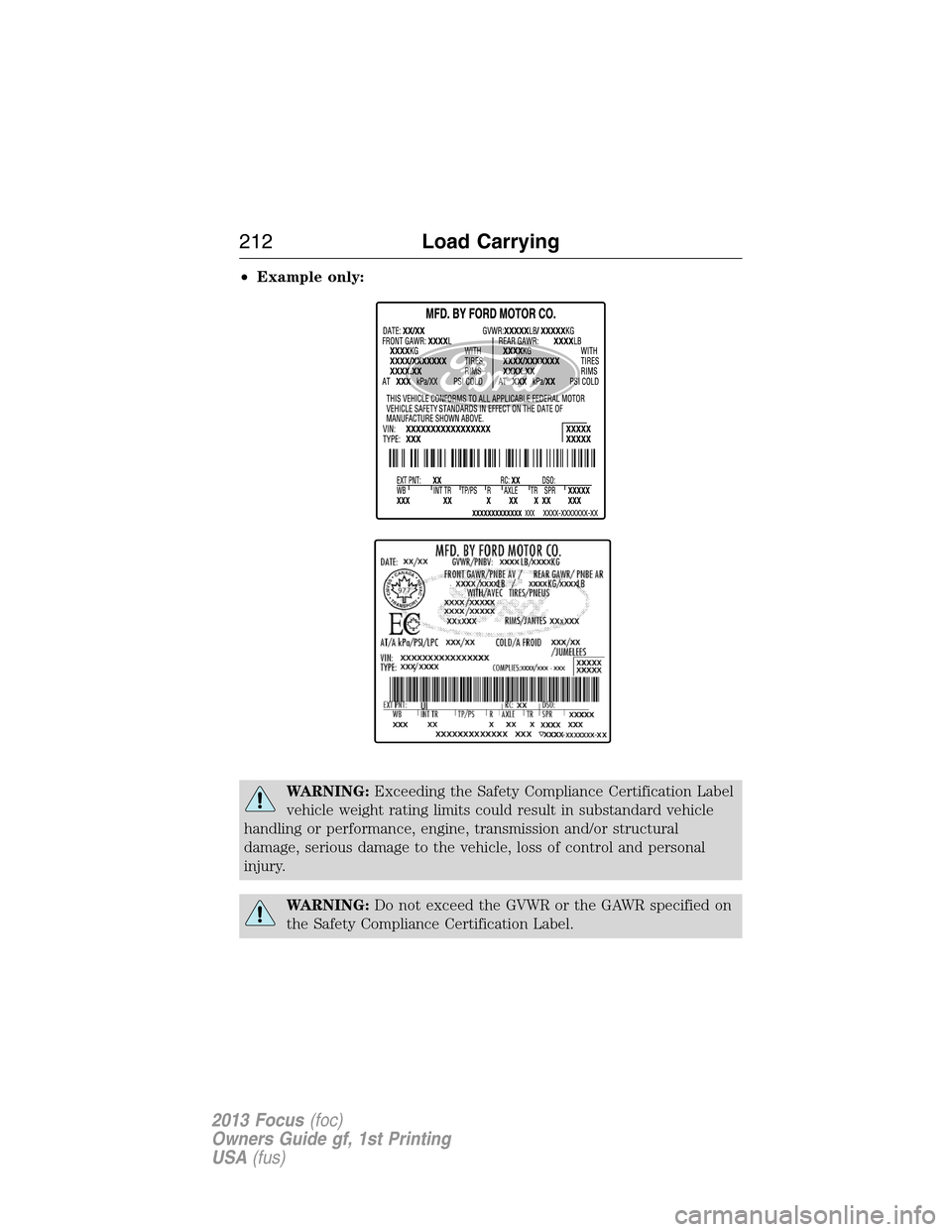
•Example only:
WARNING:Exceeding the Safety Compliance Certification Label
vehicle weight rating limits could result in substandard vehicle
handling or performance, engine, transmission and/or structural
damage, serious damage to the vehicle, loss of control and personal
injury.
WARNING:Do not exceed the GVWR or the GAWR specified on
the Safety Compliance Certification Label.
212Load Carrying
2013 Focus(foc)
Owners Guide gf, 1st Printing
USA(fus)
Page 216 of 475
If your vehicle is towed from the rear with wheel lift equipment, the
front wheels must be placed on a dolly to prevent damage to the
transmission.
If your vehicle is towed from the front with wheel lift equipment, it is
recommended that the rear wheels be placed on a dolly to prevent
damage to the rear fascia.
TOWING THE VEHICLE ON FOUR WHEELS
Emergency Towing
In the event your vehicle becomes disabled (without access to wheel
dollies, car-hauling trailer, or flatbed transport vehicle), it can be
flat-towed (all wheels on the ground, regardless of the
powertrain/transmission configuration) under the following conditions:
•The vehicle is facing forward so that it is towed in a forward
direction.
•The transmission is placed in positionN.SeeAutomatic
transmissionin theTransmissionchapter if you cannot move the
transmission intoN.
•Maximum speed is 35 mph (56 km/h).
•Maximum distance is 50 miles (80 kilometers).
Recreational Towing
Note:Put your climate control system in recirculated air mode to
prevent exhaust fumes from entering the vehicle. Refer to theClimate
Controlschapter for more information.
Note:The vehicle must be towed in the forward position to ensure no
damage is done to the internal transmission components. In addition, it is
recommended that you follow the instructions provided by the
aftermarket manufacturer of the towing equipment, if provided.
Follow these guidelines if you have a need for recreational (RV) towing.
An example of recreational towing would be towing your vehicle behind
a motor home. These guidelines are designed to ensure that your
transmission is not damaged.
Before you tow your vehicle, follow these directions for your specific
vehicle configurationafterit is hooked-up to the RV or tow dolly:
216Towing
2013 Focus(foc)
Owners Guide gf, 1st Printing
USA(fus)
Page 217 of 475

Vehicles with a Manual Transmission
1. Release the parking brake.
2. Move the gearshift to the neutral position.
•The maximum towing speed is 70 mph (113 km/h).
•There is no limitation on towing distance.
Vehicles with an Automatic Transmission but No Push Button Start
System
Note:Theremustbe battery power to properly move the transmission’s
internal components to N (Neutral) in Step 3. Also, moving the gearshift
to the N (Neutral) position without first turning the ignition to the on
(II) position limits the towing capability to 35 mph (56 km/h) and
50 miles (80 kilometers).
1. Release the parking brake.
2. Turn the ignition to the on (II) position.
3. Press the brake pedal, then move the gearshift to the N (Neutral)
position.
4. Wait for TRANSMISSION READY to appear in the multi-function
display, then turn the ignition to the off (0) position and release the
brake pedal.
5. Disconnect the negative (black) cable from the battery. (The
anti-theft system is disabled until the battery cable is reconnected.)
Refer toBatteryin theMaintenancechapter when disconnecting
and reconnecting the battery cable.
•The maximum towing speed is 70 mph (113 km/h).
•There is no limitation on towing distance.
When done towing, start the engine within 15 minutes of reconnecting
the battery cable. When reconnecting that cable, tighten it until it’s snug
against the terminal; be careful not to overtighten.
Vehicles with an Automatic Transmission and Push Button Start
System
Note:Theremustbe battery power to properly move the transmission’s
internal components to N (Neutral) in Step 3. Also, moving the gearshift
to the N (Neutral) position without first turning the ignition to the on
(II) position limits the towing capability to 35 mph (56 km/h) and
50 miles (80 kilometers).
1. Release the parking brake.
2. Activate the ignition by pressing the START/STOP button, butnot
applying the brake pedal.
Towing217
2013 Focus(foc)
Owners Guide gf, 1st Printing
USA(fus)
Page 218 of 475

3. Press the brake pedal, then move the gearshift to the N (Neutral)
position. Release the brake pedal.
4. Wait for TRANSMISSION READY to appear in the multi-function
display, then deactivate the ignition by pressing the START/STOP
button.
5. Disconnect the negative (black) cable from the battery. (The door
key [inside the Intelligent Access Key] is needed to lock/unlock doors
when the battery cable is disconnected. Also, the anti-theft system is
disabled until the battery cable is reconnected.) Refer toBatteryin
theMaintenance and Specificationschapter when disconnecting
and reconnecting the battery cable.
•The maximum towing speed is 70 mph (113 km/h).
•There is no limitation on towing distance.
When done towing, start the engine within 15 minutes of reconnecting
the battery cable. When reconnecting that cable, tighten it until it’s snug
against the terminal; be careful not to overtighten.
218Towing
2013 Focus(foc)
Owners Guide gf, 1st Printing
USA(fus)
Page 220 of 475
![FORD FOCUS 2013 3.G Owners Manual •Carry unnecessary weight (approximately 1 mpg [0.4 km/L] is lost for
every 400 lb [180 kg] of weight carried).
•Add particular accessories to your vehicle (e.g. bug deflectors,
rollbars/light bar](/manual-img/11/5144/w960_5144-219.png "FORD FOCUS 2013 3.G Owners Manual •Carry unnecessary weight (approximately 1 mpg [0.4 km/L] is lost for
every 400 lb [180 kg] of weight carried).
•Add particular accessories to your vehicle (e.g. bug deflectors,
rollbars/light bar")
•Carry unnecessary weight (approximately 1 mpg [0.4 km/L] is lost for
every 400 lb [180 kg] of weight carried).
•Add particular accessories to your vehicle (e.g. bug deflectors,
rollbars/light bars, running boards, ski racks).
•Drive with the wheels out of alignment.
DRIVING THROUGH WATER
If driving through deep or standing
water is unavoidable, proceed very
slowly. Never drive through water
that is higher than the bottom of
the wheel rims (for cars) or the
bottom of the hubs (for trucks).
When driving through water, traction or brake capability may be limited.
Also, water may enter your engine’s air intake and severely damage your
engine or your vehicle may stall.
Note:Driving through deep water where the transmission vent tube is
submerged may allow water into the transmission and cause internal
transmission damage.
Note:Once through the water, always dry the brakes by moving your
vehicle slowly while applying light pressure on the brake pedal. Wet
brakes do not stop the vehicle as quickly as dry brakes.
220Driving Hints
2013 Focus(foc)
Owners Guide gf, 1st Printing
USA(fus)