Page 95 of 341
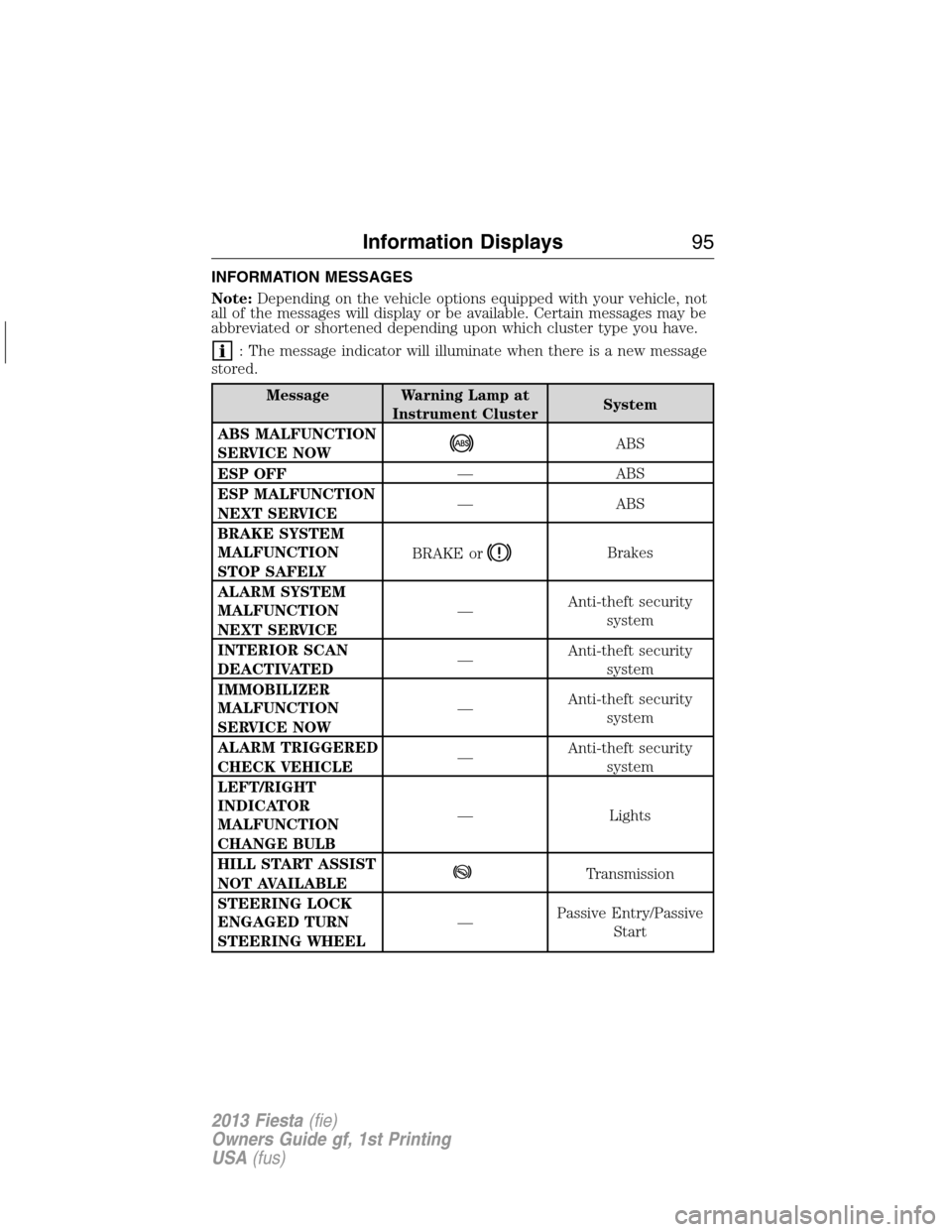
INFORMATION MESSAGES
Note:Depending on the vehicle options equipped with your vehicle, not
all of the messages will display or be available. Certain messages may be
abbreviated or shortened depending upon which cluster type you have.
: The message indicator will illuminate when there is a new message
stored.
Message Warning Lamp at
Instrument ClusterSystem
ABS MALFUNCTION
SERVICE NOW
ABS
ESP OFF— ABS
ESP MALFUNCTION
NEXT SERVICE— ABS
BRAKE SYSTEM
MALFUNCTION
STOP SAFELYBRAKE or
Brakes
ALARM SYSTEM
MALFUNCTION
NEXT SERVICE—Anti-theft security
system
INTERIOR SCAN
DEACTIVATED—Anti-theft security
system
IMMOBILIZER
MALFUNCTION
SERVICE NOW—Anti-theft security
system
ALARM TRIGGERED
CHECK VEHICLE—Anti-theft security
system
LEFT/RIGHT
INDICATOR
MALFUNCTION
CHANGE BULB— Lights
HILL START ASSIST
NOT AVAILABLE
Transmission
STEERING LOCK
ENGAGED TURN
STEERING WHEEL—Passive Entry/Passive
Start
Information Displays95
2013 Fiesta(fie)
Owners Guide gf, 1st Printing
USA(fus)
Page 96 of 341
Message Warning Lamp at
Instrument ClusterSystem
STEERING
MALFUNCTION
SERVICE NOW—Passive Entry/Passive
Start
STEERING
MALFUNCTION
STOP SAFELY—Passive Entry/Passive
Start
POWER STEERING
MALFUNCTION
SERVICE NOW— Power Steering
KEY NOT
DETECTED—Passive entry/passive
start system
TURN IGNITION
OFF USE POWER
BUTTON—Passive entry/passive
start system
KEY OUTSIDE CAR
—Passive entry/passive
start system
KEY BATTERY LOW
REPLACE BATTERY—Passive entry/passive
start system
TO START PRESS
BRAKE—Passive Entry/Passive
Start
CLOSE TRUNK OR
USE SPARE KEY— Trunk
TO START PRESS
CLUTCH—Passive Entry/Passive
Start
ENGINE
MALFUNCTION
SERVICE NOW
Engine
TRANSMISSION
MALFUNCTION
SERVICE NOW— Transmission
TRANSMISSION
HOT STOP SAFELY— Transmission
96Information Displays
2013 Fiesta(fie)
Owners Guide gf, 1st Printing
USA(fus)
Page 97 of 341
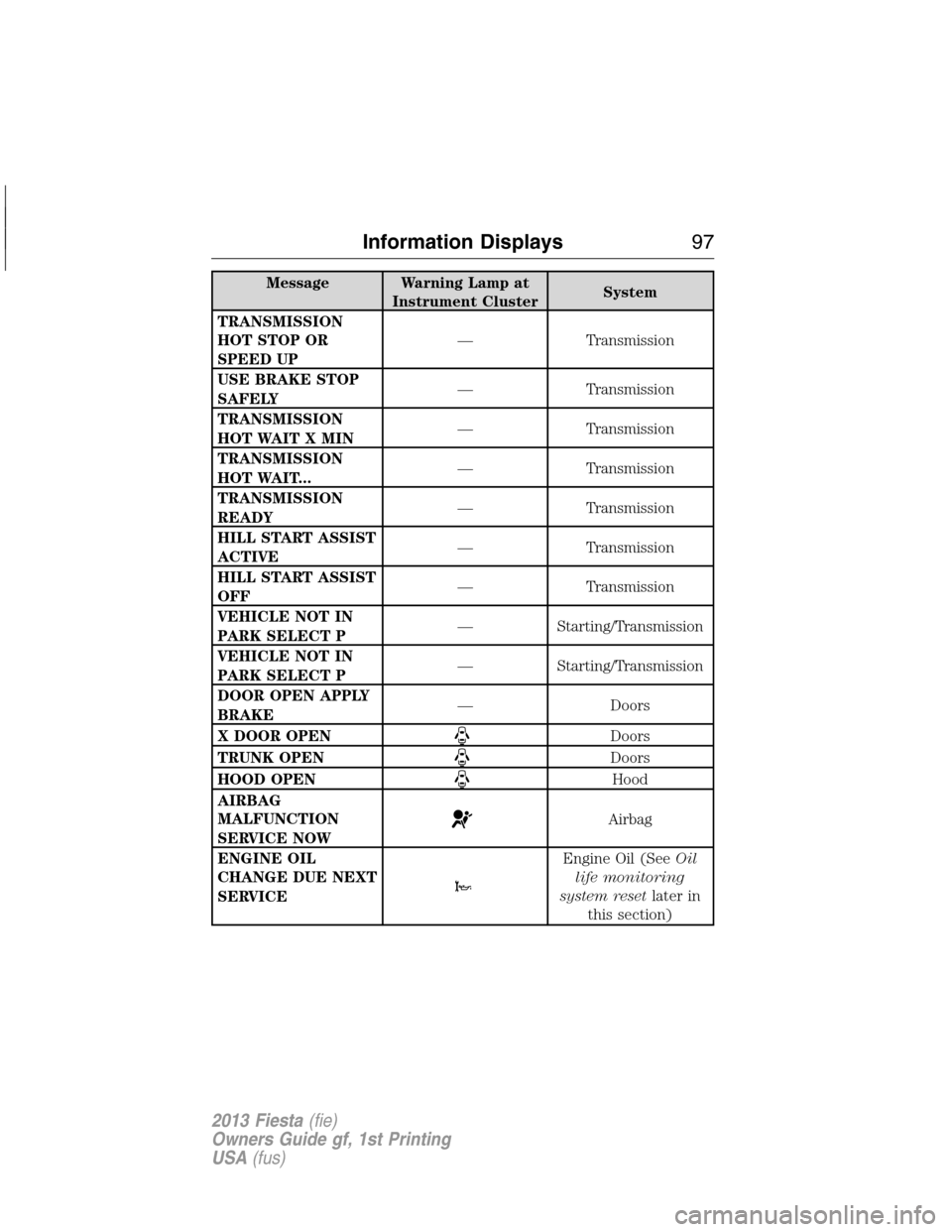
Message Warning Lamp at
Instrument ClusterSystem
TRANSMISSION
HOT STOP OR
SPEED UP— Transmission
USE BRAKE STOP
SAFELY— Transmission
TRANSMISSION
HOT WAIT X MIN— Transmission
TRANSMISSION
HOT WAIT...— Transmission
TRANSMISSION
READY— Transmission
HILL START ASSIST
ACTIVE— Transmission
HILL START ASSIST
OFF— Transmission
VEHICLE NOT IN
PARK SELECT P— Starting/Transmission
VEHICLE NOT IN
PARK SELECT P— Starting/Transmission
DOOR OPEN APPLY
BRAKE— Doors
X DOOR OPEN
Doors
TRUNK OPEN
Doors
HOOD OPEN
Hood
AIRBAG
MALFUNCTION
SERVICE NOW
Airbag
ENGINE OIL
CHANGE DUE NEXT
SERVICE
Engine Oil (SeeOil
life monitoring
system resetlater in
this section)
Information Displays97
2013 Fiesta(fie)
Owners Guide gf, 1st Printing
USA(fus)
Page 98 of 341
Message Warning Lamp at
Instrument ClusterSystem
ENGINE OIL
PRESSURE LOW
STOP SAFELY
Engine Oil
BRAKE FLUID
LEVEL LOW
SERVICE NOWBRAKE or
Brakes
CHECK FUEL FILL
INLET— Fuel
Oil life monitoring system reset
To reset the oil service light and clear the oil change message after
servicing, use the following procedure:
1. Begin with the ignition off.
2. Turn the key to the accessory position for keyed vehicles and for push
button start vehicles press the Start/Stop button once quickly. DO NOT
attempt to start the engine.
3. Press the accelerator and brake pedals fully for 20 seconds.
4.ENGINE OIL CHANGE DUE NEXT SERVICEand
will display.
5. Turn the vehicle off. The message and lights will be cleared.
98Information Displays
2013 Fiesta(fie)
Owners Guide gf, 1st Printing
USA(fus)
Page 101 of 341
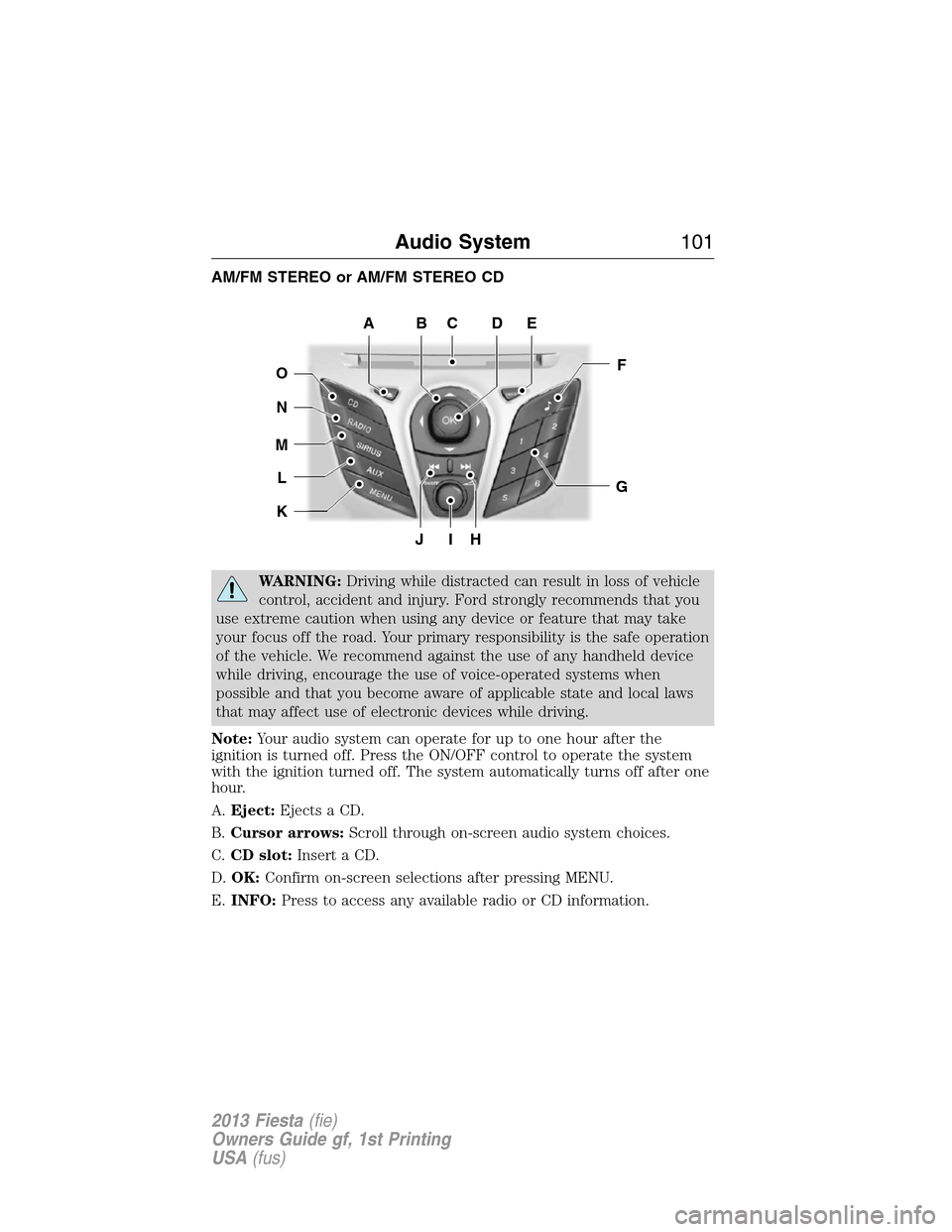
AM/FM STEREO or AM/FM STEREO CD
WARNING:Driving while distracted can result in loss of vehicle
control, accident and injury. Ford strongly recommends that you
use extreme caution when using any device or feature that may take
your focus off the road. Your primary responsibility is the safe operation
of the vehicle. We recommend against the use of any handheld device
while driving, encourage the use of voice-operated systems when
possible and that you become aware of applicable state and local laws
that may affect use of electronic devices while driving.
Note:Your audio system can operate for up to one hour after the
ignition is turned off. Press the ON/OFF control to operate the system
with the ignition turned off. The system automatically turns off after one
hour.
A.Eject:Ejects a CD.
B.Cursor arrows:Scroll through on-screen audio system choices.
C.CD slot:Insert a CD.
D.OK:Confirm on-screen selections after pressing MENU.
E.INFO:Press to access any available radio or CD information.
JIH
F
G
EDCBA
O
N
M
L
K
Audio System101
2013 Fiesta(fie)
Owners Guide gf, 1st Printing
USA(fus)
Page 103 of 341
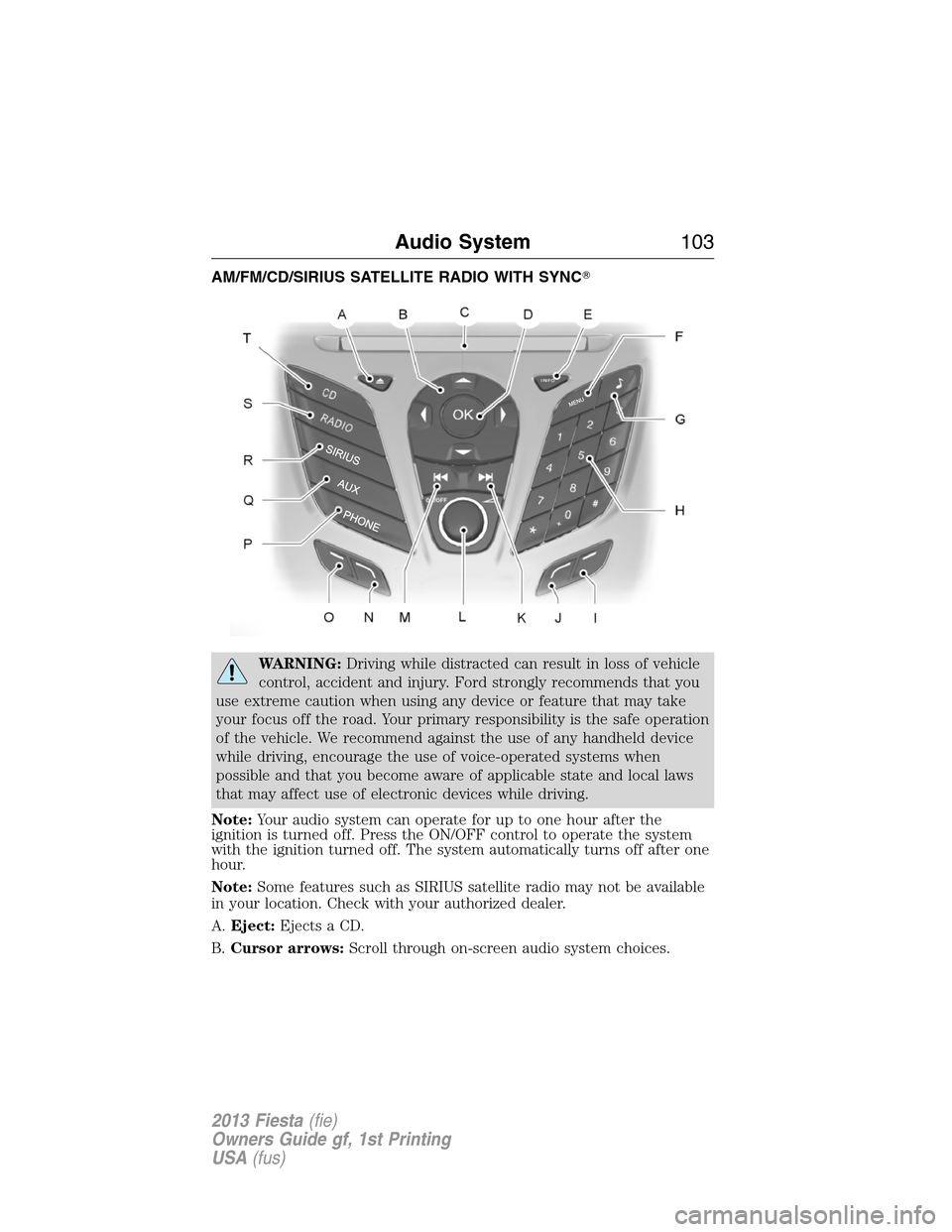
AM/FM/CD/SIRIUS SATELLITE RADIO WITH SYNC�
WARNING:Driving while distracted can result in loss of vehicle
control, accident and injury. Ford strongly recommends that you
use extreme caution when using any device or feature that may take
your focus off the road. Your primary responsibility is the safe operation
of the vehicle. We recommend against the use of any handheld device
while driving, encourage the use of voice-operated systems when
possible and that you become aware of applicable state and local laws
that may affect use of electronic devices while driving.
Note:Your audio system can operate for up to one hour after the
ignition is turned off. Press the ON/OFF control to operate the system
with the ignition turned off. The system automatically turns off after one
hour.
Note:Some features such as SIRIUS satellite radio may not be available
in your location. Check with your authorized dealer.
A.Eject:Ejects a CD.
B.Cursor arrows:Scroll through on-screen audio system choices.
Audio System103
2013 Fiesta(fie)
Owners Guide gf, 1st Printing
USA(fus)
Page 108 of 341
AUXILIARY INPUT JACK
WARNING:Driving while distracted can result in loss of vehicle
control, accident and injury. Ford strongly recommends that you
use extreme caution when using any device or feature that may take
your focus off the road. Your primary responsibility is the safe operation
of the vehicle. We recommend against the use of any handheld device
while driving, encourage the use of voice-operated systems when
possible and that you become aware of applicable state and local laws
that may affect use of electronic devices while driving.
WARNING:For safety reasons, do not connect or adjust the
settings on your portable music player while the vehicle is moving.
WARNING:Store the portable music player in a secure location,
such as the center console or the glove box, when the vehicle is
in motion. Hard objects may become projectiles in a collision or sudden
stop, which may increase the risk of serious injury. The audio extension
cable must be long enough to allow the portable music player to be
safely stored while the vehicle is in motion.
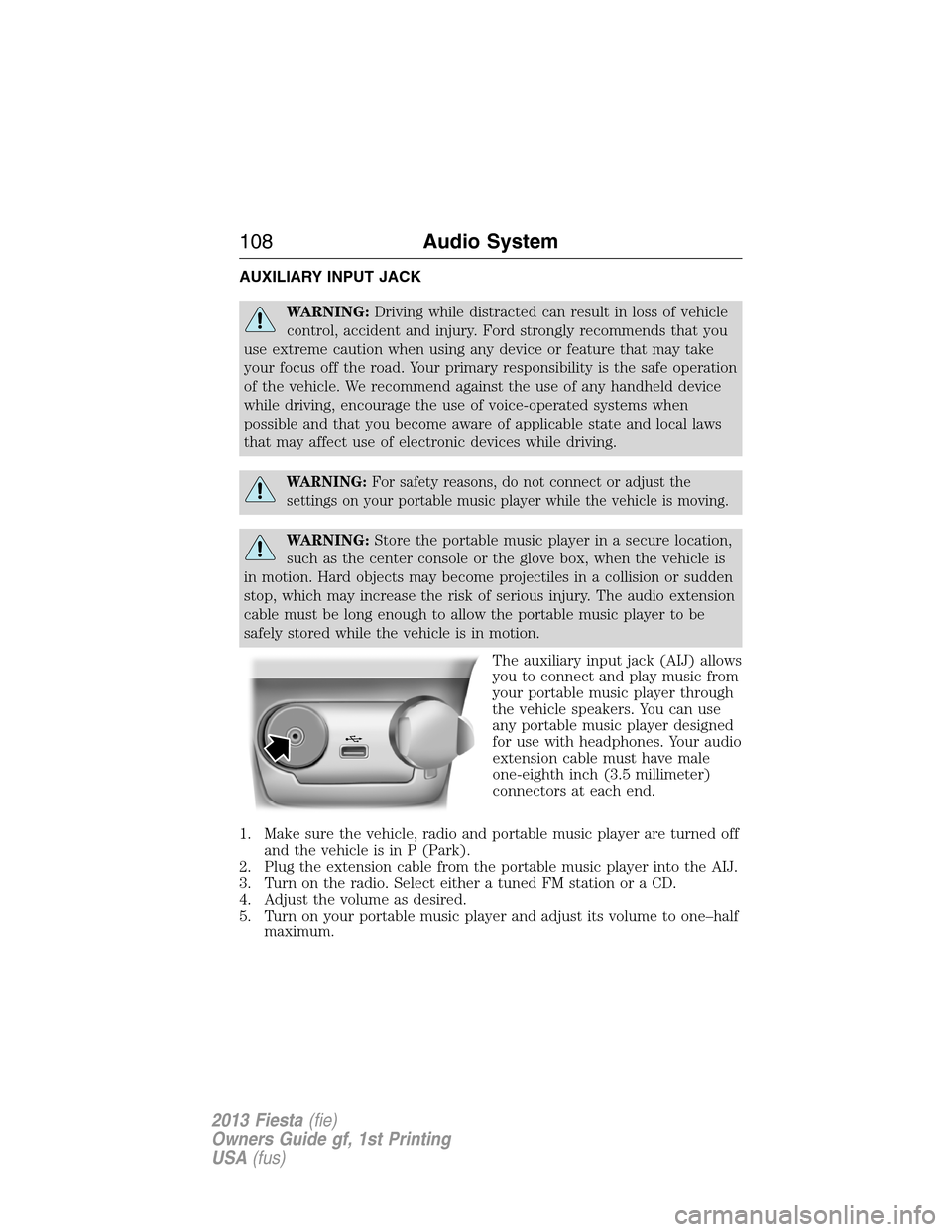
The auxiliary input jack (AIJ) allows
you to connect and play music from
your portable music player through
the vehicle speakers. You can use
any portable music player designed
for use with headphones. Your audio
extension cable must have male
one-eighth inch (3.5 millimeter)
connectors at each end.
1. Make sure the vehicle, radio and portable music player are turned off
and the vehicle is in P (Park).
2. Plug the extension cable from the portable music player into the AIJ.
3. Turn on the radio. Select either a tuned FM station or a CD.
4. Adjust the volume as desired.
5. Turn on your portable music player and adjust its volume to one–half
maximum.
108Audio System
2013 Fiesta(fie)
Owners Guide gf, 1st Printing
USA(fus)
Page 109 of 341
6. Press AUX until LINE or LINE IN appears in the display. You should
hear music from your device even if it is low.
7. Adjust the volume on your portable music player until it reaches the
volume level of the FM station or CD. Do this by switching back and
forth between the AUX and FM or CD controls.
USB PORT
WARNING:Driving while distracted can result in loss of vehicle
control, accident and injury. Ford strongly recommends that you
use extreme caution when using any device or feature that may take
your focus off the road. Your primary responsibility is the safe operation
of the vehicle. We recommend against the use of any handheld device
while driving, encourage the use of voice-operated systems when
possible and that you become aware of applicable state and local laws
that may affect use of electronic devices while driving.
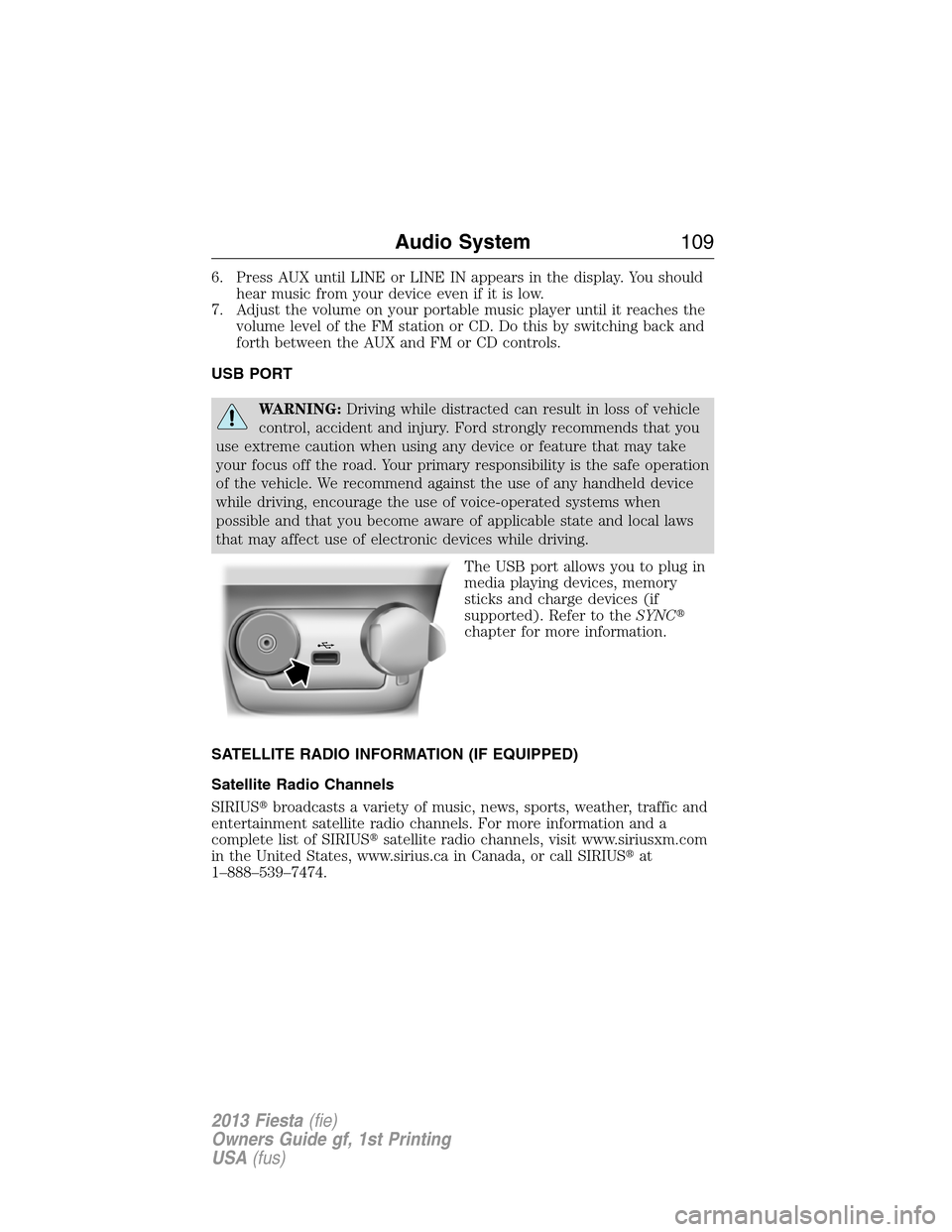
The USB port allows you to plug in
media playing devices, memory
sticks and charge devices (if
supported). Refer to theSYNC�
chapter for more information.
SATELLITE RADIO INFORMATION (IF EQUIPPED)
Satellite Radio Channels
SIRIUS�broadcasts a variety of music, news, sports, weather, traffic and
entertainment satellite radio channels. For more information and a
complete list of SIRIUS�satellite radio channels, visit www.siriusxm.com
in the United States, www.sirius.ca in Canada, or call SIRIUS�at
1–888–539–7474.
Audio System109
2013 Fiesta(fie)
Owners Guide gf, 1st Printing
USA(fus)