2013 FORD F750 turn signal
[x] Cancel search: turn signalPage 241 of 378
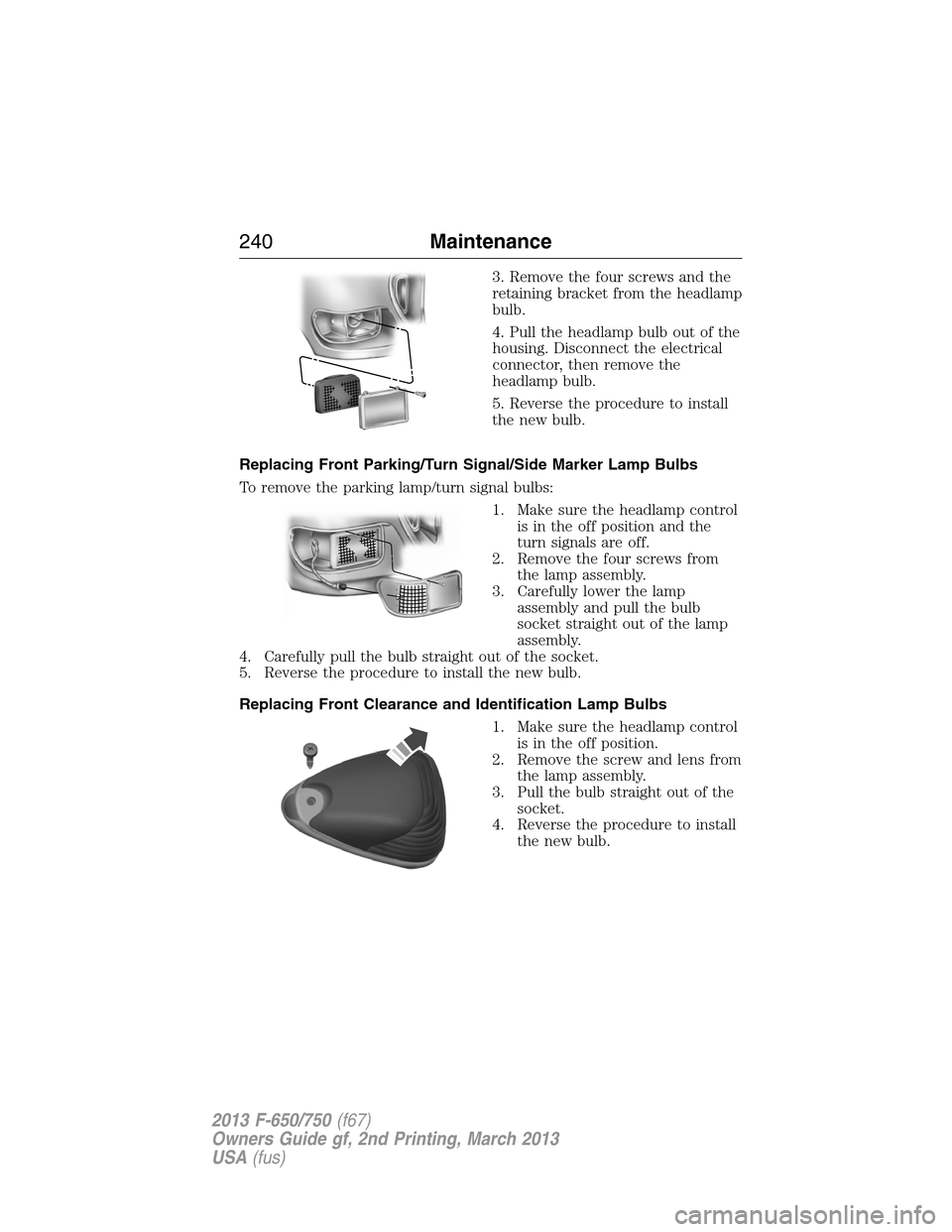
3. Remove the four screws and the
retaining bracket from the headlamp
bulb.
4. Pull the headlamp bulb out of the
housing. Disconnect the electrical
connector, then remove the
headlamp bulb.
5. Reverse the procedure to install
the new bulb.
Replacing Front Parking/Turn Signal/Side Marker Lamp Bulbs
To remove the parking lamp/turn signal bulbs:
1. Make sure the headlamp control
is in the off position and the
turn signals are off.
2. Remove the four screws from
the lamp assembly.
3. Carefully lower the lamp
assembly and pull the bulb
socket straight out of the lamp
assembly.
4. Carefully pull the bulb straight out of the socket.
5. Reverse the procedure to install the new bulb.
Replacing Front Clearance and Identification Lamp Bulbs
1. Make sure the headlamp control
is in the off position.
2. Remove the screw and lens from
the lamp assembly.
3. Pull the bulb straight out of the
socket.
4. Reverse the procedure to install
the new bulb.
240Maintenance
2013 F-650/750(f67)
Owners Guide gf, 2nd Printing, March 2013
USA(fus)
Page 242 of 378

Replacing Brake/Tail/Rear Turn Signal/Reverse/License Plate Lamp
Bulbs
1. Remove the four screws and the
lamp lens from the lamp
assembly.
2. Carefully pull the bulb straight
out of the socket.
3. Reverse the procedure to install
the new bulb.
BULB SPECIFICATION CHART
Replacement bulbs are specified in the chart below. Headlamp bulbs
must be marked with an authorized D.O.T. for North America and an E
for Europe to make sure lamp performance, light brightness and pattern
and safe visibility. The correct bulbs will not damage the lamp assembly
or void the lamp assembly warranty and will provide quality bulb
illumination time.
Function Number of
BulbsTrade Number
Headlamps 2 H6054
Front turn signal lamps 2 1157
Front sidemarker lamps, parking
lamps2 (amber) 194
Brake lamps, tail lamps, stop lamps,
rear turn signals lamps, license plate
lamps1 (each side) 1157
Back up lamps 2 1156
Front clearance and identification
lamps5 194
Dome lamp 1 105
To replace all instrument panel lights, see your authorized dealer.
Maintenance241
2013 F-650/750(f67)
Owners Guide gf, 2nd Printing, March 2013
USA(fus)
Page 334 of 378

Pre-defined text message options
Too funny
Can’t wait to see you
I’m stuck in traffic
Accessing Your Phone Settings
These are phone-dependent features. Your phone settings allow you to
access and adjust features such as your ring tone, text message
notification, modify your phone book and also set up automatic
download.
1. Press the phone button.
2. Scroll until Phone Settings appears, then press OK.
3. Scroll to select from the following options:
When you select: You can:
Phone StatusSee the provider, name, signal power, battery
power and roaming status of your connected
phone.
Press OK to select and scroll to view the
information. When done, press OK again to
return to the phone status menu.
Set RingerSelect which ring tone sounds during an
incoming call (one of the system’s or your
phone’s).
1. Press OK to select and scroll to hear
Ringer 1, Ringer 2, Ringer 3 and Phone
Ringer.
2. Press OK to select.
Note:If your phone supports in-band ringing,
your phone’s ringer sounds when Phone
Ringer is chosen.
Message NotificationHave the option of hearing an audible tone to
notify you when a text message arrives.
1. Press OK to select and scroll between
Message Notification On or Message
Notification Off.
2. Press OK to select.
SYNC®333
2013 F-650/750(f67)
Owners Guide gf, 2nd Printing, March 2013
USA(fus)
Page 362 of 378

Vehicle Health Report and SYNC Services (Traffic, Directions and
Information) issues
Issue Possible
cause(s)Possible solution(s)
I received a text
that the Vehicle
Health Report is
not activated.•Your account
may not be
activated on the
website, OR
•You may have
the wrong VIN
(vehicle
identification
number) listed.•This is a free feature, but you
must first register online to use it.
•Make sure that your VIN is
correctly listed in your account.
I am unable to
retrieve the report
on the website, or
I receive a system
error.The preferred
dealer information
did not load
correctly.When you register your account,
you must list a preferred dealer. If
one is already listed, try selecting
another dealer and logging out.
Log back in and change it back to
your preferred dealer and retrieve
the report.
I am unable to
submit a report.•This could be
due to your
phone’s
compatibility, OR
•Bad signal
strength, OR
•Your phone may
not be activated
on the website.•Update your mobile number in
your account on the website.
•Make sure you have full signal
strength and that yourBluetooth
volume level has been turned up.
•Try deleting your phone and
performing a clean pairing.
I heard a
commercial when I
tried to use
Traffic, Directions
and Information.•The phone in
use is not
activated, OR
•Your phone has
ID blocker active.•This is a free feature, but you
must first register online to use it.
•Turn off ID blocker on your
phone as the system recognizes
you by your phone number.
•Make sure the currently
connected phone is the same one
that is registered on your
SyncMyRide account.
SYNC®361
2013 F-650/750(f67)
Owners Guide gf, 2nd Printing, March 2013
USA(fus)
Page 375 of 378

Exhaust fumes ..........................104
F
Fail safe cooling ........................222
Fan, Engine Cooling .................219
Filter
fuel ...........................................232
Fuel
cap ...........................................118
capacity ...................................277
filler funnel .............................116
filling your vehicle with fuel ..118
octane rating ...................116, 263
quality ......................................114
running out of fuel .................116
safety information relating to
automotive fuels .....................113
Fuses ..........................194–195, 203
G
Gas cap (see Fuel cap) ............118
Gauges ...................................64, 66
H
Hazard flashers .........................185
Headlamps ...................................56
aiming ......................................239
bulb specifications ..................241
daytime running lights .............57
flash to pass ..............................56
replacing bulbs .......................239
turning on and off ....................56
Head restraints ...........................92
Heating ........................................88
Hood ..........................................215I
Ignition ...............................103, 263
Information displays ...................74
Instrument panel
cleaning ...................................247
cluster ........................................68
lighting up panel and
interior .......................................57
J
Joining two calls
(multiparty/conference call) ....328
Jump-starting your vehicle ......185
K
Keys
positions of the ignition .........103
L
Lamps ..........................................56
bulb replacement
specifications chart ................241
daytime running light ...............57
headlamps .................................56
headlamps, flash to pass ..........56
instrument panel, dimming .....57
interior lamps .....................58–59
replacing bulbs .......................239
Lane change indicator
(see Turn signal) ........................58
LATCH anchors ...........................36
Lights, warning and indicator ....68
Load limits .................................174
Locks
childproof ..................................40
doors ..........................................53
374Index
2013 F-650/750(f67)
Owners Guide gf, 2nd Printing, March 2013
USA(fus)
Page 377 of 378

for adults .................42–43, 45, 47
for children .........................28, 33
safety belt maintenance ...........51
seat belt maintenance ..............51
warning light and chime ..........48
Safety restraints - LATCH
anchors ........................................36
Safety seats for children ......28, 33
Safety Compliance
Certification Label ....................281
Seat belts (see Safety
restraints) ....................................42
Seats
child safety seats ................28, 33
front seats .................................96
heated ........................................99
Selecting your media source
(USB, Line in, BT audio) .........350
Setting the clock ...................79–80
Spark plugs,
specifications .....................263, 280
Specification chart, lubricants..264
Starting your vehicle ........103, 105
jump starting ..........................185
Steering .....................................212
Steering wheel ............................54
controls ......................................54
tilting .........................................54
Suspension ........................171, 214
SYNC® AppLink™ ...................346
SYNC® customer support ........320
SYNC® Services ........................343
T
Tail lamps
bulb replacement ....................239Temperature control
(see Climate control) .................88
Text messaging .........................331
Text messaging (sending,
downloading, deleting) .....331, 333
Tilt steering wheel ......................54
Tires ...........................................252
Towing .......................................175
trailer towing ..........................175
wrecker ....................................179
Traction control ........................164
Traffic, Directions and
Information ................................343
Transmission .....................132, 136
automatic operation ...............136
brake-shift interlock (BSI) ....136
fluid, checking and adding
(automatic) .............................223
fluid, checking and adding
(manual) .................................225
fluid, refill capacities ..............277
lubricant specifications ..........264
manual operation ....................132
Turn signal ..................................58
U
Upfitter controls .......................172
UREA .........................................120
USB port ......................................84
Using privacy mode ..................328
V
Vehicle health report ................341
Vehicle Identification Number
(VIN) ..................................281–282
Vehicle loading ..........................174
376Index
2013 F-650/750(f67)
Owners Guide gf, 2nd Printing, March 2013
USA(fus)