2013 FORD F250 light
[x] Cancel search: lightPage 109 of 577
To reset the oil monitoring system to 100% after each oil change,
perform the following:
1. Press and release the SETUP button to display OIL LIFE XXX% HOLD
RESET = NEW.
2. Press and hold the RESET button for two seconds and release to reset
the oil life to 100%.
Note:To change oil life 100% value (if equipped with this feature) to
another value, proceed to Step 3.
3. Once OIL LIFE SET TO XXX% is displayed, release and press the
RESET button to change the Oil Life Start Value. Each release and press
will reduce the value by 10%.
•UNITS: Displays the current units in English or Metric.
•AUTOLAMP (SEC): This feature keeps your headlights on for up to
three minutes after the ignition is switched off.
•AUTOLOCK: This feature automatically locks all vehicle doors when
the vehicle is shifted into any gear, putting the vehicle in motion.
•AUTOUNLOCK: This feature automatically unlocks all vehicle doors
when the driver’s door is opened within 10 minutes of the ignition
being turned off.
•COURTESY WIPE: This feature allows for an extra swipe of the wipers
after a wipe/wash cycle.
•REMOTE WINDOW OPEN: This feature allows for all windows to be
opened remotely.
•CREATE MYKEY / MYKEY SETUP / CLEAR MYKEY: For more
information refer toMyKey®in theLocks and Securitychapter.
•RESET FOR ZONE SETTING (if equipped): This feature changes the
compass zone setting.
Most geographic areas (zones) have a magnetic north compass point
that varies slightly from the northerly direction on maps. This variation
is four degrees between adjacent zones and will become noticeable
as the vehicle crosses multiple zones. A correct zone setting will
eliminate this error.
Refer toCompass zone/calibration adjustment.
•ZONE XX RESET = CHANGE (if equipped): The compass heading is
displayed as one of N, NE, E, SE, S, SW, W and NW in the message
center display.
Refer toCompass zone/calibration adjustment.
108Information Displays
2013 F-250/350/450/550(f23)
Owners Guide gf, 3rd Printing, December 2012
USA(fus)
Page 111 of 577
3. The compass is now calibrated.
•RESET FOR REMOTE START (if equipped)
•REAR PARK AID (if equipped): This feature sounds a warning tone to
warn the driver of obstacles near the rear bumper, and functions only
when R (Reverse) gear is selected.
•TBC MODE (if equipped): Allows you to choose the trailer brake
mode.
•TRAILER SWAY (if equipped): This feature uses the electronic
stability control to mitigate trailer sway.
•LANGUAGE = ENGLISH / SPANISH / FRENCH: Allows you to choose
which language the message center will display in.
Waiting four seconds or pressing the RESET button cycles the message
center through each of the language choices.
Press the RESET button to set the language choice.
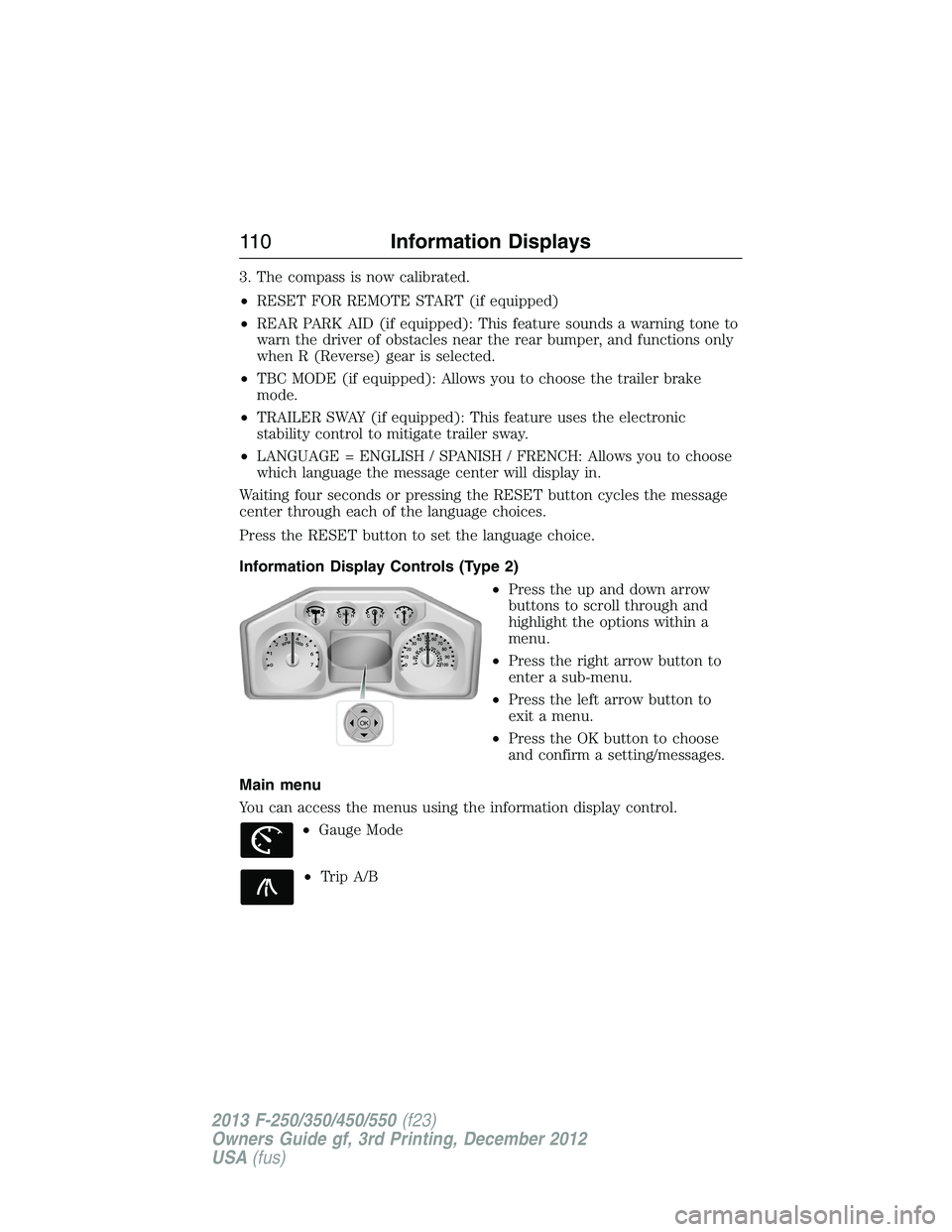
Information Display Controls (Type 2)
•Press the up and down arrow
buttons to scroll through and
highlight the options within a
menu.
•Press the right arrow button to
enter a sub-menu.
•Press the left arrow button to
exit a menu.
•Press the OK button to choose
and confirm a setting/messages.
Main menu
You can access the menus using the information display control.
•Gauge Mode
•Trip A/B
OK
11 0Information Displays
2013 F-250/350/450/550(f23)
Owners Guide gf, 3rd Printing, December 2012
USA(fus)
Page 115 of 577
Truck Apps (cont’d)
Trailer
(cont’d)Active trailer name or default trailer
Accumulated trailer distance
Trailer gain and output
Trailer disconnected. Disregard this status if your vehicle
is not equipped with a factory installed trailer brake
controller. This message may appear when an aftermarket
TBC is used even when the trailer is connected.
Press OK for
optionsOptions
Change
Active
TrailerWhen this is highlighted,
press the right arrow key
to change the currently
selected trailer. Use the up
and down arrows to select
a trailer and press the OK
button to choose the
highlighted trailer.
Adding a new trailer– Use
the up/down arrows to
highlight New Trailer and
press the right arrow key to
enter the New Trailer input
screen. Use the up/down
arrow keys to choose alpha,
numeric and symbol
characters and then press
the right arrow to move the
character space over.
Continue adding characters
as needed. Press the left
arrow to go back and change
a previously selected
character. When finished
with the new trailer name,
press OK to accept the new
trailer name.
11 4Information Displays
2013 F-250/350/450/550(f23)
Owners Guide gf, 3rd Printing, December 2012
USA(fus)
Page 116 of 577
Truck Apps (cont’d)
Trailer
(cont’d)Press OK for
optionsConnection
Checklist
(if equipped)
Conventional, Fifth Wheel
and Gooseneck. Use the
up/down arrows to highlight
one of these choices and
press OK to display the
connection checklist.
Follow the on-screen
instructions to go through
the connections list.
Delete
TrailerUse the up/down arrows to
highlight the trailer you
want to delete and press
OK to delete. Follow the
on-screen prompts to exit
or confirm delete.
Information
ScreenTow Haul mode, Trailer
Brake Controller.
Rename
TrailerUse the up/down buttons
to highlight a trailer and
press OK to select it. Use
the up/down arrow buttons
to change the characters
as needed. When done,
press OK to accept the
change.
Reset Trailer
Mileage /
Kilometers
(if equipped)Use the up/down buttons
to select a trailer, then
press and hold OK to
reset the trailer mileage
(kilometers).
Information Displays11 5
2013 F-250/350/450/550(f23)
Owners Guide gf, 3rd Printing, December 2012
USA(fus)
Page 120 of 577
Information
System Check
Some items will only display during a system check if
a problem has been detected. If an issue exists on one
of the monitored systems, the number of warnings
that need immediate attention will display in red and
the number of informational warnings will display in
amber. Use the up/down arrow buttons to scroll
through the list; press the right arrow button to
display specific information on the highlighted
warning
Compass/Transmission indicator display (if equipped)
The compass heading will display in the upper right corner of the
information display; the transmission gear indicator displays in the right
side of the information display when using the SelectShift Automatic™
transmission feature. These displays will not be shown in all screen
modes. For example: when programming certain vehicle features or in
certain information menus.
INFORMATION MESSAGES
Note:Depending on the vehicle options equipped with your vehicle, not
all of the messages will display or be available. Certain messages may be
abbreviated or shortened depending upon which cluster type you have.
Press the RESET button for Type 1 displays or the OK button for Type 2
displays to acknowledge and remove some messages from the information
display. Other messages will be removed automatically after a short time.
Certain messages need to be confirmed before you can access the menus.
AdvanceTrac® /
Traction Control
MessagesAction / Description
SERVICE
ADVANCETRAC
Displayed when the AdvanceTrac® system has
detected a condition that requires service.
Contact your authorized dealer as soon as
possible.
ADVANCETRAC
OFFDisplayed when the AdvanceTrac® system has
been disabled by the driver.
Information Displays11 9
2013 F-250/350/450/550(f23)
Owners Guide gf, 3rd Printing, December 2012
USA(fus)
Page 122 of 577
Diesel Messages Action / Description
CHECK COOLANT
ADDITIVEDisplayed when the coolant additive needs to be
checked. Refer to your diesel supplement for
more information.
CLEANING
EXHAUST FILTERDisplayed when the vehicle has entered the
cleaning mode. Various engine actions will raise
the exhaust temperature in the Diesel Particulate
Filter (DPF) system to burn off the particles
(exhaust soot). After the particles are burned
off, the exhaust temperature will fall back to
normal levels. This message is NORMAL. Refer to
your diesel supplement for more information.
DRIVE TO CLEAN
EXHAUST SYSTEMDisplayed when the Diesel Particulate Filter
(DPF) is full of particles (exhaust soot) and the
vehicle is not being operated in a manner to
allow normal cleaning. This message will stay on
until the exhaust filter cleaning has begun, at
which time the CLEANING EXHAUST FILTER
message will be displayed. It is recommended the
vehicle operator drive the vehicle above 30 mph
(48 km/h) until the CLEANING EXHAUST
FILTER message turns off. This message is
NORMAL. Refer to your diesel supplement for
more information.Note:If this message is
ignored, your vehicle will continue to fill the
Diesel Particulate Filter (DPF) with particles
(exhaust soot). If cleaning is not permitted, the
light will illuminate and engine power may be
limited. If the vehicle is still not operated in a
manner to allow cleaning, the service engine
soon light will illuminate and engine power will
be further limited. Dealer service will then be
required to restore your vehicle to full-power
operation.
Information Displays121
2013 F-250/350/450/550(f23)
Owners Guide gf, 3rd Printing, December 2012
USA(fus)
Page 135 of 577
GENERAL INFORMATION
Radio Frequencies and Reception Factors
AM and FM frequencies are established by the Federal Communications
Commission (FCC) and the Canadian Radio and Telecommunications
Commission (CRTC). Those frequencies are:
AM: 530, 540–1700, 1710 kHz
FM: 87.9–107.7, 107.9 MHz
Radio reception factors
Distance and
strengthThe further you travel from an FM station,
the weaker the signal and the weaker the
reception.
TerrainHills, mountains, tall buildings, bridges,
tunnels, freeway overpasses, parking garages,
dense tree foliage and thunderstorms can
interfere with the reception.
Station overloadWhen you pass a ground-based broadcast
repeating tower, a stronger signal may
overtake a weaker one and result in the
audio system muting.
CD and CD Player Information
Note:CD units play commercially pressed 4.75-inch (12 centimeter)
audio compact discs only. Due to technical incompatibility, certain
recordable and re-recordable compact discs may not function correctly
when used in Ford CD players.
Note:Do not insert CDs with homemade paper (adhesive) labels into
the CD player as the label may peel and cause the CD to become
jammed. You should use a permanent felt tip marker rather than
adhesive labels on your homemade CDs. Ballpoint pens may damage
CDs. Please contact your authorized dealer for further information.
Note:Do not use any irregularly shaped discs or discs with a scratch
protection film attached.
Always handle discs by their edges only. Clean the disc with an approved
CD cleaner only. Wipe it from the center of the disc toward the edge.
Do not clean in a circular motion.
Do not expose discs to direct sunlight or heat sources for extended
periods.
134Audio System
2013 F-250/350/450/550(f23)
Owners Guide gf, 3rd Printing, December 2012
USA(fus)
Page 148 of 577

Distributes air through the instrument panel vents, floor vents,
and demister vents.
Distributes air through the floor vents.
E.A/C:Press to turn air conditioning off and on. Air conditioning cools
the vehicle using outside air. To improve air conditioning when starting
your vehicle, drive with the windows slightly open for two to three
minutes.
F.Recirculated air:Press to switch between outside air and
recirculated air. When the LED on the button is lit, the air currently in
the passenger compartment is being recirculated. Using recirculated air
can reduce the time needed to cool the interior and reduce unwanted
odors from entering your vehicle.
G.MAX A/C:Distributes recirculated air through the instrument panel
vents to cool the vehicle. This position is more economical and efficient
than normal A/C.
H.Temperature control:Controls the temperature of the air circulated
in your vehicle. Turn to select the desired temperature.
I.Fan speed control:Controls the volume of air circulated in your
vehicle. Turn to select the desired fan speed or switch off. If you switch
the fan off, the windshield may fog up.
J.Power:Press to turn the system off and on. When the system is off,
outside air cannot enter the vehicle.
Climate Control147
2013 F-250/350/450/550(f23)
Owners Guide gf, 3rd Printing, December 2012
USA(fus)