2013 FORD F250 remote start
[x] Cancel search: remote startPage 78 of 577
SECURILOCK® PASSIVE ANTI-THEFT SYSTEM (IF EQUIPPED)
Note:The system is not compatible with non-Ford aftermarket remote
start systems. Use of these systems may result in vehicle starting
problems and a loss of security protection.
Note:Metallic objects, electronic devices or a second coded key on the
same key chain may cause vehicle starting issues if they are too close to
the key when starting the engine. Prevent these objects from touching
the coded key while starting the engine. Switch the ignition off, move all
objects on the key chain away from the coded key and restart the engine
if a problem occurs.
Note:Do not leave a duplicate coded key in the vehicle. Always take
your keys and lock all doors when leaving the vehicle.
The system is an engine immobilization system. It helps prevent the
engine from starting unless a coded key programmed to your vehicle
is used. Using the wrong key may prevent the engine from starting.
A message may appear in the information display.
If you are unable to start the engine with a correctly coded key, a
malfunction has happened and a message may appear in the information
display.
Automatic Arming
Your vehicle arms immediately after you switch the ignition off.
Automatic Disarming
Your vehicle disarms when you switch the ignition on with a coded key.
Replacement Keys
Note:Your vehicle may come with two integrated keyhead transmitters.
The integrated keyhead transmitter functions as a programmed ignition
key that operates all the locks and starts the vehicle, as well as a remote
control.
If your programmed transmitters or standard SecuriLock coded keys are
lost or stolen and you do not have an extra coded key, you will need to
have your vehicle towed to an authorized dealer. The key codes need
to be erased from your vehicle and new coded keys will need to be
programmed.
Store an extra programmed key away from the vehicle in a safe place to
help prevent any inconveniences. See an authorized dealer to purchase
additional spare or replacement keys.
Security77
2013 F-250/350/450/550(f23)
Owners Guide gf, 3rd Printing, December 2012
USA(fus)
Page 79 of 577
Programming a Spare Key
Note:A maximum of eight coded keys can be programmed to your
vehicle. Only four of these eight can be integrated keyhead transmitters.
You can program your own integrated keyhead transmitters or standard
SecuriLock coded keys to your vehicle. This procedure will program both
the engine immobilizer key code and the remote entry portion of the
remote control to your vehicle.
Only use integrated keyhead transmitters or standard SecuriLock keys.
You must have two previously programmed coded keys and the new
unprogrammed key readily accessible. See your authorized dealer to have
the spare key programmed if two previously programmed coded keys are
not available
Read and understand the entire procedure before you begin.
1. Insert the first previously programmed coded key into the ignition.
2. Turn the ignition from off to on. Keep the ignition on for at least three
seconds, but no more than 10 seconds.
3. Turn the ignition off and remove the first coded key from the ignition.
4. After three seconds but within 10 seconds of removing the first coded
key, insert the second previously coded key into the ignition.
5. Turn the ignition from off to on. Keep the ignition on for at least one
second, but no more than 10 seconds.
6. Turn the ignition off and remove the second previously programmed
coded key from the ignition.
7. After three seconds but within 10 seconds of turning the ignition off
and removing the previously programmed coded key, insert the new
unprogrammed key into the ignition.
8. Turn the ignition from off to on. Keep the ignition on for at least
one second, but no more than 10 seconds.
9. Remove the newly programmed coded key from the ignition.
The key will start the vehicle’s engine and will operate the remote entry
system (if the new key is an integrated keyhead transmitter) if it has
been successfully programmed.
If the key was not successfully programmed, wait 20 seconds and repeat
Steps 1 through 8. Take your vehicle to your authorized dealer to have
the new key programmed if you are still unsuccessful.
Wait 20 seconds and then repeat this procedure from Step 1 to program
an additional key.
78Security
2013 F-250/350/450/550(f23)
Owners Guide gf, 3rd Printing, December 2012
USA(fus)
Page 108 of 577
SETUP
OIL LIFE
UNITS press the
RESET buttonDistance English
Metric
Temperature Fahrenheit
Celsius
AUTOLAMP
(SEC)0 to 180 seconds
AUTOLOCK On or Off
AUTOUNLOCK On or Off
COURTESY
WIPEOn or Off
REMOTE
WINDOW OPENOn or Off
CREATE MYKEY / MYKEY SETUP / CLEAR MYKEY
RESET FOR ZONE SETTING (if equipped)
ZONE XX RESET = CHANGE (if equipped)
RESET FOR CALIBRATION (if equipped)
RESET FOR
REMOTE START
(if equipped)press the
RESET buttonOn or Off
5, 10, 15 minutes
TBC MODE (if
equipped)Electric or EOH
TRAILER SWAY
(if equipped)On or Off
LANGUAGE =
ENGLISH /
SPANISH /
FRENCHEnglish / Spanish / French
•RESET FOR SYSTEM CHECK: The message center will begin to cycle
through the vehicle systems and provide a status of the item if
needed. Some systems show a message only if a condition is present.
•
OIL LIFE: This displays the remaining oil life. An oil change is required
whenever indicated by the message center and according to the
recommended maintenance schedule. USE ONLY RECOMMENDED
ENGINE OILS.
Information Displays107
2013 F-250/350/450/550(f23)
Owners Guide gf, 3rd Printing, December 2012
USA(fus)
Page 109 of 577
To reset the oil monitoring system to 100% after each oil change,
perform the following:
1. Press and release the SETUP button to display OIL LIFE XXX% HOLD
RESET = NEW.
2. Press and hold the RESET button for two seconds and release to reset
the oil life to 100%.
Note:To change oil life 100% value (if equipped with this feature) to
another value, proceed to Step 3.
3. Once OIL LIFE SET TO XXX% is displayed, release and press the
RESET button to change the Oil Life Start Value. Each release and press
will reduce the value by 10%.
•UNITS: Displays the current units in English or Metric.
•AUTOLAMP (SEC): This feature keeps your headlights on for up to
three minutes after the ignition is switched off.
•AUTOLOCK: This feature automatically locks all vehicle doors when
the vehicle is shifted into any gear, putting the vehicle in motion.
•AUTOUNLOCK: This feature automatically unlocks all vehicle doors
when the driver’s door is opened within 10 minutes of the ignition
being turned off.
•COURTESY WIPE: This feature allows for an extra swipe of the wipers
after a wipe/wash cycle.
•REMOTE WINDOW OPEN: This feature allows for all windows to be
opened remotely.
•CREATE MYKEY / MYKEY SETUP / CLEAR MYKEY: For more
information refer toMyKey®in theLocks and Securitychapter.
•RESET FOR ZONE SETTING (if equipped): This feature changes the
compass zone setting.
Most geographic areas (zones) have a magnetic north compass point
that varies slightly from the northerly direction on maps. This variation
is four degrees between adjacent zones and will become noticeable
as the vehicle crosses multiple zones. A correct zone setting will
eliminate this error.
Refer toCompass zone/calibration adjustment.
•ZONE XX RESET = CHANGE (if equipped): The compass heading is
displayed as one of N, NE, E, SE, S, SW, W and NW in the message
center display.
Refer toCompass zone/calibration adjustment.
108Information Displays
2013 F-250/350/450/550(f23)
Owners Guide gf, 3rd Printing, December 2012
USA(fus)
Page 111 of 577
3. The compass is now calibrated.
•RESET FOR REMOTE START (if equipped)
•REAR PARK AID (if equipped): This feature sounds a warning tone to
warn the driver of obstacles near the rear bumper, and functions only
when R (Reverse) gear is selected.
•TBC MODE (if equipped): Allows you to choose the trailer brake
mode.
•TRAILER SWAY (if equipped): This feature uses the electronic
stability control to mitigate trailer sway.
•LANGUAGE = ENGLISH / SPANISH / FRENCH: Allows you to choose
which language the message center will display in.
Waiting four seconds or pressing the RESET button cycles the message
center through each of the language choices.
Press the RESET button to set the language choice.
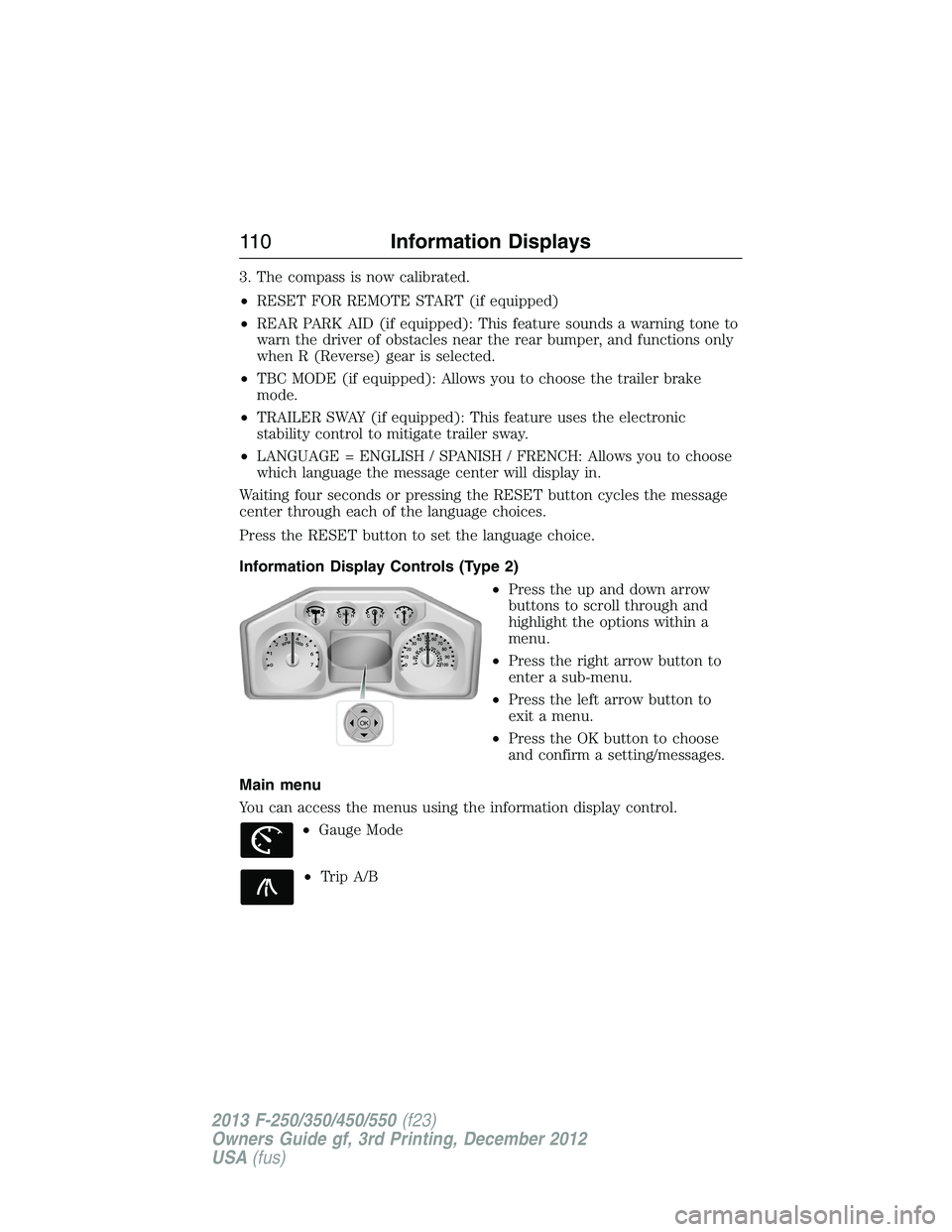
Information Display Controls (Type 2)
•Press the up and down arrow
buttons to scroll through and
highlight the options within a
menu.
•Press the right arrow button to
enter a sub-menu.
•Press the left arrow button to
exit a menu.
•Press the OK button to choose
and confirm a setting/messages.
Main menu
You can access the menus using the information display control.
•Gauge Mode
•Trip A/B
OK
11 0Information Displays
2013 F-250/350/450/550(f23)
Owners Guide gf, 3rd Printing, December 2012
USA(fus)
Page 118 of 577

Settings (cont’d)
Vehicle Autolamp
DelayOff or XXX seconds
Compass Zone Setting (1–15) See the diagram
below to determine your magnetic zone.
Calibration (When choosing Calibration,
follow the on-screen directions to
calibrate the compass)
Easy
Entry/ExitOn/Off
DTE
Calculation
(distance to
empty)Normal History Used
Towing History Used
Locks Autolock On/Off
Autounlock On/Off
Unlocking One Stage or Two Stage
Maintenance Coolant
(if equipped)Hold OK if coolant
maintenance performed
Fuel Filter
(diesel only)Hold OK if Fuel Filter
Changed
Menu Control Standard: with standard set, pressing the
up/down arrows from a lower level menu
will escape to the main menu.
Memory On: with memory on set, pressing
the up/down arrows will navigate to the
previous lower level menu.
Oil Life Reset Set to XXX% (Hold OK to Reset)
Remote Start Duration 5, 10 or 15 minutes
System Enable/Disable
Windows Remote
OpenOn/Off
Wiper Control On/Off
Information Displays11 7
2013 F-250/350/450/550(f23)
Owners Guide gf, 3rd Printing, December 2012
USA(fus)
Page 129 of 577
Engine Messages Action / Description
TRANSPORT MODE
CONTACT DEALERDisplayed when the vehicle is set to transport
mode. The transport mode is used to disable
certain vehicle functions to prevent battery
discharge when the vehicle is in the
transport/inventory phase and is not driven
long enough to maintain the battery’s charge.
This mode can be disabled by doing the
following: Turn the ignition on, without
starting the engine. Press and release the
brake pedal fully five times and press the
hazard button four times (on, off, on, off)
within 10 seconds.
POWER REDUCED
TO LOWER ENGINE
TEMPDisplayed when the engine temperature gauge
needle moves to H. You may notice reduced
engine power. Refer toEngine coolantin the
Maintenancechapter for more information.
Fuel Messages Action / Description
CHECK FUEL CAPDisplayed when the fuel cap may not be
properly closed.
FUEL LEVEL LOWDisplayed as an early reminder of a low fuel
condition.
Key Messages Action / Description
COULD NOT
PROGRAM
INTEGRATED KEYDisplayed when an attempt is made to
program a fifth integrated key. For more
information, refer to theSecuritychapter.
TO DRIVE: TURN
KEY TO ONDisplayed when the factory equipped remote
start is activated.
Maintenance
MessagesAction / Description
ENGINE OIL
CHANGE SOONDisplayed when the engine oil life is nearing
its end.
OIL CHANGE
REQUIREDDisplayed when the oil life left reaches 0%.
128Information Displays
2013 F-250/350/450/550(f23)
Owners Guide gf, 3rd Printing, December 2012
USA(fus)
Page 153 of 577
5. Direct the outer instrument panel vents toward the side windows.
6. To increase airflow to the outer instrument panel vents, close the
vents located in the middle of the instrument panel.
HEATED WINDOWS AND MIRRORS (IF EQUIPPED)
Heated Rear Window
Note:The engine must be running to use this feature.
Note:If your vehicle is equipped with a sliding rear window, the feature
still operates when the window is opened.
Press the button to clear the rear window of thin ice and fog. Press
the button again within 10 minutes to switch it off. It switches off
automatically after 10 minutes, or when you switch the ignition off.
Do not use razor blades or other sharp objects to clean the inside
of the rear window or to remove decals from the inside of the
rear window. This may cause damage to the heated grid lines.
Your warranty does not cover this damage.
Heated Exterior Mirror (If Equipped)
Note:Do not remove ice from the mirrors with a scraper or attempt to
readjust the mirror glass that has frozen in place. These actions could
cause damage to the glass and mirrors.
Note:Do not clean the housing or glass of any mirror with harsh
abrasives, fuel or other petroleum-based cleaning products.
Both mirrors heat to remove ice, mist and fog when you turn the rear
window defroster on.
REMOTE START CLIMATE OPERATION (IF EQUIPPED)
The climate control system adjusts the cabin temperature during remote
start.
You cannot adjust the system during remote start operation. Turn the
ignition on to return the system to its previous settings. You can now
make adjustments. You will need to turn certain vehicle-dependent
features back on, such as:
•heated seats
•cooled seats
•heated steering wheel
•heated mirrors
•heated rear window.
152Climate Control
2013 F-250/350/450/550(f23)
Owners Guide gf, 3rd Printing, December 2012
USA(fus)