2013 FORD EXPLORER climate control
[x] Cancel search: climate controlPage 472 of 576

INTRODUCTION
WARNING:Driving while distracted can result in loss of vehicle
control, accident and injury. Ford strongly recommends that
drivers use extreme caution when using any device or feature that may
take their focus off the road. Your primary responsibility is the safe
operation of the vehicle. We recommend against the use of any
handheld device while driving, encourage the use of voice-operated
systems when possible and that you become aware of applicable state
and local laws that may affect use of electronic devices while driving.
Note:Some features are not available while the vehicle is moving.
This system uses a four-corner strategy to provide quick access to
vehicle features and settings. The comprehensive touchscreen provides
easy interaction with your cellular phone, multimedia, climate control
and navigation system. The corners display any active modes within
those menus, such as your phone being connected or the climate
temperature.
Press to select any of the following:
•Clock
•Sound
•Settings
•Display
•Vehicle
•Help
Press to select any of the following:
•SYNC Services
•Notifications
•SYNC Apps
•SIRIUS Travel Link
•Calendar
If the icon is yellow, refer toNotificationsin theInformationsection of
this chapter.
472MyFord Touch™
2013 Explorer(exp)
Owners Guide gf, 1st Printing
USA(fus)
Page 474 of 576
Press to select any of the following:
•Driver Settings
•Recirculated Air
•Auto
•Dual
•Passenger Settings
•A/C
•Defrost
Press to access your home screen.
Depending on your vehicle’s option package and software, your
screens may vary in appearance from the screens shown in this
section. Your features may also be limited depending on your market.
Check with your authorized dealer for availability.
Customizing Your Home Screen
Press the house icon to access the home screen.
Using the Touch-Sensitive Controls on Your System
Your vehicle’s centerstack has touch-sensitive switches for your
infotainment and climate control systems. To turn a feature on and off,
just touch the graphic with your finger. To get the best performance from
the touch-sensitive controls:
•Do not press hard on the controls. They are sensitive to light touch.
•Use your bare finger to touch the center of a touch-control graphic.
Touching off-center of the graphic may cause a nearby control to turn
on or off.
•Make sure your hands are clean and dry.
•Since the touchscreen operates based on the touch of a finger, you
may have trouble using it if you are wearing gloves.
•Metal and other conductive material should be kept away from the
surface of the touchscreen as this may cause electronic interference
(i.e. control activation).
474MyFord Touch™
2013 Explorer(exp)
Owners Guide gf, 1st Printing
USA(fus)
Page 475 of 576
Depending on your vehicle and option package, you may also have these
controls on your bezel:
•Power: Turn the media (or climate features) on or off.
•VOL: Increase or decrease the volume.
•Fan: Increase or decrease the fan speed.
•Seek and Tune buttons: Use as you normally would in media modes.
•Eject: Eject a CD.
•SOURCE: Touch the word repeatedly to see all available media modes.
The screen does not change, but you see the media changes in the
lower left status bar.
•SOUND: Touch the word to access the Sound menu where you can
make adjustments to settings such as: Bass, Treble, Midrange, Balance
and Fade, THX Deep Note Demo (if equipped), DSP (if equipped),
Occupancy Mode (if equipped), and Speed Compensated Volume
settings.
•Hazard flasher: Press the button to turn the hazard flashers on or off.
Cleaning the Touchscreen Display
Clean the display with a clean, soft cloth such as one used for cleaning
glasses. If dirt or finger prints are still visible, apply a small amount of
alcohol to the cloth. Do not pour or spray alcohol onto the display. Do
not use detergent or any type of solvent to clean the display.
Support
The SYNC support team is available to help you with any questions you
aren’t able to answer on your own.
Monday-Saturday, 8:30 am-8pm EST
In the United States, call: 1–888–270–1055
In Canada, call: 1–800–565–3673
Times are subject to change due to holidays.
MyFord Touch™475
2013 Explorer(exp)
Owners Guide gf, 1st Printing
USA(fus)
Page 480 of 576
Navigation
Climate
You can make selections from the menu by using the OK button or
touching the screen. If you make a selection by touching the screen, the
selection menu expands and you are allowed different options.
•Press the up and down arrows to scroll through the modes.
•Press the right arrow to enter the mode.
•Press the left or right arrows to make adjustments within the chosen
mode.
•Press OK to confirm your selection.
Note:If your vehicle is not equipped with navigation, Compass appears
in the display instead of Navigation. If you press the right arrow to go
into the Compass menu, you can see the compass graphic. The compass
displays the direction in which the vehicle is traveling, not “true”
direction (i.e. if the vehicle is traveling west, the middle of the compass
graphic displays west; north displays to the left of west though its “true”
direction is to the right of west.)
USING YOUR VOICE RECOGNITION SYSTEM
This system helps you control many features using voice commands. This
allows you to keep your hands on the wheel and focus on what is in front
of you. The system provides feedback through audible tones, prompts,
questions and spoken confirmations depending on the situation and the
chosen level of interaction (voice settings).
The system also asks short questions (confirmation prompts) when it is
not sure of your request or when there are multiple possible responses to
your request.
When using voice commands, words and icons may also appear in the
lower left status bar indicating the status of the voice session (i.e.,
listening, success, failed, paused or try again).
480MyFord Touch™
2013 Explorer(exp)
Owners Guide gf, 1st Printing
USA(fus)
Page 481 of 576
How to Use Voice Commands with Your System
Press the voice icon; after the tone, speak your command
clearly.
These commands can be said at any time
“Cancel”
“Exit”
“Go back”
“List of commands”
“Main menu”
“Next page”
“Previous page”
“What can I say?”
“Help”
What Can I Say?
To access the available voice commands for the current session, do one
of the following:
•During a voice session, press the lower left status bar of the screen,
OR
•Say “What can I say?” for an on-screen listing of the possible voice
commands associated with your current voice session, OR
•Press the voice icon; after the tone, say “Help” for an audible list of
possible voice commands.
To Access a List of Available Commands
•Press Menu > Help > Voice Command List, OR
•Press the voice icon; after the tone, speak your command clearly:
Voice command list
“Audio list of commands”
“Bluetooth audio list of commands”
“Browse list of commands”
“CD list of commands”
“Climate control list of commands”
“List of commands”
MyFord Touch™481
2013 Explorer(exp)
Owners Guide gf, 1st Printing
USA(fus)
Page 536 of 576
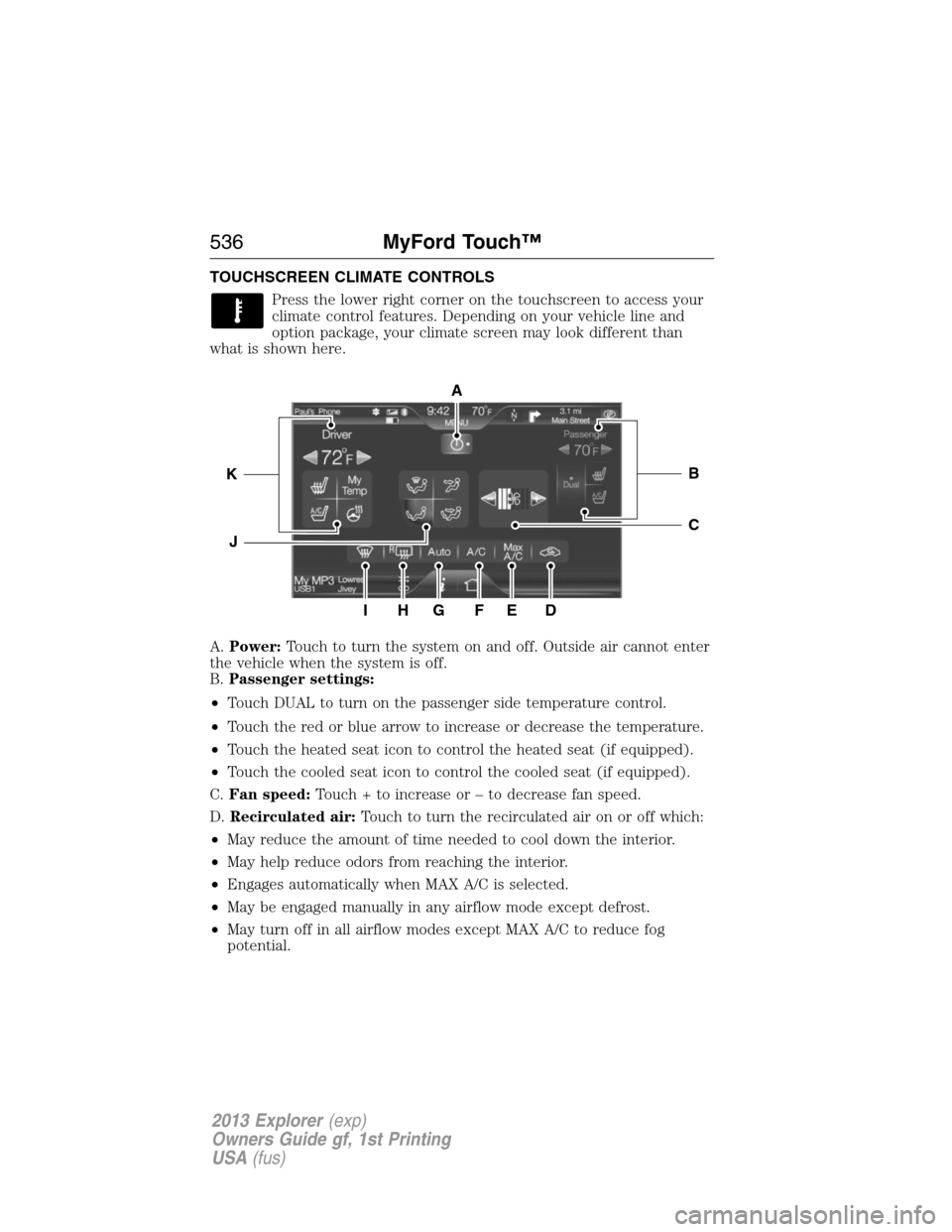
TOUCHSCREEN CLIMATE CONTROLS
Press the lower right corner on the touchscreen to access your
climate control features. Depending on your vehicle line and
option package, your climate screen may look different than
what is shown here.
A.Power:Touch to turn the system on and off. Outside air cannot enter
the vehicle when the system is off.
B.Passenger settings:
•Touch DUAL to turn on the passenger side temperature control.
•Touch the red or blue arrow to increase or decrease the temperature.
•Touch the heated seat icon to control the heated seat (if equipped).
•Touch the cooled seat icon to control the cooled seat (if equipped).
C.Fan speed:Touch + to increase or – to decrease fan speed.
D.Recirculated air:Touch to turn the recirculated air on or off which:
•May reduce the amount of time needed to cool down the interior.
•May help reduce odors from reaching the interior.
•Engages automatically when MAX A/C is selected.
•May be engaged manually in any airflow mode except defrost.
•May turn off in all airflow modes except MAX A/C to reduce fog
potential.
A
IHG
C
BK
J
FED
536MyFord Touch™
2013 Explorer(exp)
Owners Guide gf, 1st Printing
USA(fus)
Page 538 of 576

K.Driver settings:Depending on your vehicle and option package, you
may have the following features:
•Touch the red or blue arrow to increase or decrease the temperature.
•Touch the heated seat icon to control the heated seat (if equipped).
Refer to the Seats chapter.
•Touch the cooled seat icon to control the cooled seat (if equipped).
Refer to the Seats chapter.
•Touch and hold MyTemp to select a temperature you would like the
vehicle to remember and maintain for you.
•Touch the heated steering wheel icon (if equipped) to warm the
steering wheel.
Note:If your vehicle is equipped with a wood-trimmed steering wheel,
is does not heat between the 10 o’clock and 2 o’clock positions.
Climate Control Voice Commands
The following voice commands are available at the main menu
level of a voice session. For example, press the voice button and
after the prompt, “Say a command”; say any of the following
commands:
Climate control voice commands
“Climate automatic”
“Climate my temperature”
“Climate off”
“Climate on”
“Climate temperature <15.5–29.5> degrees”
“Climate temperature <60–85> degrees”
“Help”
There are additional climate control commands but in order to access
them, you have to say “Climate” first, then when the system is ready to
listen, you may say any of the following commands:
Additional climate control voice commands
“Automatic” “Panel floor on”
“A/C off” “Panel on”
“A/C on” “Rear defrost off”
“Defrost off” “Rear defrost on”
“Defrost on” “Recirc off”
538MyFord Touch™
2013 Explorer(exp)
Owners Guide gf, 1st Printing
USA(fus)
Page 539 of 576
Additional climate control voice commands
“Dual off” “Recirc on”
“Fan decrease” “Temperature”*
“Fan increase” “Temperature <15.5–29.5>
degrees”
“Floor on” “Temperature <60–85> degrees”
“Max A/C off” “Temperature decrease”
“Max A/C on” “Temperature high”
“My temp” “Temperature increase”
“Off” “Temperature low”
“On” “Windshield floor on”
“Help”
*If you have said “Temperature”, you can say any of the commands in
the following “Temperature” chart.
“TEMPERATURE”
“High”
“Low”
“<15.5–29.5> degrees”
“<60–85> degrees”
“Help”
NAVIGATION SYSTEM (IF EQUIPPED)
Note:The navigation SD card must be in the SD card slot to operate the
navigation system. If you need a replacement SD card, see your
authorized dealer.
Note:The SD card slot is spring-loaded. To remove the SD card, just
push the card in and release it. Do not attempt to pull the card out to
remove it; this could cause damage.
Your navigation system is comprised of two main features, destination
mode and map mode.
To set a destination, press the green corner of your touchscreen, then
the Dest button when it appears. Refer toSetting a destination.
To view the navigation map and the vehicle’s current location, touch the
green bar in the upper right hand corner of the touchscreen, or, press
Dest > Map. Refer toMap mode.
MyFord Touch™539
2013 Explorer(exp)
Owners Guide gf, 1st Printing
USA(fus)