Page 269 of 576
Using the Systems
BLIS�turns on when the engine is started and the vehicle is driven
forward above 3 mph (5 km/h); it remains on while the transmission is in
D (Drive) and N (Neutral). If shifted out of D (Drive) or N (Neutral), the
system enters CTA mode. Once shifted back into D (Drive), BLIS�turns
back on when the vehicle is driven above 3 mph (5 km/h).
Note:BLIS�does not function in R (Reverse) or P (Park) or provide
any additional warning when a turn signal is on.
CTA detects approaching vehicles from up to 45 feet (14 meters) away
though coverage decreases when the sensors are blocked. Reversing
slowly helps increase the coverage area and effectiveness.
WARNING:To help avoid personal injury, NEVER use the CTA
system as a replacement for using the interior and exterior
mirrors and looking over your shoulder before backing out of a parking
space. CTA is not a replacement for careful driving and only an assist.
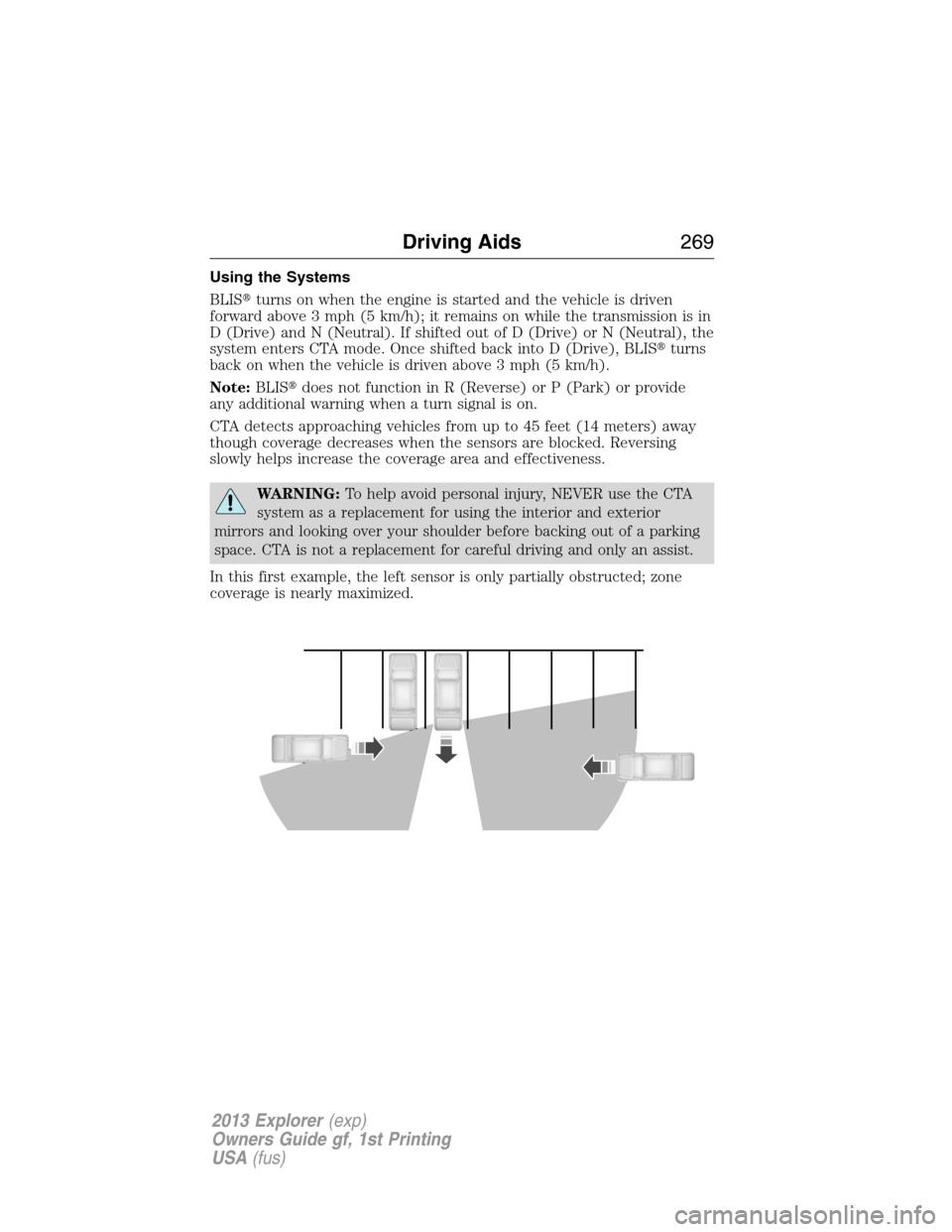
In this first example, the left sensor is only partially obstructed; zone
coverage is nearly maximized.
Driving Aids269
2013 Explorer(exp)
Owners Guide gf, 1st Printing
USA(fus)
Page 293 of 576
•Use the grade assist or tow/haul feature when towing. These provide
engine braking and help eliminate excessive transmission shifting for
optimum fuel economy and transmission cooling.
•Allow more distance for stopping with a trailer attached; anticipate
stops and brake gradually.
•Avoid parking on a grade. However, if you must park on a grade, place
wheel chocks under the trailer’s wheels.
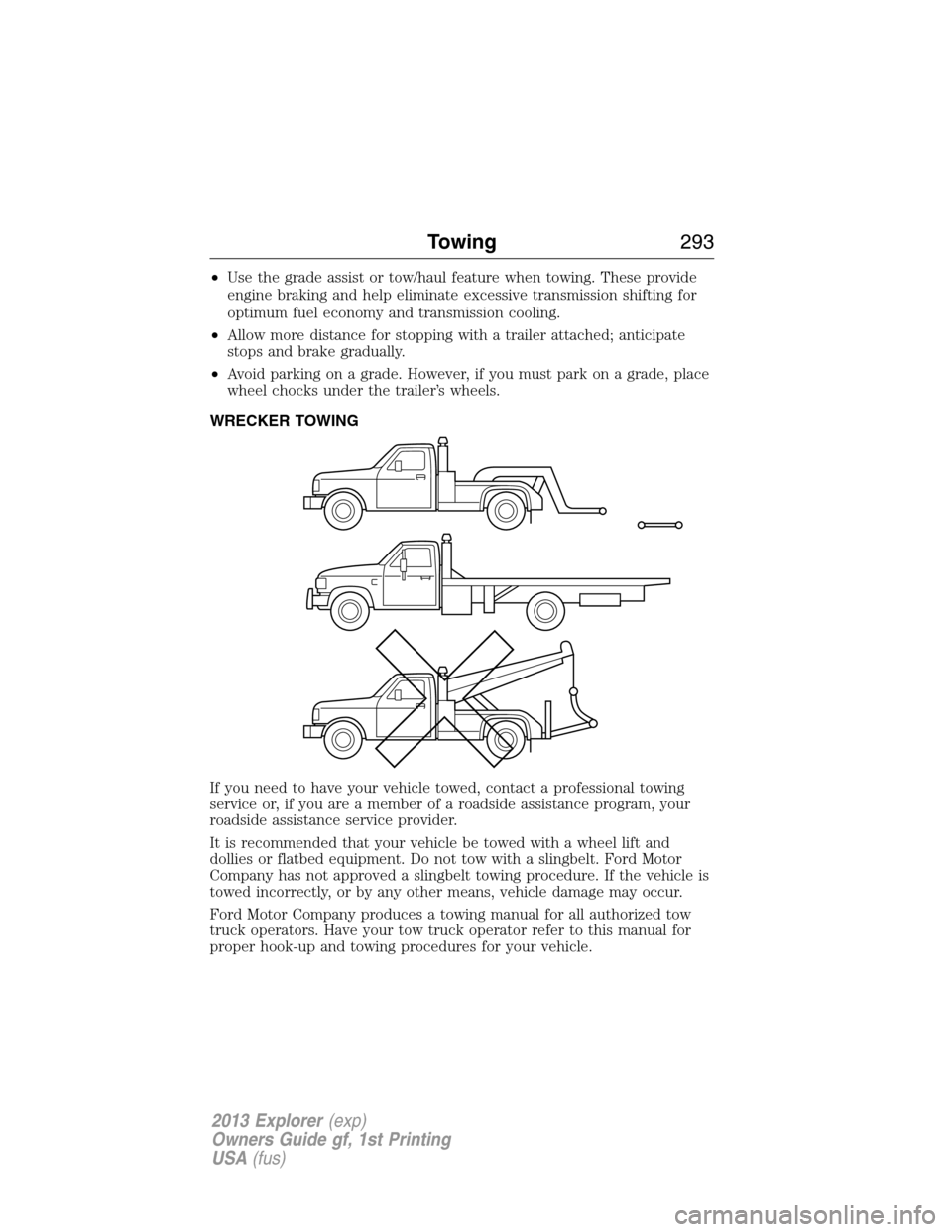
WRECKER TOWING
If you need to have your vehicle towed, contact a professional towing
service or, if you are a member of a roadside assistance program, your
roadside assistance service provider.
It is recommended that your vehicle be towed with a wheel lift and
dollies or flatbed equipment. Do not tow with a slingbelt. Ford Motor
Company has not approved a slingbelt towing procedure. If the vehicle is
towed incorrectly, or by any other means, vehicle damage may occur.
Ford Motor Company produces a towing manual for all authorized tow
truck operators. Have your tow truck operator refer to this manual for
proper hook-up and towing procedures for your vehicle.
Towing293
2013 Explorer(exp)
Owners Guide gf, 1st Printing
USA(fus)
Page 303 of 576
3. Park the booster vehicle close to the hood of the disabled vehicle making
sure the two vehicles do not touch. Set the parking brake on both vehicles
and stay clear of the engine cooling fan and other moving parts.
4. Check all battery terminals and remove any excessive corrosion before
you attach the battery cables. Ensure that vent caps are tight and level.
5. Turn the heater fan on in both vehicles to protect from any electrical
surges. Turn all other accessories off.
Connecting the Jumper Cables
WARNING:Do not connect the end of the second cable to the
negative (-) terminal of the battery to be jumped. A spark may
cause an explosion of the gases that surround the battery.
Note:Do not attach the negative (-) cable to fuel lines, engine rocker
covers, the intake manifold or electrical components as grounding points.
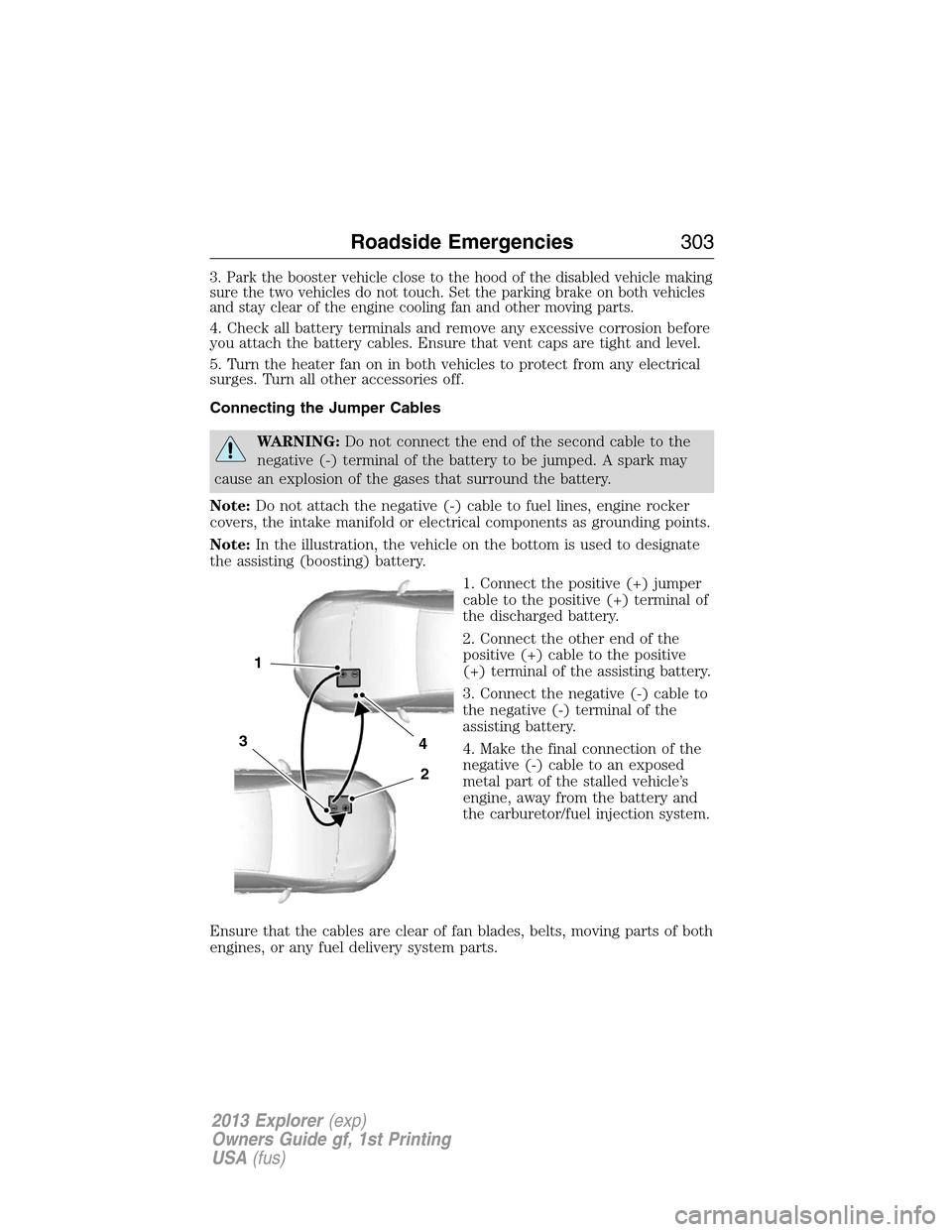
Note:In the illustration, the vehicle on the bottom is used to designate
the assisting (boosting) battery.
1. Connect the positive (+) jumper
cable to the positive (+) terminal of
the discharged battery.
2. Connect the other end of the
positive (+) cable to the positive
(+) terminal of the assisting battery.
3. Connect the negative (-) cable to
the negative (-) terminal of the
assisting battery.
4. Make the final connection of the
negative (-) cable to an exposed
metal part of the stalled vehicle’s
engine, away from the battery and
the carburetor/fuel injection system.
Ensure that the cables are clear of fan blades, belts, moving parts of both
engines, or any fuel delivery system parts.
4
2
1
3
Roadside Emergencies303
2013 Explorer(exp)
Owners Guide gf, 1st Printing
USA(fus)
Page 310 of 576
If your vehicle must be serviced while you are traveling or living in
Asia-Pacific Region, Sub-Saharan Africa, U.S. Virgin Islands, Central
America, the Caribbean, and Israel, contact the nearest authorized dealer.
If the authorized dealer cannot help you, contact:
FORD MOTOR COMPANY
FORD EXPORT OPERATIONS & GLOBAL INITIATIVES
1555 Fairlane Drive
Fairlane Business Park #3
Allen Park, Michigan 48101
U.S.A.
Telephone: (313) 594-4857
For customers in Guam, the Commonwealth of the Northern Mariana
Islands (CNMI), America Samoa, and the U.S. Virgin Islands, please feel
free to call our Toll-Free Number: (800) 841-FORD (3673).
FAX: (313) 390-0804
Email: [email protected]
If your vehicle must be serviced while you are traveling or living in
Puerto Rico, contact the nearest authorized dealer. If the authorized
dealer cannot help you, contact:
Ford International Business Development Inc.
Customer Relationship Center
P.O. Box 11957
Caparra Heights Station
San Juan, Puerto Rico 00922-1957
Telephone: (800) 841-FORD (3673)
FAX: (313) 390-0804
Email: [email protected]
www.ford.com.pr
If your vehicle must be serviced while you are traveling or living in the
Middle East, contact the nearest authorized dealer. If the authorized
dealer cannot help you, contact:
Ford Middle East
Customer Relationship Center
P.O. Box 21470
Dubai, United Arab Emirates
Telephone: +971 4 3326084
Toll-Free Number for the Kingdom of Saudi Arabia: 800 8971409
Local Telephone Number for Kuwait: 24810575
FAX: +971 4 3327299
Email: [email protected]
www.me.ford.com
310Customer Assistance
2013 Explorer(exp)
Owners Guide gf, 1st Printing
USA(fus)
Page 318 of 576
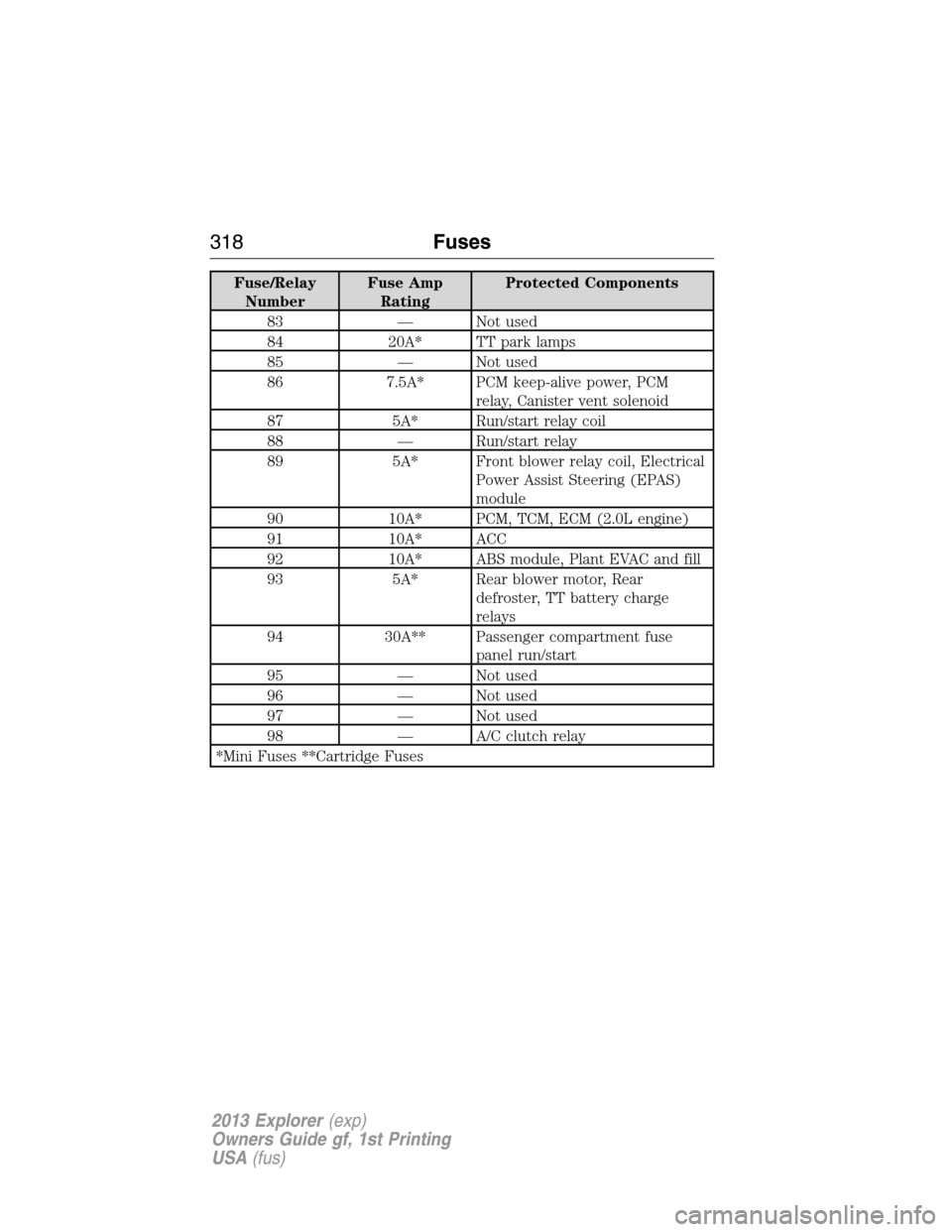
Fuse/Relay
NumberFuse Amp
RatingProtected Components
83 — Not used
84 20A* TT park lamps
85 — Not used
86 7.5A* PCM keep-alive power, PCM
relay, Canister vent solenoid
87 5A* Run/start relay coil
88 — Run/start relay
89 5A* Front blower relay coil, Electrical
Power Assist Steering (EPAS)
module
90 10A* PCM, TCM, ECM (2.0L engine)
91 10A* ACC
92 10A* ABS module, Plant EVAC and fill
93 5A* Rear blower motor, Rear
defroster, TT battery charge
relays
94 30A** Passenger compartment fuse
panel run/start
95 — Not used
96 — Not used
97 — Not used
98 — A/C clutch relay
*Mini Fuses **Cartridge Fuses
318Fuses
2013 Explorer(exp)
Owners Guide gf, 1st Printing
USA(fus)
Page 421 of 576
ENGINE IDLE HOUR METER (IF EQUIPPED):
Your vehicle may be equipped with an idle meter to indicate how much
time the vehicle is idling in P (Park) or N (Neutral). The meter is
incorporated with the vehicle odometer. Depressing the odometer-reset
button once will display the trip odometer (miles [km] followed by a “T”
for trip odometer); depressing the odometer-reset button a second time
will display the idle meter (hours followed by an “H” for hours). The idle
meter only accumulates time when the vehicle is in P (Park) or N
(Neutral). Displayed time is cumulative for the vehicle.It cannot be
reset to zero.Police/Fleet vehicles often experience long periods of
idling, during which engine oil will continue to break down but distance
is not accumulated on the odometer.
To assist fleet managers in maintaining proper oil change intervals, the
idle meter will help determine when an oil change is required. For every
hour that the vehicle idles, it has accumulated the equivalent of
approximately 33 miles (53 km) of driving. Using the combination of the
vehicle odometer and idle meter allows the fleet manager to better
determine when the oil needs to be changed
Engine idle hour meter calculation:
Idle hours x 33 = miles (km) equivalency
Miles (km) driven + miles (km) equivalency = oil change interval
Example:When the odometer has accumulated 3,000 miles (4,800 km)
and the idle meter shows 61 hours, a 5,000 mile (8,000 km) oil change
interval will have been reached: 3,000 road miles (4,800 road km) + (61
idle hours x 33 miles [53 km]/idle hour) = 5,013 miles (8,067 km).
Scheduled Maintenance421
2013 Explorer(exp)
Owners Guide gf, 1st Printing
USA(fus)
Page 477 of 576
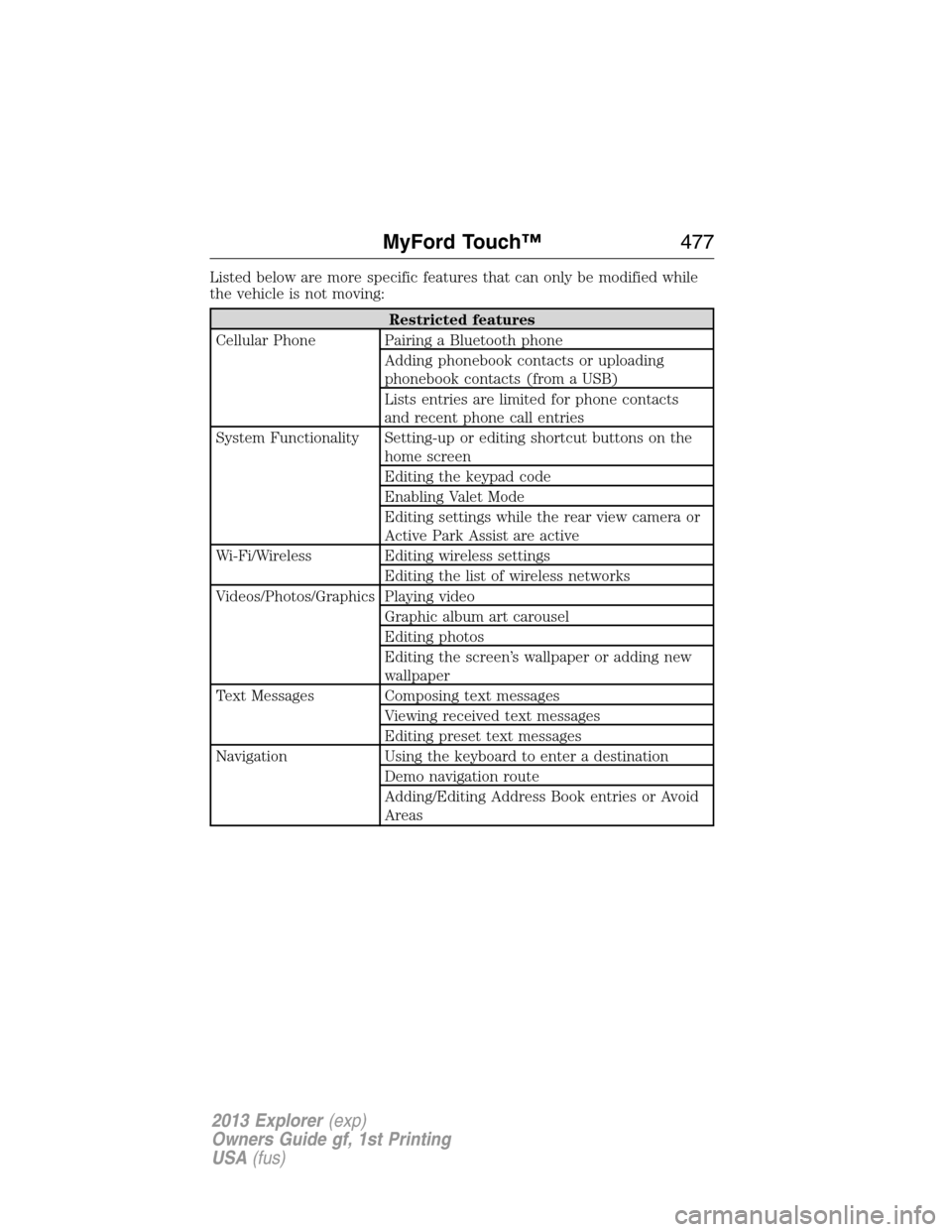
Listed below are more specific features that can only be modified while
the vehicle is not moving:
Restricted features
Cellular Phone Pairing a Bluetooth phone
Adding phonebook contacts or uploading
phonebook contacts (from a USB)
Lists entries are limited for phone contacts
and recent phone call entries
System Functionality Setting-up or editing shortcut buttons on the
home screen
Editing the keypad code
Enabling Valet Mode
Editing settings while the rear view camera or
Active Park Assist are active
Wi-Fi/Wireless Editing wireless settings
Editing the list of wireless networks
Videos/Photos/Graphics Playing video
Graphic album art carousel
Editing photos
Editing the screen’s wallpaper or adding new
wallpaper
Text Messages Composing text messages
Viewing received text messages
Editing preset text messages
Navigation Using the keyboard to enter a destination
Demo navigation route
Adding/Editing Address Book entries or Avoid
Areas
MyFord Touch™477
2013 Explorer(exp)
Owners Guide gf, 1st Printing
USA(fus)
Page 529 of 576
Valet Mode
Note:If you are locked out and need to reset the PIN, you can enter
3681 and the system unlocks.
Valet mode allows you to lock the system so that none of your
information on the system can be accessed until it is unlocked with the
correct PIN.
1. Press Menu > Vehicle > Valet Mode.
2. Select Enable Valet Mode.
3. When prompted, enter a four-digit PIN.
After you press Continue, the system is locked until the correct PIN is
entered again.
Changing Your Door Keypad Code (If Equipped)
To change the keypad code for your keyless entry keypad system:
1. Press Menu > Vehicle > Edit Door Keypad Code.
2. Enter your current factory code, then, when prompted, enter your
new code.
Active Park Assist (If Equipped)
When activated, your system will display directions for you regarding the
active park assist process.
For complete information on this system, please refer toActive park
assistin theDriving Aidschapter.
Settings
Access and adjust system settings, voice features, as well as phone,
navigation and wireless settings. Some of these settings can also be
accessed with regard to their specific modes (i.e., phone and media).
System Settings
Press Menu > Settings > System, then select from the following:
System settings
Language Distance Units
Temperature Units System Prompt Volume
Touchscreen Beeps Keyboard Layout
Install Applications Master Reset
MyFord Touch™529
2013 Explorer(exp)
Owners Guide gf, 1st Printing
USA(fus)