2013 FORD EXPLORER warning
[x] Cancel search: warningPage 291 of 576
Hitches
Do not use hitches that clamp onto the vehicle bumper; use a
load-carrying hitch. You must distribute the load in your trailer so that
10–15% of the total weight of the trailer is on the tongue, not to exceed
the maximum tongue load of 500 lb (227 kg) on a Class III receiver.
Weight-Distributing Hitch
When hooking-up a trailer using a weight-distributing hitch, always use
the following procedure:
1. Park the vehicle (without the trailer) on a level surface.
2. Measure the height of the top of the front wheel opening on the
fender, this is H1.
3. Attach the trailer to the vehicle without the weight distributing bars
connected.
4. Measure the height of the top of the front wheel opening on the
fender a second time, this is H2.
5. Install and adjust the tension in the weight distributing bars so that
the height of the front fender is approximately halfway between H1 and
H2.
6. Check that the trailer is level. If not level, adjust the ball height
accordingly and repeat Steps 3–6.
WARNING:Do not adjust a weight-distributing hitch to any
position where the rear bumper of the vehicle is higher than it
was before attaching the trailer. Doing so will defeat the function of the
weight-distributing hitch, which may cause unpredictable handling, and
could result in serious personal injury.
Safety Chains
Always connect the safety chains to the vehicle’s hook retainers. To
connect the safety chains, cross them under the trailer tongue and allow
slack for turning corners.
If you use a rental trailer, follow the rental agency’s instructions.
Note:Never attach safety chains to the bumper.
Towing291
2013 Explorer(exp)
Owners Guide gf, 1st Printing
USA(fus)
Page 292 of 576
Trailer Brakes
Note:The braking system of the tow vehicle is rated for operation at the
GVWR not GCWR.
Be sure the trailer conforms to all applicable local and Federal
regulations regarding trailer braking. If the trailer is equipped with
electronically-controlled brakes, the brakes need to have an electronic
brake controller with associated wiring installed to the vehicle by an
authorized dealer.
WARNING:Do not connect a trailer’s hydraulic brake system
directly to your vehicle’s brake system. Your vehicle may not have
enough braking power and your chances of having a collision greatly
increase.
Trailer Lamps
Trailer lamps are required on most towed vehicles. Ensure all running
lights, brake lights, turn signals and hazard lights are working. Contact
your authorized dealer or trailer rental agency for proper instructions
and equipment for hooking up the lamps.
Before Towing a Trailer
Practice turning, stopping and backing-up to get the feel of the
vehicle-trailer combination before starting on a trip. When turning, make
wider turns so the trailer wheels will clear curbs and other obstacles.
When Towing a Trailer
•Do not drive faster than 70 mph (113 km/h) during the first 500 miles
(800 kilometers) and do not make full-throttle starts.
•Check your hitch, electrical connections and trailer wheel lug nuts
thoroughly after you have traveled 50 miles (80 kilometers).
•Place the gearshift lever in P (Park) to aid in engine/transmission
cooling and A/C efficiency during hot weather while stopped in traffic.
•Turn off the speed control. The speed control may turn off
automatically when you are towing on long, steep grades.
•
Shift to a lower gear when driving down a long or steep hill. Do not apply
the brakes continuously, as they may overheat and become less effective.
292Towing
2013 Explorer(exp)
Owners Guide gf, 1st Printing
USA(fus)
Page 298 of 576
FLOOR MATS
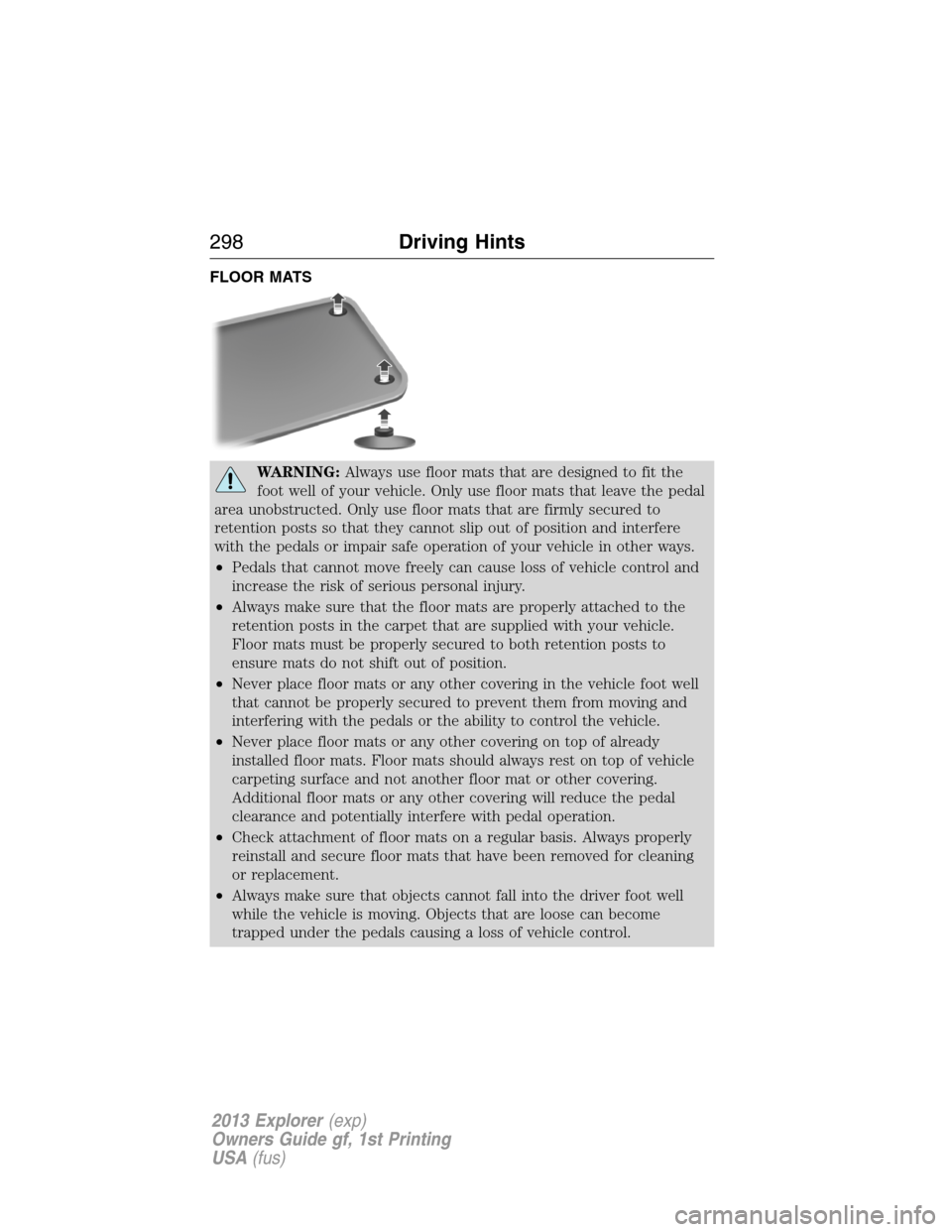
WARNING:Always use floor mats that are designed to fit the
foot well of your vehicle. Only use floor mats that leave the pedal
area unobstructed. Only use floor mats that are firmly secured to
retention posts so that they cannot slip out of position and interfere
with the pedals or impair safe operation of your vehicle in other ways.
•Pedals that cannot move freely can cause loss of vehicle control and
increase the risk of serious personal injury.
•Always make sure that the floor mats are properly attached to the
retention posts in the carpet that are supplied with your vehicle.
Floor mats must be properly secured to both retention posts to
ensure mats do not shift out of position.
•Never place floor mats or any other covering in the vehicle foot well
that cannot be properly secured to prevent them from moving and
interfering with the pedals or the ability to control the vehicle.
•Never place floor mats or any other covering on top of already
installed floor mats. Floor mats should always rest on top of vehicle
carpeting surface and not another floor mat or other covering.
Additional floor mats or any other covering will reduce the pedal
clearance and potentially interfere with pedal operation.
•Check attachment of floor mats on a regular basis. Always properly
reinstall and secure floor mats that have been removed for cleaning
or replacement.
•Always make sure that objects cannot fall into the driver foot well
while the vehicle is moving. Objects that are loose can become
trapped under the pedals causing a loss of vehicle control.
298Driving Hints
2013 Explorer(exp)
Owners Guide gf, 1st Printing
USA(fus)
Page 299 of 576
WARNING(Continued)
•Failure to properly follow floor mat installation or attachment
instructions can potentially cause interference with pedal operation
causing loss of control of vehicle.
•To install floor mats, position the floor mat so that the eyelet is over
the retention post and press down to lock in.
•To remove the floor mat, reverse the installation procedure.
Driving Hints299
2013 Explorer(exp)
Owners Guide gf, 1st Printing
USA(fus)
Page 301 of 576

Vehicles sold in the U.S. : Using roadside assistance
Complete the roadside assistance identification card and place it in your
wallet for quick reference. This card is found in the owner’s information
portfolio in the glove compartment.
U.S. Ford vehicle customers who require Roadside Assistance, call
1-800-241-3673.
If you need to arrange roadside assistance for yourself, Ford Motor
Company will reimburse a reasonable amount for towing to the nearest
dealership within 35 miles (56 km). To obtain reimbursement
information, U.S. Ford vehicle customers call 1-800-241-3673. Customers
will be asked to submit their original receipts.
Vehicles sold in Canada : Getting roadside assistance
Canadian customers who require roadside assistance, call 1–800–665–2006.
Vehicles sold in Canada : Using roadside assistance
Complete the roadside assistance identification card and place it in your
wallet for quick reference. In Canada, the card is found in the Warranty
Guide in the glove box.
Canadian Roadside coverage and benefits may differ from the U.S.
coverage. Please refer to your Warranty Guide or visit our website at
www.ford.ca for information on Canadian services and benefits.
Canadian customers who need to obtain roadside information, call
1-800-665-2006 or visit our website at www.ford.ca.
HAZARD WARNING FLASHERS
The hazard flasher control is located on the instrument panel
by the radio. Use it when your vehicle is disabled and is
creating a safety hazard for other motorist.
•Press the flasher control and all front and rear direction signals will
flash.
•Press the flasher control again to turn them off.
Vehicles equipped with MyTouch
•Press and hold the flasher control and all front and rear direction
signals will flash.
•Press and hold the flasher control again to turn them off.
Note:With extended use, the flasher may run down your battery.
Roadside Emergencies301
2013 Explorer(exp)
Owners Guide gf, 1st Printing
USA(fus)
Page 302 of 576

FUEL CUT-OFF SWITCH
WARNING:Failure to inspect and if necessary repair fuel leaks
after a collision may increase the risk of fire and serious injury.
Ford Motor Company recommends that the fuel system be inspected by
an authorized dealer after any collision.
In the event of a moderate to severe collision, this vehicle is equipped
with a fuel pump shut-off feature that stops the flow of fuel to the
engine. Not every impact will cause a shut-off.
Should your vehicle shut off after a collision, you may restart your
vehicle by doing the following:
1. Turn the ignition off.
2. Turn the ignition on.
3. Repeat steps 1 and 2 to re-enable fuel pump.
Note:If your vehicle has the push button start system, press the
stop/start button twice to reactivate the fuel system.
JUMP-STARTING THE VEHICLE
WARNING:The gases around the battery can explode if exposed
to flames, sparks, or lit cigarettes. An explosion could result in
injury or vehicle damage.
WARNING:Batteries contain sulfuric acid which can burn skin,
eyes and clothing, if contacted.
Do not attempt to push-start your automatic transmission vehicle. Automatic
transmissions do not have push-start capability. Attempting to push-start a
vehicle with an automatic transmission may cause transmission damage.
Preparing Your Vehicle
When the battery is disconnected or a new battery is installed, the automatic
transmission must relearn its shift strategy. As a result, the transmission may
have firm soft shifts, firm shifts or both. This operation is considered normal
and will not affect function or durability of the transmission. Over time, the
adaptive learning process will fully update transmission operation.
1. Use only a 12–volt supply to start your vehicle.
2. Do not disconnect the battery of the disabled vehicle as this could
damage the vehicle’s electrical system.
302Roadside Emergencies
2013 Explorer(exp)
Owners Guide gf, 1st Printing
USA(fus)
Page 303 of 576
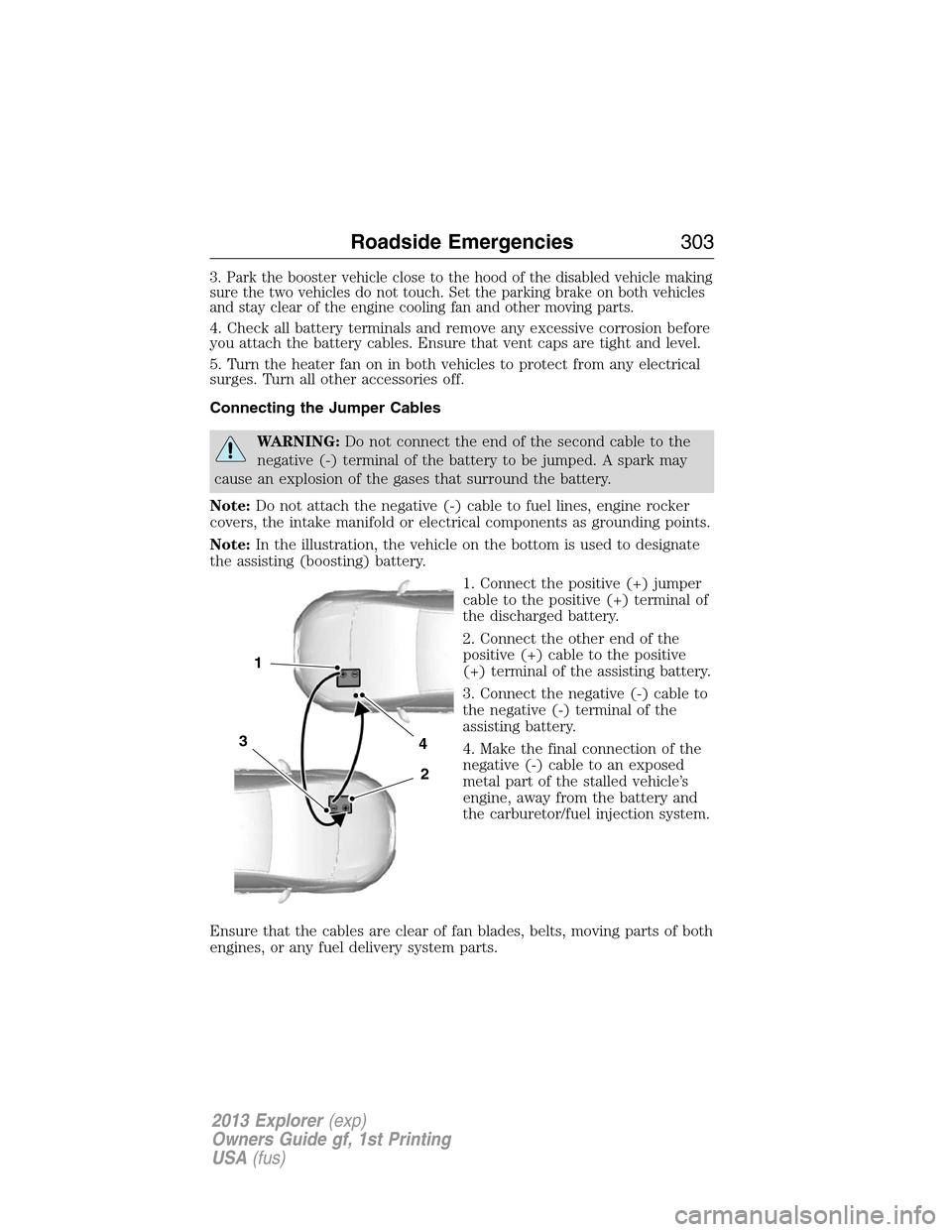
3. Park the booster vehicle close to the hood of the disabled vehicle making
sure the two vehicles do not touch. Set the parking brake on both vehicles
and stay clear of the engine cooling fan and other moving parts.
4. Check all battery terminals and remove any excessive corrosion before
you attach the battery cables. Ensure that vent caps are tight and level.
5. Turn the heater fan on in both vehicles to protect from any electrical
surges. Turn all other accessories off.
Connecting the Jumper Cables
WARNING:Do not connect the end of the second cable to the
negative (-) terminal of the battery to be jumped. A spark may
cause an explosion of the gases that surround the battery.
Note:Do not attach the negative (-) cable to fuel lines, engine rocker
covers, the intake manifold or electrical components as grounding points.
Note:In the illustration, the vehicle on the bottom is used to designate
the assisting (boosting) battery.
1. Connect the positive (+) jumper
cable to the positive (+) terminal of
the discharged battery.
2. Connect the other end of the
positive (+) cable to the positive
(+) terminal of the assisting battery.
3. Connect the negative (-) cable to
the negative (-) terminal of the
assisting battery.
4. Make the final connection of the
negative (-) cable to an exposed
metal part of the stalled vehicle’s
engine, away from the battery and
the carburetor/fuel injection system.
Ensure that the cables are clear of fan blades, belts, moving parts of both
engines, or any fuel delivery system parts.
4
2
1
3
Roadside Emergencies303
2013 Explorer(exp)
Owners Guide gf, 1st Printing
USA(fus)
Page 314 of 576

FUSE SPECIFICATION CHART
Power Distribution Box
WARNING:Always disconnect the battery before servicing high
current fuses.
WARNING:To reduce risk of electrical shock, always replace the
cover to the power distribution box before reconnecting the
battery or refilling fluid reservoirs.
The power distribution box is located in the engine compartment. It has
high-current fuses that protect your vehicle’s main electrical systems
from overloads.
If the battery has been disconnected and reconnected, refer to the
Changing the Vehicle Batteryin theMaintenancechapter.
The high-current fuses are coded as follows:
Fuse/Relay
NumberFuse Amp
RatingProtected Components
1 — Not used
2 — Not used
3 30A** Trailer brake control module
97
98
77969594
93 92 91 90 89
88
66
4478
56
39
26
18 1617
312 4 5 6 7 8 919 20 21 22 23 2427 28 29 30 3140 41 42 4355
57 58 59 60 61 62 63 64 6579 80 81 82 83 84 85 86 87
67
45
32
10 11 12 1333 34 3546 47 48 49 50 5168 69 70 71 72 74
73 76
75
53
37 36 54
38
25
151452
314Fuses
2013 Explorer(exp)
Owners Guide gf, 1st Printing
USA(fus)