Page 438 of 497
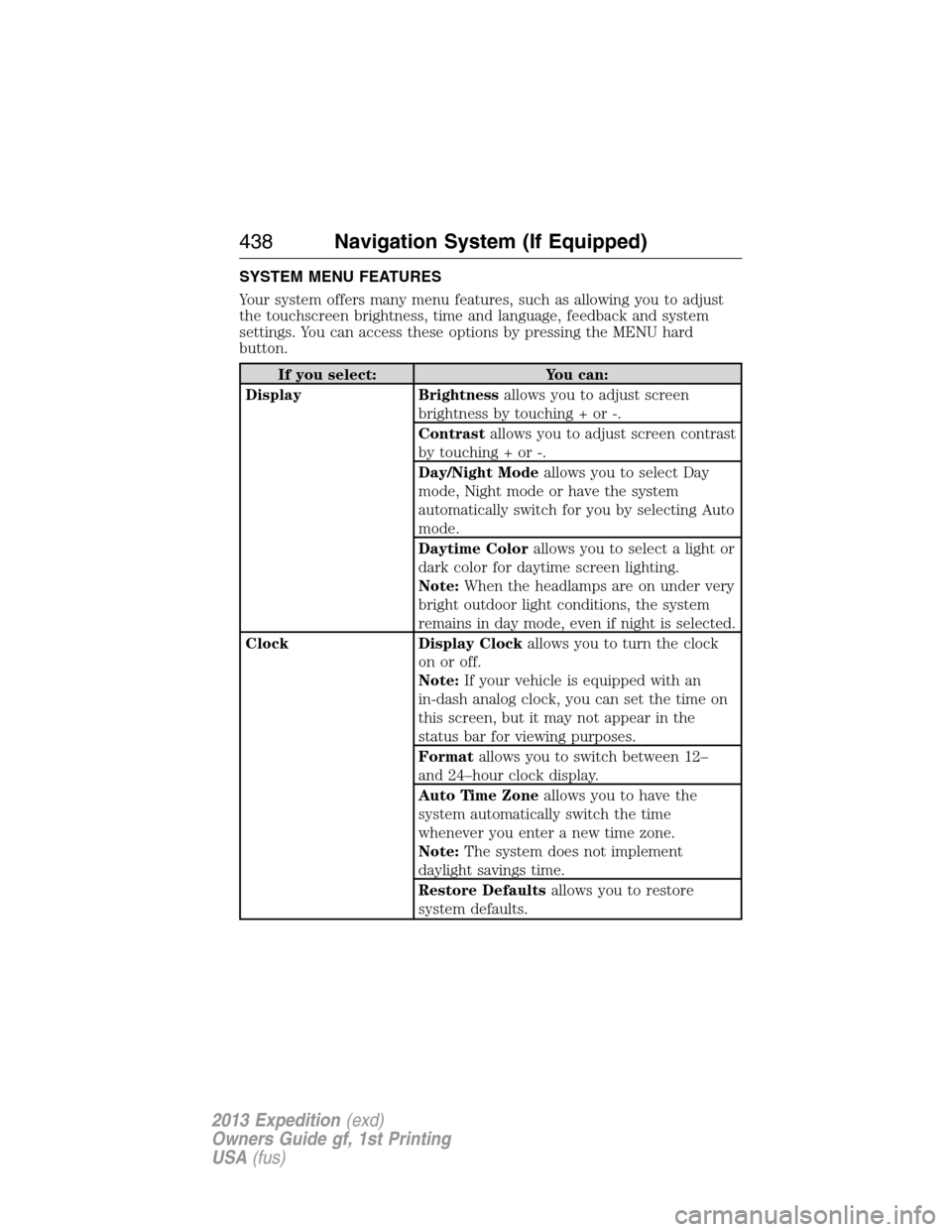
SYSTEM MENU FEATURES
Your system offers many menu features, such as allowing you to adjust
the touchscreen brightness, time and language, feedback and system
settings. You can access these options by pressing the MENU hard
button.
If you select: You can:
Display Brightnessallows you to adjust screen
brightness by touching + or -.
Contrastallows you to adjust screen contrast
by touching + or -.
Day/Night Modeallows you to select Day
mode, Night mode or have the system
automatically switch for you by selecting Auto
mode.
Daytime Colorallows you to select a light or
dark color for daytime screen lighting.
Note:When the headlamps are on under very
bright outdoor light conditions, the system
remains in day mode, even if night is selected.
Clock Display Clockallows you to turn the clock
on or off.
Note:If your vehicle is equipped with an
in-dash analog clock, you can set the time on
this screen, but it may not appear in the
status bar for viewing purposes.
Formatallows you to switch between 12–
and 24–hour clock display.
Auto Time Zoneallows you to have the
system automatically switch the time
whenever you enter a new time zone.
Note:The system does not implement
daylight savings time.
Restore Defaultsallows you to restore
system defaults.
438Navigation System (If Equipped)
2013 Expedition(exd)
Owners Guide gf, 1st Printing
USA(fus)
Page 440 of 497
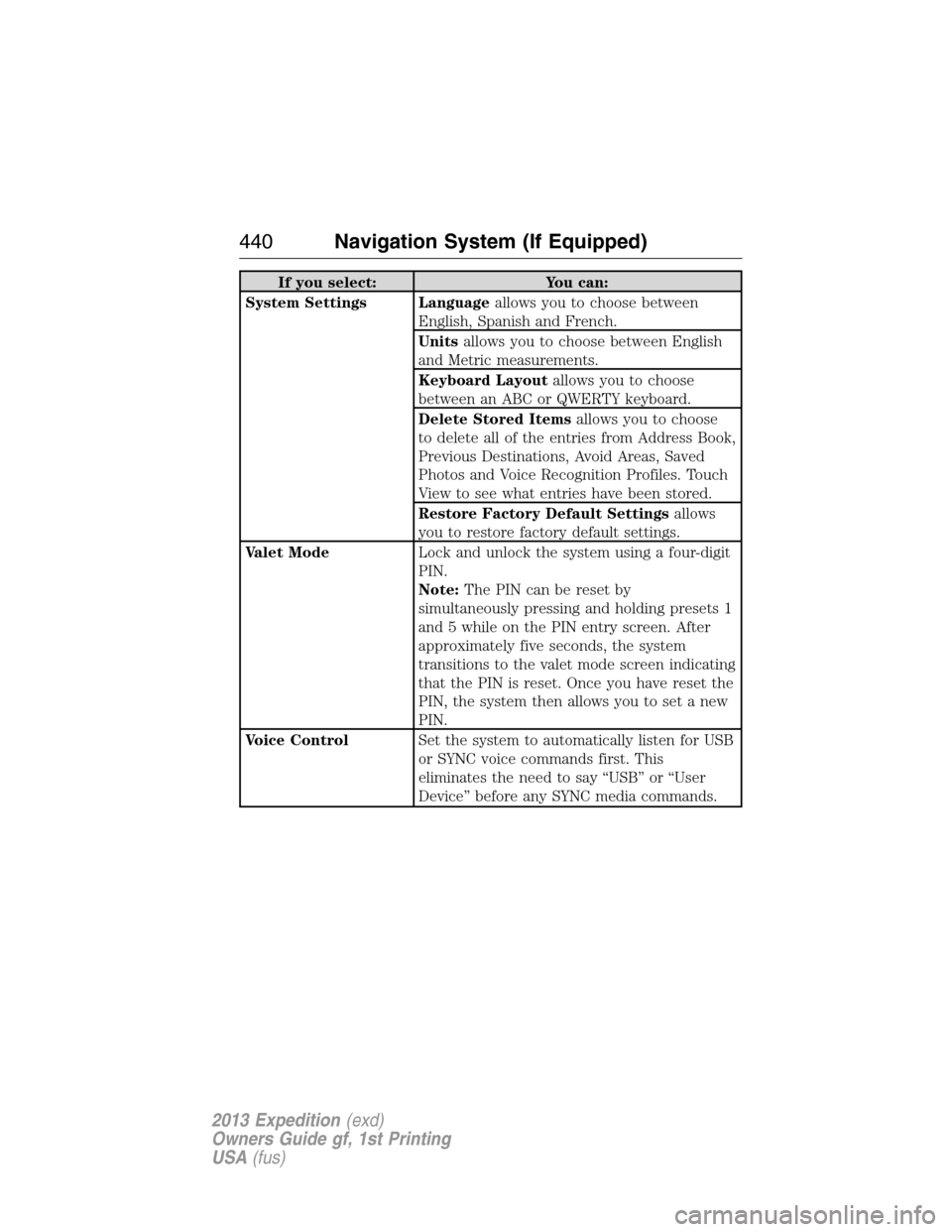
If you select: You can:
System Settings Languageallows you to choose between
English, Spanish and French.
Unitsallows you to choose between English
and Metric measurements.
Keyboard Layoutallows you to choose
between an ABC or QWERTY keyboard.
Delete Stored Itemsallows you to choose
to delete all of the entries from Address Book,
Previous Destinations, Avoid Areas, Saved
Photos and Voice Recognition Profiles. Touch
View to see what entries have been stored.
Restore Factory Default Settingsallows
you to restore factory default settings.
Valet ModeLock and unlock the system using a four-digit
PIN.
Note:The PIN can be reset by
simultaneously pressing and holding presets 1
and 5 while on the PIN entry screen. After
approximately five seconds, the system
transitions to the valet mode screen indicating
that the PIN is reset. Once you have reset the
PIN, the system then allows you to set a new
PIN.
Voice ControlSet the system to automatically listen for USB
or SYNC voice commands first. This
eliminates the need to say “USB” or “User
Device” before any SYNC media commands.
440Navigation System (If Equipped)
2013 Expedition(exd)
Owners Guide gf, 1st Printing
USA(fus)
Page 455 of 497
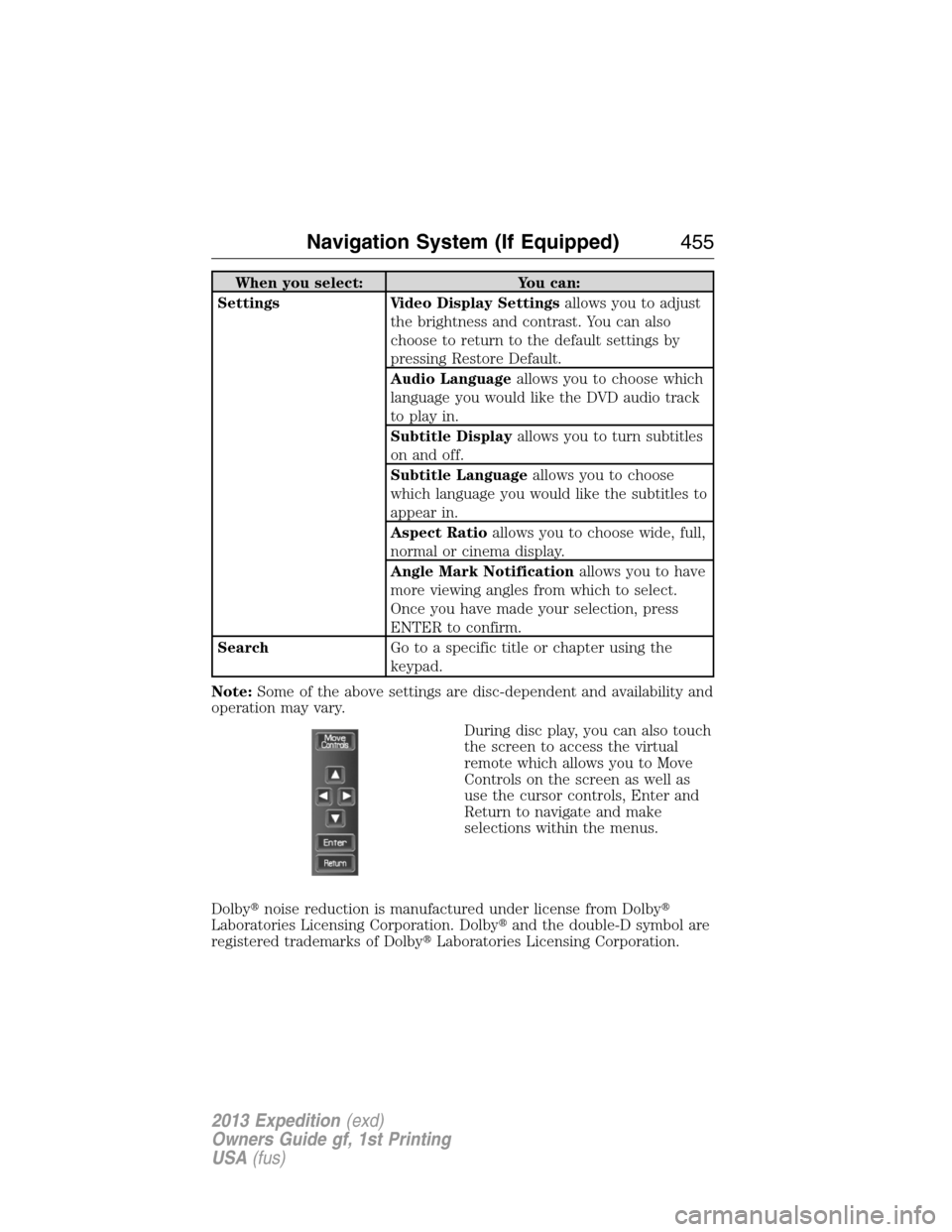
When you select: You can:
Settings Video Display Settingsallows you to adjust
the brightness and contrast. You can also
choose to return to the default settings by
pressing Restore Default.
Audio Languageallows you to choose which
language you would like the DVD audio track
to play in.
Subtitle Displayallows you to turn subtitles
on and off.
Subtitle Languageallows you to choose
which language you would like the subtitles to
appear in.
Aspect Ratioallows you to choose wide, full,
normal or cinema display.
Angle Mark Notificationallows you to have
more viewing angles from which to select.
Once you have made your selection, press
ENTER to confirm.
SearchGo to a specific title or chapter using the
keypad.
Note:Some of the above settings are disc-dependent and availability and
operation may vary.
During disc play, you can also touch
the screen to access the virtual
remote which allows you to Move
Controls on the screen as well as
use the cursor controls, Enter and
Return to navigate and make
selections within the menus.
Dolby�noise reduction is manufactured under license from Dolby�
Laboratories Licensing Corporation. Dolby�and the double-D symbol are
registered trademarks of Dolby�Laboratories Licensing Corporation.
Navigation System (If Equipped)455
2013 Expedition(exd)
Owners Guide gf, 1st Printing
USA(fus)
Page 465 of 497
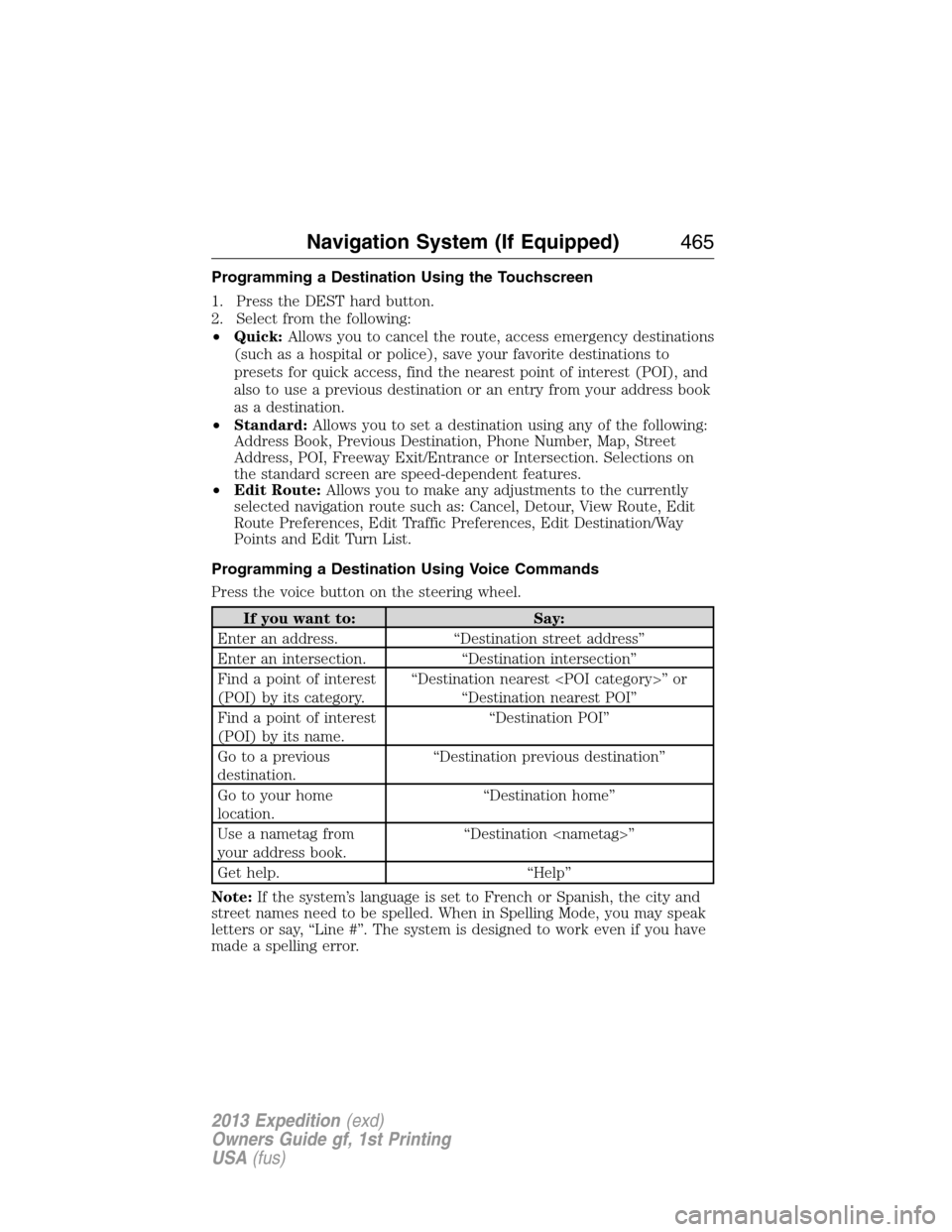
Programming a Destination Using the Touchscreen
1. Press the DEST hard button.
2. Select from the following:
•Quick:Allows you to cancel the route, access emergency destinations
(such as a hospital or police), save your favorite destinations to
presets for quick access, find the nearest point of interest (POI), and
also to use a previous destination or an entry from your address book
as a destination.
•Standard:Allows you to set a destination using any of the following:
Address Book, Previous Destination, Phone Number, Map, Street
Address, POI, Freeway Exit/Entrance or Intersection. Selections on
the standard screen are speed-dependent features.
•Edit Route:Allows you to make any adjustments to the currently
selected navigation route such as: Cancel, Detour, View Route, Edit
Route Preferences, Edit Traffic Preferences, Edit Destination/Way
Points and Edit Turn List.
Programming a Destination Using Voice Commands
Press the voice button on the steering wheel.
If you want to: Say:
Enter an address. “Destination street address”
Enter an intersection. “Destination intersection”
Find a point of interest
(POI) by its category.“Destination nearest ” or
“Destination nearest POI”
Find a point of interest
(POI) by its name.“Destination POI”
Go to a previous
destination.“Destination previous destination”
Go to your home
location.“Destination home”
Use a nametag from
your address book.“Destination ”
Get help. “Help”
Note:If the system’s language is set to French or Spanish, the city and
street names need to be spelled. When in Spelling Mode, you may speak
letters or say, “Line #”. The system is designed to work even if you have
made a spelling error.
Navigation System (If Equipped)465
2013 Expedition(exd)
Owners Guide gf, 1st Printing
USA(fus)
Page 490 of 497

911 Assist™ ..............................404
A
ABS (see Brakes) .....................225
Accessing call history/phone
book during active call .............394
Accessing the help screen .......463
Accessing the music in
your jukebox .....................457–458
Accessing your media menu
features ......................................416
Accessing your phone menu
features ......................................395
Accessory delay ..........................88
Active call menu options .........394
Advanced menu options ...402, 423
Advanced menu options
(prompts, languages, defaults,
master reset, installing
applications) ..............................402
Airbag supplemental restraint
system ..........................................45
and child safety seats ..............47
description ................................45
disposal ......................................51
driver airbag ..............................45
passenger airbag .......................45
side airbag ...........................45, 47
Air cleaner filter .......303–304, 360
Air conditioning ................146, 148
manual heating and air
conditioning system .......146, 148
Air filter .............................304, 360
Air suspension ...........................239
description ..............................239All Wheel Drive (AWD),
driving off road .........................216
Ambulance packages ..................15
AM/FM .......................................441
Antifreeze
(see Engine coolant) ................294
Anti-lock brake system
(see Brakes) ..............................225
Anti-theft system ..................73, 75
arming the system ..............73, 75
disarming a triggered system ..75
AppLink™ .................................411
Armrests ....................................178
Ashtray(s) .................................193
Audio system
Single CD ................................118
Audio system (see Radio) .......118
Automatic transmission
driving an automatic
overdrive .................................209
fluid, adding ............................298
fluid, checking ........................298
fluid, refill capacities ..............356
fluid, specification ..................356
Auxiliary input jack (Line in) ..123
Auxiliary powerpoint ................189
Axle
lubricant specifications ..........356
refill capacities ........................356
B
Battery .......................................300
acid, treating emergencies .....300
jumping a disabled battery ....270
maintenance-free ....................300
replacement, specifications ...360
490Index
2013 Expedition(exd)
Owners Guide gf, 1st Printing
USA(fus)
Page:
< prev 1-8 9-16 17-24