Page 226 of 497
HINTS ON DRIVING WITH ANTI-LOCK BRAKES
When the system is operating, the brake pedal will pulse and may travel
further. Maintain pressure on the brake pedal. You may also hear a noise
from the system. This is normal.
The ABS will not eliminate the dangers inherent when:
•you drive too closely to the vehicle in front of you.
•your vehicle is hydroplaning.
•you take corners too fast.
•the road surface is poor.
PARKING BRAKE
WARNING:Always set the parking brake fully and make sure
that the transmission selector lever is securely latched in
positionP.
To set the parking brake, press the parking brake pedal down until the
pedal stops.
The BRAKE warning lamp will illuminate and will remain illuminated
until the parking brake is released.
To release, pull the brake release lever located at the lower left side of
the instrument panel.
226Brakes
2013 Expedition(exd)
Owners Guide gf, 1st Printing
USA(fus)
Page 286 of 497
Fuse/Relay
LocationFuse Amp
RatingProtected Circuits
82 — Not used
83 — Not used
84 — Not used
85 — Wiper motor relay
* Mini Fuses ** Cartridge Fuses
Passenger Compartment Fuse Panel
The fuse panel is located under the right-hand side of the instrument
panel.
To remove the trim panel for access
to the fuse box, pull the panel
toward you and swing it out away
from the side and remove it. To
reinstall it, line up the tabs with the
grooves on the panel, then push it
shut.
To remove the fuse box cover, press in the tabs on both sides of the
cover, then pull the cover off.
To reinstall the fuse box cover, place the top part of the cover on the
fuse panel, then push the bottom part of the cover until you hear it click
shut. Gently pull on the cover to make sure it is seated properly.
286Fuses
2013 Expedition(exd)
Owners Guide gf, 1st Printing
USA(fus)
Page 305 of 497
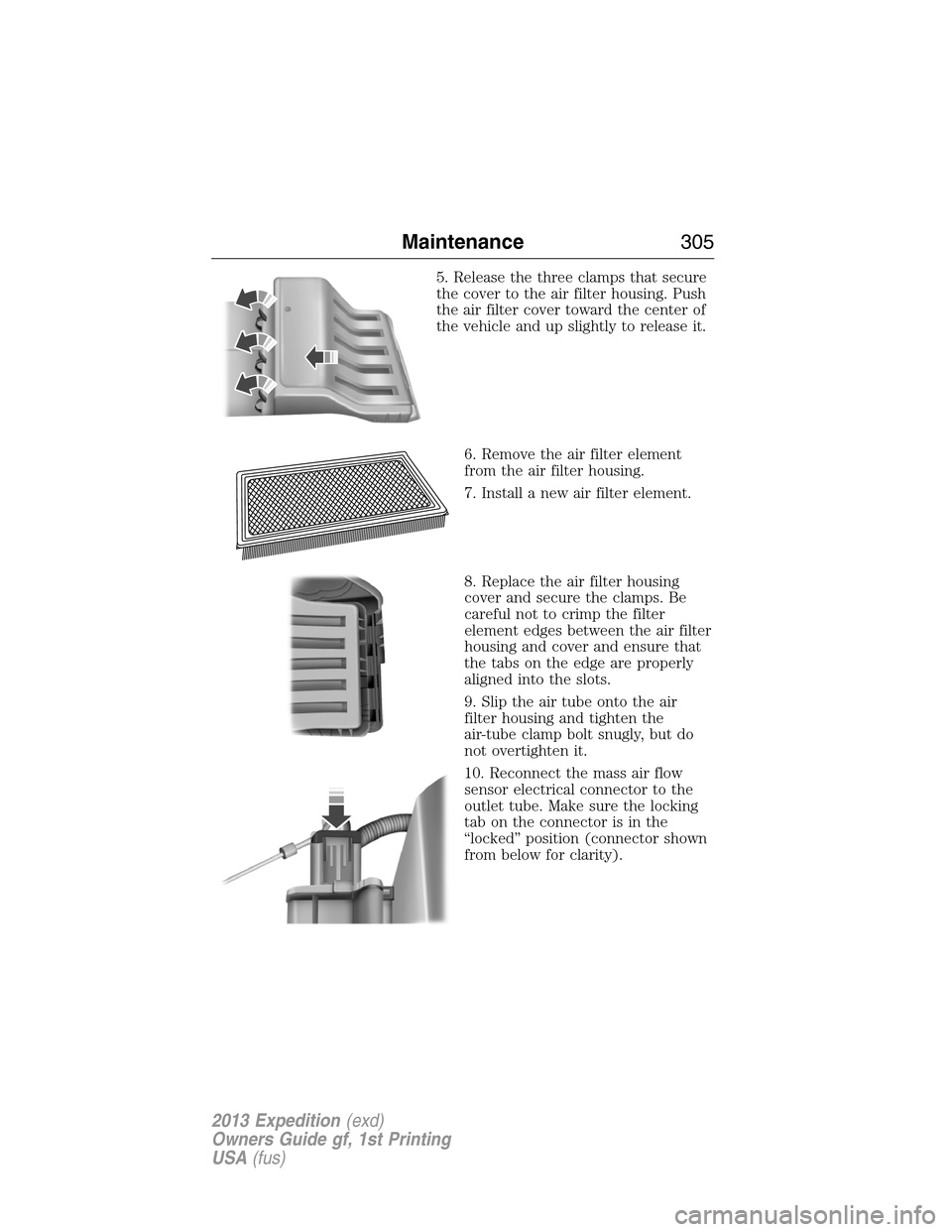
5. Release the three clamps that secure
the cover to the air filter housing. Push
the air filter cover toward the center of
the vehicle and up slightly to release it.
6. Remove the air filter element
from the air filter housing.
7. Install a new air filter element.
8. Replace the air filter housing
cover and secure the clamps. Be
careful not to crimp the filter
element edges between the air filter
housing and cover and ensure that
the tabs on the edge are properly
aligned into the slots.
9. Slip the air tube onto the air
filter housing and tighten the
air-tube clamp bolt snugly, but do
not overtighten it.
10. Reconnect the mass air flow
sensor electrical connector to the
outlet tube. Make sure the locking
tab on the connector is in the
“locked” position (connector shown
from below for clarity).
Maintenance305
2013 Expedition(exd)
Owners Guide gf, 1st Printing
USA(fus)
Page 311 of 497
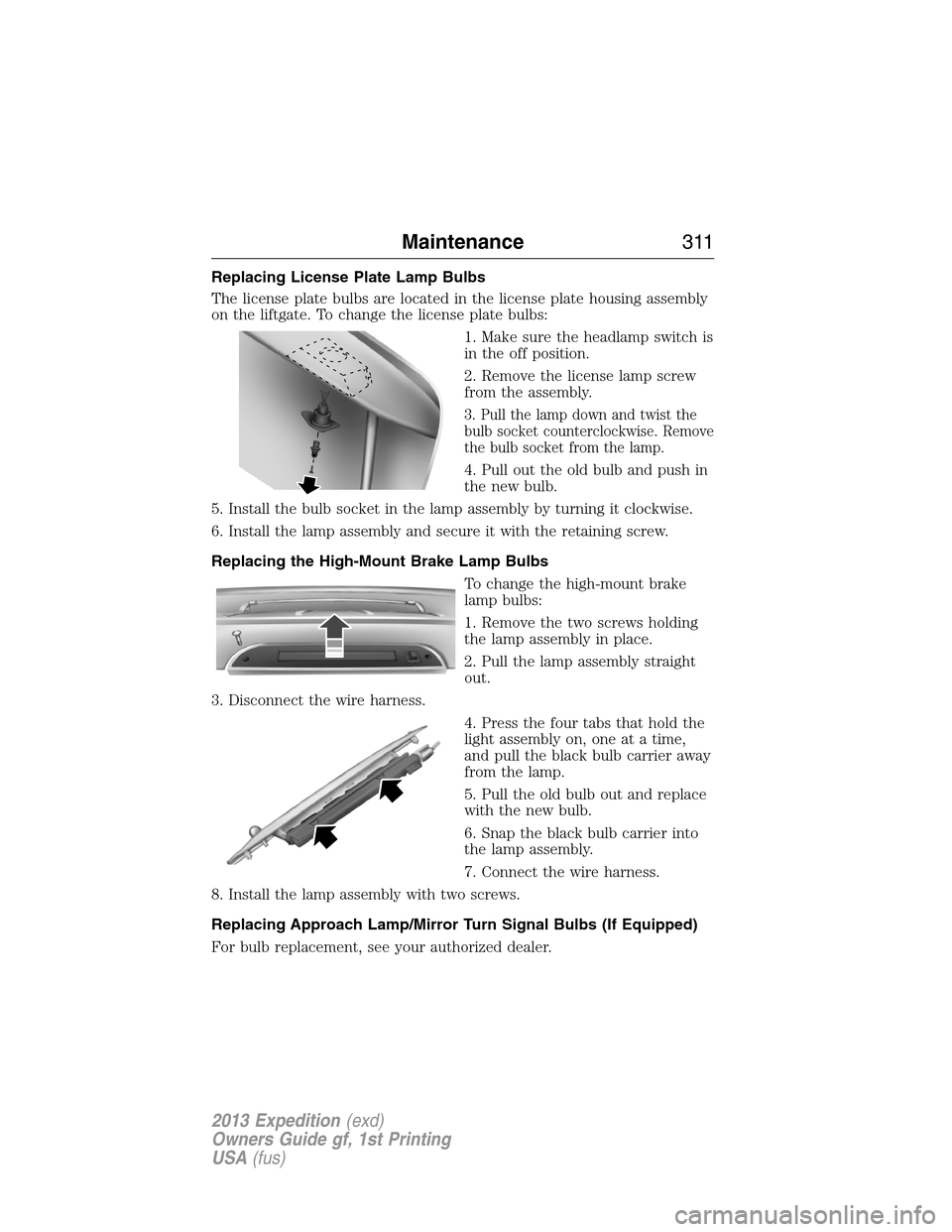
Replacing License Plate Lamp Bulbs
The license plate bulbs are located in the license plate housing assembly
on the liftgate. To change the license plate bulbs:
1. Make sure the headlamp switch is
in the off position.
2. Remove the license lamp screw
from the assembly.
3. Pull the lamp down and twist the
bulb socket counterclockwise. Remove
the bulb socket from the lamp.
4. Pull out the old bulb and push in
the new bulb.
5. Install the bulb socket in the lamp assembly by turning it clockwise.
6. Install the lamp assembly and secure it with the retaining screw.
Replacing the High-Mount Brake Lamp Bulbs
To change the high-mount brake
lamp bulbs:
1. Remove the two screws holding
the lamp assembly in place.
2. Pull the lamp assembly straight
out.
3. Disconnect the wire harness.
4. Press the four tabs that hold the
light assembly on, one at a time,
and pull the black bulb carrier away
from the lamp.
5. Pull the old bulb out and replace
with the new bulb.
6. Snap the black bulb carrier into
the lamp assembly.
7. Connect the wire harness.
8. Install the lamp assembly with two screws.
Replacing Approach Lamp/Mirror Turn Signal Bulbs (If Equipped)
For bulb replacement, see your authorized dealer.
Maintenance311
2013 Expedition(exd)
Owners Guide gf, 1st Printing
USA(fus)
Page 366 of 497
Ford ESP Can Quickly Pay for Itself
One service bill – the cost of parts and labor – can easily exceed the
price of your Ford ESP Service Contract. With Ford ESP, you minimize
your risk for unexpected repair bills and rising repair costs.
Avoid the rising cost of properly maintaining your vehicle!
Ford ESP also offers a Premium Maintenance Plan that covers items that
routinely wear out.
The coverage is prepaid, so you never have to worry about affording
your vehicle maintenance. It covers regular checkups, routine
inspections, preventive care and replacement of items that require
periodic attention fornormal “wear”:
•Wiper blades•Brake pads and linings
•Spark plugs (except
California)•Shock absorbers
•Clutch disc•Belts and hoses
Contact your selling Ford or Lincoln dealership today so they can
customize a Ford Extended Service Plan that fits your driving lifestyle
and budget.
Interest free finance options available
Take advantage of our installment payment plan, just a 10% down
payment will provide you with an affordable no interest, no-fee payment
opportunity.
Protect Yourself From the Rising Cost of Vehicle Repairs With a
Ford Extended Service Plan
To learn more, call our Ford ESP specialists at 800–367–3377, and don’t
forget to ask about our interest free payment program, allowing you all
the security and benefits Ford ESP has to offer while paying over time.
You’re pre-approved with no credit checks, no hassles!
Or, mail your name, address, city, state and zip code to:
Ford ESP
P.O. Box 8072
Royal Oak, MI 48068–9933
366Ford Extended Service Plan
2013 Expedition(exd)
Owners Guide gf, 1st Printing
USA(fus)
Page 370 of 497
Owner Checks and Services
Certain basic maintenance checks and inspections should be performed
every month or at six month intervals.
Check Every Month
Engine oil level.
Function of all interior and exterior lights.
Tires (including spare) for wear and proper pressure.
Windshield washer fluid level.
Check Every Six Months
Battery connections. Clean if necessary.
Body and door drain holes for obstructions. Clean if necessary.
Cooling system fluid level and coolant strength.
Door weatherstrips for wear. Lubricate if necessary.
Hinges, latches and outside locks for proper operation. Lubricate if
necessary.
Parking brake for proper operation.
Safety belts and seat latches for wear and function.
Safety warning lamps (brake, ABS, airbag, safety belt) for operation.
Washer spray and wiper operation. Clean or replace blades as
necessary.
370Scheduled Maintenance
2013 Expedition(exd)
Owners Guide gf, 1st Printing
USA(fus)
Page 387 of 497
When using SYNC, do not:
•Operate playing devices if the power cords or cables are broken, split
or damaged. Carefully place cords and cables where they cannot be
stepped on or interfere with the operation of pedals, seats,
compartments or safe driving abilities.
•Leave playing devices in the vehicle during extreme conditions as it
could cause them damage. See your device’s user guide for further
information.
•Attempt to service or repair the system. See your authorized dealer.
Privacy Information
When a cellular phone is connected to SYNC, the system creates a
profile within your vehicle that is linked to that cellular phone. This
profile is created in order to offer you more cellular features and to
operate more efficiently. Among other things, this profile may contain
data about your cellular phone book, text messages (read and unread),
and call history, including history of calls when your cell phone was not
connected to the system. In addition, if you connect a media device, the
system creates and retains an index of supported media content. The
system also records a short development log of approximately
10 minutes of all recent system activity. The log profile and other system
data may be used to improve the system and help diagnose any problems
that may occur.
The cellular profile, media device index, and development log remain in
the vehicle unless you delete them and are generally accessible only in
the vehicle when the cellular phone or media player is connected. If you
no longer plan to use the system or the vehicle, we recommend you
perform a Master Reset to erase all stored information.
System data cannot be accessed without special equipment and access to
the vehicle’s SYNC module. Ford Motor Company and Ford of Canada do
not access the system data for any purpose other than as described
absent consent, a court order, or where required by law enforcement,
other government authorities, or other third parties acting with lawful
authority. Other parties may seek to access the information
independently of Ford Motor Company and Ford of Canada. For further
privacy information, see the sections on 911 Assist�(if equipped),
Vehicle Health Report (if equipped), and Traffic, Directions and
Information (if equipped).
SYNC�387
2013 Expedition(exd)
Owners Guide gf, 1st Printing
USA(fus)
Page 432 of 497
A.Memory presets:In radio and satellite radio mode, press to access
your saved preset stations or channels.
To save a station or channel, tune to the desired station or channel, then
press and hold a preset button. The sound momentarily mutes, then
returns when the preset is saved.
B.CD/DVD slot:Insert a CD or DVD, label side up.
C.Eject:Eject a CD or DVD from the system.
D.TUNE/RPT:
•In radio or satellite radio mode, turn to advance in individual
increments up or down the frequency band to the desired station.
•In MP3 mode, turn to advance to the next or previous folder.
•In navigation mode, hear the last spoken navigation guidance prompt.
E.MAP:
•Press to access the navigation map.
•Press while the map display is active to center the map on the
current vehicle position. Press while the map display and route are
active to see the different map guidance views.
F.DEST:
•Press to access the navigation destination entry menu.
•Press while the navigation destination entry menu is active to show
additional destination entry techniques.
G.N AV:
•Press to access the navigation menu.
•Press while the navigation menu is active to see the navigation menu
tabs.
H.I (Information):Access features such as Where am I?, SIRIUS�
Travel Link™, Calendar, System Info and Help.
I.PHONE:Access the SYNC phone menu.
J.DISP:Select a display mode: On, Status Bar Only, and Off.
K.SEEK:
•In radio and satellite radio mode, press the arrow buttons to find
previous or next available stations or channels within the currently
selected Category or Genre.
•In CD/DVD mode, press the arrow buttons to select the previous or
next track or chapter.
L.MENU:
•Press to access the system menu.
•Press while the system menu is active to see the menu tabs of
Display, Clock, Feedback Settings, System Settings and Valet Mode.
432Navigation System (If Equipped)
2013 Expedition(exd)
Owners Guide gf, 1st Printing
USA(fus)