Page 112 of 526

Settings
MyKey Create MyKey Hold OK to Create MyKey
911 Assist Always On / User Selectable
Traction Control Always On or User Selectable
Max Speed 80 MPH (130 km/h) or Off
Speed Warning 45 mph (75 km/h), 55 mph
(90 km/h), 65 mph (105 km/h) or
Off
Volume Limiter
Clear MyKeys Hold OK to Clear MyKeys
System Reset Hold OK to Reset System to Factory Default
System Check
All active warnings will display first if applicable. The system check
menu may appear different based upon equipment options and current
vehicle status. Use the up/down arrow buttons to scroll through the list.
Trip Computer
Resetting the trip computer
Press and hold OK on the current screen to reset the respective trip,
distance, time and fuel information.
Trip Odometer
Registers the distance of individual journeys.
Distance to E
Indicates the approximate distance the vehicle will travel on the fuel
remaining in the tank. Changes in driving pattern may cause the value to
vary.
Inst. Fuel Econ
Shows instantaneous fuel usage.
Average fuel
Indicates the average fuel consumption since the function was last reset.
11 2Information Displays
2013 Edge(edg)
Owners Guide gf, 1st Printing
USA(fus)
Page 115 of 526

Display Mode
Use the up/down arrow buttons to choose between the
following display options.
Display mode †Option 1 Option 2 Option 3 †Option 4
XXX mi (km) to empty X
Fuel gaugeXXXX
Bar tachometer X X
Round tachometer X X
Engine coolant temp
gaugeX
Intelligent AWD X
Total odometer (lower
left corner)XXXX
†You can also choose to have only the fuel gauge show in this mode.
Refer toDisplay>Gauge Displayfound in the table under the
Settingssection later in this chapter.
Regardless of display mode chosen, when SelectShift Automatic™
transmission (SST) is activated, the cluster will change to the round
tachometer if not already selected. After the round tachometer
displays, other display modes with the bar tachometer can also be
chosen.
•XXX mi (km) to empty: Shows approximate fuel level before the fuel
tank reaches empty. The value is dynamic and can change (raise or
lower) depending on driving style.
•Fuel gauge: Indicates approximately how much fuel is left in the fuel
tank. The fuel gauge may vary slightly when the vehicle is in motion or
on a grade. When the fuel level becomes low (50 miles [80 km] to
empty), the level indicator will change to amber. When the fuel level
becomes critically low (0 miles [0 km] to empty), the level indicator
will change to red.
Note:When a MyKey�is in use, low fuel warnings will display earlier.
The fuel icon and arrow indicates which side of the vehicle the fuel
filler door is located.
Information Displays11 5
2013 Edge(edg)
Owners Guide gf, 1st Printing
USA(fus)
Page 117 of 526

Fuel Economy
Use the left/right arrow buttons to choose the desired fuel
economy display.
Fuel EconomyInst. Fuel
EconomyXX. Min Fuel
History
Instantaneous fuel usage x
†Fuel usage over a 5, 10, or
30 minute time spanx
Total odometer (lower left corner)
Press and hold OK to reset the currently displayed fuel usage
information.
†To configure the fuel usage time span, press the right arrow button
when in this screen.
•Inst. Fuel Economy: This display shows a visual graph of your
instantaneous fuel economy.
•
XX. Min Fuel History: This display shows a bar chart of your fuel history.
Settings
In this mode, you can configure different driver setting choices.
Note:Some items are optional and may not appear.
Driver Assist
Traction Control On (default setting) / Off
Blind Spot On (default on key cycle) / Off
Collision Warning Sensitivity High / Normal / Low
Chimes On (default on key cycle) / Off
Warn On (default on key cycle) / Off
Cross Traffic On (default on key cycle) / Off
Cruise Control Adaptive or Normal
Rear Park Aid On (default on key cycle) / Off
Trailer Sway On (default on key cycle) / Off
Information Displays11 7
2013 Edge(edg)
Owners Guide gf, 1st Printing
USA(fus)
Page 118 of 526

Vehicle
Autolamp Delay Off or number of seconds
Easy Entry/Exit On / Off
Fuel DTE Calculation Normal, Towing
Locks Autolock, On / Off
Autounlock On / Off
Remote
UnlockingAll doors / Driver’s door
Menu ControlStandard / Memory On (SeeMenu controllater in
this section)
Oil Life Reset Set to XXX %
Power Liftgate Enable / Disable
Remote StartClimate Control
(using this
feature allows
you to select
different climate
control modes
when the vehicle
is started using
the remote start
feature)Heater – A/C Auto / Last
Settings
Front Defrost Auto / Off
Rear Defrost Auto / Off
Driver Seat Auto / Off
Passenger Seat Auto / Off
Duration 5 / 10 /15 minutes
Quiet Start On / Off
System Enable / Disable
WipersCourtesy Wipe On / Off
Rain Sensing On / Off
Reverse Wiper On / Off
*MyKey
Create MyKey Press and hold OK to create MyKey
911 Assist Always On / User Selectable
Traction Control Always On / User Selectable
Max Speed Choose desired speed or off
Speed Warning Choose desired speed or off
11 8Information Displays
2013 Edge(edg)
Owners Guide gf, 1st Printing
USA(fus)
Page 119 of 526
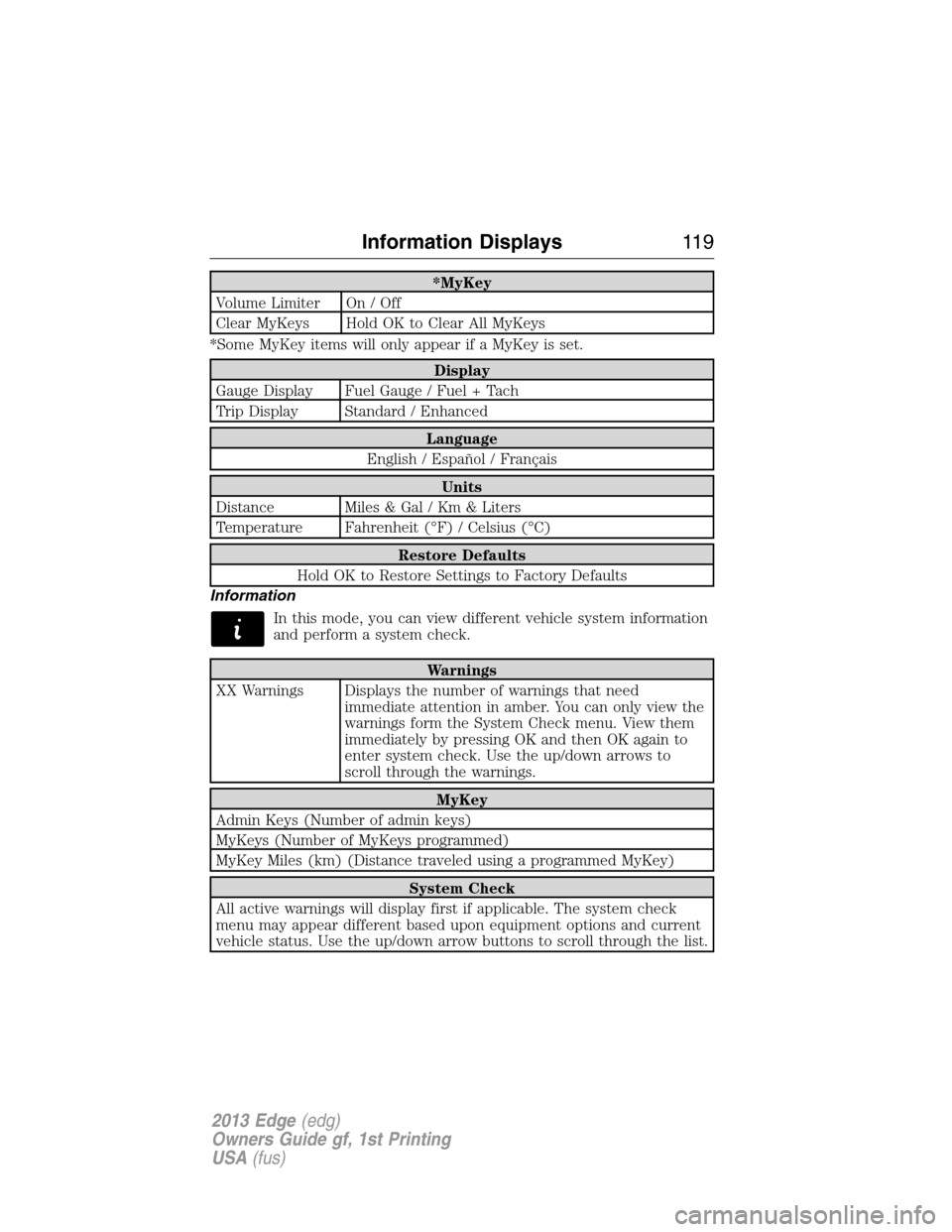
*MyKey
Volume Limiter On / Off
Clear MyKeys Hold OK to Clear All MyKeys
*Some MyKey items will only appear if a MyKey is set.
Display
Gauge Display Fuel Gauge / Fuel + Tach
Trip Display Standard / Enhanced
Language
English / Español / Français
Units
Distance Miles & Gal / Km & Liters
Temperature Fahrenheit (°F) / Celsius (°C)
Restore Defaults
Hold OK to Restore Settings to Factory Defaults
Information
In this mode, you can view different vehicle system information
and perform a system check.
Warnings
XX Warnings Displays the number of warnings that need
immediate attention in amber. You can only view the
warnings form the System Check menu. View them
immediately by pressing OK and then OK again to
enter system check. Use the up/down arrows to
scroll through the warnings.
MyKey
Admin Keys (Number of admin keys)
MyKeys (Number of MyKeys programmed)
MyKey Miles (km) (Distance traveled using a programmed MyKey)
System Check
All active warnings will display first if applicable. The system check
menu may appear different based upon equipment options and current
vehicle status. Use the up/down arrow buttons to scroll through the list.
Information Displays11 9
2013 Edge(edg)
Owners Guide gf, 1st Printing
USA(fus)
Page 121 of 526

AdvanceTrac�/
Traction Control
MessagesAction / Description
Service AdvanceTrac Displayed when the AdvanceTrac�system has
detected a condition that requires service.
Contact your authorized dealer as soon as
possible.
Traction control off Displayed when the traction control has been
disabled by the driver.
Trailer Sway Reduce
SpeedDisplayed when the trailer sway control has
detected trailer sway.
Alarm/Security
MessagesAction / Description
To Stop Alarm, Start
VehicleDisplayed when the perimeter alarm system is
armed and the vehicle is entered using the key
on the driver’s side door. In order to prevent
the perimeter alarm system from triggering,
the ignition must be turned to start or on
before the 12 second chime expires.
AWD Messages Action / Description
AWD Off Displayed when the AWD system has been
automatically disabled to protect itself. This is
caused by operating the vehicle with the
compact spare tire installed or if the system is
overheating. The AWD system will resume
normal function and clear this message after
driving a short distance with the road tire
re-installed or after the system is allowed to
cool.
Check AWD Displayed in conjunction with the Throttle
Control/Transmission/AWD light when the AWD
system is not operating properly. If the
warning stays on or continues to come on,
contact your authorized dealer as soon as
possible.
Information Displays121
2013 Edge(edg)
Owners Guide gf, 1st Printing
USA(fus)
Page 122 of 526

Battery and
Charging System
MessagesAction / Description
Check Charging
SystemDisplayed when the charging system needs
servicing. If the warning stays on or continues
to come on, contact your authorized dealer as
soon as possible.
Turn Power Off to
Save BatteryDisplayed when the battery management
system determines that:
•the battery is at a low state of charge or,
•the ignition has been in accessory position
or on position with the engine off for
approximately 45 minutes.
Turn the ignition off as soon as possible to
protect the battery. This message will clear
once the vehicle has been started and the
battery state of charge has recovered. Turning
off unnecessary electrical loads will allow
faster battery state-of-charge recovery.
Transport Mode
Contact DealerContact your authorized dealer as soon as
possible.
Factory Mode Contact
DealerContact your authorized dealer as soon as
possible.
BLIS�Messages Action / Description
Blind Spot Not
Available Sensor
BlockedDisplayed when the blind spot information
system/cross traffic alert system sensors are
blocked. Driver can typically clean the sensor
to resolve.
Blind Spot System
FaultDisplayed when a fault with the blind spot
information system has occurred. Contact your
authorized dealer as soon as possible.
Cross Traffic Not
Available Sensor
BlockedDisplayed when the blind spot information
system/cross traffic alert system sensors are
blocked. Driver can typically clean the sensor
to resolve.
122Information Displays
2013 Edge(edg)
Owners Guide gf, 1st Printing
USA(fus)
Page 123 of 526

BLIS�Messages Action / Description
Cross Traffic System
FaultDisplayed when a fault with the cross traffic
alert system has occurred. Contact your
authorized dealer as soon as possible.
Vehicle Coming From
XDisplayed when the blind spot information
system with cross traffic alert (CTA) system is
operating and senses a vehicle.
Brake System
MessagesAction / Description
Brake Fluid Level Low Indicates the brake fluid level is low and the
brake system should be inspected immediately.
Check Brake System Displayed when the brake system needs
servicing. If the warning stays on or continues
to come on, contact your authorized dealer as
soon as possible.
Park Brake Engaged Displayed when the parking brake is set, the
engine is running and the vehicle is driven
more than 3 mph (5 km/h). If the warning
stays on after the parking brake is released,
contact your authorized dealer as soon as
possible.
Collision Warning
System MessagesAction / Description
Collision Warn Not
AvailableDisplayed when there is a system malfunction
with the collision warning system. The system
will be disabled. Contact your authorized
dealer as soon as possible.
Collision Warn Not
Available Sensor
BlockedDisplayed when the collision warning system
radar is blocked because of poor radar
visibility due to bad weather or ice/mud/water
in front of the radar. Driver can typically clean
the sensor to resolve. Contact your authorized
dealer as soon as possible.
Information Displays123
2013 Edge(edg)
Owners Guide gf, 1st Printing
USA(fus)