Page 342 of 526
Item Capacity Ford part nameFord part number /
Ford specification
Engine coolant
3
(3.5L/3.7L engines)
11.7 quarts
(11.1L)
4,5
Motorcraft�Orange
Antifreeze/Coolant
Prediluted•VC-3DIL-B (US)
•CVC-3DIL-B (Canada) /
WSS-M97B44-D2 2.0L EcoBoost™
engine
8.9 quarts
(8.4L)
4
Power steering fluidBetween MIN and
MAX on reservoirMotorcraft�MERCON�
LV AT FXT-10-QLV /
MERCON�LV
Automatic
transmission fluid
6,7
11.0 quarts (10.4L)
(6F50)
Motorcraft�
MERCON�LV AT FXT-10-QLV /
MERCON�LV
9.0 quarts (8.5L)
(6F35)
Rear differential
(AWD) fluid2.4 pints (1.15L)Motorcraft�SAE 80W-90
Premium Rear Axle
LubricantXY-80W90-QL /
WSP-M2C197-A
Power Transfer Unit
(PTU) fluid (AWD)
8
12 ounces (0.35L)Motorcraft�SAE 75W-140
Synthetic Rear Axle
LubricantXY-75W140-QL /
WSL-M2C192-A
342Capacities and Specifications
2013 Edge(edg)
Owners Guide gf, 1st Printing
USA(fus)
Page 357 of 526

Multi-Point Inspection
In order to keep your vehicle running right, it is important to have the
systems on your vehicle checked regularly. This can help identify
potential issues and prevent major problems. Ford Motor Company
recommends the following multi-point inspection be performed at every
scheduled maintenance interval to help make sure your vehicle keeps
running great.
Multi-point inspection – Recommended each visit
Accessory drive belt(s) Half-shaft dust boots (if equipped)
Battery performance Horn operation
Clutch operation (if equipped) Radiator, cooler, heater and A/C hoses
Engine air filter Suspension component for leaks or
damage
Exhaust system Steering and linkage
Exterior lamps and hazard
warning system operationTires for wear and proper pressure,
including spare
Fluid levels*; fill if necessary Windshield for cracks, chips or pits
For oil and fluid leaks Washer spray and wiper operation
*Brake, coolant recovery reservoir, manual and automatic transmission
(with an underhood dipstick), power steering (if equipped) and
window washer
Be sure to ask your dealership service advisor or technician about the
multi-point vehicle inspection. It’s a comprehensive way to perform a
thorough inspection of your vehicle. It’s your checklist that gives you
immediate feedback on the overall condition of your vehicle. You’ll know
what’s been checked, what’s okay, as well as those things that may
require future or immediate attention. The multi-point vehicle inspection
is one more way to keep your vehicle running great!
Scheduled Maintenance357
2013 Edge(edg)
Owners Guide gf, 1st Printing
USA(fus)
Page 360 of 526

Normal Scheduled Maintenance - At every oil change interval as
indicated by the message center
Change engine oil and filter
Rotate tires, inspect tire wear and measure tread depth
Perform multi-point inspection (recommended)
Inspect automatic transmission fluid level (if equipped with dipstick);
consult dealer for requirements
Inspect brake pads, shoes, rotors, drums, brake linings, hoses and
parking brake
Inspect cabin air filter (if equipped)
Inspect engine cooling system strength and hoses
Inspect exhaust system and heat shields
Inspect rear axle and U-joints; lubricate if equipped with grease fittings
(AWD vehicles)
Inspect half-shaft boots (if equipped)
Inspect steering linkage, ball joints, suspension, tie-rod ends, driveshaft
and U-joints; lubricate if equipped with grease fittings
Inspect wheels and related components for abnormal noise, wear,
looseness or drag
Reset your Intelligent Oil Life Monitor™ after each engine oil and filter
change; refer to theInstrument Clusterchapter
Do not exceed one year or 10,000 miles (16,000 km) between
service intervals
360Scheduled Maintenance
2013 Edge(edg)
Owners Guide gf, 1st Printing
USA(fus)
Page 367 of 526
Police Interceptor equipped with engine idle hour meter
Inspect frequently,
service as requiredReplace cabin air filter (if equipped)
Every 5,000 miles
(8,000 km)Inspect the brake system
Lubricate control arm and steering ball joints if
equipped with grease fittings
Rotate tires, inspect tires for wear and measure
tread depth
Every 5,000 miles
(8,000 km) or
6 months or as
indicated by
time/mileage
calculationChange engine oil and filter (see description
below)
Perform multi-point inspection
Every 30,000 miles
(48,000 km)Change automatic transmission fluid
Every 60,000 miles
(96,000 km)Replace spark plugs
Reset your Intelligent Oil Life Monitor™ after each engine oil and filter
change; refer to theInstrument Clusterchapter
Scheduled Maintenance367
2013 Edge(edg)
Owners Guide gf, 1st Printing
USA(fus)
Page 394 of 526

•A connected Bluetooth-enabled phone must have adequate network
coverage, battery power and signal strength.
•The vehicle must have battery power and be located in the U.S.,
Canada or in a territory in which 911 is the emergency number.
In the Event of a Crash
Not all crashes deploy an airbag or activate the fuel pump shut-off
(which would activate 911 Assist™); however, if 911 Assist™ is
triggered, SYNC�tries to contact emergency services. If a connected
phone is damaged or loses connection to SYNC�, SYNC�searches for,
and tries to connect to, any available previously paired phone and tries to
make the call to 911.
Before making the call:
•
SYNC�provides a short window of time (about 10 seconds) to cancel the
call. Failure to cancel the call results in SYNC�attempting to dial 911.
•SYNC�says the following, or a similar message: “SYNC�will attempt to
call 911, to cancel the call, press Cancel on your screen or press and hold
the phone button on your steering wheel.”
If the call is not cancelled and a successful call is made, a pre-recorded
message is played for the 911 operator, then the occupant(s) in the
vehicle is able to talk with the operator. Be prepared to provide your
name, phone number and location immediately, because not all 911
systems are capable of receiving this information electronically.
911 Assist™ May Not Work If
•Your cellular phone or 911 Assist™ hardware was damaged in a crash.
•The vehicle’s battery or SYNC system has no power.
•The phone(s) paired and connected to the system was thrown from
the vehicle.
911 Assist™ Privacy Notice
Once 911 Assist™ is set on, it may disclose to emergency services that
the vehicle has been in a crash involving the deployment of an airbag or
activation of the fuel pump shut-off. Certain versions or updates to 911
Assist™ may also be capable of electronically or verbally disclosing to
911 operators the vehicle location, and/or other details about the vehicle
or crash to assist 911 operators to provide the most appropriate
emergency services. If you do not want to disclose this information, do
not turn the feature on.
394SYNC�
2013 Edge(edg)
Owners Guide gf, 1st Printing
USA(fus)
Page 399 of 526

3. While on an active route, you can select or say “Route Summary” or
“Route Status” to view the Route Summary turn list or the Route
Status ETA. You can also turn voice guidance on or off, cancel the
route or update the route.
If you miss a turn, SYNC automatically asks if you want the route
updated. Just say, “Yes” when prompted and a new route will be
delivered to your vehicle.
Disconnecting from SYNC�Services
1. Press and hold the phone button on the steering wheel.
2. Say “Goodbye” from the SYNC Services main menu.
SYNC Services Quick Tips
PersonalizingYou can personalize your services feature to
provide quicker access to your most used or
favorite information. You can save address
points such as, work or home. You can also
save favorite information like sports teams,
such as Detroit Lions, or a news category. To
learn more, log onto www.SYNCMyRide.com.
Push to interruptPress the voice button at any time (while you
are connected to SYNC TDI Services) to
interrupt a voice prompt or an audio clip
(such as a sports report), wait for the
listening tone, and say your voice command.
PortableYour subscription is associated with your
Bluetooth-enabled cellular phone number, not
your VIN (Vehicle Identification Number). You
can pair and connect your phone to any
vehicle equipped with Traffic, Directions and
Information and continue enjoying your
personalized services.
You can even access your account outside the
vehicle. Just use the number on your phone’s
call history. Traffic and Directions features do
not function properly but information services
and the 411 connect and text message
features are available.
SYNC�399
2013 Edge(edg)
Owners Guide gf, 1st Printing
USA(fus)
Page 426 of 526
ACCESSING AND ADJUSTING MODES THROUGH YOUR
INFOTAINMENT DISPLAY (IF EQUIPPED)
The infotainment display is located on the right side of your instrument
cluster. It allows you to view and make minor adjustments to active
modes without taking your hands off the wheel. For example:
•In entertainment mode, you can view what is now playing, change the
audio source, select presets and make some adjustments.
•In phone mode, you can accept or reject an incoming call.
•In navigation mode (if equipped), you can view the current route or
activate a route.
•In climate mode, the driver side temperature can bet set as well as fan
speed.
Use the OK and arrow buttons on
the right side of your steering wheel
to scroll through the available
modes:
Entertainment
Phone
km/h
80
60
40
20
0
20
0 40 60 80
100120140160180
200
220
100120140
MPH
426MyFord Touch™ (If Equipped)
2013 Edge(edg)
Owners Guide gf, 1st Printing
USA(fus)
Page 434 of 526
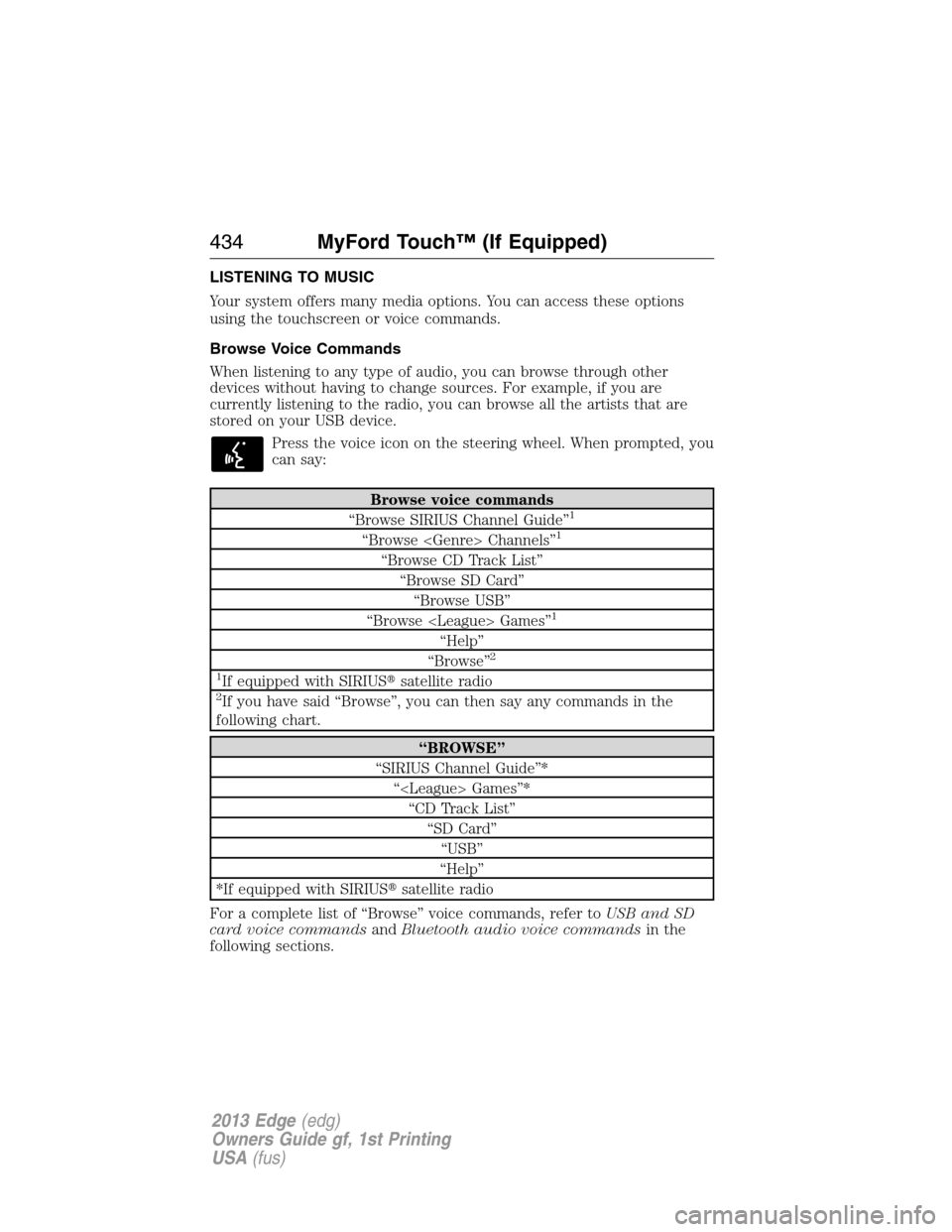
LISTENING TO MUSIC
Your system offers many media options. You can access these options
using the touchscreen or voice commands.
Browse Voice Commands
When listening to any type of audio, you can browse through other
devices without having to change sources. For example, if you are
currently listening to the radio, you can browse all the artists that are
stored on your USB device.
Press the voice icon on the steering wheel. When prompted, you
can say:
Browse voice commands
“Browse SIRIUS Channel Guide”1
“Browse Channels”1
“Browse CD Track List”
“Browse SD Card”
“Browse USB”
“Browse Games”
1
“Help”
“Browse”2
1
If equipped with SIRIUS�satellite radio2If you have said “Browse”, you can then say any commands in the
following chart.
“BROWSE”
“SIRIUS Channel Guide”*
“ Games”*
“CD Track List”
“SD Card”
“USB”
“Help”
*If equipped with SIRIUS�satellite radio
For a complete list of “Browse” voice commands, refer toUSB and SD
card voice commandsandBluetooth audio voice commandsin the
following sections.
434MyFord Touch™ (If Equipped)
2013 Edge(edg)
Owners Guide gf, 1st Printing
USA(fus)


