Page 26 of 350
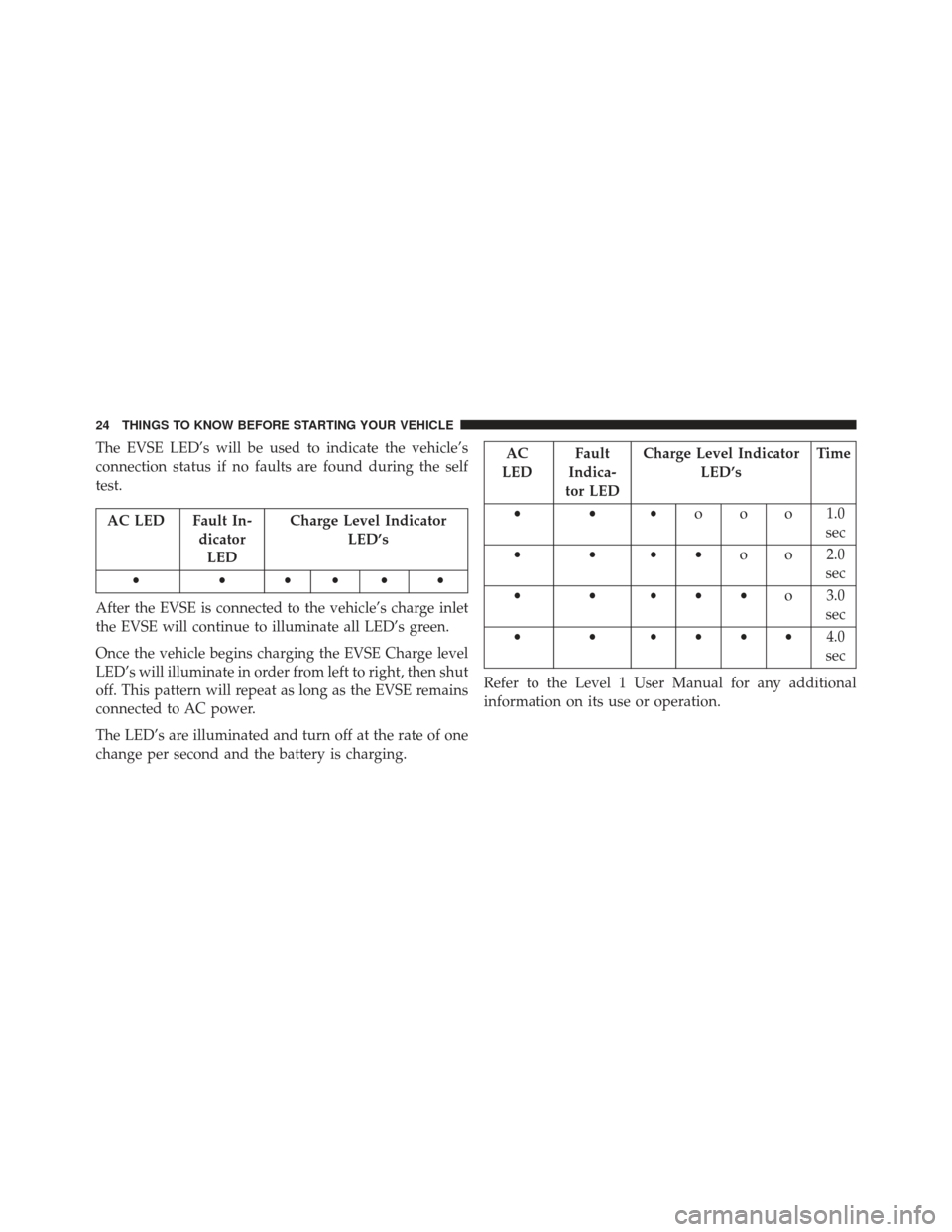
The EVSE LED’s will be used to indicate the vehicle’s
connection status if no faults are found during the self
test.
AC LED Fault In-dicatorLED Charge Level Indicator
LED’s
••••••
After the EVSE is connected to the vehicle’s charge inlet
the EVSE will continue to illuminate all LED’s green.
Once the vehicle begins charging the EVSE Charge level
LED’s will illuminate in order from left to right, then shut
off. This pattern will repeat as long as the EVSE remains
connected to AC power.
The LED’s are illuminated and turn off at the rate of one
change per second and the battery is charging.
AC
LED Fault
Indica-
tor LED Charge Level Indicator
LED’s Time
••• ooo1.0
sec
•••• o o 2.0
sec
••••• o 3.0
sec
• • •••• 4.0
sec
Refer to the Level 1 User Manual for any additional
information on its use or operation.
24 THINGS TO KNOW BEFORE STARTING YOUR VEHICLE
Page 27 of 350
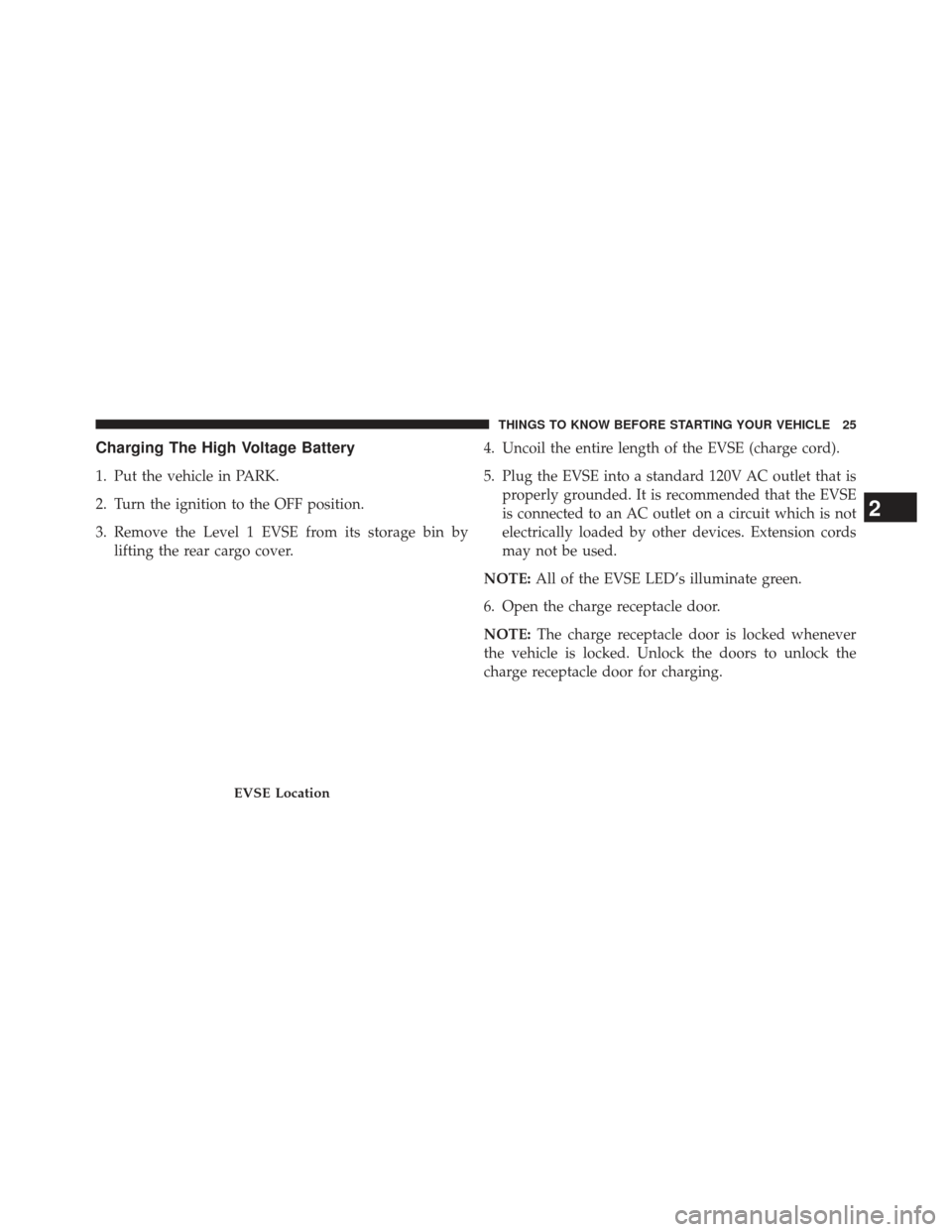
Charging The High Voltage Battery
1. Put the vehicle in PARK.
2. Turn the ignition to the OFF position.
3. Remove the Level 1 EVSE from its storage bin bylifting the rear cargo cover. 4. Uncoil the entire length of the EVSE (charge cord).
5. Plug the EVSE into a standard 120V AC outlet that is
properly grounded. It is recommended that the EVSE
is connected to an AC outlet on a circuit which is not
electrically loaded by other devices. Extension cords
may not be used.
NOTE: All of the EVSE LED’s illuminate green.
6. Open the charge receptacle door.
NOTE: The charge receptacle door is locked whenever
the vehicle is locked. Unlock the doors to unlock the
charge receptacle door for charging.
EVSE Location
2
THINGS TO KNOW BEFORE STARTING YOUR VEHICLE 25
Page 28 of 350
7. Plug the EVSE into the charge receptacle. Push theEVSE in firmly until it is completely engaged (if not
completely engaged the vehicle may not charge). NOTE:
•The vehicle will initiate the charging cycle automati-
cally when all the conditions are satisfied.
• The vehicle charge indicator will show the pattern
for charging.
EVSE Charge Coupler
Charge Indicator
26 THINGS TO KNOW BEFORE STARTING YOUR VEHICLE
Page 29 of 350
8. When charging is complete, or the vehicle needs to beunplugged, remove the EVSE by pushing the button
on the connector and pull firmly to remove it from the
charge receptacle.
9. Close the charge receptacle door. NOTE:
•
In the event of an error in the charging process the AC
power to the vehicle will stop and a red indicator will
illuminate on the EVSE.
• Keep the door for the charge receptacle closed when
not in use.
Charge Receptacle Door
2
THINGS TO KNOW BEFORE STARTING YOUR VEHICLE 27
Page 33 of 350
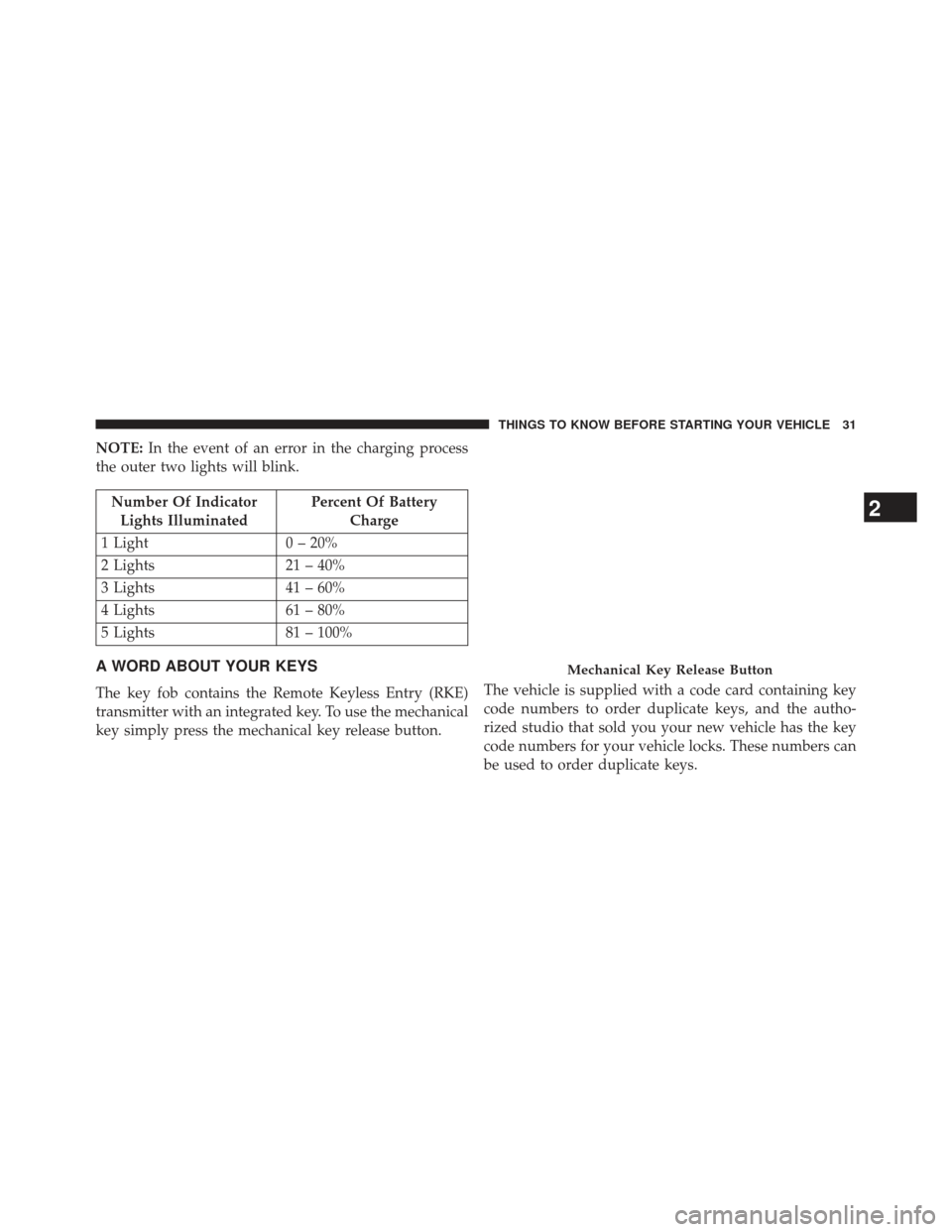
NOTE:In the event of an error in the charging process
the outer two lights will blink.
Number Of Indicator Lights Illuminated Percent Of Battery
Charge
1 Light 0 – 20%
2 Lights 21 – 40%
3 Lights 41 – 60%
4 Lights 61 – 80%
5 Lights 81 – 100%
A WORD ABOUT YOUR KEYS
The key fob contains the Remote Keyless Entry (RKE)
transmitter with an integrated key. To use the mechanical
key simply press the mechanical key release button. The vehicle is supplied with a code card containing key
code numbers to order duplicate keys, and the autho-
rized studio that sold you your new vehicle has the key
code numbers for your vehicle locks. These numbers can
be used to order duplicate keys.
Mechanical Key Release Button
2
THINGS TO KNOW BEFORE STARTING YOUR VEHICLE 31
Page 158 of 350

10. Electronic Stability Control OFF (ESC OFF) Indi-
cator Light
This light indicates the Electronic Stability Con-
trol system (ESC) has been turned off by the
driver.
11. Turn Signal Indicators
The arrows will flash in unison with the exte-
rior turn signal, when using the turn signal
lever.
12. EV System Malfunction Indicator Light
This indicator will illuminate when there is a
malfunction in the Electric Vehicle (EV) Sys-
tem. If the EV System Malfunction Indicator
light comes on while driving or charging see
your authorized studio as soon as possible.
13. Regenerative Brake System Light
If the light turns on and remains on while
driving, it suggests that there is a potential
problem with the Regenerative Brake System
(RBS) and the need for system service. See your
authorized studio as soon as possible.
14. Door Ajar
This light will turn on to indicate that one or
more doors or the trunk may be ajar.
15. Service Propulsion System Warning Light
The Service Propulsion System Warning Light
will illuminate if there is a malfunction de-
tected with the Propulsion System. If the light
comes on or remains on while driving see your
authorized studio.
156 UNDERSTANDING YOUR INSTRUMENT PANEL
Page 159 of 350
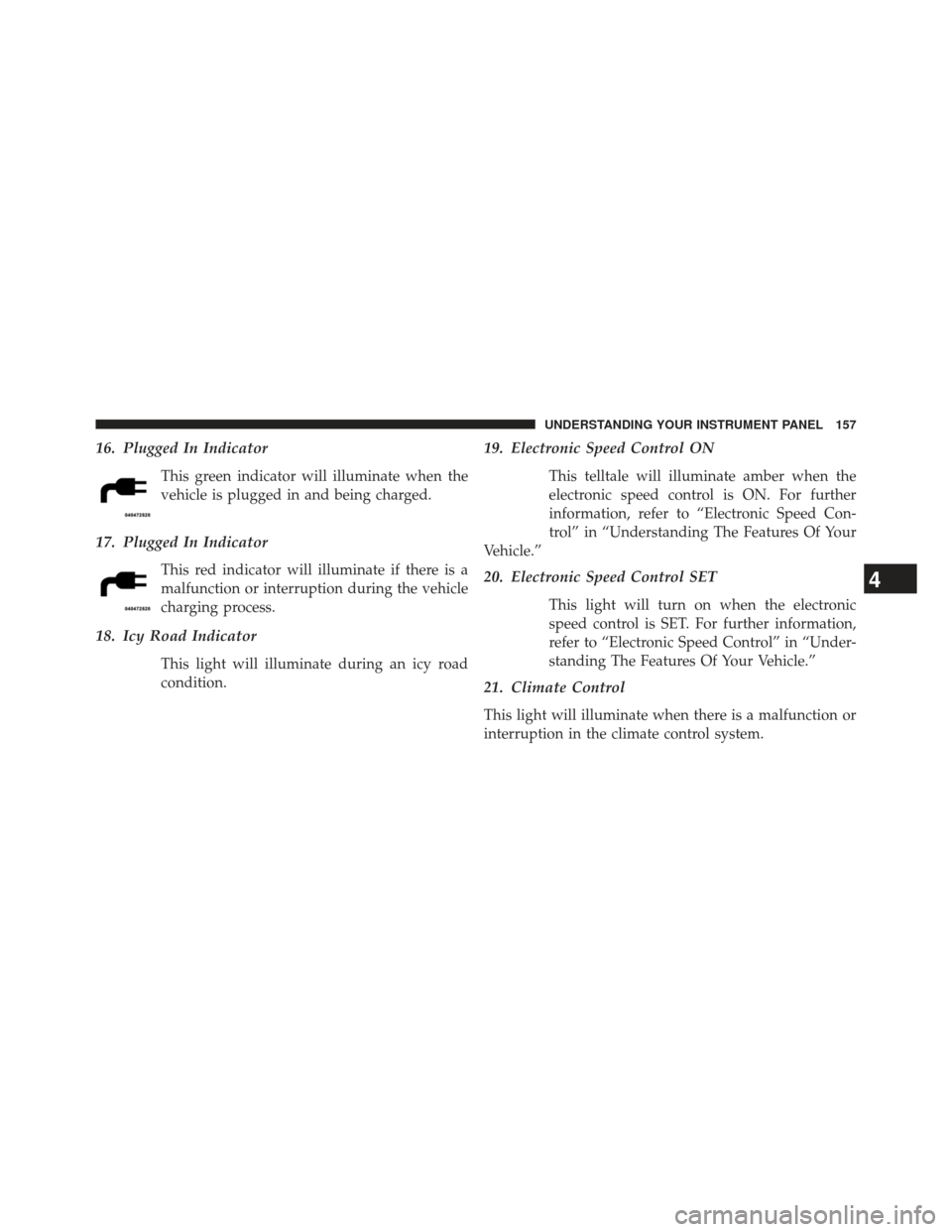
16. Plugged In Indicator
This green indicator will illuminate when the
vehicle is plugged in and being charged.
17. Plugged In Indicator
This red indicator will illuminate if there is a
malfunction or interruption during the vehicle
charging process.
18. Icy Road Indicator
This light will illuminate during an icy road
condition.
19. Electronic Speed Control ON
This telltale will illuminate amber when the
electronic speed control is ON. For further
information, refer to “Electronic Speed Con-
trol” in “Understanding The Features Of Your
Vehicle.”
20. Electronic Speed Control SET
This light will turn on when the electronic
speed control is SET. For further information,
refer to “Electronic Speed Control” in “Under-
standing The Features Of Your Vehicle.”
21. Climate Control
This light will illuminate when there is a malfunction or
interruption in the climate control system.
4
UNDERSTANDING YOUR INSTRUMENT PANEL 157
Page 160 of 350

22. Charging System Light
This light shows the status of the electrical charg-
ing system. If the light stays on or comes on while
driving, turn off some of the vehicle’s non-essential
electrical devices. If the charging system light remains on,
it means that the vehicle is experiencing a problem with
the charging system. Obtain SERVICE IMMEDIATELY.
See an authorized studio.
If jump starting is required, refer to “Jump Starting
Procedures” in “What To Do In Emergencies”.
For vehicles equipped with a premium cluster this indi-
cator will display in the Electronic Vehicle Information
Center (EVIC). Refer to ”Electronic Vehicle Information
Center (EVIC) — If Equipped” for further information.
23. Exterior Bulb Failure Indicator
This light will illuminate when there is a malfunction in
one of the exterior bulbs.
24. Power Steering System Warning
This light is used to manage the electrical
warning of the EPS (Power Steering System).
Refer to “Power Steering” in “Starting and
Operating” for further information.
25. Speedometer
The Speedometer shows the vehicle speed in miles per
hour (mph) and/or kilometers per hour (km/h).
26. Anti-Lock Brake (ABS) Light
This light monitors the Anti-Lock Brake System
(ABS). The light will turn on when the ignition
switch is turned to the ON/RUN position and
may stay on for as long as four seconds.
158 UNDERSTANDING YOUR INSTRUMENT PANEL