2013 FIAT 500C audio
[x] Cancel search: audioPage 193 of 423

Menu
MENU Button Functions
Press the MENU button briefly to activate the Menu
function.
Use theorbuttons to scroll through the menu
functions. To change the setting of the selected func-
tion, use theorbuttons.
The current status of the selected function appears on the
display.
The functions managed by the Menu are:
•Speech Volume
•Aux Audio Offset
•Radio Off
•Sat ID
•SiriusXM Telephone Number
•System Reset
•Speed Volume
•On Volume Limit
Press the MENU button again to exit the Menu function.
Speed Volume Function — If Equipped
This function automatically adapts the volume level to
the speed of the car, turning up the volume when the
speed increases to maintain the ratio with the noise level
inside the passenger compartment. To activate/
deactivate the function, use the buttons. The wording
“Speed volume” appears on the display, followed by the
current status of the function:
•Off: function deactivated
•Low: function activated (low sensitivity)
•High: function activated (high sensitivity)
4
UNDERSTANDING YOUR INSTRUMENT PANEL 191
Page 195 of 423

The chosen mode appears on the display:
•“Radio off: 00 min” — The radio turns off in connec-
tion with the ignition key; the radio is turned auto-
matically off as soon as the key is turned to the STOP
position.
•“Radio off: 20 min” — The radio turns off indepen-
dently from the ignition key; the radio remains on for
a maximum period of 20 minutes after the key has
been turned to the STOP position.
System Reset Function
This function is used to restore all settings to the factory
values. The options are:
•NO — No restore intervention.
•YES — The default parameters will be restored. Dur-
ing such operation, the wording “Resetting” appears
on the display. At the end of the operation, the source
does not change and the previous situation will be
displayed.
Radio
(Tuner) Introduction
When the car radio is turned on, the last function that
was selected before turning it off (Radio, CD, CD MP3,
AUX) is activated.
To select the Radio function when another audio source is
being listened to, briefly press the TUNER button.
Once the Radio mode has been activated, the display will
show the name (RBDS stations only) or the frequency of
the selected radio station, the frequency band selected
(e.g. FMA) and the preset button number (e.g. P1).
4
UNDERSTANDING YOUR INSTRUMENT PANEL 193
Page 201 of 423

CD Loading/Ejecting
To load the CD, insert it gently into the slot to activate the
motorized loading system, which will position it cor-
rectly.
The CD can be loaded with the radio off and the ignition
key turned to ON/RUN. In this case, the radio will
remain off. When the radio is turned on, the last source
listened to before being switched off, will be activated.
When a CD is inserted, the display will show the symbol
“CD” and the wording “CD Reading.” They will remain
displayed for the whole time required for the radio to
read the CD. When this time has elapsed the radio
automatically starts playing the first track.
Press thebutton with the radio turned on, to
activate the motorized CD ejection system. After ejec-
tion, the last audio source listened to before playing
the CD will be heard.
If the CD is not removed from the radio, it will automati-
cally be reloaded about 20 seconds later but will not
resume playing until the#MEDIA#button is pressed to
select the CD mode. The radio will switch to the last
source prior to CD mode.
The CD cannot be ejected if the radio is off.
Possible Error Messages
If the loaded CD cannot be read (e.g. a CD ROM has been
inserted or the CD is inserted the wrong way or there is
a reading error) the display shows the wording “CD Disc
error.”
The CD will then be ejected and the audio source
activated before the CD mode selection will be heard.
A CD which cannot be read will not be ejected until these
functions are over. At the end, with the CD mode
activated, the display will show the wording “CD Disc
error” for a few seconds and then the CD will be ejected.
4
UNDERSTANDING YOUR INSTRUMENT PANEL 199
Page 203 of 423

NOTE:Layer-3 audio decoding technology is licensed
from Fraunhofer IIS and Thomson multimedia.
MP3 Mode
In addition to playing regular audio CDs, the radio is also
enabled to play CDROMs on which compressed audio
files have been recorded in an MP3 format.
To guarantee optimal reproduction, it is advisable to use
good quality CDs burned at the lowest speed possible.
The files on an MP3 CD are structured in folders that
create lists of all the folders containing MP3 tracks
(folders or subfolders are all on the same level). The
folders that do not contain MP3 tracks cannot be selected.
The specifications and operating conditions for playing
MP3 files are the following:
•The CD-ROMs used should be burned in accordance
with ISO standard 9660.
•The music files should have the extension “.mp3” or
“.wma” files with a different extension will not be
reproduced.
•The sampling frequencies that can be reproduced are:
44.1 kHz, stereo (from 96 to 320 kbit/s) – 22.05 kHz,
mono or stereo (from 32 to 80 kbit/s).
•Tracks with a variable bit-rate can be reproduced.
NOTE:The track names must not include the following
characters: spaces, ‘ (apostrophes), ( and ) (open and close
brackets). During the burning of a MP3 CD, make sure
that the names of the files do not contain these characters;
if not, the radio will not be able to play the tracks
involved.
Selecting MP3 Sessions With Hybrid Discs
If a hybrid disc is inserted (Mixed Mode, Enhanced,
CD-Extra) also containing MP3 files, the radio automati-
cally starts playing the audio session. It is possible to
4
UNDERSTANDING YOUR INSTRUMENT PANEL 201
Page 204 of 423

move to the MP3 session while playing by keeping the
CD button pressed for more than two seconds.
NOTE:When the function is activated the radio may take
a few seconds to start playing. While checking the disc
the display will show “CD Reading.” If no MP3 files are
detected, the radio will resume playing the audio session
from the point where it was interrupted.
Display Information
ID3–Tag Information Display
In addition to the information relating to the time
elapsed, folder name and file name, the radio is also
capable of displaying ID3–TAG information relating to
Title Track, Artist and Author.
When one of the ID3-TAG pieces of information is chosen
to be displayed (Title, Artist, Album) and this informa-
tion has not been recorded for the track played, the text
#UNKNOWN#will be displayed for that field.
Selection Of Next/Previous Folder
Press thebutton to select a next folder or the
button to select the previous folder. The display
will show the number of the folder.
The folders are selected cyclically. The first folder is
selected after the last folder and vice versa.
If no other folder/track is selected in the next 2 seconds,
the first track on the new folder will be played.
At that moment selected the last track in the folder is
playing, the next folder will be played.
Structure Of The Folders
The radio with MP3 player:
•Recognizes only the folders that effectively contain
MP3 format files
202 UNDERSTANDING YOUR INSTRUMENT PANEL
Page 207 of 423

STEERING WHEEL AUDIO CONTROLS
The remote sound system controls are located on the rear
surface of the steering wheel. Reach behind the wheel to
access the switches.
The right-hand control is a rocker-type switch with a
pushbutton in the center and controls the volume and
mode of the sound system. Pressing the top of the rocker
switch will increase the volume, and pressing the bottom
of the rocker switch will decrease the volume.
Pressing the center button will make the radio switch
between the various modes available (AM/FM/SAT/
CD/AUX/Media Player, etc.) and can also be used to
select/enter an item while scrolling through menu.
The left-hand control is a rocker-type switch with a
pushbutton in the center. The function of the left-hand
control is different depending on which mode you are in.
The following describes the left-hand control operation in
each mode.
Remote Sound System Controls (Back View Of
Steering Wheel)
4
UNDERSTANDING YOUR INSTRUMENT PANEL 205
Page 379 of 423

The ID number of the electrical component correspond-
ing to each fuse can be found on the back of the cover.
CavityMaxi
FuseMini Fuse Description
F01 60 Amp
Blue
Body Controller
F02 20 Amp
Yellow
Audio Amplifier
F03 20 Amp
Yellow
Ignition Switch
F04 40 Amp
Orange
Anti-Lock Brake
Pump
F05 70 Amp
Ta n
Electric Power
Steering
F06 20 Amp
Yellow
Radiator Fan -
Single Speed
F06 30 Amp
Green
Radiator Fan -
Low Speed
Front Distribution Unit
7
MAINTAINING YOUR VEHICLE 377
Page 419 of 423
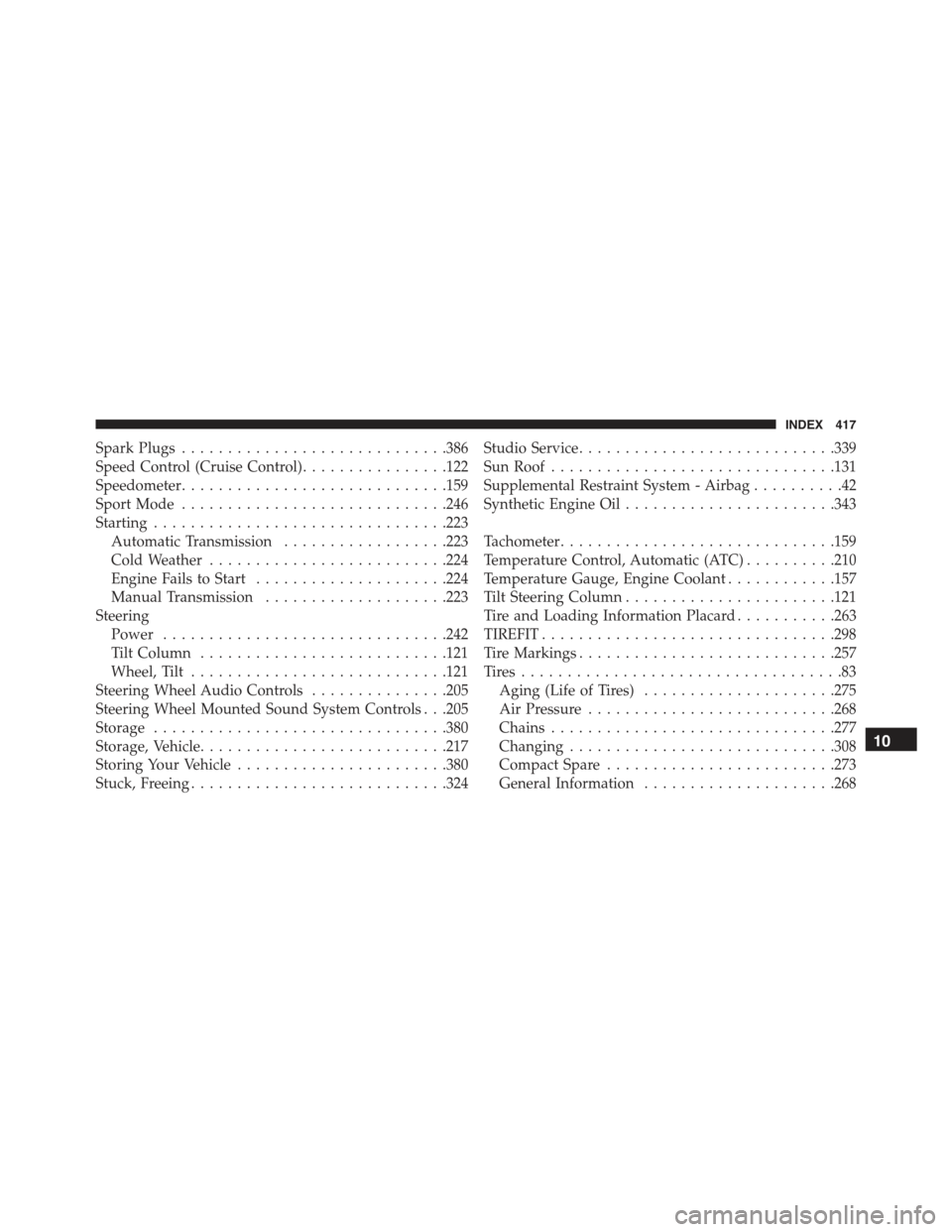
Spark Plugs.............................386
Speed Control (Cruise Control)................122
Speedometer.............................159
Sport Mode.............................246
Starting................................223
Automatic Transmission..................223
Cold Weather..........................224
Engine Fails to Start.....................224
Manual Transmission....................223
Steering
Power...............................242
Tilt Column...........................121
Wheel, Tilt............................121
Steering Wheel Audio Controls...............205
Steering Wheel Mounted Sound System Controls . . .205
Storage................................380
Storage, Vehicle...........................217
Storing Your Vehicle.......................380
Stuck, Freeing............................324
Studio Service............................339
Sun Roof...............................131
Supplemental Restraint System - Airbag..........42
Synthetic Engine Oil.......................343
Tachometer..............................159
Temperature Control, Automatic (ATC)..........210
Temperature Gauge, Engine Coolant............157
Tilt Steering Column.......................121
Tire and Loading Information Placard...........263
TIREFIT................................298
Tire Markings............................257
Ti re s . . . . . . . . . . . . . . . . . . . . . . . . . . . . . . . . . . . 8 3
Aging (Life of Tires).....................275
Air Pressure...........................268
Chains...............................277
Changing.............................308
Compact Spare.........................273
General Information.....................268
10
INDEX 417