Page 28 of 683
Power Open/Close Left Power Sliding Door — If
Equipped
Press the LEFT Power Sliding Door button twice on the
RKE transmitter within five seconds to Power Open/
Close the Left Power Sliding Door. If the button on the
RKE transmitter is pushed while the door is being
power-closed, the door will reverse to the full open
position.
If the vehicle is locked and the Vehicle Security Alarm is
armed, pressing the LEFT Power Sliding Door button
twice unlocks the power sliding door and disarms Ve-
hicle Security Alarm.
Power Open/Close Right Power Sliding Door — If
Equipped
Press the RIGHT Power Sliding Door button twice on the
RKE transmitter within five seconds to Power Open/
Close the Right Power Sliding Door. If the button on the
RKE transmitter is pushed while the door is being
power-closed, the door will reverse to the full open
position.
If the vehicle is locked and the Vehicle Security Alarm is
armed, pressing the RIGHT Power Sliding Door button
twice unlocks the power sliding door and disarms Ve-
hicle Security Alarm.
26 THINGS TO KNOW BEFORE STARTING YOUR VEHICLE
Page 29 of 683

Turn Off Flash Lights With RKE Lock — If Equipped
This feature will cause the turn signal lights to flash when
the doors are locked or unlocked with the RKE transmit-
ter. This feature can be turned on or turned off. To change
the current setting, proceed as follows:
•
For vehicles equipped with the EVIC, refer to “Electronic
Vehicle Information Center (EVIC)/Personal Settings
(Customer-Programmable Features)” in “Understanding
Your Instrument Panel” for further information.
•For vehicles not equipped with the EVIC, perform the
following steps:
1. Perform this operation while standing outside the
vehicle.
2. Press and hold the UNLOCK button on a programmed
RKE transmitter for at least 4 seconds, but no longer
than 10 seconds. Then, press and hold the LOCK
button while still holding the UNLOCK button.3. Release both buttons at the same time.
4. Test the feature while outside of the vehicle by press-
ing the LOCK/UNLOCK buttons on the RKE trans-
mitter with the ignition switch in the OFF position and
the Key Fob removed.
5. Repeat these steps if you want to return this feature to
its previous setting.
NOTE:Pressing the LOCK button on the RKE transmit-
ter while you are in the vehicle will activate the Vehicle
Security Alarm. Opening a door with the Vehicle Security
Alarm activated will cause the alarm to sound. Press the
UNLOCK button to deactivate the Vehicle Security
Alarm.
2
THINGS TO KNOW BEFORE STARTING YOUR VEHICLE 27
Page 33 of 683
How To Use Remote Start
All of the following conditions must be met before the
engine will Remote Start:
•Shift lever in PARK
•Doors closed
•Hood closed
•Liftgate closed
•Hazard switch off
•Brake switch inactive (brake pedal not pressed)
•Ignition key removed from ignition switch
•Battery at an acceptable charge level
•RKE PANIC button not pressed•System not disabled from previous remote start event
•Vehicle theft alarm not active
•Ignition in Off position
WARNING!
•Do not start or run an engine in a closed garage or
confined area. Exhaust gas contains Carbon Mon-
oxide (CO) which is odorless and colorless. Carbon
Monoxide is poisonous and can cause serious in-
jury or death when inhaled.
•Keep Remote Keyless Entry (RKE) transmitters
away from children. Operation of the Remote Start
System, windows, door locks or other controls
could cause serious injury or death.
2
THINGS TO KNOW BEFORE STARTING YOUR VEHICLE 31
Page 35 of 683

•For security, power window and power sunroof op-
eration (if equipped) are disabled when the vehicle is
in the Remote Start mode.
•The engine can be started two consecutive 15-minute
cycles with the RKE transmitter. However, the ignition
switch must be turned to the ON/RUN position.
To Enter the Vehicle After Remote Start
To enter the vehicle while the engine is running during a
Remote Start, you must first unlock the vehicle using the
UNLOCK button on the transmitter. After the vehicle is
unlocked, you can enter the vehicle, insert the Key Fob
into the ignition switch and turn it to the ON/RUN
position, otherwise the engine will shut off at the end of
15-minute cycle.
To Exit Remote Start Mode And Drive The Vehicle
Before the end of the 15-minute cycle, press and release the
UNLOCK button on the RKE transmitter to unlock the
doors and disarm the Vehicle Security Alarm (if equipped).
Then, prior to the end of the 15-minute cycle, insert the Key
Fob into the ignition switch and turn the switch to the
ON/RUN position.
NOTE:
•The ignition switch must be in the ON/RUN position
in order to drive the vehicle.
•The message “Remote Start Active — Key To Run” will
display in the EVIC until you insert and turn the key to
ON/RUN position. Refer to “Electronic Vehicle Infor-
mation Center (EVIC)” for further information.
2
THINGS TO KNOW BEFORE STARTING YOUR VEHICLE 33
Page 36 of 683

Cancel Remote Start
Remote Starting will also cancel if any of the following
occur:
•The engine stalls or engine speed exceeds 2500 rpm
•Any engine warning lights come on
•Low Fuel Light turns on
•The hood is opened
•The hazard switch is pressed
•The shift lever is moved out of PARK
•The engine is allowed to run for the entire 15-minute
cycle
•The brake pedal is pressedTo Turn Off The Engine While In Remote Start Mode
Press and release the REMOTE START button 1 time or
allow the engine to run for the entire 15 minute cycle.
NOTE:To avoid unintentional shutdowns while in the
Remote Start Mode, the system will not allow the Remote
Start button to shut down the engine for 2 seconds after
receiving a valid Remote Start request.
When To Reset Remote Start
The vehicle can be started remotely up to a maximum of
two times. The vehicle is also allowed a maximum of one
failed start, where the Remote Starting sequence was
initiated but the engine stopped cranking without start-
ing. After either of these conditions, or if the Vehicle
Security Alarm system is alarming, or if the PANIC
button was pressed, the vehicle must be reset insert the
Key Fob into the ignition switch and turn the switch to
the ON/RUN position.
34 THINGS TO KNOW BEFORE STARTING YOUR VEHICLE
Page 79 of 683

•Supplemental Side Air Bag Inflatable Curtains (SABIC)
•Front and Side Impact Sensors
•Front Seat Belt Pretensioners, Seat Belt Buckle Switch,
and Seat Track Position Sensors
Advanced Front Air Bag Features
The Advanced Front Air Bag system has multistage
driver and front passenger air bags. This system provides
output appropriate to the severity and type of collision as
determined by the Occupant Restraint Controller (ORC),
which may receive information from the front impact
sensors.
The first stage inflator is triggered immediately during an
impact that requires air bag deployment. This low output
is used in less severe collisions. A higher energy output is
used for more severe collisions.
WARNING!
•No objects should be placed over or near the air bag
on the instrument panel, because any such objects
could cause harm if the vehicle is in a collision
severe enough to cause the air bag to inflate.
•Do not put anything on or around the air bag
covers or attempt to open them manually. You may
damage the air bags and you could be injured
because the air bags may no longer be functional.
The protective covers for the air bag cushions are
designed to open only when the air bags are
inflating.
•Do not drill, cut or tamper with the knee bolster in
any way.
•
Do not mount any accessories to the knee bolster
such as alarm lights, stereos, citizen band radios, etc.
2
THINGS TO KNOW BEFORE STARTING YOUR VEHICLE 77
Page 145 of 683

NOTE:In a parking lot situation, oncoming vehicles can
be obscured by vehicles parked on either side. If the
sensors are blocked by other structures or vehicles, the
system will not be able to alert the driver.
When RCP is on and the vehicle is in REVERSE, the
driver is alerted using both the visual and audible
alarms, including reducing the radio volume.
WARNING!
RCP is not a Back Up Aid system. It is intended to be
used to help a driver detect an oncoming vehicle in a
parking lot situation. Drivers must be careful when
backing up, even when using RCP. Always check
carefully behind your vehicle, look behind you, and be
sure to check for pedestrians, animals, other vehicles,
obstructions, and blind spots before backing up. Fail-
ure to do so can result in serious injury or death.
Modes Of Operation
Three selectable modes of operation are available in the
Electronic Vehicle Information Center (EVIC). Refer to
“Electronic Vehicle Information Center (EVIC)/Personal
Settings (Customer-Programmable Features)” in “Under-
standing Your Instrument Panel” for further information.
Blind Spot Alert
When operating in Blind Spot Alert mode, the BSM
system will provide a visual alert in the appropriate side
view mirror based on a detected object. However, when
the system is operating in RCP, the system will respond
with both visual and audible alerts when a detected
object is present. Whenever an audible alert is requested,
the radio is muted.
3
UNDERSTANDING THE FEATURES OF YOUR VEHICLE 143
Page 259 of 683
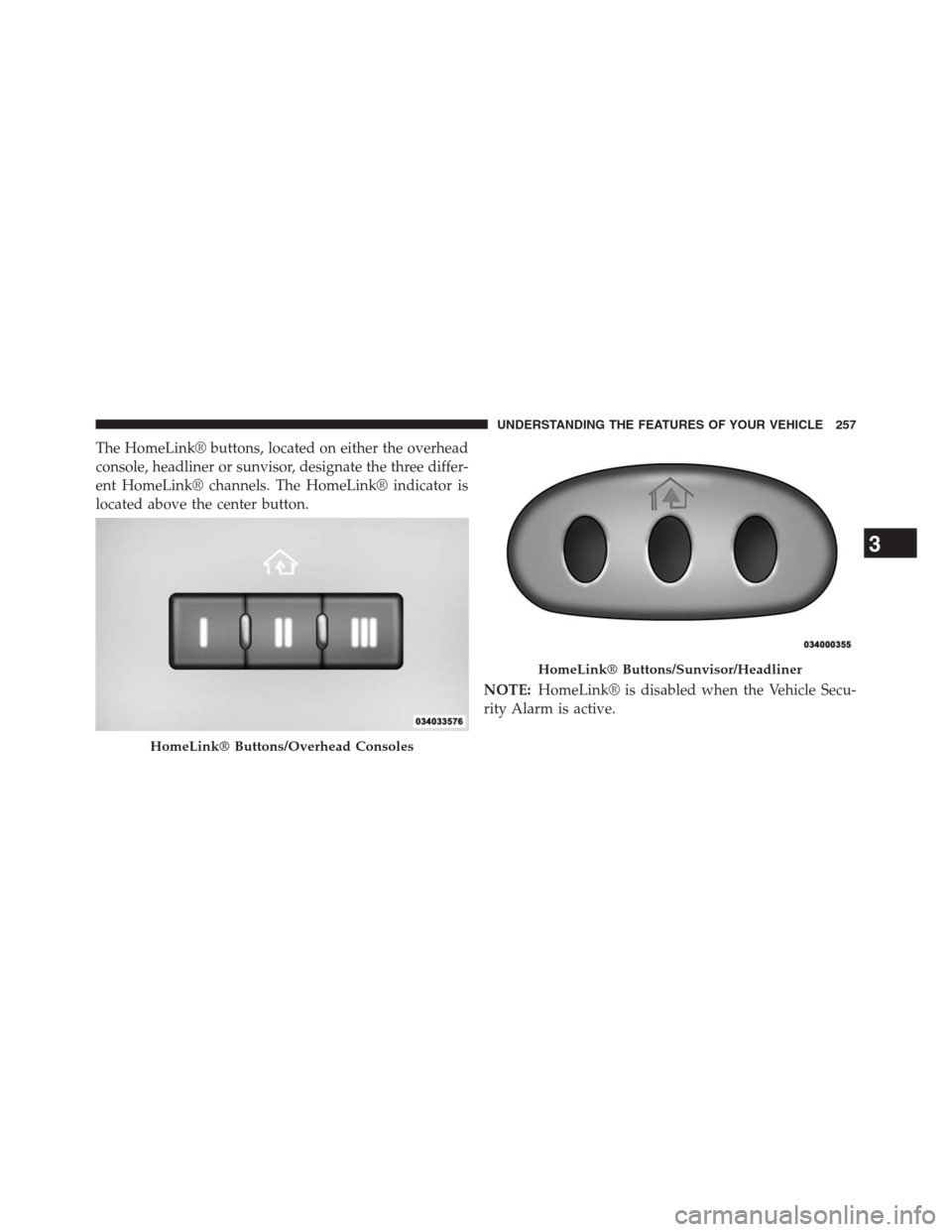
The HomeLink® buttons, located on either the overhead
console, headliner or sunvisor, designate the three differ-
ent HomeLink® channels. The HomeLink® indicator is
located above the center button.
NOTE:HomeLink® is disabled when the Vehicle Secu-
rity Alarm is active.
HomeLink® Buttons/Overhead Consoles
HomeLink® Buttons/Sunvisor/Headliner
3
UNDERSTANDING THE FEATURES OF YOUR VEHICLE 257