Page 103 of 699
What is the weight limit (child’s weight +
weight of the child restraint) for using the
Tether Anchor with the seat belt to attach a
forward facing child restraint?Weight limit of the
Child Restraint
Always use the tether anchor when using
the seat belt to install a forward facing child
restraint, up to the recommended weight
limit of the child restraint.
Can the rear-facing child restraint touch the
back of the front passenger seat? Yes
Contact between the front passenger seat
and the child restraint is allowed, if the child
restraint manufacturer also allows contact.
Can the head restraints be removed? Yes, center position only.
Can the buckle stalk be twisted to tighten
the seat belt against the belt path of the child
restraint? Yes
In positions with cinching latch plates
(CINCH), the buckle stalk may be twisted
up to 3 full turns. Do not twist the buckle
stalk in a seating position with an ALR
retractor.
2
THINGS TO KNOW BEFORE STARTING YOUR VEHICLE 101
Page 104 of 699

Installing A Child Restraint with a Switchable
Automatic Locking Retractor (ALR)
1. Place the child seat in the center of the seatingposition. For some second row seats, you may need to
recline the seat and/or raise the head restraint to get a
better fit.
2. Pull enough of the seat belt webbing from the retractor to pass it through the belt path of the child restraint.
Do not twist the belt webbing in the belt path.
3. Slide the latch plate into the buckle until you hear a “click.”
4. Pull on the webbing to make the lap portion tight against the child seat.
5. To lock the seat belt, pull down on the shoulder part of the belt until you have pulled all the seat belt webbing
out of the retractor. Then, allow the webbing to retract back into the retractor. As the webbing retracts, you
will hear a clicking sound. This means the seat belt is
now in the Automatic Locking mode.
6. Try to pull the webbing out of the retractor. If it is locked, you should not be able to pull out any web-
bing. If the retractor is not locked, repeat step 5.
7. Finally, pull up on any excess webbing to tighten the lap portion around the child restraint while you push
the child restraint rearward and downward into the
vehicle seat.
8. If the child restraint has a top tether strap and the seating position has a top tether anchorage, connect
the tether strap to the anchorage and tighten the tether
strap. Refer to “Lower Anchors and Tethers for Chil-
dren (LATCH) Restraint System” for directions to
attach a tether anchor.
102 THINGS TO KNOW BEFORE STARTING YOUR VEHICLE
Page 105 of 699

9. Test that the child restraint is installed tightly bypulling back and forth on the child seat at the belt
path. It should not move more than 1 inch (25.4 mm)
in any direction.
Any seat belt system will loosen with time, so check the
belt occasionally, and pull it tight if necessary.
Installing A Child Restraint With A Cinching
Latch Plate (CINCH) — If Equipped
1. Place the child seat in the center of the seating position. For some second row seats, you may need to
recline the seat and / or raise the head restraint to get
a better fit.
2. Next, pull enough of the seat belt webbing from the retractor to pass it through the belt path of the child
restraint. Do not twist the belt webbing in the belt
path. 3. Slide the latch plate into the buckle until you hear a
“click.”
4. Finally, pull up on any excess webbing to tighten the lap portion around the child restraint while you push
the child restraint rearward and downward into the
vehicle seat.
5. If the child restraint has a top tether strap and the seating position has a top tether anchorage, connect
the tether strap to the anchorage and tighten the tether
strap. Refer to “Lower Anchors and Tethers for Chil-
dren (LATCH) Restraint System” for directions to
attach a tether anchor.
6. Test that the child restraint is installed tightly by pulling back and forth on the child seat at the belt
path. It should not move more than 1 inch (25.4 mm)
in any direction.
2
THINGS TO KNOW BEFORE STARTING YOUR VEHICLE 103
Page 108 of 699
3. Route the tether strap to provide the most direct pathfor the strap between the anchor and the child seat. If
your vehicle is equipped with adjustable rear head
restraints, raise the head restraint, and where possible,
route the tether strap under the head restraint and
between the two posts. If not possible, lower the head
restraint and pass the tether strap around the outboard
side of the head restraint.
4. For the center seating position, route the tether strap over the seatback and headrest then attach the hook to
the tether anchor located on the back of the seat.
5. Attach the tether strap hook of the child restraint to the top tether anchorage as shown in the diagram.
Top Tether Strap Mounting (60/40 Seat)
106 THINGS TO KNOW BEFORE STARTING YOUR VEHICLE
Page 109 of 699
6. Remove slack in the tether strap according to the childrestraint manufacturer ’s instructions.
WARNING!
The top tether anchorages are not visible until the
gap panel is folded down. Do not use the visible
cargo tie down hooks, located on the floor behind the
seats, to attach a child restraint tether anchor.
Installing Child Restraints Using The Top Tether
Anchorage — Center Seating Position
For center seating position route the tether strap over the
seatback and headrest then attach the hook to the tether
anchor located on the back of the seat.
Transporting Pets
Air Bags deploying in the front seat could harm your pet.
An unrestrained pet will be thrown about and possibly
injured, or injure a passenger during panic braking or in
a collision.
Top Tether Strap Mounting (Captain’s Chair)
2
THINGS TO KNOW BEFORE STARTING YOUR VEHICLE 107
Page 116 of 699

▫Phone Call Features ....................142
▫ Uconnect� Phone Features ...............145
▫ Advanced Phone Connectivity ............150
▫ Things You Should Know About Your Uconnect�
Phone ............................. .152
▫ General Information ...................163
� VOICE COMMAND — IF EQUIPPED .......163
▫ Voice Command System Operation .........163
▫ Commands ......................... .165
▫ Voice Training ....................... .169
� SEATS ............................. .169
▫ Power Seats — If Equipped ..............170
▫ Passenger’s Power Seat — If Equipped ......172▫
Power Lumbar — If Equipped ............172
▫ Manual Front Passenger Seat Forward/Rearward
Adjustment ........................ .173
▫ Manual Front Passenger Seatback Adjustment —
Recline ........................... .174
▫ Front Passenger Seat Fold-Flat Feature — If
Equipped .......................... .175
▫ Heated Seats — If Equipped ..............175
▫ Ventilated Seats — If Equipped ............178
▫ Head Restraints ...................... .179
▫ 60/40 Split Rear Seat ..................184
▫ Rear Captain Chairs — If Equipped .........187
▫ Folding Third Row ....................191
114 UNDERSTANDING THE FEATURES OF YOUR VEHICLE
Page 117 of 699

�DRIVER MEMORY SEAT — IF EQUIPPED . . . .192
▫ Programming The Memory Feature .........193
▫ Linking And Unlinking The Remote Keyless Entry
Transmitter To Memory .................194
▫ Memory Position Recall .................195
▫ Easy Entry/Exit Seat ...................196
� TO OPEN AND CLOSE THE HOOD .........198
� LIGHTS ............................ .200
▫ Headlight Switch .....................200
▫ Automatic Headlights — If Equipped .......201
▫ Headlights On Automatically With Wipers . . .201
▫ SmartBeam™ — If Equipped .............202
▫ Daytime Running Lights — If Equipped .....203▫
Headlight Delay ..................... .203
▫ Parking Lights And Panel Lights ...........204
▫ Fog Lights — If Equipped ...............204
▫ Interior Lights ....................... .205
▫ Lights-On Reminder ...................206
▫ Battery Saver ........................ .206
▫ Front Map/Reading Lights ..............206
▫ Courtesy Lights ...................... .261
▫ Ambient Light ....................... .208
▫ Multifunction Lever ....................208
▫ Turn Signals ........................ .209
▫ Lane Change Assist ...................209
▫ Flash-To-Pass ....................... .209
3
UNDERSTANDING THE FEATURES OF YOUR VEHICLE 115
Page 119 of 699
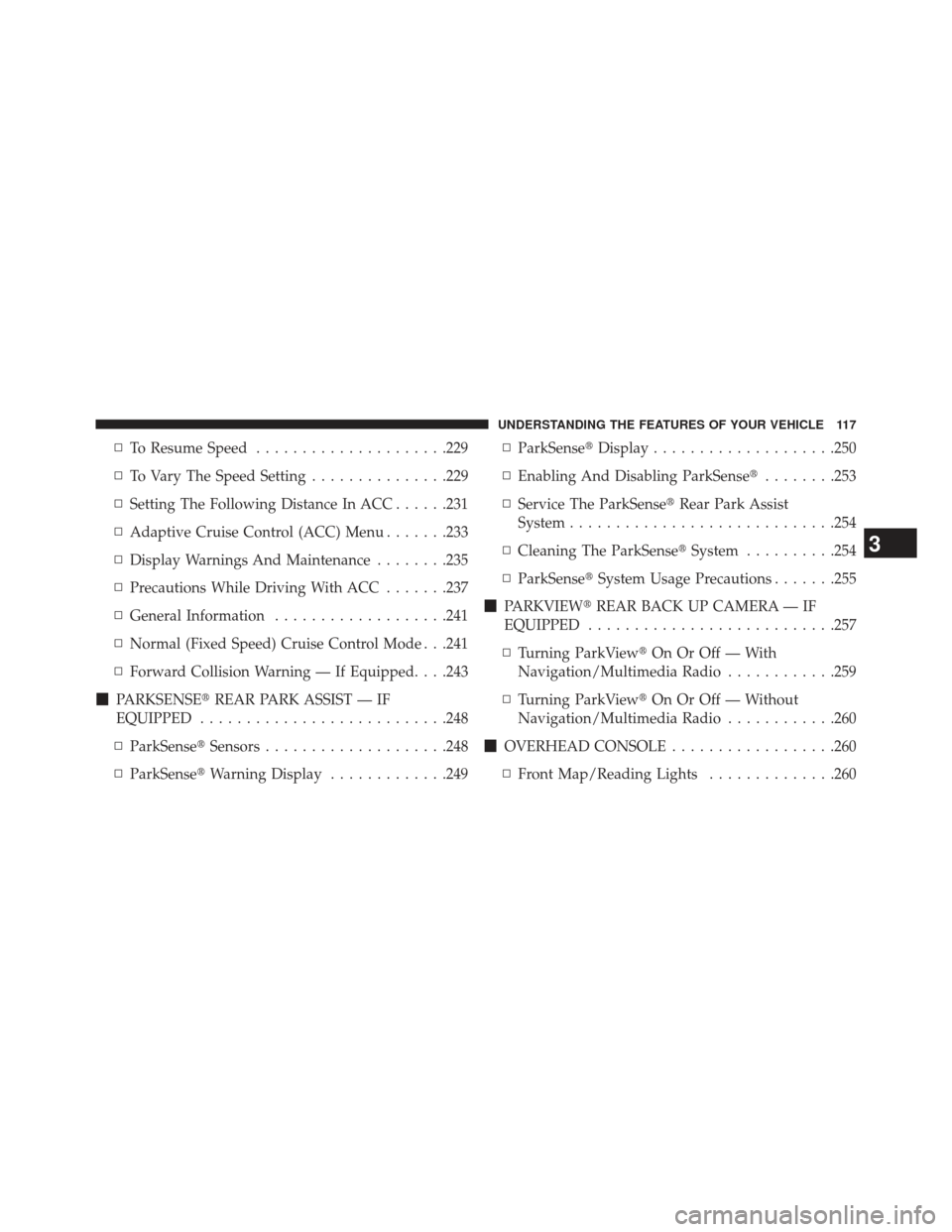
▫To Resume Speed .....................229
▫ To Vary The Speed Setting ...............229
▫ Setting The Following Distance In ACC ......231
▫ Adaptive Cruise Control (ACC) Menu .......233
▫ Display Warnings And Maintenance ........235
▫ Precautions While Driving With ACC .......237
▫ General Information ...................241
▫ Normal (Fixed Speed) Cruise Control Mode . . .241
▫ Forward Collision Warning — If Equipped. . . .243
� PARKSENSE� REAR PARK ASSIST — IF
EQUIPPED .......................... .248
▫ ParkSense� Sensors....................248
▫ ParkSense� Warning Display .............249 ▫
ParkSense� Display....................250
▫ Enabling And Disabling ParkSense� ........253
▫ Service The ParkSense� Rear Park Assist
System ............................ .254
▫ Cleaning The ParkSense� System..........254
▫ ParkSense� System Usage Precautions .......255
� PARKVIEW� REAR BACK UP CAMERA — IF
EQUIPPED .......................... .257
▫ Turning ParkView� On Or Off — With
Navigation/Multimedia Radio ............259
▫ Turning ParkView� On Or Off — Without
Navigation/Multimedia Radio ............260
� OVERHEAD
CONSOLE ..................260
▫ Front Map/Reading Lights ..............260
3
UNDERSTANDING THE FEATURES OF YOUR VEHICLE 117


