Page 274 of 599
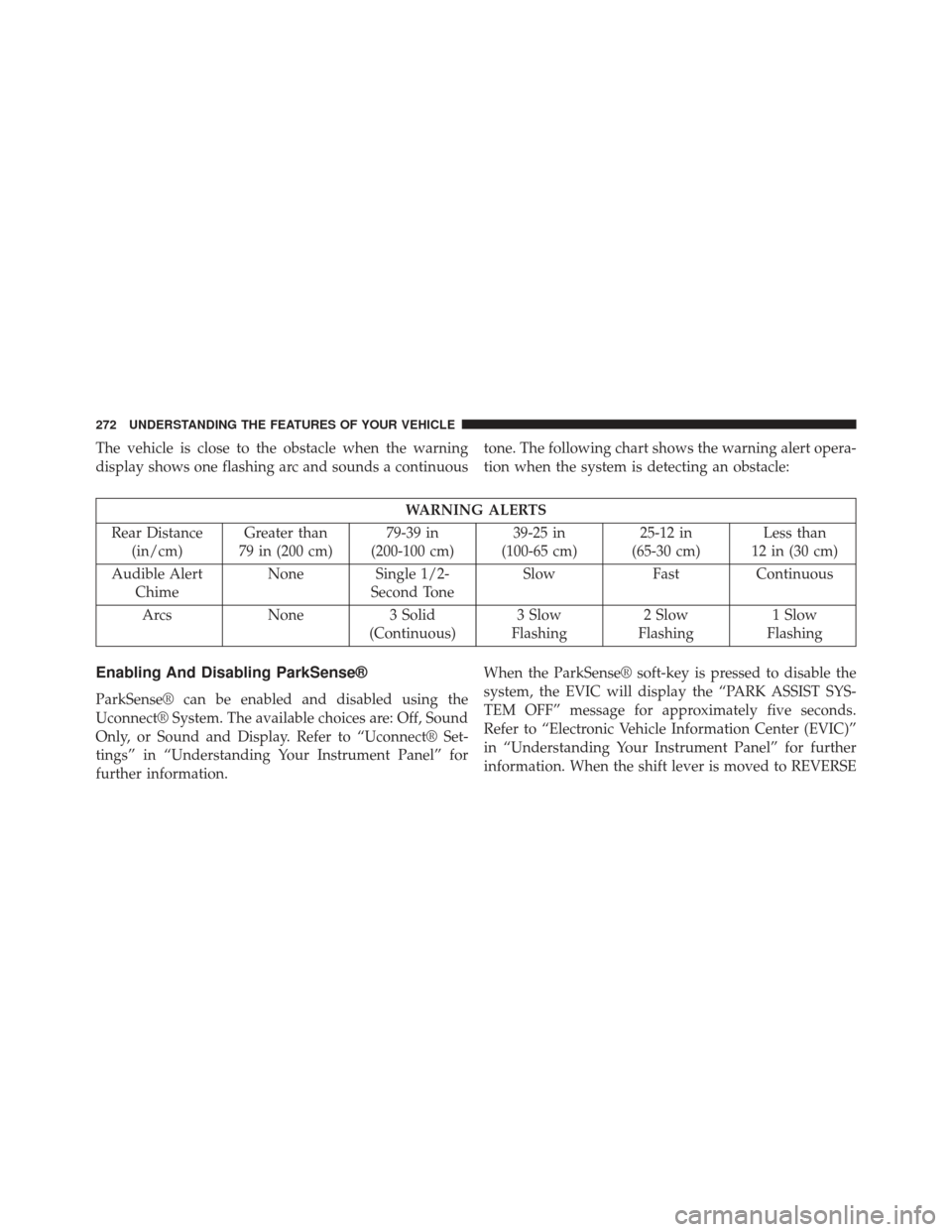
The vehicle is close to the obstacle when the warning
display shows one flashing arc and sounds a continuoustone. The following chart shows the warning alert opera-
tion when the system is detecting an obstacle:
WARNING ALERTS
Rear Distance (in/cm) Greater than
79 in (200 cm) 79-39 in
(200-100 cm) 39-25 in
(100-65 cm) 25-12 in
(65-30 cm) Less than
12 in (30 cm)
Audible Alert Chime None Single 1/2-
Second Tone Slow
FastContinuous
Arcs None3 Solid
(Continuous) 3 Slow
Flashing 2 Slow
Flashing 1 Slow
Flashing
Enabling And Disabling ParkSense®
ParkSense® can be enabled and disabled using the
Uconnect® System. The available choices are: Off, Sound
Only, or Sound and Display. Refer to “Uconnect® Set-
tings” in “Understanding Your Instrument Panel” for
further information. When the ParkSense® soft-key is pressed to disable the
system, the EVIC will display the “PARK ASSIST SYS-
TEM OFF” message for approximately five seconds.
Refer to “Electronic Vehicle Information Center (EVIC)”
in “Understanding Your Instrument Panel” for further
information. When the shift lever is moved to REVERSE
272 UNDERSTANDING THE FEATURES OF YOUR VEHICLE
Page 275 of 599

and the system is disabled, the EVIC will display the
“PARK ASSIST SYSTEM OFF” message for as long as the
vehicle is in REVERSE.
Service The ParkSense® Rear Park Assist
System
When the ParkSense® Rear Park Assist system is mal-
functioning, the Electronic Vehicle Information Center
(EVIC) will actuate a single chime, once per ignition
cycle, and it will display the “CLEAN PARK ASSIST”,
“SERVICE PARK ASSIST” or the “SERVICE PARK AS-
SIST SYSTEM” message. Refer to “Electronic Vehicle
Information Center (EVIC)” in “Understanding Your
Instrument Panel” for further information. When the
shift lever is moved to REVERSE and the system has
detected a fault condition, the EVIC will display the
“PARK ASSIST SYSTEM OFF” message for as long as the
vehicle is in REVERSE. Under this condition, ParkSense®
will not operate.If “CLEAN PARK ASSIST” appears in the Electronic
Vehicle Information Center (EVIC) make sure the outer
surface and the underside of the rear fascia/bumper is
clean and clear of snow, ice, mud, dirt or other obstruc-
tion and then cycle the ignition. If the message continues
to appear see an authorized dealer.
If “SERVICE PARK ASSIST” or “SERVICE PARK ASSIST
SYSTEM” appears in the EVIC, see an authorized dealer.
Cleaning The ParkSense® System
Clean the ParkSense® sensors with water, car wash soap
and a soft cloth. Do not use rough or hard cloths. Do not
scratch or poke the sensors. Otherwise, you could dam-
age the sensors.
3
UNDERSTANDING THE FEATURES OF YOUR VEHICLE 273
Page 276 of 599

ParkSense® System Usage Precautions
NOTE:
•Ensure that the rear bumper is free of snow, ice, mud,
dirt and debris to keep the ParkSense® system oper-
ating properly.
• Jackhammers, large trucks, and other vibrations could
affect the performance of ParkSense®.
• When you turn ParkSense® off, the EVIC will display
“PARK ASSIST SYSTEM OFF.” Furthermore, once you
turn ParkSense® off, it remains off until you turn it on
again, even if you cycle the ignition key.
• When you move the shift lever to the REVERSE
position and ParkSense® is turned off, the EVIC will
display the “PARK ASSIST SYSTEM OFF” message for
as long as the vehicle is in REVERSE. •
Clean the ParkSense® sensors regularly, taking care not
to scratch or damage them. The sensors must not be
covered with ice, snow, slush, mud, dirt or debris. Failure
to do so can result in the system not working properly.
The ParkSense® system might not detect an obstacle
behind the fascia/bumper, or it could provide a false
indication that an obstacle is behind the fascia/bumper.
•Objects such as bicycle carriers, trailer hitches, etc., must
not be placed within 12 in (30 cm) from the rear
fascia/bumper while driving the vehicle. Failure to do
so can result in the system misinterpreting a close object
as a sensor problem, causing the “SERVICE PARK
ASSIST” message to be displayed in the EVIC.
CAUTION!
• ParkSense® is only a parking aid and it is unable to
recognize every obstacle, including small obstacles.
(Continued)
274 UNDERSTANDING THE FEATURES OF YOUR VEHICLE
Page 278 of 599
PARKVIEW® REAR BACK UP CAMERA —
IF EQUIPPED
Your vehicle may be equipped with the ParkView® Rear
Back Up Camera that allows you to see an on-screen
image of the rear surroundings of your vehicle whenever
the shift lever is put into REVERSE. The image will be
displayed on the touchscreen display along with a cau-
tion note to “check entire surroundings” across the top of
the screen. After five seconds this note will disappear.The ParkView® camera is located on the rear of the
vehicle above the rear License plate.
When the vehicle is shifted out of REVERSE, the rear
camera mode is exited and the navigation or audio screen
appears again.
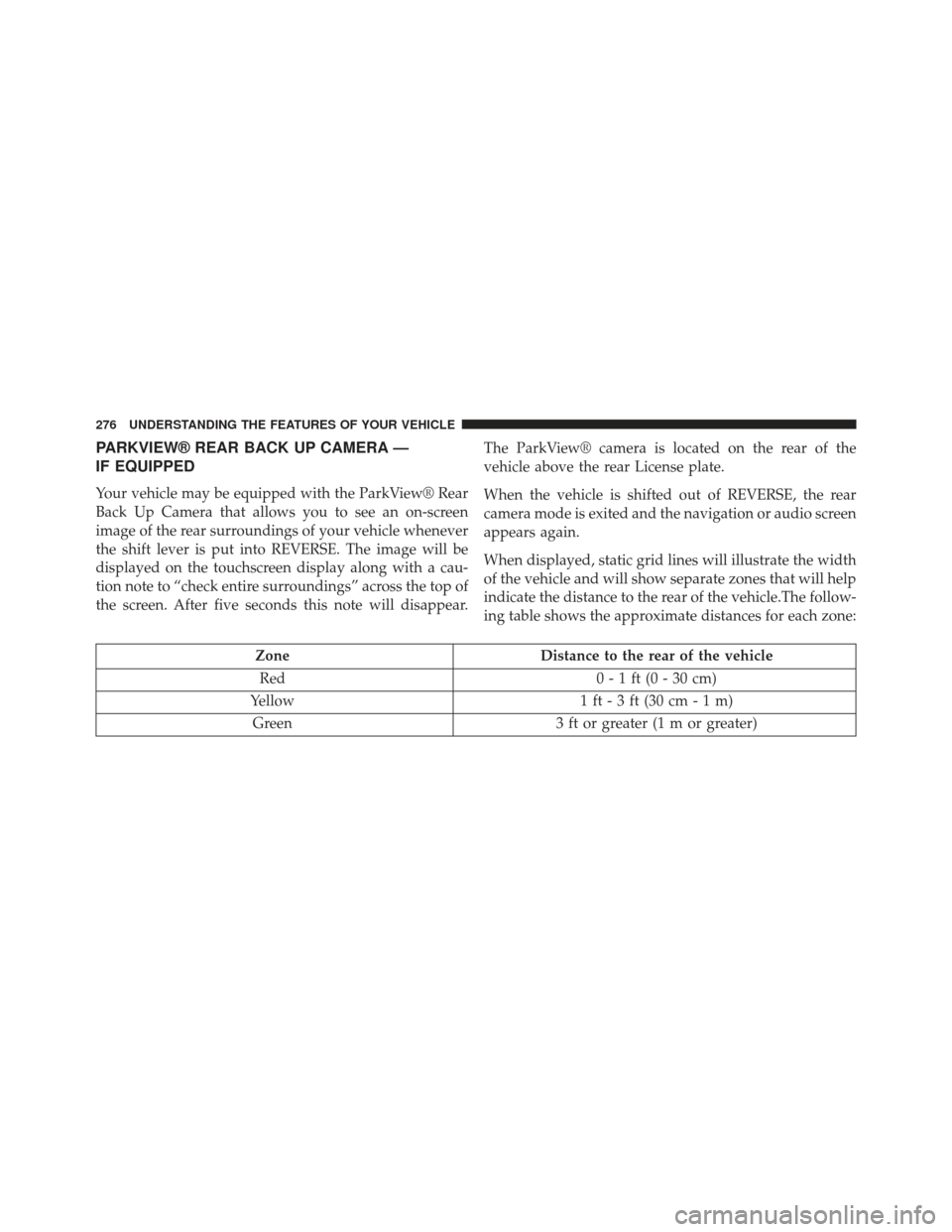
When displayed, static grid lines will illustrate the width
of the vehicle and will show separate zones that will help
indicate the distance to the rear of the vehicle.The follow-
ing table shows the approximate distances for each zone:
Zone
Distance to the rear of the vehicle
Red 0 - 1 ft (0 - 30 cm)
Yellow 1 ft - 3 ft (30 cm - 1 m)
Green 3 ft or greater (1 m or greater)
276 UNDERSTANDING THE FEATURES OF YOUR VEHICLE
Page 309 of 599
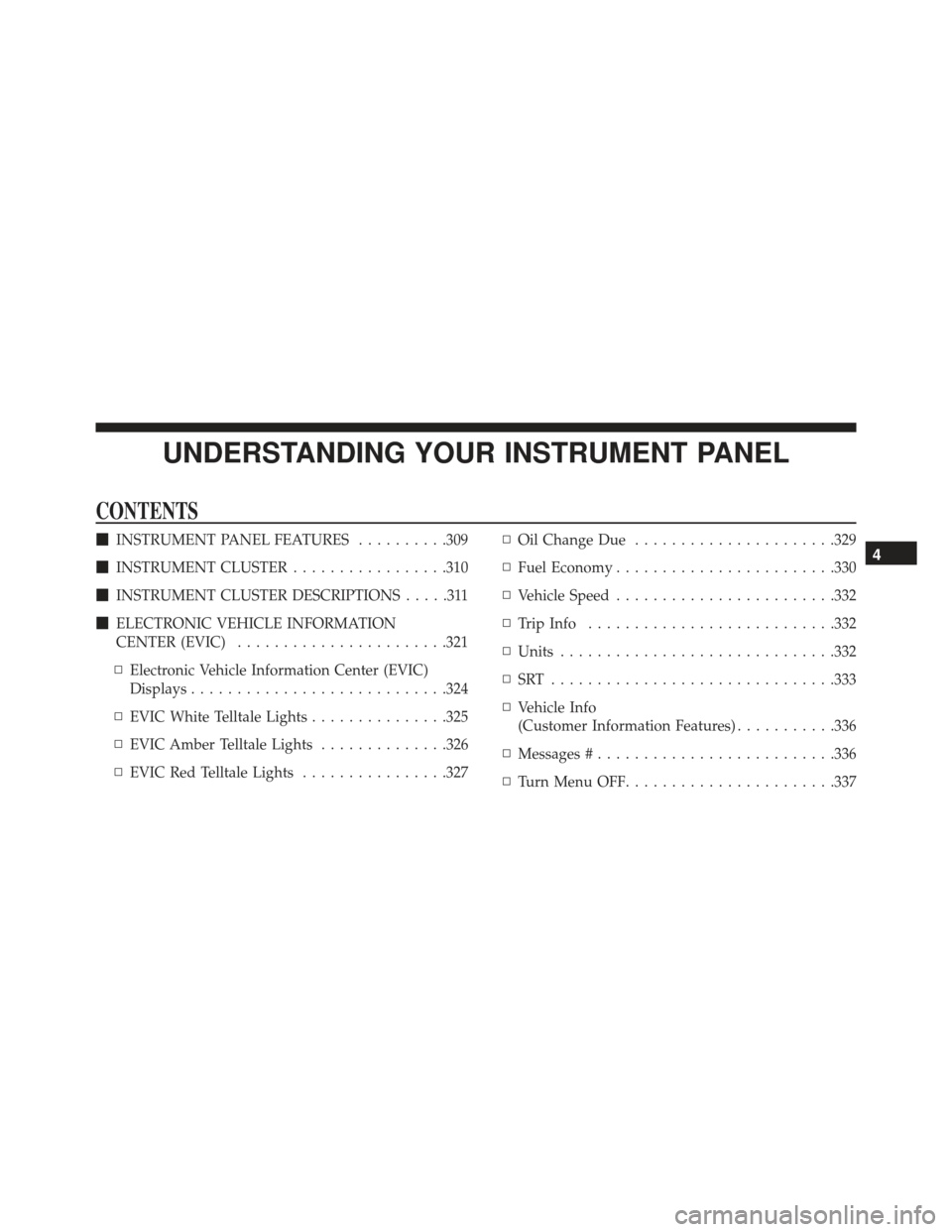
UNDERSTANDING YOUR INSTRUMENT PANEL
CONTENTS
�INSTRUMENT PANEL FEATURES ..........309
� INSTRUMENT CLUSTER .................310
� INSTRUMENT CLUSTER DESCRIPTIONS .....311
� ELECTRONIC VEHICLE INFORMATION
CENTER (EVIC) ...................... .321
▫ Electronic Vehicle Information Center (EVIC)
Displays ........................... .324
▫ EVIC White Telltale Lights ...............325
▫ EVIC Amber Telltale Lights ..............326
▫ EVIC Red Telltale Lights ................327 ▫
Oil Change Due ..................... .329
▫ Fuel Economy ....................... .330
▫ Vehicle Speed ....................... .332
▫ Trip Info .......................... .332
▫ Units ............................. .332
▫ SRT .............................. .333
▫ Vehicle Info
(Customer Information Features) ...........336
▫ Messages # ......................... .336
▫ Turn Menu OFF ...................... .3374
Page 313 of 599

INSTRUMENT CLUSTER DESCRIPTIONS
1. Tachometer
This gauge measures engine revolutions-per-minute
(RPM x 1000).
2. Park/Headlight ON Indicator — If EquippedThis indicator will illuminate when the park
lights or headlights are turned on.
3. Turn Signal Indicators The arrow will flash with the exterior turn
signal when the turn signal lever is operated.
If the vehicle electronics sense that the vehicle
is driven more than 1 mile (1.6 km) with either
turn signal on, a continuous chime will sound to alert
you to turn the signals off. If either indicator flashes at a
rapid rate, check for a defective outside light bulb. 4. Front Fog Light Indicator — If Equipped
This indicator will illuminate when the front
fog lights are on.
5. High Beam Indicator This indicator shows that the high beam head-
lights are on. Push the multifunction lever for-
ward to switch the headlights to high beam, and pull
toward yourself (normal position) to return to low beam.
6. Odometer Display / Electronic Vehicle Information
Center (EVIC) Display
Odometer Display
The odometer display shows the total distance the ve-
hicle has been driven.
U.S. Federal regulations require that upon transfer of
vehicle ownership, the seller certify to the purchaser the
correct mileage that the vehicle has been driven. If your
4
UNDERSTANDING YOUR INSTRUMENT PANEL 311
Page 314 of 599

odometer needs to be repaired or serviced, the repair
technician should leave the odometer reading the same
as it was before the repair or service. If s/he cannot do so,
then the odometer must be set at zero, and a sticker must
be placed in the door jamb stating what the mileage was
before the repair or service. It is a good idea for you to
make a record of the odometer reading before the repair/
service, so that you can be sure that it is properly reset, or
that the door jamb sticker is accurate if the odometer
must be reset at zero.
Electronic Vehicle Information Center (EVIC) Display
The Electronic Vehicle Information Center (EVIC) fea-
tures a driver-interactive display that is located in the
instrument cluster. For further information, refer to
“Electronic Vehicle Information Center (EVIC)”.
The Shift Lever Indicator is self-contained within the
EVIC display. It displays the gear position of the auto-
matic transmission.NOTE:
•
You must apply the brakes before shifting from PARK.
•The highest available transmission gear is displayed
in the lower right corner of the Electronic Vehicle
Information Center (EVIC) whenever the Electronic
Range Select (ERS) feature is active. Use the +/-
selector on the shift lever to activate ERS. Refer to
“Automatic Transmission” in “Starting And Operat-
ing” for further information.
7. Tire Pressure Monitoring Telltale Light — If Equipped
Each tire, including the spare (if provided),
should be checked monthly when cold and in-
flated to the inflation pressure recommended by
the vehicle manufacturer on the vehicle placard
or tire inflation pressure label. (If your vehicle has tires of
312 UNDERSTANDING YOUR INSTRUMENT PANEL
Page 317 of 599
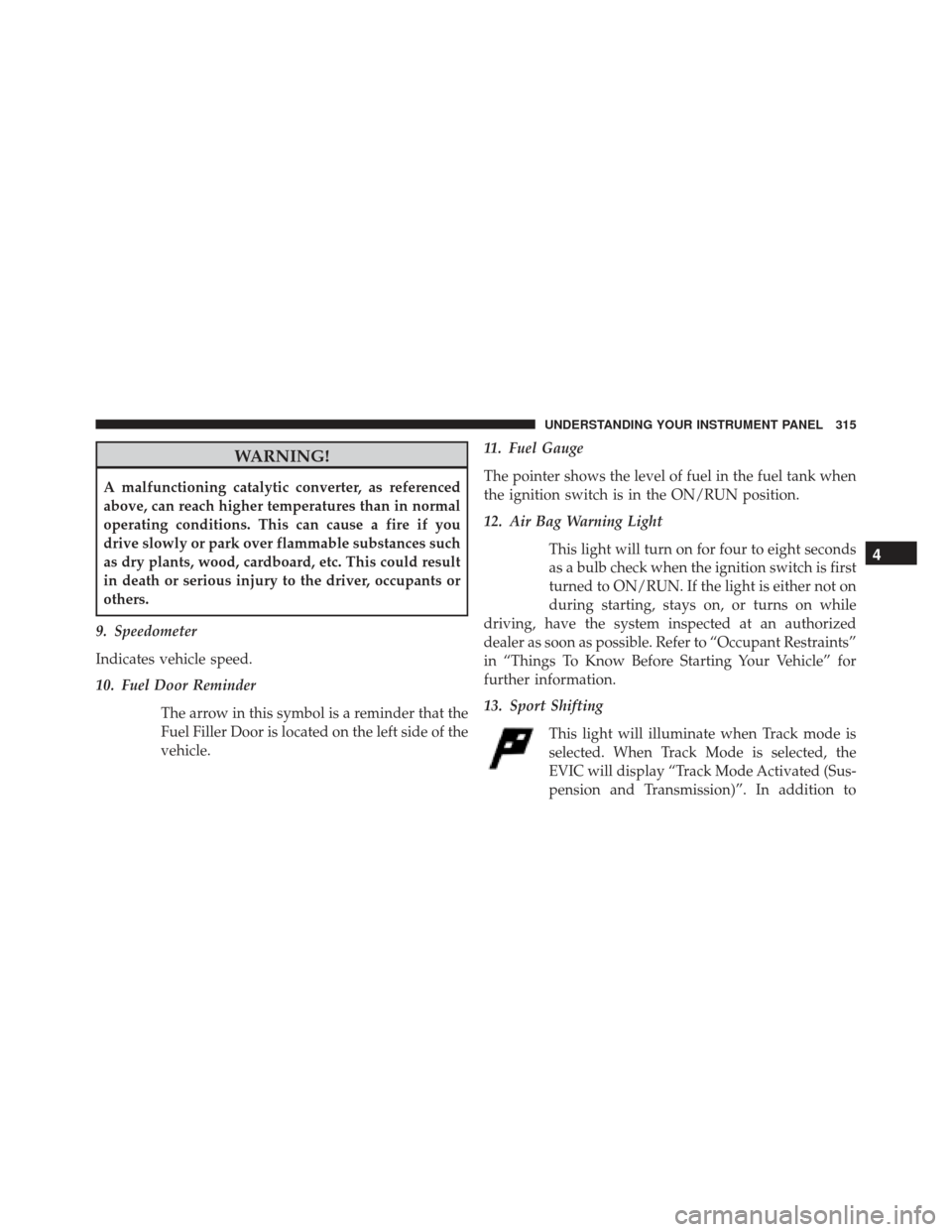
WARNING!
A malfunctioning catalytic converter, as referenced
above, can reach higher temperatures than in normal
operating conditions. This can cause a fire if you
drive slowly or park over flammable substances such
as dry plants, wood, cardboard, etc. This could result
in death or serious injury to the driver, occupants or
others.
9. Speedometer
Indicates vehicle speed.
10. Fuel Door Reminder The arrow in this symbol is a reminder that the
Fuel Filler Door is located on the left side of the
vehicle. 11. Fuel Gauge
The pointer shows the level of fuel in the fuel tank when
the ignition switch is in the ON/RUN position.
12. Air Bag Warning Light
This light will turn on for four to eight seconds
as a bulb check when the ignition switch is first
turned to ON/RUN. If the light is either not on
during starting, stays on, or turns on while
driving, have the system inspected at an authorized
dealer as soon as possible. Refer to “Occupant Restraints”
in “Things To Know Before Starting Your Vehicle” for
further information.
13. Sport Shifting
This light will illuminate when Track mode is
selected. When Track Mode is selected, the
EVIC will display “Track Mode Activated (Sus-
pension and Transmission)”. In addition to
4
UNDERSTANDING YOUR INSTRUMENT PANEL 315