2013 DODGE CHALLENGER reset
[x] Cancel search: resetPage 275 of 543
•During all List modes, the iPod® displays all lists in
“wrap-around” mode. So if the track is at the bottom
of the list, just turn the wheel backward (counter-
clockwise) to get to the track faster.
• In List mode, the radio PRESETbuttons are used as
shortcuts to the following lists on the iPod® or
external USB device.
• Preset 1 – Playlists
• Preset 2 – Artists
• Preset 3 – Albums
• Preset 4 – Genres
• Preset 5 – Audiobooks
• Preset 6 – Podcasts •
Pressing a PRESET button will display the current
list on the top line and the first item in that list on the
second line.
•
To exit List mode without selecting a track, press the
same PRESET button again to go back to Play mode.
•LIST button: The LISTbutton will display the top
level menu of the iPod® or external USB device. Turn
the TUNE control knob to list the top-menu item to be
selected and press the TUNEcontrol knob. This will
display the next sub-menu list item on the audio
device, then follow the same steps to go to the desired
track in that list. Not all iPod® or external USB device
sub-menu levels are available on this system.
4
UNDERSTANDING YOUR INSTRUMENT PANEL 273
Page 280 of 543
Pressing the center button will make the radio switch
between the various modes available (AM/FM/CD/
HDD/AUX/VES, etc.).
The left-hand control is a rocker-type switch with a
pushbutton in the center. The function of the left-hand
control is different depending on which mode you are in.
The following describes the left-hand control operation in
each mode.
Radio Operation
Pressing the top of the switch will “Seek” up for the next
listenable station and pressing the bottom of the switch
will “Seek” down for the next listenable station.
The button located in the center of the left-hand control
will tune to the next preset station that you have pro-
grammed in the radio preset pushbutton.
CD Player
Pressing the top of the switch once will go to the next
track on the CD. Pressing the bottom of the switch once
will go to the beginning of the current track, or to the
beginning of the previous track if it is within one second
after the current track begins to play.
If you press the switch up or down twice, it plays the
second track; three times, it will play the third, etc.
The center button on the left side rocker switch has no
function for a single-disc CD player. However, when a
multiple-disc CD player is equipped on the vehicle, the
center button will select the next available CD in the
player.
278 UNDERSTANDING YOUR INSTRUMENT PANEL
Page 319 of 543

may be illuminated. Limp Home Mode allows the vehicle
to be driven to an authorized dealer for service without
damaging the transmission.
In the event of a momentary problem, the transmission
can be reset to regain all forward gears by performing the
following steps:
1. Stop the vehicle.
2. Shift the transmission into PARK.
3. Turn the ignition switch to the OFF position.
4. Wait approximately 10 seconds.
5. Restart the engine.
6. Shift into the desired gear range. If the problem is nolonger detected, the transmission will return to normal
operation. NOTE:
Even if the transmission can be reset, we recom-
mend that you visit your authorized dealer at your
earliest possible convenience. Your authorized dealer has
diagnostic equipment to determine if the problem could
recur.
If the transmission cannot be reset, authorized dealer
service is required.
Overdrive Operation
The automatic transmission includes an electronically
controlled Overdrive (fifth gear). The transmission will
automatically shift into Overdrive if the following con-
ditions are present:
• the shift lever is in the DRIVE position,
• vehicle speed is sufficiently high, and
• the driver is not heavily pressing the accelerator.5
STARTING AND OPERATING 317
Page 383 of 543
E-85 Usage In Non-Flex Fuel Vehicles
Non-FFV vehicles arecompatible with gasoline containing
10% ethanol (E10). Gasoline with higher ethanol content
may void the New Vehicle Limited Warranty.
If a Non-FFV vehicle is inadvertently fueled with E-85
fuel, the engine will have some or all of these symptoms:
• operate in a lean mode
• OBD II “Malfunction Indicator Light” on
• poor engine performance
• poor cold start and cold drivability
• increased risk for fuel system component corrosion
To fix a Non-FFV vehicle inadvertently fueled once with
E-85 perform the following:
• drain the fuel tank (see your authorized dealer)
• change the engine oil and oil filter •
disconnect and reconnect the battery to reset the
engine controller memory
More extensive repairs will be required for prolonged
exposure to E-85 fuel.MMT In Gasoline
MMT(Methylcyclopentadienyl Manganese Tricarbonyl) is
a manganese-containing metallic additive that is blended
into some gasoline to increase octane. Gasoline blended
with MMT provides no performance advantage beyond
gasoline of the same octane number without MMT. Gaso-
line blended with MMT reduces spark plug life and
reduces emissions system performance in some vehicles.
The manufacturer recommends that gasoline without
MMT be used in your vehicle. The MMT content of
gasoline may not be indicated on the gasoline pump,
therefore, you should ask your gasoline retailer whether
the gasoline contains MMT. MMT is prohibited in Federal
and California reformulated gasoline.
5
STARTING AND OPERATING 381
Page 475 of 543

CAUTION!
Using a transmission fluid other than the manufac-
turer ’s recommended fluid may cause deterioration
in transmission shift quality and/or torque converter
shudder, and will require more frequent fluid and
filter changes. Refer to “Fluids, Lubricants, and
Genuine Parts” in this section for fluid specifica-
tions.
Special Additives
The manufacturer strongly recommends against using
any special additives in the transmission.
Automatic Transmission Fluid (ATF) is an engineered
product and its performance may be impaired by supple-
mental additives. Therefore, do not add any fluid addi-
tives to the transmission. The only exception to this
policy is the use of special dyes for diagnosing fluidleaks. Avoid using transmission sealers as they may
adversely affect seals.
CAUTION!
Do not use chemical flushes in your transmission as
the chemicals can damage your transmission compo-
nents. Such damage is not covered by the New
Vehicle Limited Warranty.
Fluid Level Check
The fluid level is preset at the factory and does not
require adjustment under normal operating conditions.
Routine fluid level checks are not required, therefore the
transmission filler tube is capped and no dipstick is
provided.
Your authorized dealer can check your transmission fluid
level using a special service dipstick. If you notice fluid
7
MAINTAINING YOUR VEHICLE 473
Page 490 of 543
Cavity Car-tridgeFuse Mini-
Fuse Description
40 — 5 Amp OrangeAuto Inside Rear-
view Mirror/
Heated Seats – If
Equipped/Switch Bank
41 — — —
42 30 Amp Pink — Front Blower Motor
43 30 Amp Pink — Rear Window De-
froster
44 20 Amp Blue —
Amplifier/Sunroof
– If Equipped
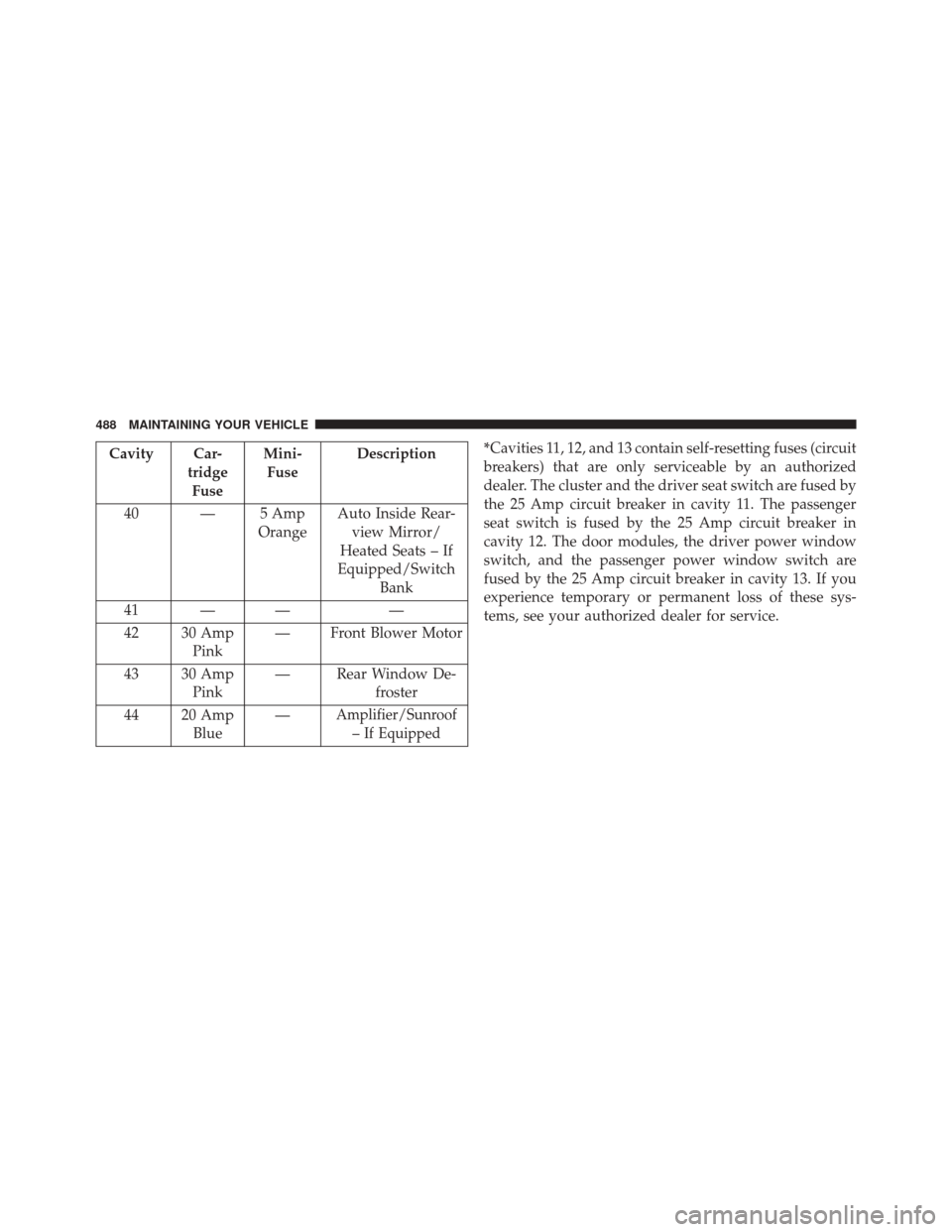
*Cavities 11, 12, and 13 contain self-resetting fuses (circuit
breakers) that are only serviceable by an authorized
dealer. The cluster and the driver seat switch are fused by
the 25 Amp circuit breaker in cavity 11. The passenger
seat switch is fused by the 25 Amp circuit breaker in
cavity 12. The door modules, the driver power window
switch, and the passenger power window switch are
fused by the 25 Amp circuit breaker in cavity 13. If you
experience temporary or permanent loss of these sys-
tems, see your authorized dealer for service.
488 MAINTAINING YOUR VEHICLE
Page 502 of 543
MAINTENANCE SCHEDULE
Your vehicle is equipped with an automatic oil change
indicator system. The oil change indicator system will
remind you that it is time to take your vehicle in for
scheduled maintenance.
Based on engine operation conditions, the oil change
indicator message will illuminate. This means that ser-
vice is required for your vehicle. Operating conditions
such as frequent short-trips, trailer tow, extremely hot or
cold ambient temperatures, and E85 fuel usage will
influence when the “Change Oil” or “Oil Change Re-
quired” message is displayed. Severe Operating Condi-
tions can cause the change oil message to illuminate as
early as 3,500 miles (5,600 km) since last reset. Have your
vehicle serviced as soon as possible, within the next 500
miles (805 km).On Electronic Vehicle Information Center (EVIC)
equipped vehicles, “Oil Change Required” will be dis-
played in the EVIC and a single chime will sound,
indicating that an oil change is necessary.
On Non-EVIC equipped vehicles, “Change Oil” will flash
in the instrument cluster odometer and a single chime
will sound, indicating that an oil change is necessary.
Your authorized dealer will reset the oil change indicator
message after completing the scheduled oil change. If a
scheduled oil change is performed by someone other
than your authorized dealer, the message can be reset by
referring to the steps described under “Electronic Vehicle
Information Center (EVIC)/Oil Change Required” in
“Understanding Your Instrument Panel” or under “In-
strument Cluster Description/Odometer/Trip Odom-
eter” in “Understanding Your Instrument Panel” for
further information.
8
M
A I
N T
E
N
A
N
C E
S
C
H E
D
U L
E
S500 MAINTENANCE SCHEDULES
Page 533 of 543

Rearview............................ .108
Vanity ...............................111
Mode Fuel Saver ........................... .229
Modifications/Alterations, Vehicle ...............7
Monitor, Tire Pressure System ................368
Mopar Parts ............................ .447
MTBE/ETBE ........................... .380
Multi-Function Control Lever .................166
New Vehicle Break-In Period ..................96
Occupant Restraints ........................45
Occupant Restraints (Sedan) ..................62
Octane Rating, Gasoline (Fuel) ................378
Odometer .............................. .212
Trip ................................ .212
Oil Change Indicator ...................... .228
Oil Change Indicator, Reset ..................228 Oil, Engine
............................. .448
Capacity ............................ .495
Change Interval ....................... .450
Checking ............................ .448
Dipstick ............................. .448
Disposal ............................. .452
Filter ............................... .452
Filter Disposal ........................ .452
Identification Logo ..................... .450
Materials Added to ..................... .451
Recommendation ...................... .450
Synthetic ............................ .452
Viscosity ............................ .451
Oil Filter, Selection ....................... .452
Onboard Diagnostic System ..................444
Operating Precautions ..................... .444
Operator Manual (Owner’s Manual) .............4
Outside Rearview Mirrors ...................109
Overdrive .............................. .317
10
INDEX 531