Page 184 of 543

or other obstruction and then cycle the ignition. If the
message continues to appear see an authorized dealer.
If “SERVICE PARK ASSIST” or “SERVICE PARK ASSIST
SYSTEM” appears in the EVIC, see an authorized dealer.
Cleaning The ParkSense® System
Clean the ParkSense® sensors with water, car wash soap
and a soft cloth. Do not use rough or hard cloths. Do not
scratch or poke the sensors. Otherwise, you could dam-
age the sensors.
ParkSense® System Usage Precautions
NOTE:
•Ensure that the rear bumper is free of snow, ice, mud,
dirt and debris to keep the ParkSense® system oper-
ating properly.
• Jackhammers, large trucks, and other vibrations could
affect the performance of ParkSense®. •
When
you turn ParkSense® off in DRIVE, the instrument
cluster will display �PARK ASSIST SYSTEM OFF �for five
seconds. Furthermore, once you turn ParkSense® off, it
remains off until you turn it on again, even if you cycle
the ignition key.
• When youmove the shift lever to the REVERSE position
and ParkSense® is turned off, the EVIC will display
“PARK ASSIST SYSTEM OFF” message for as long as
the vehicle is in REVERSE.
• ParkSense®, when on, will MUTE the radio when it is
sounding a tone.
• Clean
the ParkSense® sensors regularly, taking care not
to scratch or damage them. The sensors must not be
covered with ice, snow, slush, mud, dirt or debris. Failure
to do so can result in the system not working properly.
The ParkSense® system might not detect an obstacle
behind the fascia/bumper, or it could provide a false
indication that an obstacle is behind the fascia/bumper.
182 UNDERSTANDING THE FEATURES OF YOUR VEHICLE
Page 209 of 543
UNDERSTANDING YOUR INSTRUMENT PANEL
CONTENTS
�INSTRUMENT PANEL FEATURES ..........210
� INSTRUMENT CLUSTER .................211
� INSTRUMENT CLUSTER DESCRIPTIONS .....212
� ELECTRONIC VEHICLE INFORMATION
CENTER (EVIC) ...................... .224
▫ Electronic Vehicle Information Center (EVIC)
Displays ........................... .226
▫ Engine Oil Change Indicator System ........228
▫ Trip Functions ...................... .229▫
Sport Mode ......................... .232
▫ Keyless Enter-N-Go™ Display —
If Equipped ........................ .232
▫ Driver-Selectable Surround Sound (DSS) –
If Equipped ......................... .233
▫ Compass Display .....................233
▫ System Warnings (Customer Information
Features) ........................... .236
▫ Personal Settings (Customer-Programmable
Features) .......................... .236
4
Page 212 of 543
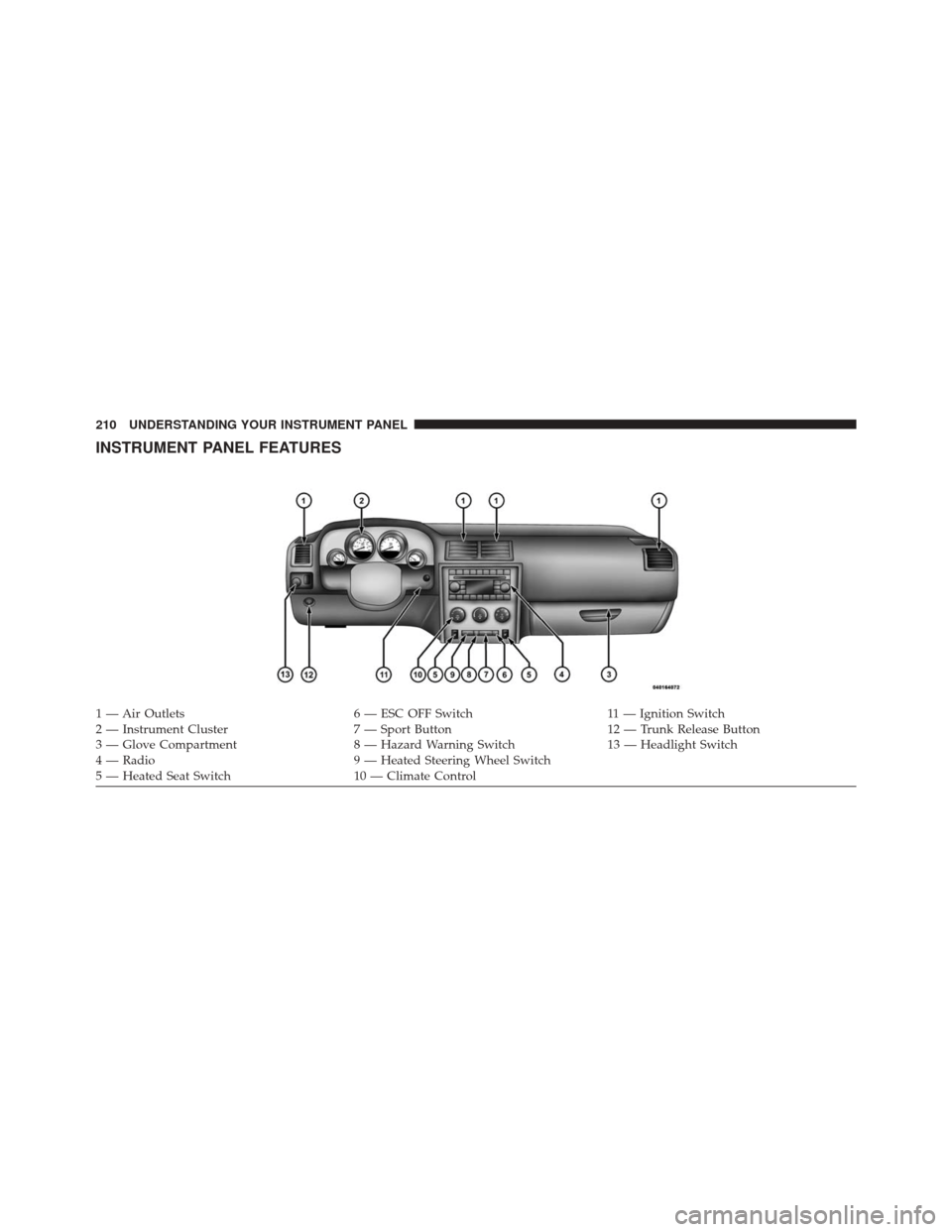
INSTRUMENT PANEL FEATURES
1 — Air Outlets6 — ESC OFF Switch11 — Ignition Switch
2 — Instrument Cluster 7 — Sport Button12 — Trunk Release Button
3 — Glove Compartment 8 — Hazard Warning Switch13 — Headlight Switch
4 — Radio 9 — Heated Steering Wheel Switch
5 — Heated Seat Switch 10 — Climate Control
210 UNDERSTANDING YOUR INSTRUMENT PANEL
Page 213 of 543
INSTRUMENT CLUSTER
4
UNDERSTANDING YOUR INSTRUMENT PANEL 211
Page 214 of 543
INSTRUMENT CLUSTER DESCRIPTIONS
1. Fuel Gauge
The pointer shows the level of fuel in the fuel tank when
the ignition switch is placed in the ON/RUN position.
2. Trip Odometer Button
Press this button to change the display from odometer to
either of two trip odometer settings. The letter “A” or “B”
will appear when in the trip odometer mode. Push in and
hold the button for two seconds to reset the trip odometer
to 0 miles (km). The odometer must be in TRIP mode to
reset it.3. Speedometer
Indicates vehicle speed.
4. Electronic Speed Control Indicator Light
This light will turn on when the electronic
speed control is on.
5. Tachometer
The red segments indicate the maximum permissible
engine revolutions per minute (RPM x 1000) for each gear
range. Ease up on the accelerator before reaching the red
area.
212 UNDERSTANDING YOUR INSTRUMENT PANEL
Page 218 of 543

12. Electronic Stability Control (ESC) Activation/
Malfunction Indicator Light — If EquippedThe “ESC Activation/Malfunction Indicator
Light” in the instrument cluster will come on
when the ignition switch is turned to the
ON/RUN position. It should go out with the
engine running. If the “ESC Activation/Malfunction In-
dicator Light” comes on continuously with the engine
running, a malfunction has been detected in the ESC
system. If this light remains on after several ignition
cycles, and the vehicle has been driven several miles
(kilometers) at speeds greater than 30 mph (48 km/h), see
your authorized dealer as soon as possible to have the
problem diagnosed and corrected. NOTE:
•
The “ESC Off Indicator Light” and the “ESC
Activation/Malfunction Indicator Light” come on mo-
mentarily each time the ignition switch is turned to
ON/RUN.
• Each time the ignition is turned to ON/RUN, the ESC
system will be ON, even if it was turned off previously.
• The ESC system will make buzzing or clicking sounds
when it is active. This is normal; the sounds will stop
when ESC becomes inactive following the maneuver
that caused the ESC activation.
216 UNDERSTANDING YOUR INSTRUMENT PANEL
Page 220 of 543

17. Shift Lever Indicator — Automatic Transmission
Only
The Shift Lever Indicator is self-contained within the
instrument cluster. It displays the gear position of the
automatic transmission.
18. Front Fog Light Indicator — If EquippedThis indicator will illuminate when the front fog
lights are on.
19. Odometer / Electronic Vehicle Information Center
(EVIC) Display Area
The odometer display shows the total distance the ve-
hicle has been driven. The trip odometer shows indi-
vidual trip mileage. Refer to “Trip Odometer Button” for
additional information. NOTE:
U.S. Federal regulations require that upon trans-
fer of vehicle ownership, the seller certify to the pur-
chaser the correct mileage that the vehicle has been
driven. If your odometer needs to be repaired or serviced,
the repair technician should leave the odometer reading
the same as it was before the repair or service. If s/he
cannot do so, then the odometer must be set at zero, and
a sticker must be placed in the door jamb stating what the
mileage was before the repair or service. It is a good idea
for you to make a record of the odometer reading before
the repair/service, so that you can be sure that it is
properly reset, or that the door jamb sticker is accurate if
the odometer must be reset at zero.
The EVIC features a driver-interactive display, for further
information refer to “Electronic Vehicle Information Cen-
ter (EVIC)”.
218 UNDERSTANDING YOUR INSTRUMENT PANEL
Page 226 of 543
ELECTRONIC VEHICLE INFORMATION CENTER
(EVIC)
The Electronic Vehicle Information Center (EVIC) fea-
tures a driver-interactive display which is located in the
instrument cluster.This system conveniently allows the driver to select a
variety of useful information by pressing the switches
mounted on the steering wheel. The EVIC consists of the
following:
•
System Status
• Vehicle Information Warning Message Displays
• Tire Pressure Monitor System
• Personal Settings (Customer-Programmable Features)
• Compass Display
• Outside Temperature Display
• Trip Computer Functions
• Uconnect® phone (If Equipped)
• Uconnect® gps Screens (If Equipped)
• Audio Mode Display
• Surround Sound Modes (if equipped with Driver-
Selectable Surround [DSS])
Electronic Vehicle Information Center (EVIC)
224 UNDERSTANDING YOUR INSTRUMENT PANEL