2013 Citroen C4 PICASSO change
[x] Cancel search: changePage 175 of 420

173
4
Driving
Flashing of the dashes indicates a fault with thecruise control.
Have it checked by a CITROËN dealer or aqualified workshop.
Operating fault
Exceeding the programmed
speed
If the programmed speed is exceeded, the
displayed speed flashes.
Once the vehicle returns to the programmedspeed, the display becomes steady again.
Switching off
)Turn wheel 1
to the "0"position.
The display of information related to the cruise control disappears.
When the cruise control is switched on,be careful if you maintain the pressure on one of the programmed speedchanging buttons: this may result in avery rapid change in the speed of your vehicle.
Do not use the cruise control on slippery roads or in heavy traffic. On a steep descent, the cruise control will not be able to prevent the vehicle from exceeding the programmed speed. On steep climbs or when towing, the programmed speed may not be reachedor maintained.
The use of mats not approved byCITROËN may inter fere with the
operation of the cruise control.
To avoid any risk of jamming of the pedals:
- ensure that the mat is positioned correctly,
- never fit one mat on top of another.
Page 176 of 420

174
Driving
Active cruise control
This systems allows, in addition to maintainingyour vehicle's speed at a value that you have defined, the inter-vehicle time you have
selected between your vehicle the the one ahead to be maintained (2 seconds by default,
on activating the function).
Principles of operation
Using a radar with a range of about 100 metres,located at the front of the vehicle, this system
detects a vehicle running in front of your
vehicle.
It automatically adapts the speed of the vehicle
to that of the vehicle in front.
If the vehicle in front is running more slowly,
the system progressively reduces the speed of your vehicle using just engine braking (as if thedriver had pressed the "- " button).
If your vehicle is too close to or approaching tooquickly the vehicle in front, the cruise control
is automatically deactivated. The driver is then
aler ted by an audible signal, accompanied by a message.
If the vehicle in front accelerates or changeslane, the active cruise control progressively
accelerates your vehicle to return to the
programmed speed.
If the driver operates a direction indicator to
the left (left hand drive) or the right (right hand
drive), to over take a slower vehicle, the active cruise control allows your vehicle to temporarily
approach the vehicle in front to assist the
over takin
g manoeuvre, though never exceeding
the programmed speed.
The active cruise control operates byday and at night, in fog or in moderate rainfall.
The system does not act on the brakingsystem, but works only with engine braking.
The regulation range is limited: there willno longer be any adjustment of speed if the difference between the programmed speedsetting and the speed of the vehicle in front becomes too high (18 mph (30 km/h).
The activation of this system deactivates the function of inter-vehicle time.
If the difference between the programmed speed setting and the speed of the vehicle in front is toogreat, the speed cannot be adjusted: the cruise control is automatically
deactivated.
Page 181 of 420
179
4
Driving
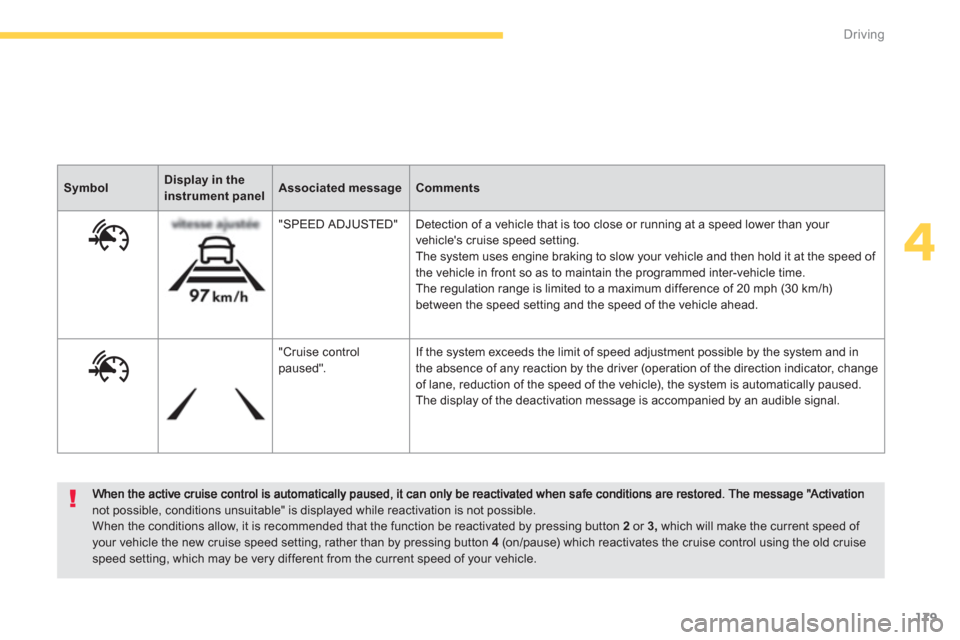
not possible, conditions unsuitable" is displayed while reactivation is not possible. When the conditions allow, it is recommended that the function be reactivated by pressing button 2or 3,
which will make the current speed of your vehicle the new cruise speed setting, rather than by pressing button 4(on/pause) which reactivates the cruise control using the old cruise speed setting, which may be very different from the current speed of your vehicle.
SymbolDisplay in theinstrument panelAssociated messageComments
"
SPEED ADJUSTED" Detection of a vehicle that is too close or running at a speed lower than your
vehicle's cruise speed setting.
The system uses engine braking to slow your vehicle and then hold it at the speed of
the vehicle in front so as to maintain the programmed inter-vehicle time.
The regulation range is limited to a maximum difference of 20 mph (30 km/h)between the speed setting and the speed of the vehicle ahead.
"
Cruise control paused". If the system exceeds the limit of speed adjustment possible by the system and in
the absence of any reaction by the driver (operation of the direction indicator, change
of lane, reduction of the speed of the vehicle), the system is automatically paused.
The display of the deactivation message is accompanied by an audible signal.
Page 183 of 420

181
4
Driving
In the event of a fault with the active cruisecontrol, you are alerted by an audible signal
and display of the message message "Drivingaid functions fault".
Have the system checked by a CITROËN
dealer or a qualified workshop.
When the cruise control is working, takecare if making a maintained press onone of the cruise control programmedspeed modification buttons: this can lead to a very quick change in thespeed of your vehicle. Do not use the active cruise control onslippery surfaces or in heavy traffic. When descending a steep hill, thecruise control may not be able to prevent the vehicle from exceeding theprogrammed speed.When ascending a steep hill or whentowing, it might not be possible to attainor maintain the programmed speed. The use of mats not approved by CITROËN may inter fere with the
operation of the cruise control. To avoid any risk of jamming the pedals:- ensure that mats are positioned correctly, - never fit one mat on top of another.
Operating fault
The operation of the radar, located in the front bumper, may be disturbed by accumulations of grime (dust, mud...) or in certain weather conditions (snow,ice...).
The message "SYSTEM INACTIVE:Visibility reduced" is displayed to signal that the system has been put intostandby.
Clean the front bumper regularly.
Page 185 of 420

183
4
Driving
The change from one level of alertto the next takes place if the drivingconditions do not change (speedunchanged, no change of lane...)
Severe weather conditions (very heavy rain, accumulation of snow in front of the radar) may interfere with the operation of the system, resulting inthe display of the message " Systeminactive: Reduced visibility
". T hesystem remains unavailable until themessage disappears.
If the speed of your vehicle is too high when approaching another vehicle, the first level of aler t may not be displayed: the level 2 aler t may be displayeddirectly.
On the other hand, the level 1 aler t is never displayed with the triggeringthreshold 3 (close).
Alerts
According to the collision risk detected by thesystem and the aler t threshold chosen, three
levels of aler t can be triggered:
Level 1: visual aler t only (orange)indicating that the vehicle in front is
very close. The message " Vehicle close" is displayed.
Level 2 : visual (red) and audible alerts indicating that a collision is imminent. The message "Brake!
" is
displayed. Thi
s level of alert is based on the inter-vehicletime between your vehicle and the one in front.
Thi
s level of alert is based on a time beforecollision. It takes account of the vehicle
dynamics, the speed of your vehicle and
the speed of the vehicle in front, the driving
conditions, the situation with your vehicle (cornering, pedals pressed, etc.) to trigger the
alert at the right moment. Level
3: an increase in
the tension of the driver'sseat belt, to hold the driver
against the backrest of their seat.
The 3rdlevel of aler t is not triggered or is interrupted in the event of an impactbetween the two vehicles. The increase in the tension of the driver's seat belt is not intended as analer t for the driver: it does not in anycircumstances assure the function of driver safety.The triggering of this aler t does not act on the safety functions provided by theseat belts.
Page 188 of 420

186
Driving
Blind spot sensors
A warning lamp appears in the door mirror on
the side in question:
-
immediately, when being over taken,
- after a delay of about one second, whenover taking a vehicle slowly. This drivin
g assistance system warns the driver
of the presence of another vehicle in the blind
spot angle of their vehicle (areas masked from
the driver's field of vision), as soon as thispresents a potential danger.
Sensors fitted in the front and rear bumpersmonitor the blind spots.
This system is designed to improve safety when driving and is in no circumstances a substitute for the use of the interior rear view mirror and door mirrors. It is the driver'sresponsibility to constantly check the traffic, to asses the distances and relative speeds of other vehicles and to predict their movements before deciding whether to change lane.
The blind spot sensor system can never replace the vigilance and responsibility of thedriver.
Activation of the system is done in the " Driving assistance
" menu, with the ignition on.
)
Press this button to activate the
function; the associated indicator lamp comes on.
This indicator lamp comes on in the
instrument panel.
Page 196 of 420

194
Driving
Park Assist
This system provides active assistance with parking, detecting a parking space then controlling the steering to park in the space. It controls the steering while the driver manages the accelerator, brakes, gears andclutch (manual gearbox). During phases of entry into and exit from a parking space, the system provides visual and audible information
to the driver in order to make the manoeuvres safe. It may be necessary to move for wards and backwards more than once.
During a manoeuvre the steering wheelturns quickly: do not hold the steeringwheel, do not place your hand between
the spokes of the steering wheel and take care with loose and bulky clothing, scarves, handbags... There is a risk of injury.
When Park Assist is activated, itprevents a change to STOP mode of Stop & Start. In STOP mode, activation of Park Assist restarts the engine.
The Park Assist system cannot in anycircumstances replace the care and responsibility of the driver.
The driver must remain in control of their vehicle ensuring that thespace remains clear throughout themanoeuvre. In some circumstances, the sensors may not detect small obstacles located in their blind spots.
The driver can take control at any time bygripping the steering wheel.
The Park Assist s
ystem provides assistance for
the following manoeuvres:
- entr
y into a parallel parking space
- exitin
g from a parallel parking space
- ba
y parking
The Park Assist system takes control of the power steering for a maximumof 4 manoeuvre cycles. The functionis deactivated after these 4 cycles.If you think that your vehicle is notpositioned correctly, you should then take control of the steering to carry outthe manoeuvre.
The Park Assist system cannot workwith the engine off.
Page 210 of 420

208
Visibility
Automatic headlamp dipping
System which automatically changes between
dipped and main beam according to theambient light level and the driving conditions,
using a camera located in the rear view mirror.
This automatic headlamp dipping system is a driving aid. The driver remains responsible for the vehicle's lighting, its correct use for the prevailingconditions of light, visibility and trafficand observation of driving and vehicle regulations.
The system will be operational as soon asyou have exceeded 15 mph (25 km/h).
If the speed drops below 9 mph (15 km/h), the system no longer operates.