Page 346 of 592
Logic7® multichannel surround-sound technology deliv-
ers an immersive, accurate sound-stage to every seating
position. This surround effect is available for audio from
any source - AM/FM/CD/ Satellite Radio or dashboard
AUX input; and is activated through the Uconnect®
System. Refer to “Surround Sound” under “Uconnect®
Settings” in “Understanding Your Instrument Panel”.
STEERING WHEEL AUDIO CONTROLS
The remote sound system controls are located on the rear
surface of the steering wheel at the three and nine o’clock
positions.The right-hand control is a rocker-type switch with a
pushbutton in the center and controls the volume and
mode of the sound system. Pressing the top of the rocker
switch will increase the volume, and pressing the bottom
of the rocker switch will decrease the volume.
Remote Sound System Controls (Back View Of SteeringWheel)
344 UNDERSTANDING YOUR INSTRUMENT PANEL
Page 353 of 592
operation if the blower control is left in the “O” (Off)po-
sition. Blower control should be left in the “ON” position
to allow the climate control to either warm or cool the
vehicle.
Hard-key
The blower speed increases as you turn the control
clockwise from the lowest blower setting. The blower
speed decreases as you turn the knob counter-clockwise.
Soft-key
Use the small blower icon to reduce the blower setting
and the large blower icon to increase the blower setting.
Blower can also be selected by pressing the blower bar
area between the icons.12. Modes
The airflow distribution mode can be adjusted so air
comes from the instrument panel outlets, floor outlets,
demist outlets and defrost outlets. The Mode settings are
as follows:
Panel Mode
Air comes from the outlets in the instrument
panel. Each of these outlets can be individually
adjusted to direct the flow of air. The air vanes of the
center outlets and outboard outlets can be moved up and
down or side to side to regulate airflow direction. There
is a shut off wheel located below the air vanes to shut off
or adjust the amount of airflow from these outlets.
4
UNDERSTANDING YOUR INSTRUMENT PANEL 351
Page 479 of 592
1. Remove the spare tire, jack, and lug wrench.
2. If equipped with aluminum wheels where the centercap covers the lug nuts, use the lug wrench to pry the
center cap off carefully before raising the vehicle.
3. Before raising the vehicle, use the lug wrench to loosen, but not remove, the lug nuts on the wheel with
the flat tire. Turn the lug nuts counterclockwise one
turn while the wheel is still on the ground.
4. Place the jack underneath the lift area that is closest to the flat tire. Turn the jack screw clockwise to firmly
engage the jack saddle with the lift area of the sill
flange.
NOTE: If the vehicle is too low for jack placement, slide
the jack on its side and rotate it up into position.
Front Jacking Location6
WHAT TO DO IN EMERGENCIES 477
Page 481 of 592
NOTE:
•For vehicles so equipped, do not attempt to install a
center cap or wheel cover on the compact spare. •
Refer to “Compact Spare Tire” and to “Limited-Use
Spare” under “Tires—General Information” in “Start-
ing and Operating” for additional warnings, cautions,
and information about the spare tire, its use, and
operation.
8. Install the lug nuts with the cone shaped end of the lug nut toward the wheel. Lightly tighten the lug nuts.
WARNING!
To avoid the risk of forcing the vehicle off the jack,
do not tighten the lug nuts fully until the vehicle has
been lowered. Failure to follow this warning may
result in personal injury.
9. Lower the vehicle to the ground by turning the jack handle counterclockwise.
Mounting Spare Tire6
WHAT TO DO IN EMERGENCIES 479
Page 482 of 592
10. Finish tightening the lug nuts. Push down on thewrench while at the end of the handle for increased
leverage. Tighten the lug nuts in a star pattern until
each nut has been tightened twice. The correct tight-
ness of each lug nut is 110 ft/lb. (150 N·m). If in doubt
about the correct tightness, have them checked with
a torque wrench by your authorized dealer or at a
service station.
11. Stow the jack, tools and flat tire. Make sure the base of the jack faces the back of the vehicle before
tightening down the fastener.
WARNING!
A loose tire or jack thrown forward in a collision or
hard stop could endanger the occupants of the ve-
hicle. Always stow the jack parts and the spare tire in
the places provided. Have the deflated (flat) tire
repaired or replaced immediately.
Road Tire Installation
1. Mount the road tire on the axle.
2. Install the remaining lug nuts with the cone shapedend of the nut toward the wheel. Lightly tighten the
lug nuts.
WARNING!
To avoid the risk of forcing the vehicle off the jack,
do not tighten the lug nuts fully until the vehicle has
been lowered. Failure to follow this warning may
result in personal injury.
3. Lower the vehicle to the ground by turning the jack handle counterclockwise.
480 WHAT TO DO IN EMERGENCIES
Page 540 of 592
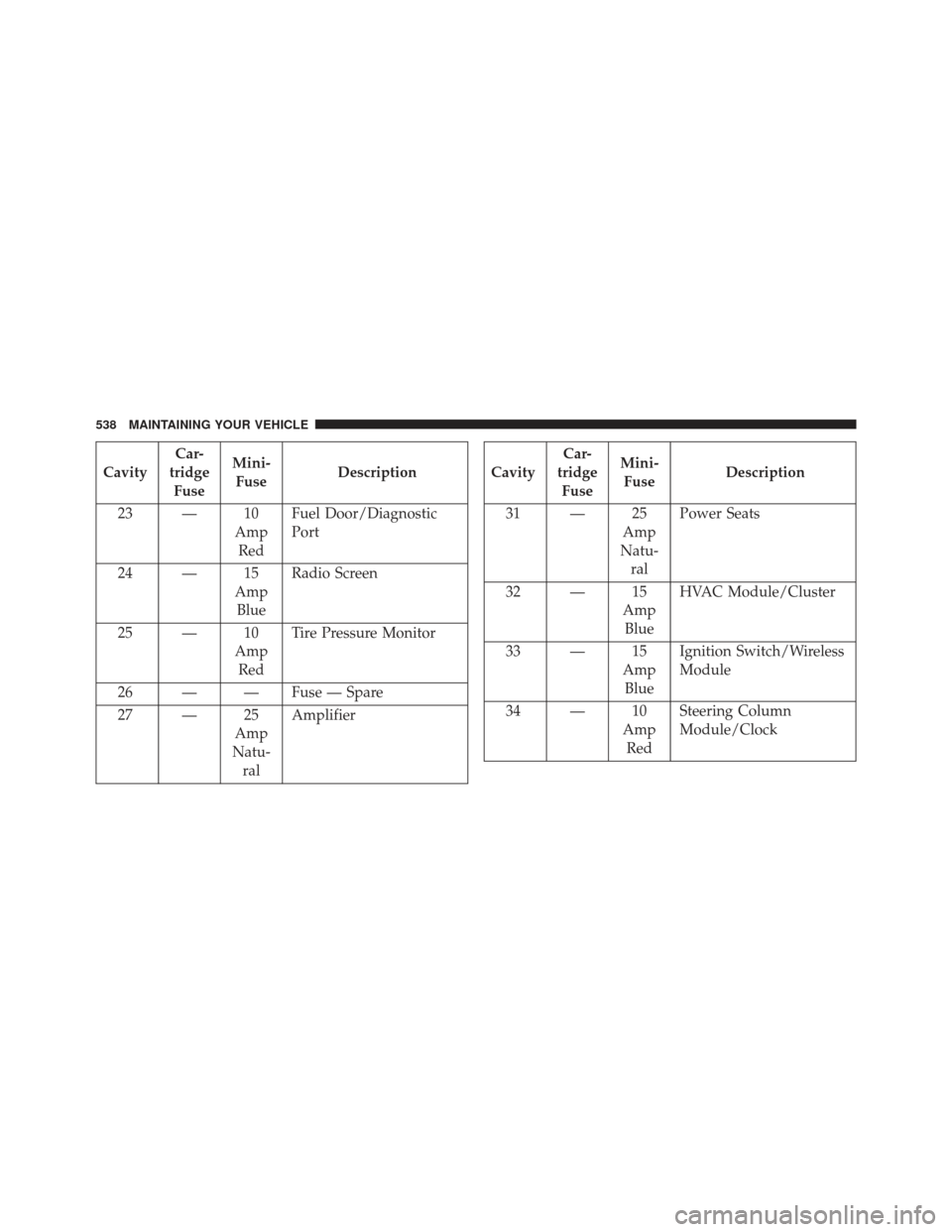
CavityCar-
tridge Fuse Mini-
Fuse Description
23 — 10 AmpRed Fuel Door/Diagnostic
Port
24 — 15 AmpBlue Radio Screen
25 — 10 AmpRed Tire Pressure Monitor
26 — — Fuse — Spare
27 — 25 Amp
Natu- ral AmplifierCavity
Car-
tridge Fuse Mini-
Fuse Description
31 — 25 Amp
Natu- ral Power Seats
32 — 15 AmpBlue HVAC Module/Cluster
33 — 15 AmpBlue Ignition Switch/Wireless
Module
34 — 10 AmpRed Steering Column
Module/Clock
538 MAINTAINING YOUR VEHICLE
Page 546 of 592
this, you should not attempt to service a headlamp bulb
yourself. If a headlamp bulb fails, take your vehicle to
an authorized dealer for service.
WARNING!
A transient high voltage occurs at the bulb sockets of
HID headlamps when the headlamp switch is turned
ON. It may cause serious electrical shock or electro-
cution if not serviced properly. See your authorized
dealer for service.
NOTE: On vehicles equipped with HID headlamps,
when the headlamps are turned on, there is a blue hue to
the lights. This diminishes and becomes more white after
approximately 10 seconds, as the system charges.
Standard Low Beam And High Beam Headlamp
1. Open the hood.
NOTE: Removal of the air cleaner filter housing may be
necessary prior to replacing bulbs in the headlamp
assembly on the driver side of the vehicle.
2. Twist the appropriate bulb and socket assembly coun- terclockwise, and then pull it out of the headlamp
assembly.
3. Disconnect the bulb from the socket assembly and install the replacement bulb.
4. Reinstall the bulb and socket assembly into the head- lamp assembly, and then turn it clockwise.
544 MAINTAINING YOUR VEHICLE
Page 547 of 592
CAUTION!
Do not touch the new bulb with your fingers. Oil
contamination will severely shorten bulb life. If the
bulb comes in contact with an oily surface, clean the
bulb with rubbing alcohol.
Rear Backup Lamp And Turn Signal Lamps
1. Open the trunk.
2. Remove the trunk trim by removing the grocery hook(using a T-20 torque driver or similar tool), remove the
fastener, and pull back the weather strip.
3. Pull back the trunk liner to gain access to the tail lamp wing nuts.
4. Remove the three wing nuts from the back of the tail lamp assembly. 5. Pull the tail lamp assembly away from the vehicle
enough to access the electrical connector.
6. Push the electrical connector locking tab to the side.
7. Disconnect the electrical connector.
8. Continue removing lamp from vehicle in order to access the bulb(s).
9. Turn the appropriate bulb and socket assembly coun- terclockwise to remove it from the tail lamp assembly.
10. Disconnect the bulb from the socket assembly and install the replacement bulb.
11. Reinstall the bulb and socket assembly into the tail lamp assembly, and then turn it clockwise.
12. Reinstall the tail lamp assembly, fasteners, electrical connector, and trunk trim.
13. Close the trunk.
7
MAINTAINING YOUR VEHICLE 545