Page 136 of 408

Black plate (32,1)Chevrolet TRAX Owner Manual - 2013 - CRC - 3/6/13
5-32 Instruments and Controls
Personalization Menu (Radio
With Touchscreen)
Settings can be made with the
ignition ON and the vehicle not
moving.
The following are all possible
personalization features. Depending
on the vehicle, some may not be
available.
D(Home):Press to access the
Home Page Menu.
QorR: Press to scroll through the
menus or setup items.
4: Press to exit, or return to the
previous screen or menu.
To access the menu:
1. Press
D.
2. Press Settings.
3. Press Vehicle Settings.
Press the menu item to select it.
Each of the menus is detailed in the
following information. Settings menus and functions may
vary depending on vehicle option.
The following list of menu items may
be available:
.Climate & Air Quality
.Cluster display info
.Comfort & Convenience
.Collision/detection
.Lighting
.Power Door Locks
.Lock, Unlock Settings
.Rear Camera Option
.Vehicle Factory Settings
.Sport Mode Settings
.Language
.Text Scroll
.Touch Beep Volume
.Max Startup Volume
.About
.DivX®VOD
Climate and Air Quality
Select the Climate and Air Quality
menu and the following may be
displayed:
.Auto Fan Speed
.Auto Compartment Zone Temp
.Rear Zone Temp
.Air Quality Sensor
.Air Conditioning Mode
.Auto Defog
.Auto Rear Defog
.Auto Cooled Vented Seats
.Auto Heated Seats
.Remote Start Auto Seat Cool
.Remote Start Heated Seats
Auto Fan Speed
This allows the selection of the
automatic fan speed. It can be
adjusted to run lower or higher than
normal.
Page 137 of 408

Black plate (33,1)Chevrolet TRAX Owner Manual - 2013 - CRC - 3/6/13
Instruments and Controls 5-33
Press Auto Fan Speed when
highlighted. Select Low, Medium,
or High. Press
4.
Auto Compartment Zone Temp
This allows the selection of the
compartment zone temperature
setting when the vehicle is
restarted.
Press Auto Compartment Zone
Temp when highlighted. Select
Single Zone, Dual Zone, or Last
Setting. Press
4.
Rear Zone Temp
This allows the selection of the rear
temperature setting when the
vehicle is restarted.
Press Rear Zone Temp when
highlighted. Select Off, Rear Mimic
Front, or Rear Last Known.
Press
4.
Air Quality Sensor
This allows the selection of whether
the system will operate at high or
low sensitivity. Press Air Quality Sensor when
highlighted. Select Off, Low
Sensitivity, High Sensitivity.
Press
4.
Air Conditioning Mode
This allows the selection of
automatic start of the air
conditioning upon vehicle start.
Selecting On indicates the air
conditioning will be on when the
vehicle is started. Selecting Off
turns the air conditioning off each
time the vehicle is started. Last
Setting will resume the last setting
when the vehicle was shut off.
Press Air Conditioning Mode when
highlighted. Select Off, On, or Last
Setting. Press
4.
Auto Defog
This allows the auto defog to be
turned on or off.
Press Auto Defog when highlighted.
Select On or Off. Press
4. Auto Rear Defog
This allows the auto rear defog to
be turned on or off. This feature will
automatically turn on the rear
window defogger when it is cold
outside.
Press Auto Rear Defog when
highlighted. Select On or Off.
Press
4.
Auto Cooled Vented Seats
When on, this feature will turn the
cooled seats on when using remote
start on warm days.
Press Auto Cooled Vented Seats
when highlighted. Select On or Off.
Press
4.
Auto Heated Seats
When on, this feature will turn the
heated seats on.
Press Auto Heated Seats when
highlighted. Select On or Off.
Press
4.
Page 138 of 408

Black plate (34,1)Chevrolet TRAX Owner Manual - 2013 - CRC - 3/6/13
5-34 Instruments and Controls
Remote Start Auto Seat Cool
When on, this feature will turn the
cooled seats on when using the
remote start on hot days.
Press Remote Start Auto Seat Cool
when highlighted and open the
menu. Select On or Off. Press
4.
Remote Start Heated Seats
When on, this feature will turn the
heated seats on when using the
remote start on cold days.
Press Remote Start Heated Seats
when highlighted. Select On or Off.
Press
4.
Cluster Display Info
Select the Cluster Display Info
menu and the following may be
displayed:
.Cluster Eco Telltale
Cluster Eco Telltale
This allows eco telltale information
display to be turned on or off. Press Cluster Eco Telltale when
highlighted. Select On or Off or turn.
Press
4.
Comfort and Convenience
Select the Comfort and
Convenience menu and the
following may be displayed:
.Chime Volume
.Easy Exit Steering Column
.Easy Exit Driver Seat
.Auto Parking Mirror Tilt
.Personalization By Driver
.Auto Wipe in Reverse Gear
Chime Volume
This allows selection of the chime
volume level.
Press Chime Volume when
highlighted. Select Normal or High.
Press
4. Easy Exit Steering Column
This allows the selection of the
Easy Exit Steering Column position
when exiting the vehicle.
Press Easy Exit Steering Column
when highlighted. Select Off,
On-Column In, On-Column Up,
On-Column In & Up. Press
4.
Easy Exit Driver Seat
This will move the seat back to
make it easier to exit the vehicle.
Press Easy Exit Driver Seat when
highlighted. Select On or Off.
Press
4.
Auto Parking Mirror Tilt
This allows the selection of the
reverse tilt mirror feature on or off.
When on, both the driver and
passenger mirrors will tilt downward
when vehicle is shifted to
R (Reverse) to improve visibility of
the ground near the rear wheels.
They will return to their previous
driving position when the vehicle is
Page 150 of 408

Black plate (6,1)Chevrolet TRAX Owner Manual - 2013 - CRC - 3/6/13
6-6 Lighting
Dome Lamps
The dome lamp controls are in the
headliner above the rear seats.
9(Dome Lamp Override):Press
to turn the lamps off, even when a
door is open.
H(Door): When the button is
returned to the middle position, the
lamps turn on automatically when a
door is opened.
R(On): Press to turn on the dome
lamps.
Reading Lamps
For vehicles with front reading
lamps, they are in the overhead
console.
#or$(Reading Lamps): Press
to turn each lamp on or off.
Lighting Features
Battery Load
Management
The vehicle has Electric Power
Management (EPM) that estimates
the battery's temperature and state
of charge. It then adjusts the voltage
for best performance and extended
life of the battery.
When the battery's state of charge
is low, the voltage is raised slightly
to quickly bring the charge back up.
When the state of charge is high,
the voltage is lowered slightly to
prevent overcharging. If the vehicle
has a voltmeter gauge or a voltage
display on the Driver Information
Center (DIC), you may see the
voltage move up or down. This is
normal. If there is a problem, an
alert will be displayed.
Page 151 of 408

Black plate (7,1)Chevrolet TRAX Owner Manual - 2013 - CRC - 3/6/13
Lighting 6-7
The battery can be discharged at
idle if the electrical loads are very
high. This is true for all vehicles.
This is because the generator
(alternator) may not be spinning fast
enough at idle to produce all the
power needed for very high
electrical loads.
A high electrical load occurs when
several of the following are on, such
as: headlamps, high beams, fog
lamps, rear window defogger,
climate control fan at high speed,
heated seats, engine cooling fans,
trailer loads, and loads plugged into
accessory power outlets.EPM works to prevent excessive
discharge of the battery. It does this
by balancing the generator's output
and the vehicle's electrical needs.
It can increase engine idle speed to
generate more power, whenever
needed. It can temporarily reduce
the power demands of some
accessories.
Normally, these actions occur in
steps or levels, without being
noticeable. In rare cases at the
highest levels of corrective action,
this action may be noticeable to
the driver.Battery Power Protection
The battery saver feature is
designed to protect the vehicle's
battery.
If some interior lamps are left on
and the ignition is turned off, the
battery rundown protection system
automatically turns the lamp off after
some time.
Page 215 of 408
Black plate (1,1)Chevrolet TRAX Owner Manual - 2013 - CRC - 3/6/13
Climate Controls 8-1
Climate Controls
Climate Control Systems
Climate Control Systems . . . . . . 8-1
Air Vents
Air Vents . . . . . . . . . . . . . . . . . . . . . . 8-4
Maintenance
Air Intake . . . . . . . . . . . . . . . . . . . . . 8-5
Passenger Compartment AirFilter . . . . . . . . . . . . . . . . . . . . . . . . . 8-5
Climate Control
Systems
For vehicles with these climate
control systems, the heating,
cooling, and ventilation can be
controlled for the vehicle.
Climate Control System with
Heater and Air Conditioning
1. Temperature Control
2. Fan Control
3. Air Delivery Mode Control 4. Driver and Passenger Heated
Seats
5. Air Conditioning
6. Rear Window Defogger
7. Recirculation
Climate Control System with Heater Only
1. Temperature Control
2. Fan Control
3. Air Delivery Mode Control
4. Rear Window Defogger
Page 217 of 408

Black plate (3,1)Chevrolet TRAX Owner Manual - 2013 - CRC - 3/6/13
Climate Controls 8-3
Press the button to turn the
recirculation mode on. An indicator
light comes on to show that the
recirculation is on. Press the button
again to return to outside air mode.
Using the recirculation mode for
extended periods may cause the
windows to fog. If this happens,
select the defrost mode.
M/L(Heated Seats, If
Equipped): Press to heat the driver
or passenger seat. See Heated
Front Seats on page 3‑7.
Rear Window and Outside
Mirror Defogger
1(Rear Window Defogger):
Press to turn the rear window and
outside mirror defogger on or off.
An indicator light comes on to show
that the feature is on.
The rear window defogger turns off
after about 10 minutes. It can also
be turned off by pressing
1again
or by turning the ignition to ACC/
ACCESSORY or LOCK/OFF.
If turned on again it runs for about
five minutes before turning off. For vehicles with heated outside
rearview mirrors, they turn on with
the rear window defogger and help
to clear fog or frost from the surface
of the mirror. See
Heated Mirrors on
page 2‑12.
Notice: Do not use anything
sharp on the inside of the rear
window. If you do, you could cut
or damage the warming grid, and
the repairs would not be covered
by the vehicle warranty. Do not
attach a temporary vehicle
license, tape, a decal, or anything
similar to the defogger grid.
Page 218 of 408
Black plate (4,1)Chevrolet TRAX Owner Manual - 2013 - CRC - 3/6/13
8-4 Climate Controls
Air Vents
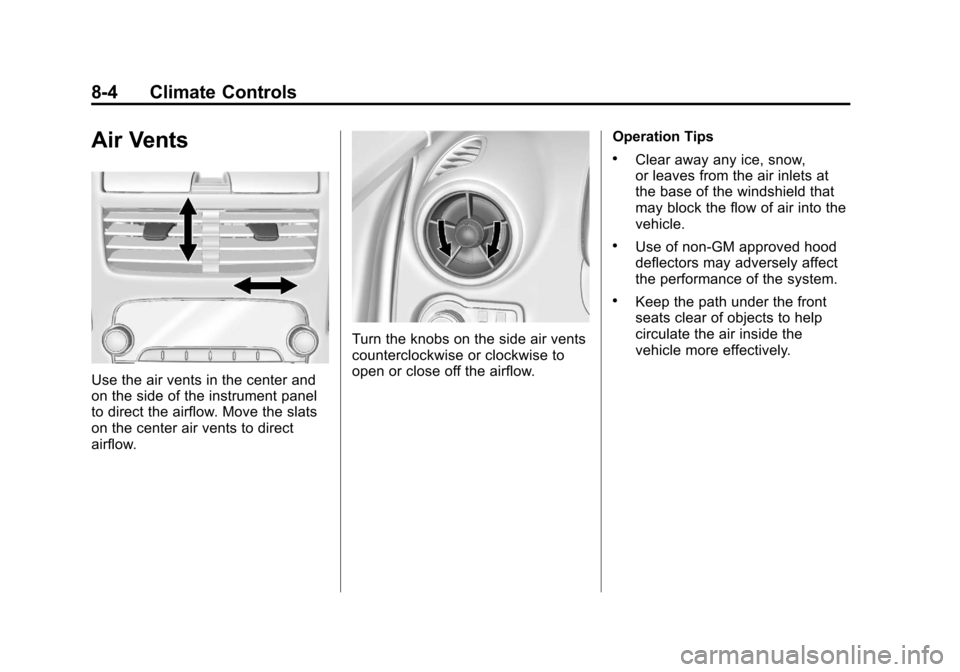
Use the air vents in the center and
on the side of the instrument panel
to direct the airflow. Move the slats
on the center air vents to direct
airflow.
Turn the knobs on the side air vents
counterclockwise or clockwise to
open or close off the airflow.Operation Tips
.Clear away any ice, snow,
or leaves from the air inlets at
the base of the windshield that
may block the flow of air into the
vehicle.
.Use of non-GM approved hood
deflectors may adversely affect
the performance of the system.
.Keep the path under the front
seats clear of objects to help
circulate the air inside the
vehicle more effectively.