Page 269 of 408
Black plate (5,1)Chevrolet TRAX Owner Manual - 2013 - CRC - 3/6/13
Vehicle Care 10-5
2. Go to the front of the vehicle andmove the secondary hood
release lever toward the right
side of the vehicle.3. Lift the hood and release thehood prop from its retainer,
above the radiator. Securely
place the hood prop into the slot
on the underside of the hood. To close the hood:
1. Before closing the hood, be sure
all filler caps are on properly.
Then, lift the hood to relieve
pressure on the hood prop.
Remove the hood prop from the
slot in the underside of the hood
and return the prop to its
retainer. The prop rod must click
into place when returning it to
the retainer to prevent hood
damage.
2. Lower the hood 30 cm (12 in) above the vehicle and release it
so it fully latches. Check to
make sure the hood is closed
and repeat the process if
necessary.
Page 278 of 408
Black plate (14,1)Chevrolet TRAX Owner Manual - 2013 - CRC - 3/6/13
10-14 Vehicle Care
To inspect or replace the air cleaner/
filter:
1.4L L4 Engine
1.8L L4 Engine
1. Remove the two screws, tilt the cover, and slide it out of the
assembly.
2. Inspect or replace the engine air cleaner/filter.
3. Lower the cover, slide it into the assembly, then secure with the
two screws.
See Maintenance Schedule on
page 11‑3 for replacement intervals.
{WARNING
Operating the engine with the air
cleaner/filter off can cause you or
others to be burned. The air
cleaner not only cleans the air; it
helps to stop flames if the engine
backfires. Use caution when
working on the engine and do not
drive with the air cleaner/filter off.
Notice: If the air cleaner/filter is
off, dirt can easily get into the
engine, which could damage it.
Always have the air cleaner/filter
in place when you are driving.
Page 291 of 408
Black plate (27,1)Chevrolet TRAX Owner Manual - 2013 - CRC - 3/6/13
Vehicle Care 10-27
3. Install the wiper blade connectorby sliding into the end of the
wiper arm until the button on the
wiper blade clicks into place with
the wiper arm.
4. Place the wiper arm with the wiper blade in place back on
the windshield.
Notice: Damage may occur if the
wiper blades are not in contact
with the windshield before
turning on the wiper system.Rear Wiper Blade Replacement
The rear wiper blade and wiper arm
have a cover for protection. The
cover must be removed before the
wiper blade can be replaced.
To remove the cover:
1. Slide a plastic tool under the cover and push upward to
unsnap.
2. Slide the cover toward the wiper blade tip to unhook it from the
blade assembly.
3. Remove the cover.
4. After wiper blade replacement, ensure that the cover hook
slides into the slot in the blade
assembly.
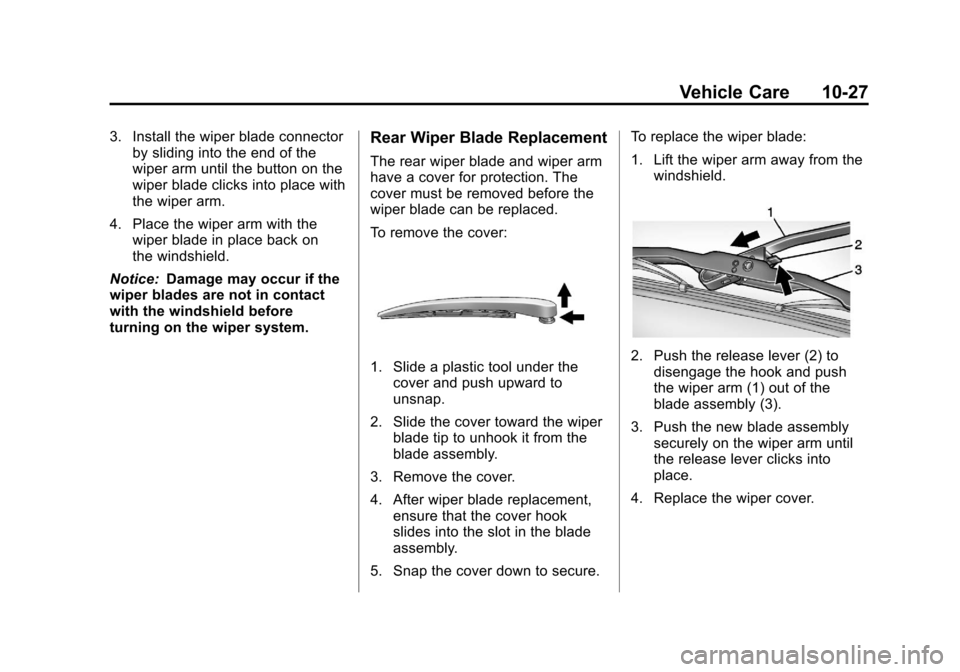
5. Snap the cover down to secure. To replace the wiper blade:
1. Lift the wiper arm away from the
windshield.2. Push the release lever (2) todisengage the hook and push
the wiper arm (1) out of the
blade assembly (3).
3. Push the new blade assembly securely on the wiper arm until
the release lever clicks into
place.
4. Replace the wiper cover.
Page 294 of 408
Black plate (30,1)Chevrolet TRAX Owner Manual - 2013 - CRC - 3/6/13
10-30 Vehicle Care
Turn Signal Lamp
1. Open the hood. SeeHood on
page 10‑4.
2. Remove the turn signal lamp bulb socket from the headlamp
assembly by turning
counterclockwise.
3. Remove the bulb from the bulb socket by pulling it straight out.
4. Install the new bulb in the bulb socket. 5. Install the bulb socket into the
headlamp assembly by turning
clockwise.
Taillamps, Turn Signal,
Sidemarker, Stoplamps,
and Back-Up Lamps
Passenger Side Shown, Driver
Side Similar
1. Sidemarker Lamp
2. Stoplamp/Taillamp
3. Taillamp 4. Back-up Lamp
5. Turn Signal Lamp
To replace one of these bulbs:
1. Open the trunk.
2. Remove the two screws, which
secure the taillamp assembly.
3. Remove the taillamp assembly by pulling it straight back until
the two posts disengage from
the grommets. Do not pull on the
wiring harness.
Page 337 of 408
Black plate (73,1)Chevrolet TRAX Owner Manual - 2013 - CRC - 3/6/13
Vehicle Care 10-73
Dolly Towing
(Front-Wheel-Drive
Vehicles Only)
To tow a front-wheel-drive vehicle
from the front with two wheels on
the ground:
1. Put the front wheels on a dolly.
2. Move the shift lever to P (Park).
3. Set the parking brake.4. Clamp the steering wheel in a
straight-ahead position with a
clamping device designed for
towing.
5. Remove the key from the ignition.
6. Secure the vehicle to the dolly.
7. Release the parking brake.
Towing the Vehicle From
the Rear
Notice: Towing the vehicle from
the rear could damage it. Also,
repairs would not be covered by
the vehicle warranty. Never have
the vehicle towed from the rear.
Do not tow the vehicle from the rear.
Page 345 of 408
Black plate (81,1)Chevrolet TRAX Owner Manual - 2013 - CRC - 3/6/13
Vehicle Care 10-81
Removing and Replacing the
Floor Mats
1. Pull up on the rear of the floormat to unlock the retainers and
remove.
2. Reinstall by lining up the floor mat retainer openings over the
carpet retainers and snap into
position.
3. Make sure the floor mat is properly secured and verify that
it does not interfere with the
pedals.
Page 374 of 408

Black plate (6,1)Chevrolet TRAX Owner Manual - 2013 - CRC - 3/6/13
13-6 Customer Information
Coverage
Services are provided up to 5 years/
160 000 km (100,000 mi), whichever
comes first.
A person driving the vehicle without
permission from the owner is not
covered.
Roadside Assistance is not a part of
the New Vehicle Limited Warranty.
Chevrolet and General Motors of
Canada Limited reserve the right to
make any changes or discontinue
the Roadside Assistance program at
any time without notification.
Chevrolet and General Motors of
Canada Limited reserve the right to
limit services or payment to an
owner or driver if they decide the
claims are made too often, or the
same type of claim is made many
times.
Services Provided
.Emergency Fuel Delivery:
Delivery of enough fuel for the
vehicle to get to the nearest
service station.
.Lock-Out Service:Service to
unlock the vehicle if you are
locked out. A remote unlock may
be available if you have OnStar.
For security reasons, the driver
must present identification
before this service is given.
.Emergency Tow from a Public
Road or Highway: Tow to the
nearest Chevrolet dealer for
warranty service, or if the vehicle
was in a crash and cannot be
driven. Assistance is also given
when the vehicle is stuck in the
sand, mud, or snow.
.Flat Tire Change: Service to
change a flat tire with the spare
tire. The spare tire, if equipped,
must be in good condition and
properly inflated. It is the owner's responsibility for the repair or
replacement of the tire if it is not
covered by the warranty.
.Battery Jump Start:
Service to
jump start a dead battery.
Services Not Included in
Roadside Assistance
.Impound towing caused by
violation of any laws.
.Legal fines.
.Mounting, dismounting,
or changing of snow tires,
chains, or other traction devices.
.Towing or services for vehicles
driven on a non-public road or
highway.
Additional Service Details
.Fuel Delivery: Reimbursement
is approximately $5 Canadian.
Diesel fuel delivery may be
restricted. Propane and other
fuels are not provided through
this service.
Page 386 of 408

Black plate (18,1)Chevrolet TRAX Owner Manual - 2013 - CRC - 3/6/13
13-18 Customer Information
OnStar®(Canada)
If the vehicle is equipped with
OnStar®and has an active
subscription, additional data may be
collected through the OnStar
system. This includes information
about the vehicle’s operation; about
collisions involving the vehicle; the
use of the vehicle and its features;
and, in certain situations, the
location and approximate GPS
speed of the vehicle. Refer to the
OnStar Terms and Conditions and
Privacy Statement on the OnStar
website.
Radio Frequency
Identification (RFID)
RFID technology is used in some
vehicles for functions such as tire
pressure monitoring and ignition
system security, as well as in
connection with conveniences such
as Remote Keyless Entry (RKE)
transmitters for remote door locking/
unlocking and starting, and
in-vehicle transmitters for garage
door openers. RFID technology in
GM vehicles does not use or record
personal information or link with any
other GM system containing
personal information.
Radio Frequency
Statement (Canada)
This vehicle has systems that
operate on a radio frequency that
comply with Part 15 of the Federal
Communications Commission (FCC)
rules and with Industry Canada
Standards RSS‐GEN/210/220/310.
Operation is subject to the following
two conditions:
1. The device may not cause harmful interference.
2. The device must accept any interference received, including
interference that may cause
undesired operation of the
device.
Changes or modifications to any of
these systems by other than an
authorized service facility could void
authorization to use this equipment.


