2013 CHEVROLET TRAX info
[x] Cancel search: infoPage 105 of 408

Black plate (1,1)Chevrolet TRAX Owner Manual - 2013 - CRC - 3/6/13
Instruments and Controls 5-1
Instruments and
Controls
Controls
Steering Wheel Adjustment . . . 5-2
Steering Wheel Controls . . . . . . 5-2
Horn . . . . . . . . . . . . . . . . . . . . . . . . . . 5-2
Windshield Wiper/Washer . . . . . 5-3
Rear Window Wiper/Washer . . . . . . . . . . . . . . . . . . . . . . 5-4
Compass . . . . . . . . . . . . . . . . . . . . . 5-4
Clock . . . . . . . . . . . . . . . . . . . . . . . . . 5-5
Power Outlets . . . . . . . . . . . . . . . . . 5-6
Cigarette Lighter . . . . . . . . . . . . . . 5-7
Ashtrays . . . . . . . . . . . . . . . . . . . . . . 5-7
Warning Lights, Gauges, and
Indicators
Warning Lights, Gauges, and Indicators . . . . . . . . . . . . . . . . . . . . 5-8
Instrument Cluster . . . . . . . . . . . . 5-9
Speedometer . . . . . . . . . . . . . . . . 5-10
Odometer . . . . . . . . . . . . . . . . . . . . 5-10
Trip Odometer . . . . . . . . . . . . . . . 5-10
Tachometer . . . . . . . . . . . . . . . . . . 5-10 Fuel Gauge . . . . . . . . . . . . . . . . . . 5-10
Safety Belt Reminders . . . . . . . 5-11
Airbag Readiness Light . . . . . . 5-12
Passenger Airbag Status
Indicator (Canada) . . . . . . . . . 5-12
Charging System Light . . . . . . 5-13
Malfunction Indicator Lamp . . . . . . . . . . . . . 5-13
Service Vehicle Soon Light . . . . . . . . . . . . . . . . . . . . . . . 5-16
Brake System Warning Light . . . . . . . . . . . . . . . . . . . . . . . 5-16
Antilock Brake System (ABS) Warning Light . . . . . . . . . . . . . . 5-17
Up-Shift Light . . . . . . . . . . . . . . . . 5-17
Descent Control System Light . . . . . . . . . . . . . . . . . . . . . . . 5-17
Power Steering Warning Light . . . . . . . . . . . . . . . . . . . . . . . 5-18
Ultrasonic Parking Sensor Light . . . . . . . . . . . . . . . . . . . . . . . 5-18
Traction Off Light . . . . . . . . . . . . 5-18
StabiliTrak
®OFF Light . . . . . . . 5-19
Traction Control System (TCS)/StabiliTrak
®Light . . . . 5-19 Engine Coolant Temperature
Warning Light . . . . . . . . . . . . . . 5-19
Tire Pressure Light . . . . . . . . . . 5-20
Engine Oil Pressure Light . . . . 5-20
Low Fuel Warning Light . . . . . . 5-21
Immobilizer Light . . . . . . . . . . . . 5-21
Reduced Engine Power Light . . . . . . . . . . . . . . . . . . . . . . . 5-22
High-Beam On Light . . . . . . . . . 5-22
Daytime Running Lamps (DRL) Indicator Light . . . . . . . 5-22
Front Fog Lamp Light . . . . . . . . 5-22
Lamps On Reminder . . . . . . . . . 5-23
Cruise Control Light . . . . . . . . . 5-23
Door Ajar Light . . . . . . . . . . . . . . 5-23
Information Displays
Driver Information Center (DIC) . . . . . . . . . . . . . . . 5-24
Vehicle Messages
Vehicle Messages . . . . . . . . . . . 5-27
Vehicle Personalization
Vehicle Personalization . . . . . . 5-27
Page 106 of 408
Black plate (2,1)Chevrolet TRAX Owner Manual - 2013 - CRC - 3/6/13
5-2 Instruments and Controls
Controls
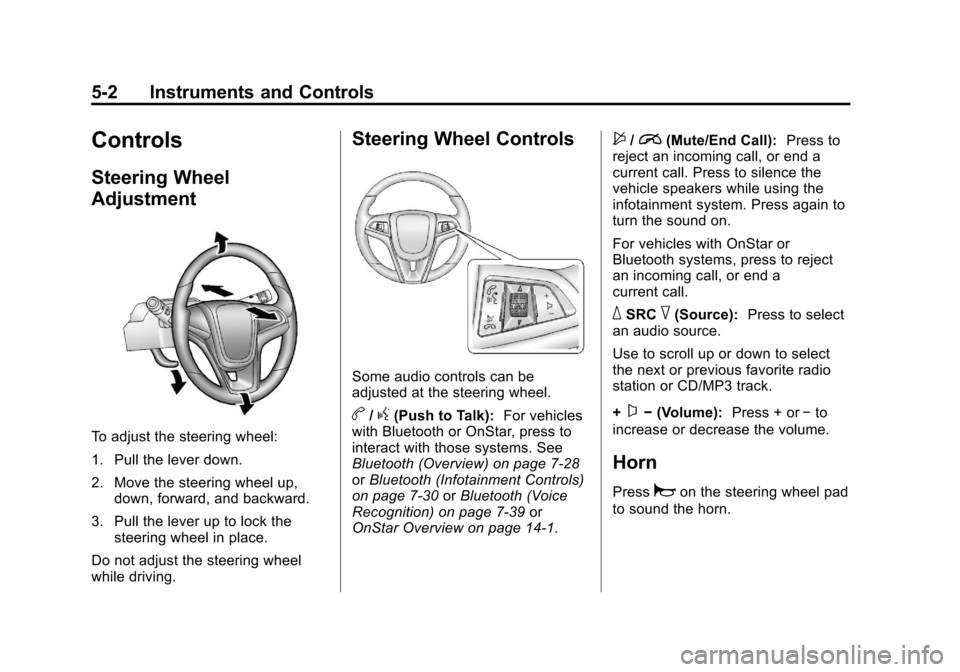
Steering Wheel
Adjustment
To adjust the steering wheel:
1. Pull the lever down.
2. Move the steering wheel up,down, forward, and backward.
3. Pull the lever up to lock the steering wheel in place.
Do not adjust the steering wheel
while driving.
Steering Wheel Controls
Some audio controls can be
adjusted at the steering wheel.
b/g(Push to Talk): For vehicles
with Bluetooth or OnStar, press to
interact with those systems. See
Bluetooth (Overview) on page 7‑28
or Bluetooth (Infotainment Controls)
on page 7‑30 orBluetooth (Voice
Recognition) on page 7‑39 or
OnStar Overview on page 14‑1.
$/i(Mute/End Call): Press to
reject an incoming call, or end a
current call. Press to silence the
vehicle speakers while using the
infotainment system. Press again to
turn the sound on.
For vehicles with OnStar or
Bluetooth systems, press to reject
an incoming call, or end a
current call.
_SRC^(Source): Press to select
an audio source.
Use to scroll up or down to select
the next or previous favorite radio
station or CD/MP3 track.
+
x− (Volume): Press + or−to
increase or decrease the volume.
Horn
Pressaon the steering wheel pad
to sound the horn.
Page 107 of 408

Black plate (3,1)Chevrolet TRAX Owner Manual - 2013 - CRC - 3/6/13
Instruments and Controls 5-3
Windshield Wiper/Washer
The windshield wiper/washer lever
is on the right side of the steering
column.
Move the lever to one of the
following positions:
HI:Use for fast wipes.
LO: Use for slow wipes.
INT (Intermittent Wipes): Move
the lever up to INT for intermittent
wipes, then turn the
xINT band
up for more frequent wipes or down
for less frequent wipes.
OFF: Use to turn the wipers off.
8(Mist): For a single wipe, briefly
move the wiper lever down. For
several wipes, hold the wiper
lever down.
b(Windshield Washer): Pull the
windshield wiper lever toward you to
spray windshield washer fluid and
activate the wipers. The wipers will
continue until the lever is released
or the maximum wash time is
reached. When the windshield wiper
lever is released, additional wipes
may occur depending on how long
the windshield washer had been
activated. See Washer Fluid on
page 10‑21 for information on filling
the windshield washer fluid
reservoir.
{WARNING
In freezing weather, do not use
the washer until the windshield is
warmed. Otherwise the washer
fluid can form ice on the
windshield, blocking your vision.
Clear snow and ice from the wiper
blades before using them. If frozen
to the windshield, carefully loosen or
thaw them. Damaged wiper blades
should be replaced. See Wiper
Blade Replacement on page 10‑26.
Heavy snow or ice can overload the
wiper motor. A circuit breaker will
stop the motor until it cools down.
Page 108 of 408

Black plate (4,1)Chevrolet TRAX Owner Manual - 2013 - CRC - 3/6/13
5-4 Instruments and Controls
Rear Window Wiper/
Washer
For vehicles with the rear wiper/
washer, the controls are on the end
of the windshield wiper lever.
ON:Press the upper portion of the
button for continuous rear window
wipes.
OFF: The rear wiper turns off when
the button is returned to the middle
position.
INT (Intermittent Rear Wipes):
Press the lower portion of the button
to set a delay between wipes.
m =REAR (Rear Washer): Push
the windshield wiper lever forward
to spray washer fluid on the rear
window. The lever returns to its
starting position when released.
The windshield washer reservoir is
used for the windshield and the rear
window. Check the fluid level in the
reservoir if either washer is not
working. See Washer Fluid on
page 10‑21.
Compass
The vehicle may have a compass
display in the Driver Information
Center (DIC).
Setting the Compass Zone
Under certain circumstances, such
as during a long trip or moving to a
new area, the compass zone will
need to be reset. If the compass is
not set to the correct zone, it may
give false readings. The compass
zone should be set to the area in
which the vehicle is currently
travelling. Use the DIC buttons to set the
compass zone:
1. While the vehicle is in P (Park),
press the MENU button to
display the DIC menu.
2. Press and hold SET/CLR while the Set Area display is active.
3. Find the vehicle's currentlocation and zone number on the
map. Zones 1 through 15 are
available.
Page 109 of 408

Black plate (5,1)Chevrolet TRAX Owner Manual - 2013 - CRC - 3/6/13
Instruments and Controls 5-5
4. Usew xto change to the
correct zone number.
5. Press SET/CLR to confirm the setting.
Recalibrating the Compass
Whenever the DIC or the battery is
disconnected, the compass must be
recalibrated. To do this, the vehicle
must be driven in circles. Only
calibrate the compass in a
magnetically clean and safe
location, such as an open parking
lot, where driving the vehicle in
circles is not a danger. It is
suggested to calibrate away from
tall buildings, utility wires, manhole
covers, or other industrial structures,
if possible.
If code 125 is displayed on the DIC,
the compass needs to be
recalibrated. Use the DIC buttons to begin
recalibrating the compass:
1. While the vehicle is in P (Park),
press the MENU button to
display the DIC menu.
2. Press and hold SET/CLR while the Set Cal display is active.
3. Drive the vehicle in tight circles. The display will begin to flash.
Continue driving in circles for
about 30 seconds. The compass
direction will be displayed.
Clock
Radio Without Touchscreen
The infotainment system controls
are used to access the time and
date settings through the menu
system. See Operation on page 7‑8
for information about how to use the
menu system.
Setting the Time and Date
1. PressH.
2. Select Set Time or Set Date. 3. Turn the Menu/Tune knob to the
desired value.
4. Press the Menu/Tune knob to select the value.
5. Turn the Menu/Tune knob to change the desired value.
6. To save and return to the Time Settings menu, press
/BACK
button at any time.
Setting the 12/24 Hour Format
1. Press theH.
2. Select Set Time Format.
3. Press the Menu/Tune knob to select the 12 hour or 24 hour
display format.
Setting the Month and Day
Format
1. Press theH.
2. Select Set Date Format.
3. Turn the Menu/Tune knob to the desired setting.
Page 110 of 408

Black plate (6,1)Chevrolet TRAX Owner Manual - 2013 - CRC - 3/6/13
5-6 Instruments and Controls
4. Press the Menu/Tune knob toselect the DD/MM/YYYY (day/
month/year), MM/DD/YYYY
(month/day/year), or YYYY/MM/
DD (year/month/day) display
format.
Radio With Touchscreen
The infotainment system controls
are used to access the time and
date settings through the menu
system. See Operation on page 7‑8
for information about how to use the
menu system.
Setting the Time and Date
1. PressD, and then press
settings.
2. Press time and date settings, and then set time and date.
3. Press
yorzto adjust the
value.
4. Press OK.
Setting the 12/24 Hour Format
1. PressD, and then press
settings.
2. Press time and date settings, and then set time format.
3. Select 12/24 HR Format.
Setting the Month and Day
Format
1. PressD, and then press
settings.
2. Press time and date settings, and then set date format.
3. Set the date display to DD/MM/ YYYY (day/month/year), MM/
DD/YYYY (month/day/year),
or YYYY/MM/DD (year/month/
day) display format.
Power Outlets
The accessory power outlets can be
used to plug in electrical equipment,
such as a cell phone or MP3 player. The vehicle has an accessory
power outlet in front of the
cupholders on the center stack.
There may also be one on the rear
of the center console.
Remove the cover to access and
replace when not in use.
{WARNING
Power is always supplied to the
outlets. Do not leave electrical
equipment plugged in when the
vehicle is not in use because the
vehicle could catch fire and cause
injury or death.
Notice: Leaving electrical
equipment plugged in for an
extended period of time while the
vehicle is off will drain the
battery. Always unplug electrical
equipment when not in use and
do not plug in equipment that
exceeds the maximum 20 ampere
rating.
Page 114 of 408

Black plate (10,1)Chevrolet TRAX Owner Manual - 2013 - CRC - 3/6/13
5-10 Instruments and Controls
Speedometer
The speedometer shows the
vehicle's speed in either kilometers
per hour (km/h) or miles per
hour (mph).
Odometer
The odometer shows how far the
vehicle has been driven, in either
kilometers or miles.
Trip Odometer
The trip odometer measures the
distance the vehicle has been
driven since the function was last
reset.
To reset the trip odometer to zero,
press and hold the reset button on
the lower right of the tachometer
while the trip odometer is being
displayed. Be careful not to reset
the engine oil life monitor
accidentally.
Tachometer
The tachometer displays the engine
speed in revolutions per
minute (rpm).
Fuel Gauge
The fuel gauge indicates about how
much fuel is left when the ignition is
turned to ON/RUN.
When the tank nears empty, the low
fuel warning light will come on.
There is still a little fuel left, but the
vehicle's fuel tank should be filled
soon. SeeLow Fuel Warning Light
on page 5‑21 for more information.
An arrow on the fuel gauge
indicates on which side of the
vehicle the fuel door is located.
Page 116 of 408

Black plate (12,1)Chevrolet TRAX Owner Manual - 2013 - CRC - 3/6/13
5-12 Instruments and Controls
Airbag Readiness Light
This light shows if there is an
electrical problem with the airbag
system. The system check includes
the airbag sensor(s), passenger
sensing system (if equipped), the
pretensioners, the airbag modules,
the wiring, and the crash sensing
and diagnostic module. For more
information on the airbag system,
seeAirbag System (Canada) on
page 3‑22 orAirbag System
(Mexico) on page 3‑24.
The airbag readiness light comes on
for several seconds when the
vehicle is started. If the light does
not come on then, have it fixed
immediately.
{WARNING
If the airbag readiness light stays
on after the vehicle is started or
comes on while driving, it means
the airbag system might not be
working properly. The airbags in
the vehicle might not inflate in a
crash, or they could even inflate
without a crash. To help avoid
injury, have the vehicle serviced
right away.
Passenger Airbag Status
Indicator (Canada)
The vehicle has a passenger
sensing system. See Passenger
Sensing System (Canada) on
page 3‑32 for important safety
information. The instrument panel
has a passenger airbag status
indicator.
When the vehicle is started, the
passenger airbag status indicator
will light the symbol for on and off,
for several seconds as a system
check. If you use remote start,
if equipped, to start the vehicle, you
may not see the system check.
Then, after several seconds, the
status indicator will light the on or off
symbol to let you know the status of
the front outboard passenger frontal
airbag and knee airbag.
If the on symbol is lit on the
passenger airbag status indicator, it
means that the front outboard
passenger frontal airbag and knee
airbag are allowed to inflate.