2013 CHEVROLET TRAVERSE radio
[x] Cancel search: radioPage 225 of 444
Black plate (45,1)Chevrolet Traverse Owner Manual - 2013 - CRC 2nd Edition - 11/13/12
Infotainment System 7-45
Cleaning the RSE Overhead
Console
When cleaning the RSE overhead
console surface, use only a clean
cloth dampened with clean water.
Cleaning the Video Screen
Use only a clean cloth dampened
with clean water. Use care when
directly touching or cleaning the
screen, as damage could result.
Rear Audio
Controller (RAC)
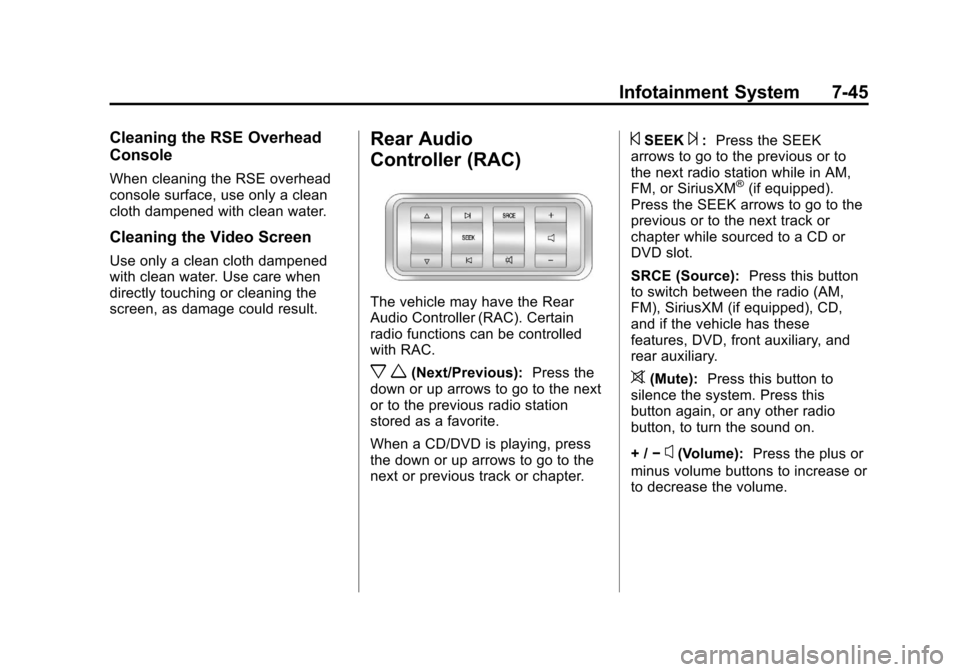
The vehicle may have the Rear
Audio Controller (RAC). Certain
radio functions can be controlled
with RAC.
x w(Next/Previous):Press the
down or up arrows to go to the next
or to the previous radio station
stored as a favorite.
When a CD/DVD is playing, press
the down or up arrows to go to the
next or previous track or chapter.
©SEEK¨: Press the SEEK
arrows to go to the previous or to
the next radio station while in AM,
FM, or SiriusXM
®(if equipped).
Press the SEEK arrows to go to the
previous or to the next track or
chapter while sourced to a CD or
DVD slot.
SRCE (Source): Press this button
to switch between the radio (AM,
FM), SiriusXM (if equipped), CD,
and if the vehicle has these
features, DVD, front auxiliary, and
rear auxiliary.
>(Mute): Press this button to
silence the system. Press this
button again, or any other radio
button, to turn the sound on.
+ / −
x(Volume): Press the plus or
minus volume buttons to increase or
to decrease the volume.
Page 233 of 444

Black plate (53,1)Chevrolet Traverse Owner Manual - 2013 - CRC 2nd Edition - 11/13/12
Infotainment System 7-53
Clearing the System
Unless information is deleted out of
the in-vehicle Bluetooth system, it
will be retained indefinitely. This
includes all saved name tags in the
phone book and phone pairing
information. For information on how
to delete this information, see the
previous section“Deleting a Paired
Phone” and the previous sections
on deleting name tags.
Other Information
The Bluetooth®word mark and
logos are owned by the Bluetooth®
SIG, Inc. and any use of such marks
by General Motors is under license.
Other trademarks and trade names
are those of their respective owners.
See Radio Frequency Statement on
page 13‑21 for information
regarding Part 15 of the Federal
Communications Commission (FCC)
rules and Industry Canada
Standards RSS-GEN/210/220/310.
Settings
Press Settings on the Home Page
to adjust features and preferences,
such as Time, Date, Bluetooth
Device List, Voice Recognition,
Favorite Pages, Display Settings,
Navigation Settings, etc.
1. Press the Settings screen button
on the Home Page.
2. Touch-tap the scroll bar until the desired option displays. Select
the desired settings to change.
A few of the setting options change
the way the navigation system
displays or reacts while in use.
From the Settings menu, press the
Set Time or Set Date settings
screen button to display the different
options for setting the time
and date.
Bluetooth Device List: Press to
display paired bluetooth devices.
Voice Recognition: Press to
display voice recognition options.
.Voice Prompt Volume: Press to
adjust the prompt volume.
.Prompt Length: Press to select
short or long prompts.
Page 234 of 444

Black plate (54,1)Chevrolet Traverse Owner Manual - 2013 - CRC 2nd Edition - 11/13/12
7-54 Infotainment System
Favorite Pages:Press to select
the number of favorite pages
displayed on the screen. The choice
is 1–6 pages.
Display Settings: Press to adjust
the screen settings.
.The Auto setting adjusts the
screen background automatically
depending on the exterior
lighting conditions.
.The Day setting brightens the
map background.
.The Night setting darkens the
map background.
Speed Dependent Volume: Select
OFF, Low, Medium, or High
sensitivity to automatically adjust
the volume to minimize the effects
of unwanted background noise that
can result from changing road
surfaces, driving speeds, or open
windows. This feature works best at
lower volume settings where
background noise is typically louder
than the sound system volume. Startup Volume:
Press to set the
maximum volume level for startup
that will be used even if a higher
volume had been set when the radio
was turned off.
Radio Favorites: Press to select
the number of FAV pages to be
used in the system.
Add/Remove XM Categories:
Press to customize which available
XM Categories are displayed and
used in the system.
RDS Settings: Press to customize
station name and radio text display
options.
Set Time:
.Press the up or down arrows to
increase or decrease the Hours,
Minutes, AM, PM, or 24 hr on
the clock.
.Press and hold to quickly
increase or decrease the time
settings.
.Press OK or the Back screen
button to save the adjustments. Set Date:
.Press the up or down arrows to
increase or decrease the Month,
Day, and Year settings.
.Press and hold to quickly
increase or decrease the date
settings.
.Press OK or the Back screen
button to save the adjustments.
Radio Settings
Press the Config button on the
Home Page or the CONFIG button
on the faceplate to enter the menu
options. Turn the PUSH/SEL knob
or touch-tap the scroll bar to scroll
through the available options. Press
the PUSH/SEL knob or press Radio
Settings to display the radio settings
menu. Press this feature to make
changes for radio information
displayed, preset pages, Auto
Volume Control, and XM Categories
Restore.
Page 235 of 444

Black plate (55,1)Chevrolet Traverse Owner Manual - 2013 - CRC 2nd Edition - 11/13/12
Infotainment System 7-55
SeeSatellite Radio (Radio without
Touchscreen) on page 7‑15 or
Satellite Radio (Radio with
Touchscreen) on page 7‑19 (if
equipped), for more information
about XM Categories.
The Radio Settings are:
Phone Settings
See Bluetooth on page 7‑46 in the
“Phone” section for more
information on phone settings.
Vehicle Settings
See Vehicle Personalization (With
DIC Buttons) on page 5‑41.
Display
Mode: Press Mode to change the
screen background. This setting
controls map colors.
Calibrate Touchscreen: Press to
display the Touchscreen Calibration
Screen.
Turn Display Off: Press to turn the
Display option off.
Rear Vision Camera (If
Equipped)
The rear vision camera can assist
the driver when backing up by
displaying a view of the area behind
the vehicle.
An image appears on the system’s
screen so that the driver can check
the surroundings for safety.
Press the Config button to access
the Display settings. Adjust the
brightness of the screen by pressing
the −or + screen button. See Rear
Vision Camera (RVC) on page 9‑35.
Page 250 of 444

Black plate (2,1)Chevrolet Traverse Owner Manual - 2013 - CRC 2nd Edition - 11/13/12
9-2 Driving and Operating
Driving Information
Distracted Driving
Distraction comes in many forms
and can take your focus from the
task of driving. Exercise good
judgment and do not let other
activities divert your attention away
from the road. Many local
governments have enacted laws
regarding driver distraction. Become
familiar with the local laws in
your area.
To avoid distracted driving, always
keep your eyes on the road, hands
on the wheel, and mind on the drive.
.Do not use a phone in
demanding driving situations.
Use a hands-free method to
place or receive necessary
phone calls.
.Watch the road. Do not read,
take notes, or look up
information on phones or other
electronic devices.
.Designate a front seat
passenger to handle potential
distractions.
.Become familiar with vehicle
features before driving, such as
programming favorite radio
stations and adjusting climate
control and seat settings.
Program all trip information into
any navigation device prior to
driving.
.Wait until the vehicle is parked
to retrieve items that have fallen
to the floor.
.Stop or park the vehicle to tend
to children.
.Keep pets in an appropriate
carrier or restraint.
.Avoid stressful conversations
while driving, whether with a
passenger or on a cell phone.
{WARNING
Taking your eyes off the road too
long or too often could cause a
crash resulting in injury or death.
Focus your attention on driving.
Refer to the Infotainment section
and the infotainment manual for
more information on using that
system, including pairing and using
a cell phone.
Defensive Driving
Defensive driving means “always
expect the unexpected.” The first
step in driving defensively is to wear
the safety belt. See Safety Belts on
page 3‑13.
.Assume that other road users
(pedestrians, bicyclists, and
other drivers) are going to be
careless and make mistakes.
Anticipate what they might do
and be ready.
Page 266 of 444
Black plate (18,1)Chevrolet Traverse Owner Manual - 2013 - CRC 2nd Edition - 11/13/12
9-18 Driving and Operating
Retained Accessory
Power (RAP)
These vehicle accessories can be
used for up to 10 minutes after the
ignition key is turned off:
.Audio System
.Power Windows
.Sunroof (if equipped)
Power to the windows and sunroof
will work up to 10 minutes or until a
door is opened.
The radio continues to work for
10 minutes or until the driver door is
opened.
For an additional 10 minutes of
operation, close all the doors and
turn the key to ON/RUN and then
back to LOCK/OFF.
All these features will work when the
key is in the ON/RUN or ACC/
ACCESSORY positions.
Shifting Into Park
1. Hold the brake pedal down and set the parking brake. See
Parking Brake on page 9‑26 for
more information.
2. Move the shift lever into P (Park) by holding in the button on the
shift lever and pushing the shift
lever all the way toward the front
of the vehicle.
3. Turn the ignition key to LOCK/OFF.
4. Remove the key and take it with you. If you can leave the vehicle
with the ignition key in your
hand, the vehicle is in P (Park).
Leaving the Vehicle with the
Engine Running
{WARNING
It can be dangerous to leave the
vehicle with the engine running.
It could overheat and catch fire.
(Continued)
WARNING (Continued)
It is dangerous to get out of the
vehicle if the shift lever is not fully
in P (Park) with the parking brake
firmly set. The vehicle can roll.
Do not leave the vehicle when the
engine is running. If you have left
the engine running, the vehicle
can move suddenly. You or others
could be injured. To be sure the
vehicle will not move, even when
you are on fairly level ground,
always set the parking brake and
move the shift lever to P (Park).
SeeShifting Into Park on
page 9‑18. If you are towing a
trailer, see Driving Characteristics
and Towing Tips on page 9‑43.
If you have to leave the vehicle with
the engine running, be sure the
vehicle is in P (Park) and the
parking brake is firmly set before
you leave it. After you have moved
the shift lever into P (Park), hold the
Page 282 of 444

Black plate (34,1)Chevrolet Traverse Owner Manual - 2013 - CRC 2nd Edition - 11/13/12
9-34 Driving and Operating
When the System Does Not Seem
To Work Properly
Missed alerts can occur under
normal circumstances and will
increase in wet conditions. The
system does not need to be
serviced. SBZA is designed to
ignore stationary objects; however,
the system may occasionally light
up due to guard rails, signs, trees,
shrubs, and other stationary objects.
This is normal system operation, the
vehicle does not need service.
If the SBZA displays do not light up
when the system is on and vehicles
are in the blind zone, the system
may need service. Take the vehicle
to your dealer.
SBZA does not operate when the
SBZA sensors in the left or right
corners of the rear bumper are
covered with mud, dirt, snow, ice,
slush, or in heavy rainstorms. For
cleaning instructions, see“Washing
the Vehicle” underExterior Care on
page 10‑73. If the DIC still displays
the SIDE DETECTION SYS TEMPORARILY OFF message after
cleaning the bumper, see your
dealer.
The SBZA displays may remain on
if a trailer is attached to the vehicle,
or a bicycle or object is extending
out to either side of the vehicle.
When SBZA is disabled for any
reason other than the driver turning
it off, it cannot be turned back on.
The SIDE BLIND ZONE ALERT ON
option will not be selectable if the
conditions for normal system
operation are not met.
SBZA Error Messages
The following messages may
appear in the DIC:
SIDE BLIND ZONE ALERT
SYSTEM OFF:
This message
indicates that the driver has turned
the system off.
SIDE DETECTION SYS
TEMPORARILY OFF: This
message indicates that the SBZA
system is disabled either because
the sensor cannot detect vehicles in your blind zone, or the vehicle is
passing through an open field of
view area, such as the desert,
where there is insufficient data for
operation. This message may also
activate during heavy rain or due to
road spray. The vehicle does not
need service. For cleaning, see
“Washing the Vehicle”
under
Exterior Care on page 10‑73.
SERVICE SIDE DETECTION
SYSTEM: If this message appears,
both SBZA displays will remain on
indicating there is a problem with
the SBZA system. If these displays
remain on after continued driving,
the system needs service. Take the
vehicle to your dealer.
FCC Information
See Radio Frequency Statement on
page 13‑21 for information
regarding Part 15 of the Federal
Communications Commission (FCC)
rules and Industry Canada
Standards RSS-GEN/210/220/310.
Page 332 of 444

Black plate (34,1)Chevrolet Traverse Owner Manual - 2013 - CRC 2nd Edition - 11/13/12
10-34 Vehicle Care
FusesUsage
PDM Power Mirrors, Liftgate Release
PWR MODE Power Mode PWR MIR Power Mirrors RDO Radio
REAR WPR Rear Wiper RPA/
SBZA/UGDO Rear Park Assist/
Side Blind Zone
Alert/Universal
Garage Door
Opener
RT TRN SIG Passenger Side Turn Signal
STR WHL ILLUM Steering Wheel
Illumination
Relay Side Relays Usage
LT/
PWR/SEAT Driver Side Power
Seat Relay
RT/
PWR/SEAT Passenger Side
Power Seat Relay
PWR/WNDW Power Windows Relay
PWR/
COLUMN Power Steering
Column Relay
L/GATE Liftgate Relay
LCK Power Lock Relay
REAR/WSW Rear Window Washer Relay
UNLCK Power Unlock Relay
DRL/
LO BEAM Daytime Running
Lamps Relay/Low
Beam Headlamps
Relay
LT/UNLCK Driver Side Unlock Relay